



As a Solutions Engineer at GitHub, I partner with our Enterprise customers to ensure they get the most out of GitHub. That often comes in the form of best practices discussions, tool optimizations or process improvements. Something every organization wants to get right is the initial rollout of a new tool or service, which can be particularly important when scaling an application security program.
As software development has evolved, so too have the expectations for application security processes. It is no longer acceptable to bolt on a vulnerability scan just prior to release; instead it’s seen as an integral part of the end-to-end SDLC. To do this well, security tools need to be deeply embedded and automated, so developers are empowered rather than encumbered. GitHub code scanning, which is powered by the CodeQL engine, surfaces security alerts right at the heart of developers’ workflows so you and your teams can ship more secure code.
This blog post explores how to centrally manage a GitHub code scanning integration that runs the CodeQL analysis engine using third party CI/CD tooling. We then explain how you can leverage CodeQL’s indirect build tracing to perform a scan on an application portfolio in a lightweight, repeatable and consistent manner.
At the individual or team level, open source maintainers and application developers continue to strive for the highest standards of code security by incorporating scans in their CI processes. Large enterprises are often tasked with the responsibility to centrally manage their implementation as it means they can provide a more reliable service and steward adoption. At scale, rolling out the same SAST workflow across thousands of applications can be a challenge.
Getting the rollout right means systematic, thoughtful planning and communication with the application development teams that will consume the service. While this post isn’t meant to cover the human aspect of rolling out that SAST workflow, it is a major component in any successful DevSecOps program. If you’re looking for tips on how to do that well, we’ve written about how customers have gotten it right for communities of thousands of developers.
A great AppSec experience will earn the trust of developers, reduce mean time to remediation, and lead to more secure code. Consistently high‐quality code scanning results, like those CodeQL produces, are therefore essential. CodeQL achieves that consistency by analyzing the full context of an application’s data and call flows during the build. With the architecture below, that build happens in the development teams’ CI/CD agent with the CodeQL engine simply “peering into” the build process. This simplified integration is achieved when those teams wrap their build commands with a library function and continue their pipeline steps while a centralized service performs the scan.
Increasingly, GitHub customers prefer to use GitHub Actions for CI/CD. GitHub code scanning natively integrates with GitHub Actions to make adopting security scanning tools, like CodeQL, frictionless. However, we recognize that some enterprises prefer to use other CI/CD tools, such as Jenkins or ADO. Even with third-party CI, from a “level of effort” perspective, integrating a new centralized scan job into the developers pipeline should be simple.
Most CI tools provide the ability to create modular, reusable and centrally managed templates (shared libraries on Jenkins or Pipeline Templates on ADO) to load external logic into an existing workflow. By leveraging this integration pattern, an application security team can externalize the core CodeQL functionality (create, analyze, upload) whilst enabling individual developer teams to include custom logic to support more granular configurations. Those configurations might look like: passing in application-specific build commands, running additional queries, or providing additional sources and sinks. This allows for the re-use of the required CodeQL stages, meaning every application team does not have to duplicate the same stages for every pipeline, and also enables application specific customization.
Here is a pseudocode example of an application team’s pipeline that loads a centrally managed security library called “central-security-library.” All of the logic to run CodeQL has been abstracted into the library “central-security-library,” and all the application team’s pipeline needs to do is pass in the build command for that individual application. This pattern is highly reusable and promotes a quick time to value:
### Application Teams Pipeline

@Library(["central-security-library"])
# This introduces the reusable step “codescan”, which is used below.

stage('Build & Scan'){

  steps{

    codescan("$REF_PARAMS"),

    {

### Teach “appsec-workflow” how to build the application via $BUILD_ARGS.

      sh("mvn clean package -f ./main/pom.xml")

    }

  }

}
Centralizing the code scanning integration with a reusable pipeline component opens the door to another key optimization. The developer’s pipeline can pass build arguments into the reusable component so it can perform the build on the pipeline’s behalf, generating the necessary AppSec insights along the way. That build artifact is then available for its usual testing and deployment or anything in between. To achieve this build, scan and deploy pattern introduce CodeQL CLI indirect build tracing to your reusable library.
Indirect build tracing enables CodeQL to detect all build steps automatically between the init and analyze steps. The reusable workflow requires the application team’s pipeline to pass in build commands for the build to be traced. The centralized security library should sandwich those build commands between CodeQL init and analyze for CodeQL to peer into the build process and assemble a representative CodeQL DB.
Below is an example (ADO pipeline pseudocode) of how you might initialize CodeQL with indirect build tracing, build the application via the “build command” arguments of the caller workflow, and perform an analysis using indirect build tracing. More examples available here.
### Centralized Security Library Workflow

# Initialize the CodeQL database using `codeql database init --begin tracing`.

- task: CmdLine@1

  displayName: Initialize CodeQL database

  inputs:

      # Assumes the source code is checked out to the current working directory.

      # Creates a database at `/codeql-dbs/example-repo`.

      # Ensure you "source" the relevant environment variables after this step!

      script: "codeql database init --language $LANG --source-root . --begin-tracing /codeql-dbs/example-repo"

# Set CodeQL environment variables

- … [docs](https://codeql.github.com/docs/codeql-cli/creating-codeql-databases/#example-of-creating-a-codeql-database-using-indirect-build-tracing)

# Build the App with Args

- task: CmdLine@1

  displayName: Build app with build command Args from caller

  inputs:

      script: $BUILD_ARGS

# Use `codeql database finalize` to complete database creation after the build is done.

- task: CmdLine@2

   displayName: Finalize CodeQL database

   inputs:

      script: 'codeql database finalize /codeql-dbs/example-repo'

# Analyze the database

- task: CmdLine@2

   displayName: Analyze CodeQL database

   inputs:

      script: 'codeql database analyze /codeql-dbs/example-repo java-code-scanning.qls --sarif-category=java --format=sarif-latest --output=/temp/example-repo-java.sarif'

# Upload the results.

- task: CmdLine@2

   displayName: Upload CodeQL results

   inputs:

      script: 'echo "$TOKEN" | codeql github upload-results

    --repository=$BUILD_REPOSITORY_NAME \ --ref=$BUILD_SOURCEBRANCH \  --commit=$BUILD_SOURCEVERSION

    --sarif=/temp/example-repo-java.sarif --github-auth-stdin'
The output of the above indirect build tracing is two-fold: the source code has been extracted into a CodeQL database and is ready for the analysis, and your standard build artifact has been built ready for deployment. All whilst only building your application once. After the CodeQL analysis has been completed, the contents of the SARIF file, containing the analysis results, is uploaded to the application team’s GitHub repository immediately for review. The next stage in the application team’s workflow is invoked without change.
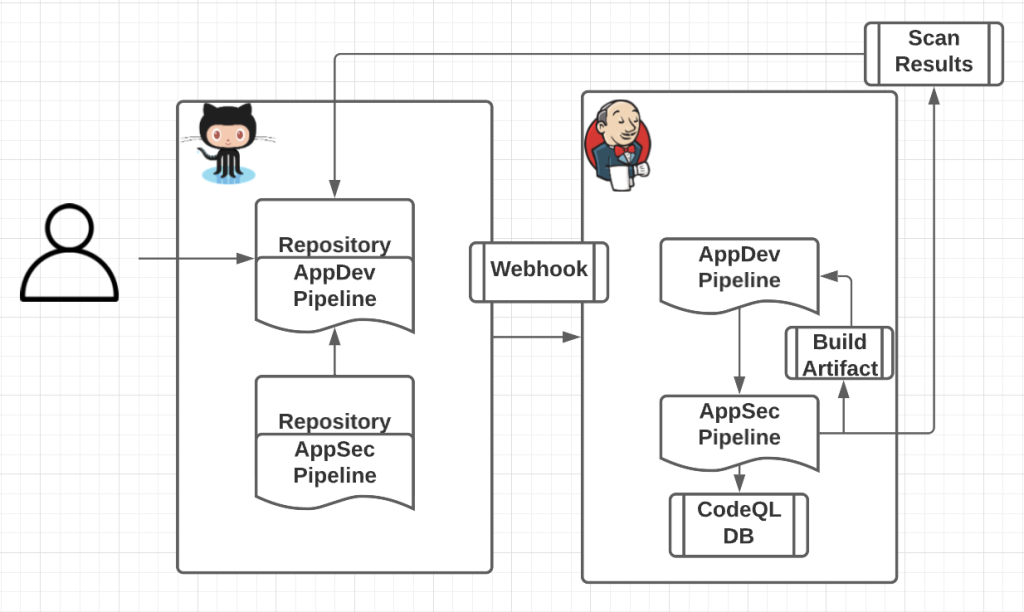
After implementing this workflow, AppDev teams will have meaningful insight into the security of the features they are delivering, and AppSec teams can now meet their objective of providing a scalable integration that provides a high quality experience with little disruption.
GitHub is a cloud-native software development leader, empowering more than 83 million developers to collaborate using open source and inner source. GitHub is committed to helping build safer and more secure software without compromising on the developer experience.
To learn more about code scanning, visit our code scanning Docs page. For any questions or to see a demo, please contact your GitHub account team.
此内容由惯性聚合(RSS阅读器)自动聚合整理,仅供阅读参考。 原文来自 — 版权归原作者所有。


