惯性聚合 高效追踪和阅读你感兴趣的博客、新闻、科技资讯
阅读原文 在惯性聚合中打开

推荐订阅源

Project Zero
Project Zero
WordPress大学
WordPress大学
Cyber Security Advisories - MS-ISAC
V
Visual Studio Blog
爱范儿
爱范儿
P
Proofpoint News Feed
F
Fortinet All Blogs
雷峰网
雷峰网
小众软件
小众软件
Jina AI
Jina AI
人人都是产品经理
人人都是产品经理
TaoSecurity Blog
TaoSecurity Blog
Exploit-DB.com RSS Feed
S
Secure Thoughts
Recent Commits to openclaw:main
博客园 - 司徒正美
freeCodeCamp Programming Tutorials: Python, JavaScript, Git & More
Microsoft Azure Blog
IT之家
IT之家
S
Security @ Cisco Blogs
Help Net Security
Help Net Security
GbyAI
GbyAI
Webroot Blog
Webroot Blog
T
Troy Hunt's Blog
B
Blog
MongoDB | Blog
MongoDB | Blog
月光博客
月光博客
H
Heimdal Security Blog
Google Online Security Blog
S
Security Affairs
云风的 BLOG
云风的 BLOG
Engineering at Meta
Engineering at Meta
www.infosecurity-magazine.com
H
Help Net Security
O
OpenAI News
H
Hacker News: Front Page
博客园 - 叶小钗
Last Week in AI
Last Week in AI
S
Schneier on Security
The Last Watchdog
The Last Watchdog
C
Cyber Attacks, Cyber Crime and Cyber Security
cs.CV updates on arXiv.org
MyScale Blog
MyScale Blog
Recorded Future
Recorded Future
博客园 - 【当耐特】
V
Vulnerabilities – Threatpost
大猫的无限游戏
大猫的无限游戏
N
News | PayPal Newsroom
The Hacker News
The Hacker News
A
Arctic Wolf

StudyingLover's Blog

Diffusion Policy笔记 rwkv笔记 act笔记 nanovllm-block_manager opencode多智能体 nanobot-pre-train nanobot-rl nanobot-sft nanobot-checkpoint_manager nanobot-gpt nanobot-mid-train Vision Mamba (Vim)笔记 BPE演示 最后一遍学习Transformer YOLOv5 目标检测笔记 下载根服务器解析记录 Dynaseal A Backend-Controlled LLM API Key Distribution Scheme with Constrained Invocation Parameters 判断链表有环 王道25数据结构勘误 关于perplexity的open-sourcing-r1-1776 AI为什么不像人类一样进行多轮对话 新博客改造日记和功能测试 linuxqq只显示登陆背景图 数字设计和计算机体系结构(机械工业出版社)勘误(自制) Dynaseal:面向未来端侧llm agent的llm api key分发机制 A Definitive Guide to Markdown Style This post is using MDX, Where you can embed JSX and Astro components RT-Patch学习 pydantic实现的LLM ReAct fastapi 和 uvicorn 设置监听 ipv6 pydantic+openai+json 控制大模型输出的最佳范式 解决 Matplotlib Scatter 不支持 Marker 列表的问题:mscatter 实现 roofline model zhipuAI接口兼容openai 在docker部署fastapi宝塔里使用nginx反代套上cloudflare获取请求的真实ip clion搭建libbpf-bootstrap开发环境 coze+coze-discord-proxy+ChatNextWebUI实现AI自由 安卓内核时间使用的是UTC时间 colab运行google最新开源模型Gemma Sora技术报告 视频生成模型作为世界模拟器 笔记 archlinux flutter开发踩坑 fastapi集成google auth登录 linux下NTFS磁盘报错输入输出错误 Venn-Abers 预测器 基于Venn-Abers预测器的系统日志异常检测方法_顾兆军 手机平板远程访问kvm虚拟机的windows phi-2弱智吧测评 poe的gemini pro或是百度开发 google gemini api使用 google gemini api申请 构建用于复杂数据处理的高效UDP服务器和客户端 matplotlib中文字体渲染 TruFor笔记和代码复现 深入分析:GitHub Trending 项目 "multipleWindow3dScene" pua大模型 ggml教程|mnist手写体识别量化推理 xgboost2.0最佳实践 xgboost使用GPU最佳实践 马踏棋盘 cloudlflare推理llama2 docker搭建elasticsearch并使用python连接 FreeU-文字生成图片的免费午餐笔记 使用xgboost的c接口推理模型 Archlinux使用CMake调用xgboost的c接口 m2cgen生成机器学习c语言推理代码 xgboost模型序列化存储并推理 speculative-sampling笔记 prompt2model笔记 RoboTAP笔记 自建obsidian同步服务 MediaPipe即将推出图像生成服务 Dual-Stream Diffusion Net for Text-to-Video Generation笔记 ViT在DDPM取代UNet(DiT) arch4edu搞崩了我的flutter LISA(推理分割)笔记 GPTBot介绍 arch蓝牙无法连接 GPU部署llama-cpp-python(llama.cpp通用) 花式求GCD 使用llama构建一个蜜罐(前端) 使用llama构建一个蜜罐(后端) llama-cpp-python快速上手 快速上手llama2.c(更新版) Paper Gestalt笔记 DINO-v2笔记 快速上手llama2.c AnyDoor笔记 Archlinux安装scrcpy加载共享库出错 error while loading shared libraries:libusb-1.0.so.0:wrong ELF class:ELFCLASS32 npc_gzip笔记 python调用c++函数 Filesystem type ntfs3,ntfs not configured in kernel open_clip编码图像和文本 PicGo配置CloudflareR2图片储存 ArchlinuxGnome快捷键打开终端 clip-interrogator代码解析 GroundingDINO安装报错解决 2023华为鲲鹏畅想日暨西安高新国际会议中心零食午饭测评 RoboMaster开源仓库汇总(长期更新) 没有手都可以在腾讯云创建镜像 I3D笔记
在终端绘制GPU显存使用曲线
About the Author StudyingLover · 2023-08-13 · via StudyingLover's Blog

在终端绘制GPU显存使用曲线

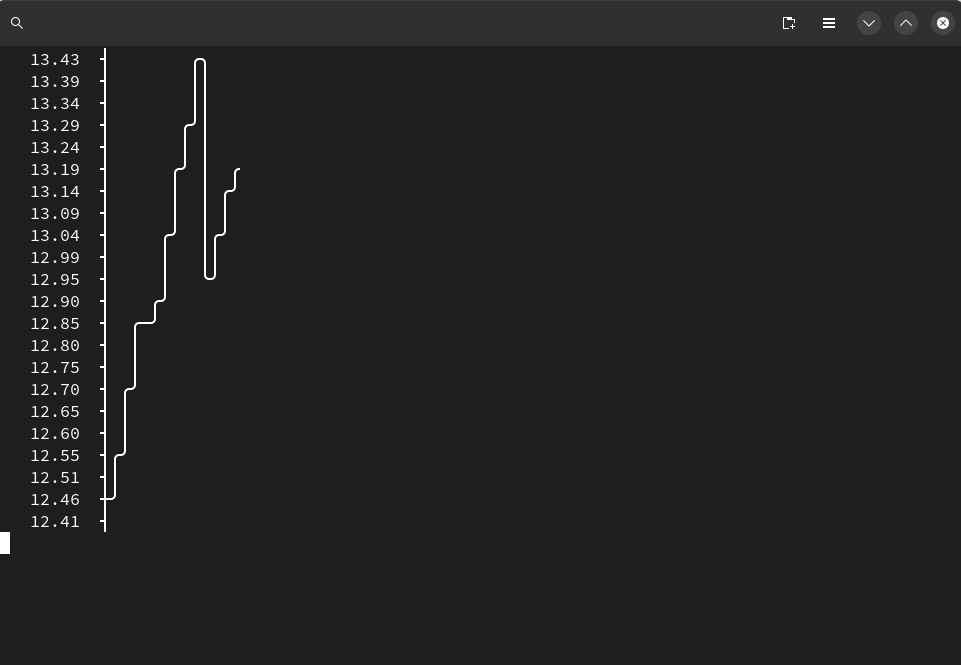
这个东西的灵感来自于写torch的时候想实时看到loss和gpu使用情况,突然想到可以在终端实时显示,经过与ai的一番激烈讨,最终有了这个代码。

我们首先要获取GPU的显存使用数据,先检查是否安装了nvidia-smi, 在终端输入有正常输出即可。

首先导入所有需要的库

import subprocess
import time
import asciichartpy
import platform

通过nvidia-smi 的命令获取已经使用的显存和所有现存

def get_gpu_used_memory():
	output = subprocess.check_output(['nvidia-smi', '--query-gpu=memory.used', '--format=csv,nounits'])
	output = output.decode('utf-8')
	lines = output.strip().split('\n')
	used_memory = int(lines[1])
	return used_memory
  
def get_gpu_total_memory():
	output = subprocess.check_output(['nvidia-smi', '--query-gpu=memory.total', '--format=csv,nounits'])
	output = output.decode('utf-8')
	lines = output.strip().split('\n')
	total_memory = int(lines[1])
	return total_memory

asciichartpy 是一个 Python 库,用于在终端中绘制 ASCII 图表。我们用他来在终端绘制图标。

def draw_gpu_memory(gpu_memory_history):
    used_memory = get_gpu_used_memory()
    total_memory = get_gpu_total_memory()

    used_percentage = used_memory / total_memory * 100
    gpu_memory_history.append(used_percentage)

    # 绘制字符图表
    chart = asciichartpy.plot(gpu_memory_history, {'height': 20, 'width': 10, 'timestamp': True})
    
    # 清空终端屏幕
    if platform.system() == 'Windows':
        subprocess.call('cls', shell=True)
    else:
        subprocess.call('clear', shell=True)
    
    print(chart)

最后运行上面的代码

while True:
    try:
        gpu_memory_history = []
        while True:
            draw_gpu_memory(gpu_memory_history)
            time.sleep(1)
    except KeyboardInterrupt:
        break

运行效果 image.png