惯性聚合 高效追踪和阅读你感兴趣的博客、新闻、科技资讯
阅读原文 在惯性聚合中打开

推荐订阅源

WordPress大学
WordPress大学
V
Visual Studio Blog
P
Privacy International News Feed
月光博客
月光博客
Threat Intelligence Blog | Flashpoint
L
Lohrmann on Cybersecurity
N
News and Events Feed by Topic
K
KPMG report finds enterprise disconnect between AI and its ROI | CIO
Apple Machine Learning Research
阮一峰的网络日志
阮一峰的网络日志
Webroot Blog
Webroot Blog
T
Threatpost
宝玉的分享
宝玉的分享
The Last Watchdog
The Last Watchdog
小众软件
小众软件
L
LINUX DO - 最新话题
C
Cisco Blogs
T
Troy Hunt's Blog
Schneier on Security
酷 壳 – CoolShell
酷 壳 – CoolShell
www.infosecurity-magazine.com
雷峰网
雷峰网
G
GRAHAM CLULEY
有赞技术团队
有赞技术团队
Know Your Adversary
Know Your Adversary
博客园 - 叶小钗
罗磊的独立博客
V
V2EX
博客园 - Franky
P
Proofpoint News Feed
SecWiki News
SecWiki News
腾讯CDC
cs.CL updates on arXiv.org
Jina AI
Jina AI
博客园 - 三生石上(FineUI控件)
S
Secure Thoughts
钛媒体:引领未来商业与生活新知
钛媒体:引领未来商业与生活新知
Google DeepMind News
Attack and Defense Labs
人人都是产品经理
人人都是产品经理
The Cloudflare Blog
PCI Perspectives
PCI Perspectives
V2EX - 技术
V2EX - 技术
Google DeepMind News
Last Week in AI
Last Week in AI
aimingoo的专栏
aimingoo的专栏
Cisco Talos Blog
Cisco Talos Blog
N
News and Events Feed by Topic
让小产品的独立变现更简单 - ezindie.com
S
SegmentFault 最新的问题

博客 | dsy4567 的小站

2024 年总结——我在地址栏输入 A-Z,浏览器会补全哪些域名? | 博客 | dsy4567 的小站 用 Vercel + DevSidecar 实现科学上网 | 博客 | dsy4567 的小站 记一次在 Termux 上搭建 code-server 环境 | 博客 | dsy4567 的小站 如何优化网站加载速度 | 博客 | dsy4567 的小站 使用 CloudFlare Workers 免费搭建 Virtual Judge 反代 | 博客 | dsy4567 的小站 P1932 题解 | 博客 | dsy4567 的小站 (转) CCF NOI 历年处罚公告 | 博客 | dsy4567 的小站 (水文)2022 €€£ €$₽ J 组第二轮游寄 | 博客 | dsy4567 的小站
使用 Cloudflare Workers 获取别人的 IP 地址 | 博客 | dsy4567 的小站
2023-02-13 · via 博客 | dsy4567 的小站

使用 Cloudflare Workers 获取别人的 IP 地址

本文将教你怎么顺着网线找到别人(

准备工作

  • 一个 CF 账号
  • 一个已绑定到 Cloudflare 的域名(*.workers.dev 域名已被屏蔽)

创建 Worker

登录 Cloudflare Dashboard,点击右边的 Workers,再点右边的创建服务。
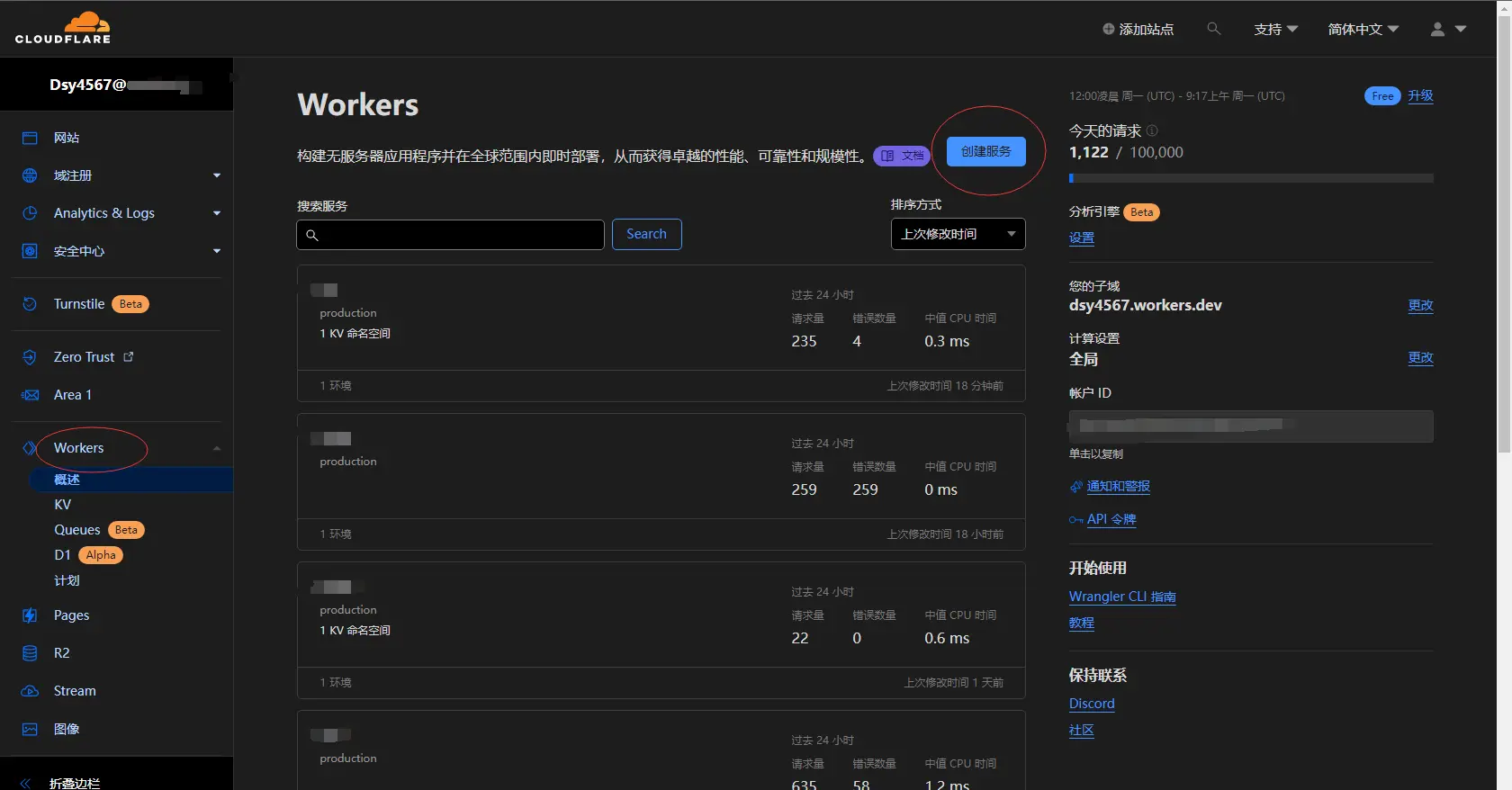
Workers 面板

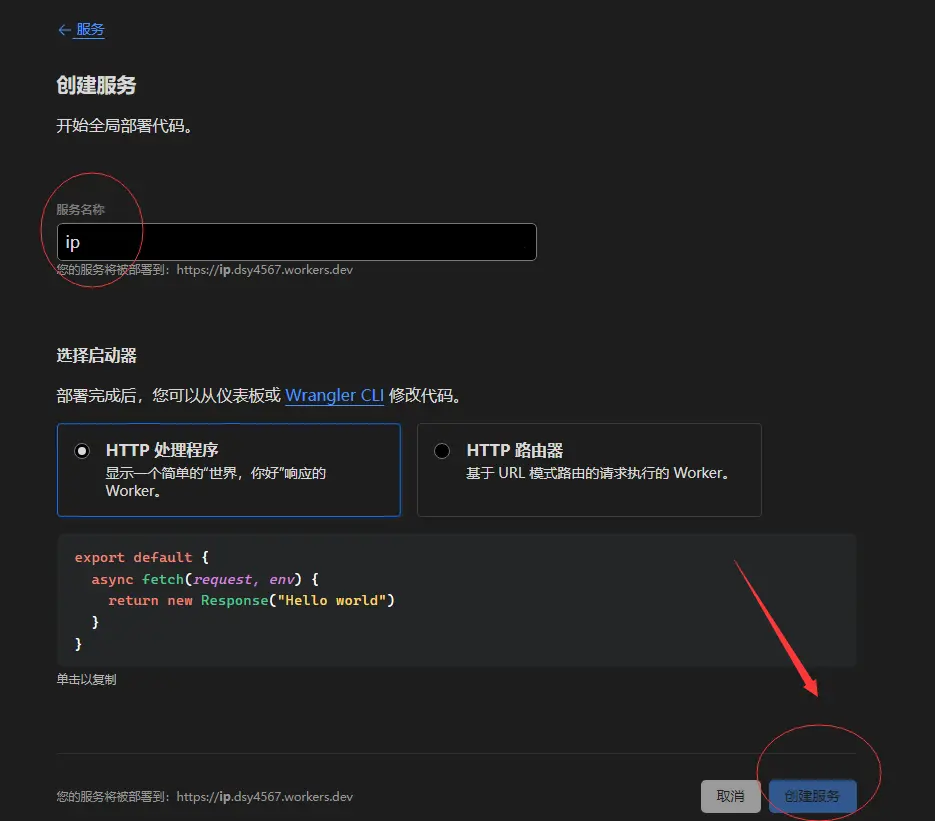
服务名称随意填写,然后点击创建服务。

创建服务

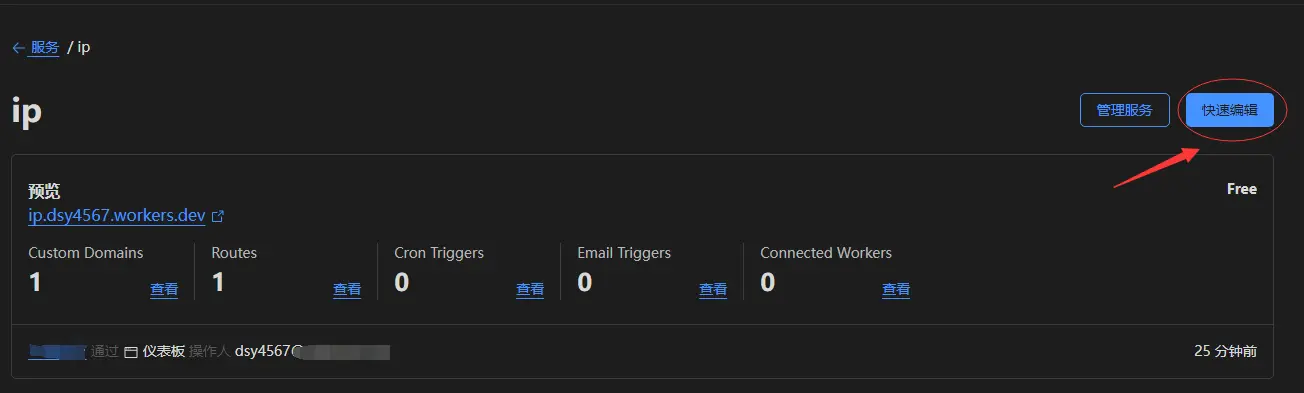
点击快速编辑。

管理面板

粘贴以下代码,然后点击保存并部署。

export default {
    async fetch(request, env) {
        let namespace = env.ip,
            u = new URL(request.url),
            ip = request.headers.get("CF-Connecting-IP");
        u.pathname == "/114514" && // 免费版每天只有一千次读写, 防滥用
            (await namespace.put(new Date().toUTCString(), ip));
        return new Response(ip);
    },
};

创建和绑定 KV 命名空间

返回,依次点击右边的 Workers > KV,然后点击创建命名空间 > 添加。
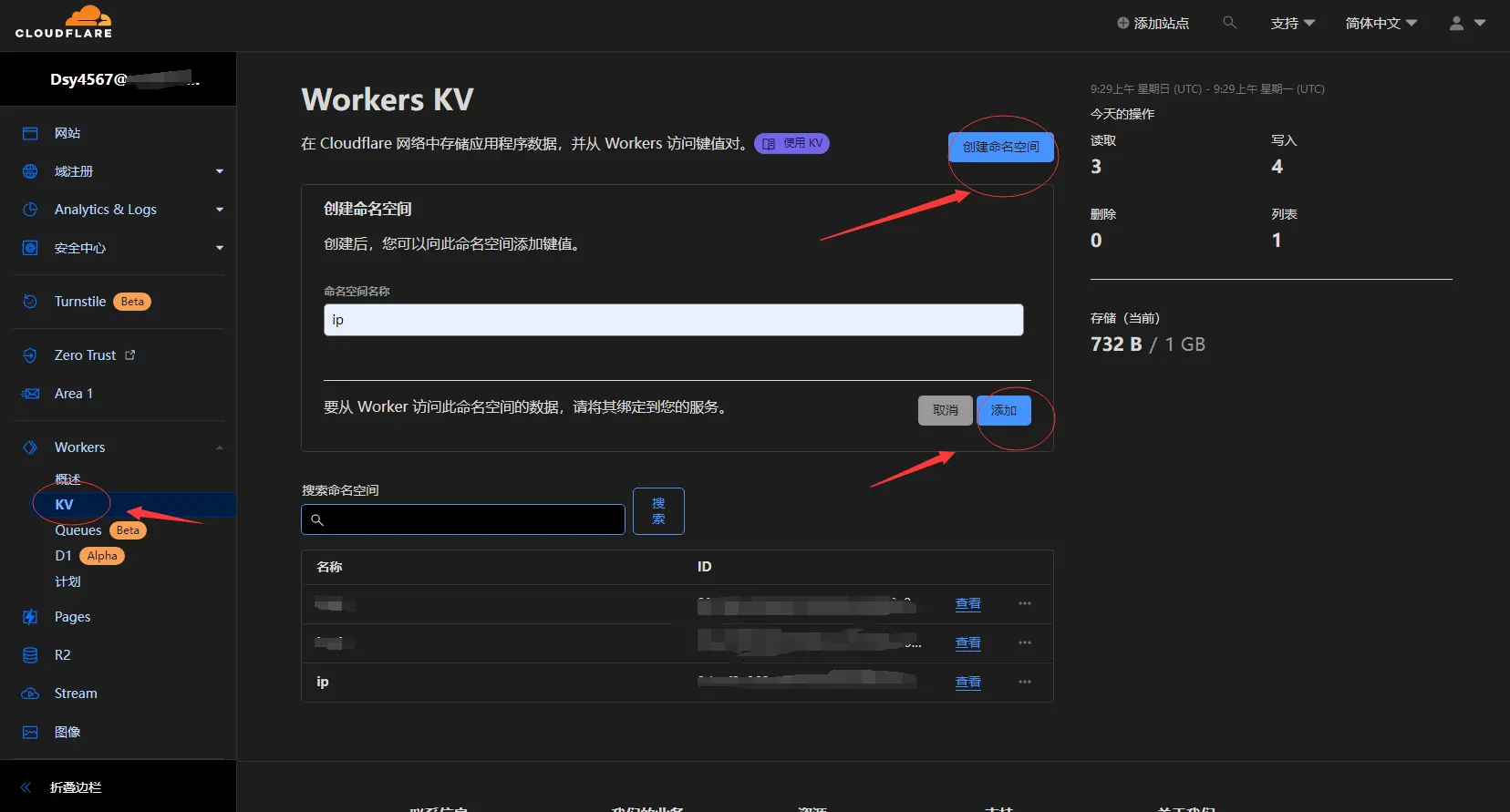
KV

回到 Worker 详情页,点击设置 > 变量 > KV 命名空间绑定。

变量名称填 ip,KV 命名空间选刚才创建的那个,保存并部署。
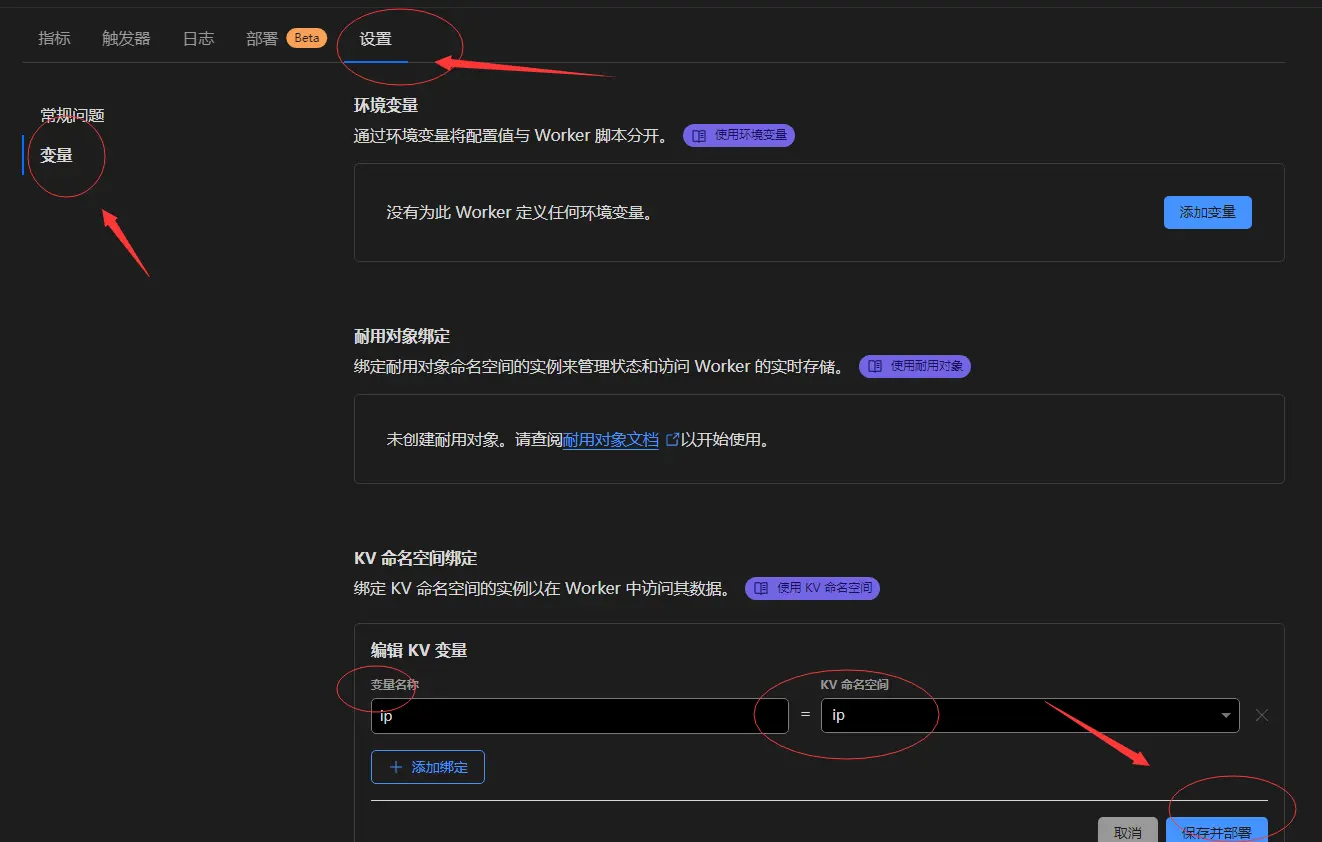
设置页

绑定自定义域

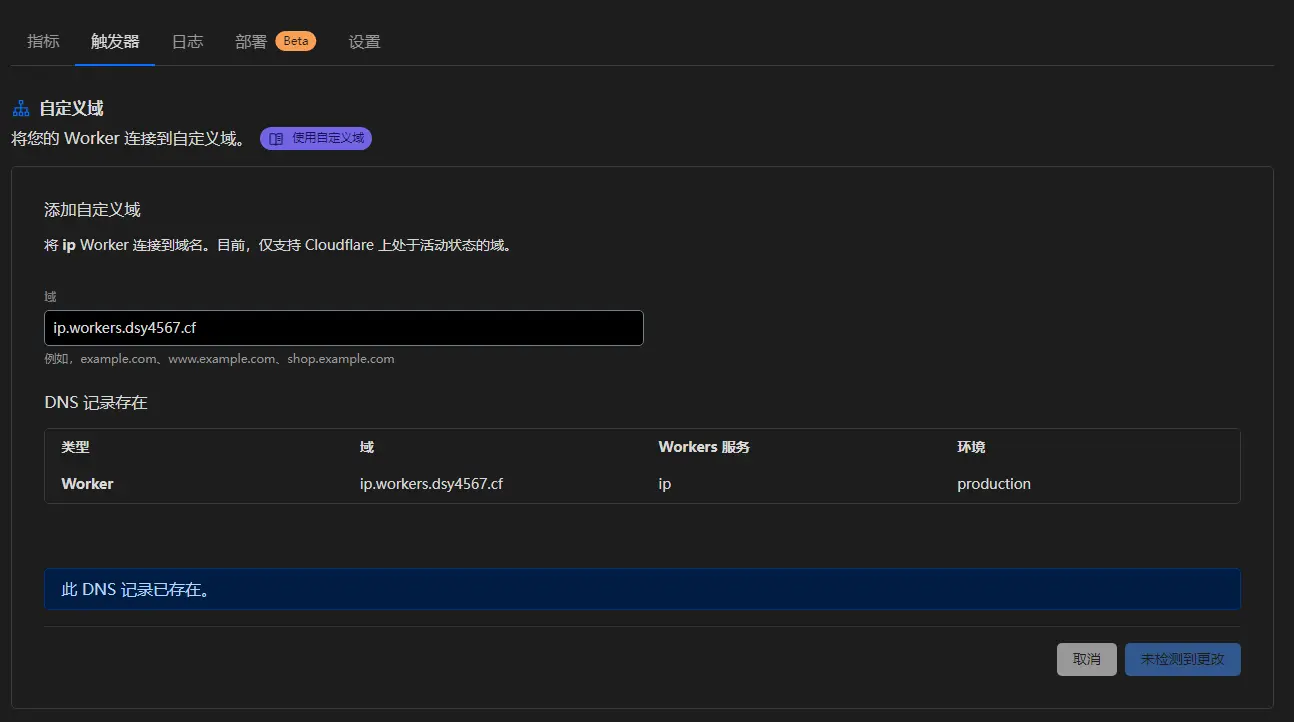
点击触发器 > 自定义域。

自定义域

https://<你的自定义域>/114514 这个网址发给别人访问,一段时间后,回到之前创建的 KV 命名空间,IP 就出来了。
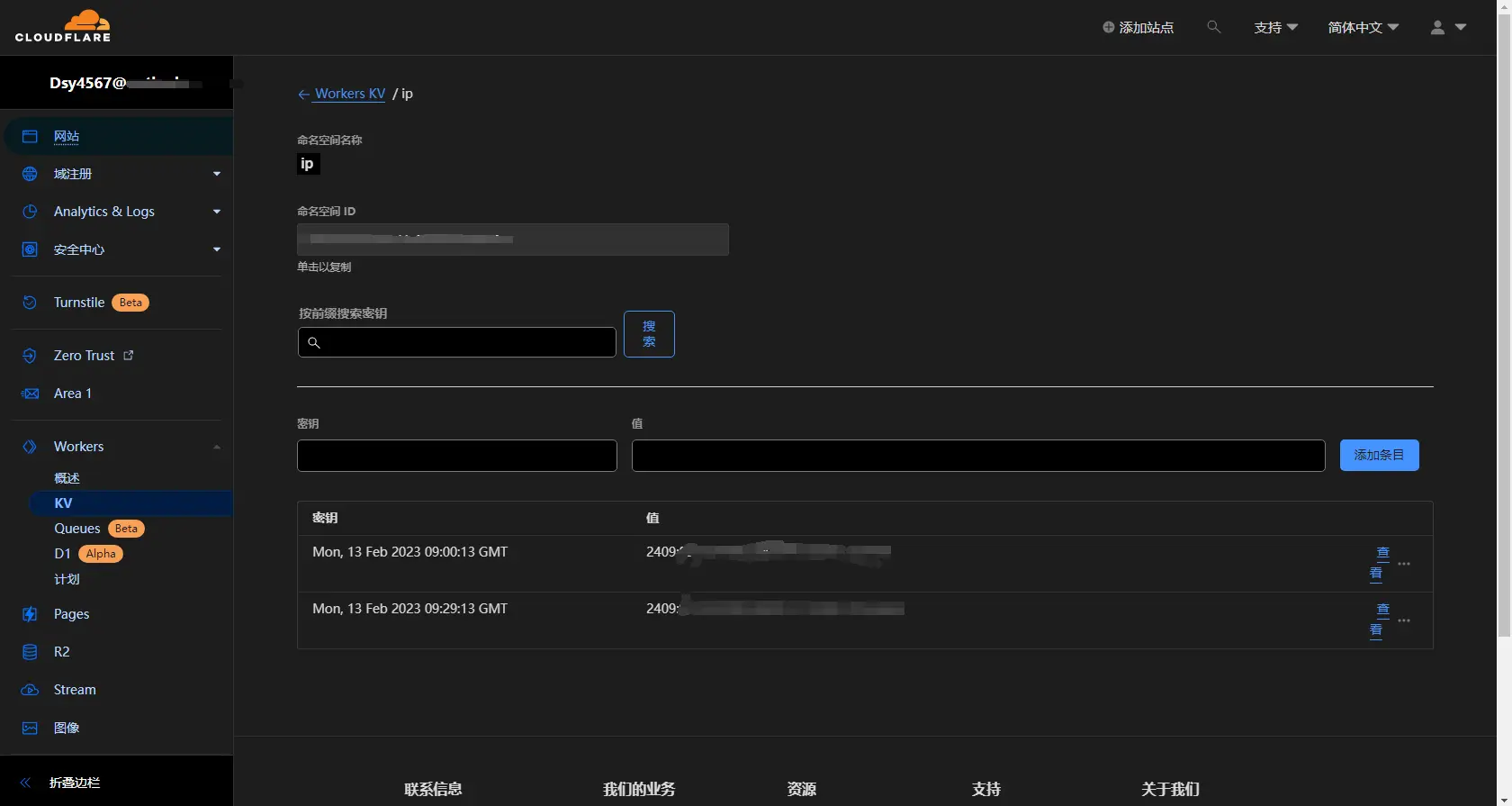
KV 命名空间管理面板

参考资料

Cloudflare Workers 文档 https://developers.cloudflare.com/workers/

恢复原始访问者 IP - Cloudflare 帮助中心 https://support.cloudflare.com/hc/zh-cn/articles/200170786-恢复原始访问者-IP


如无特别说明,本作品采用CC BY-NC-SA 4.0进行许可。
发表于: 2023/2/13 17:55:45, 更新于: 2023/2/13 17:55:45
标签: 技术 CloudFlare