












Table of contents
The Intel 285K CPU in my high-end 2025 Linux PC died again! 😡 Notably, this was the replacement CPU for the original 285K that died in March, and after reading through the reviews of Intel CPUs on my electronics store of choice, many of which (!) mention CPU replacements, I am getting the impression that Intel’s current CPUs just are not stable 😞. Therefore, I am giving up on Intel for the coming years and have bought an AMD Ryzen 9950X3D CPU instead.
What happened? Or: the batch job of death
On the 9th of July, I set out to experiment with layout-parser and tesseract in order to convert a collection of scanned paper documents from images into text.
I expected that offloading this task to the GPU would result in a drastic speed-up, so I attempted to build layout-parser with CUDA. Usually, it’s not required to compile software yourself on NixOS, but CUDA is non-free, so the default NixOS cache does not compile software with CUDA. (Tip: Enable the Nix Community Cache, which contains prebuilt CUDA packages, too!)
This lengthy compilation attempt failed with a weird symptom: I left for work, and after a while, my PC was no longer reachable over the network, but fans kept spinning at 100%! 😳 At first, I suspected a Linux bug, but now I am thinking this was the first sign of the CPU being unreliable.
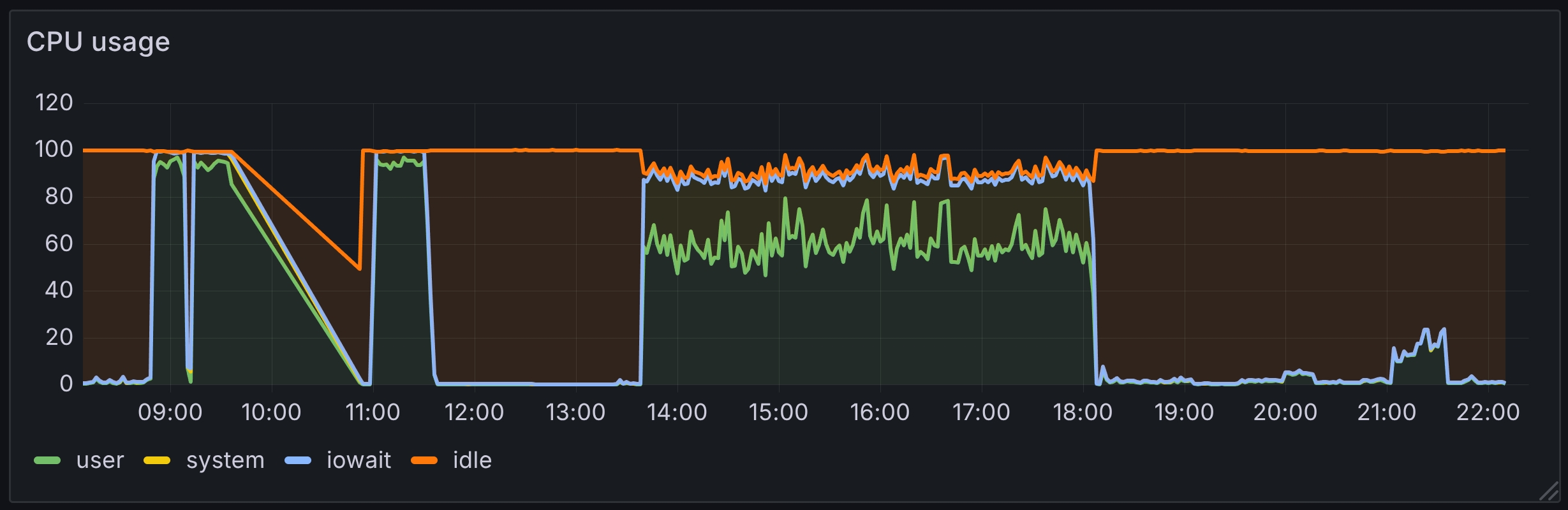
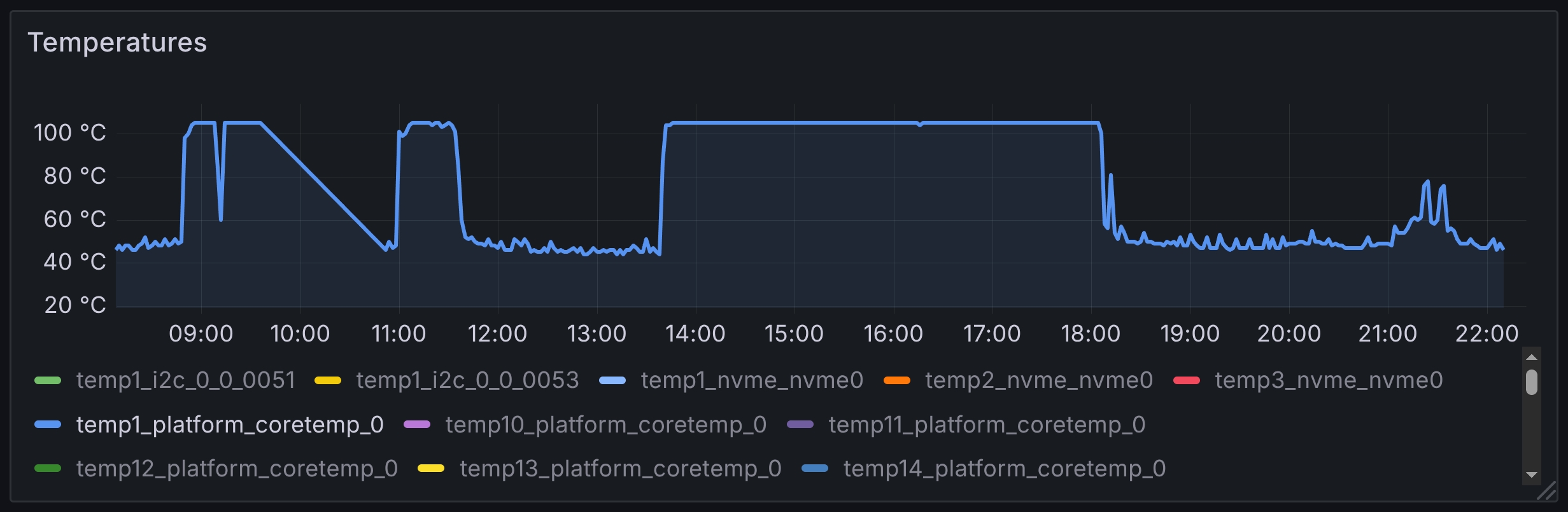
When the CUDA build failed, I ran the batch job without GPU offloading instead. It took about 4 hours and consumed roughly 300W constantly. You can see it on this CPU usage graph (screenshot of a Grafana dashboard showing metrics collected by Prometheus):
On the evening of the 9th, the computer still seemed to work fine.
But the next day, when I wanted to wake up my PC from suspend-to-RAM as usual, it wouldn’t wake up. Worse, even after removing the power cord and waiting a few seconds, there was no reaction to pressing the power button.
Later, I diagnosed the problem to either the mainboard and/or the CPU. The Power Supply, RAM and disk all work with different hardware. I ended up returning both the CPU and the mainboard, as I couldn’t further diagnose which of the two is broken.
To be clear: I am not saying the batch job killed the CPU. The computer was acting strangely in the morning already. But the batch job might have been what really sealed the deal.
No, it wasn’t the heat wave
Tom’s Hardware recently reported that “Intel Raptor Lake crashes are increasing with rising temperatures in record European heat wave”, which prompted some folks to blame Europe’s general lack of Air Conditioning.
But in this case, I actually did air-condition the room about half-way through the job (at about 16:00), when I noticed the room was getting hot. Here’s the temperature graph:
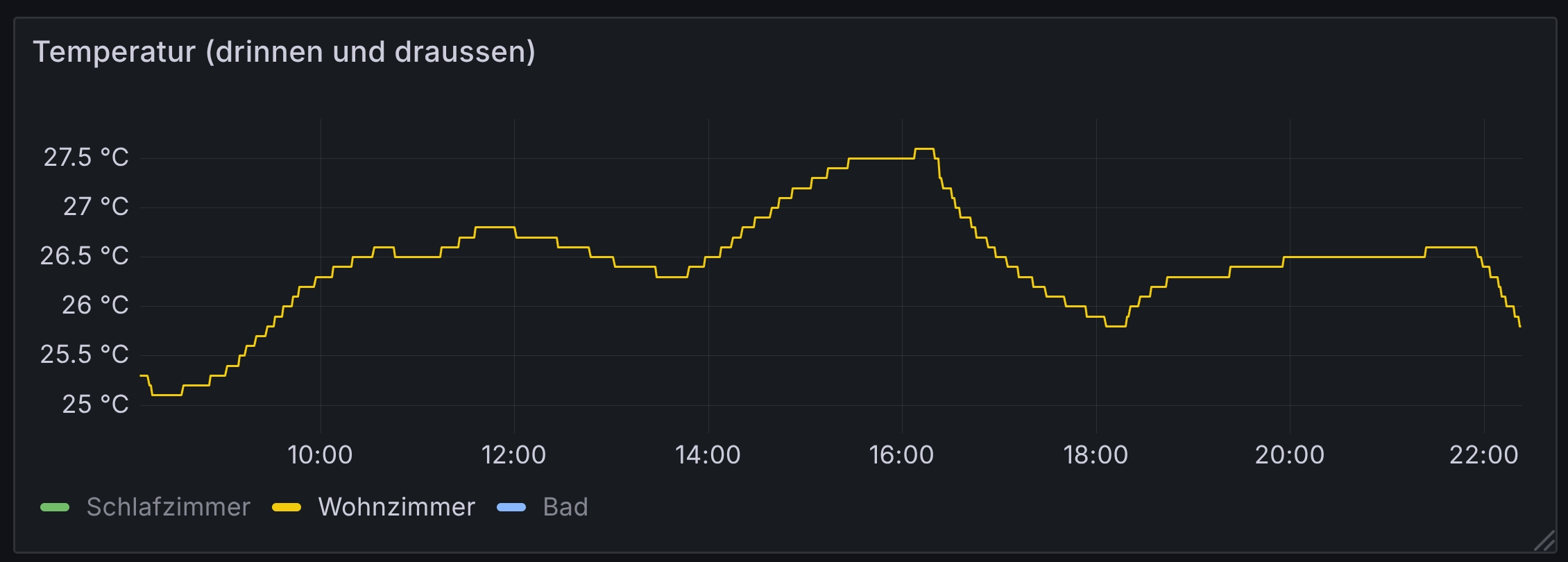
I would say that 25 to 28 degrees celsius are normal temperatures for computers.
I also double-checked if the CPU temperature of about 100 degrees celsius is too high, but no: this Tom’s Hardware article shows even higher temperatures, and Intel specifies a maximum of 110 degrees. So, running at “only” 100 degrees for a few hours should be fine.
Lastly, even if Intel CPUs were prone to crashing under high heat, they should never die.
Which AMD CPU to buy?
I wanted the fastest AMD CPU (for desktops, not for servers), which currently is the Ryzen 9 9950X, but there is also the Ryzen 9 9950X3D, a variant with 3D V-Cache. Depending on the use-case, the variant with or without 3D V-Cache is faster, see the comparison on Phoronix.
Ultimately, I decided for the 9950X3D model, not just because it performs better in many of the benchmarks, but also because Linux 6.13 and newer let you control whether to prefer the CPU cores with larger V-Cache or higher frequency, which sounds like an interesting capability: By changing this setting, maybe one can see how sensitive certain workloads are to extra cache.
Aside from the CPU, I also needed a new mainboard (for AMD’s socket AM5), but I kept all the other components. I ended up selecting the ASUS TUF X870+ mainboard. I usually look for low power usage in a mainboard, so I made sure to go with an X870 mainboard instead of an X870E one, because the X870E has two chipsets (both of which consume power and need cooling)! Given the context of this hardware replacement, I also like the TUF line’s focus on endurance…
Performance
The performance of the AMD 9950X3D seems to be slightly better than the Intel 285K:
| Workload | 12900K (2022) | 285K (2025) | 9950X3D (2025) |
|---|---|---|---|
| build Go 1.24.3 | ≈35s | ≈26s | ≈24s |
| gokrazy/rsync tests | ≈0.5s | ≈0.4s | ≈0.5s |
| gokrazy Linux compile | 3m 13s | 2m 7s | 1m 56s |
In case you’re curious, the commands used for each workload are:
cd src; ./make.bashmake testgokr-rebuild-kernel -cross=arm64
(I have not included the gokrazy UEFI integration tests because I think there is an unrelated difference that prevents comparison of my old results with how the test runs currently.)
Power consumption
In my high-end 2025 Linux PC I explained that I chose the Intel 285K CPU for its lower idle power consumption, and some folks were skeptical if AMD CPUs are really worse in that regard.
Having switched between 3 different PCs, but with identical peripherals, I can now answer the question of how the top CPUs differ in power consumption!
I picked a few representative point-in-time power values from a couple of days of usage:
| CPU | Mainboard | idle power | idle power with monitor |
|---|---|---|---|
| Intel 12900k | ASUS PRIME Z690-A | 40W | 60W |
| Intel 285k | ASUS PRIME Z890-P | 46W | 65W |
| AMD 9950X3D | ASUS TUF GAMING X870-PLUS WIFI | 55W | 80W |
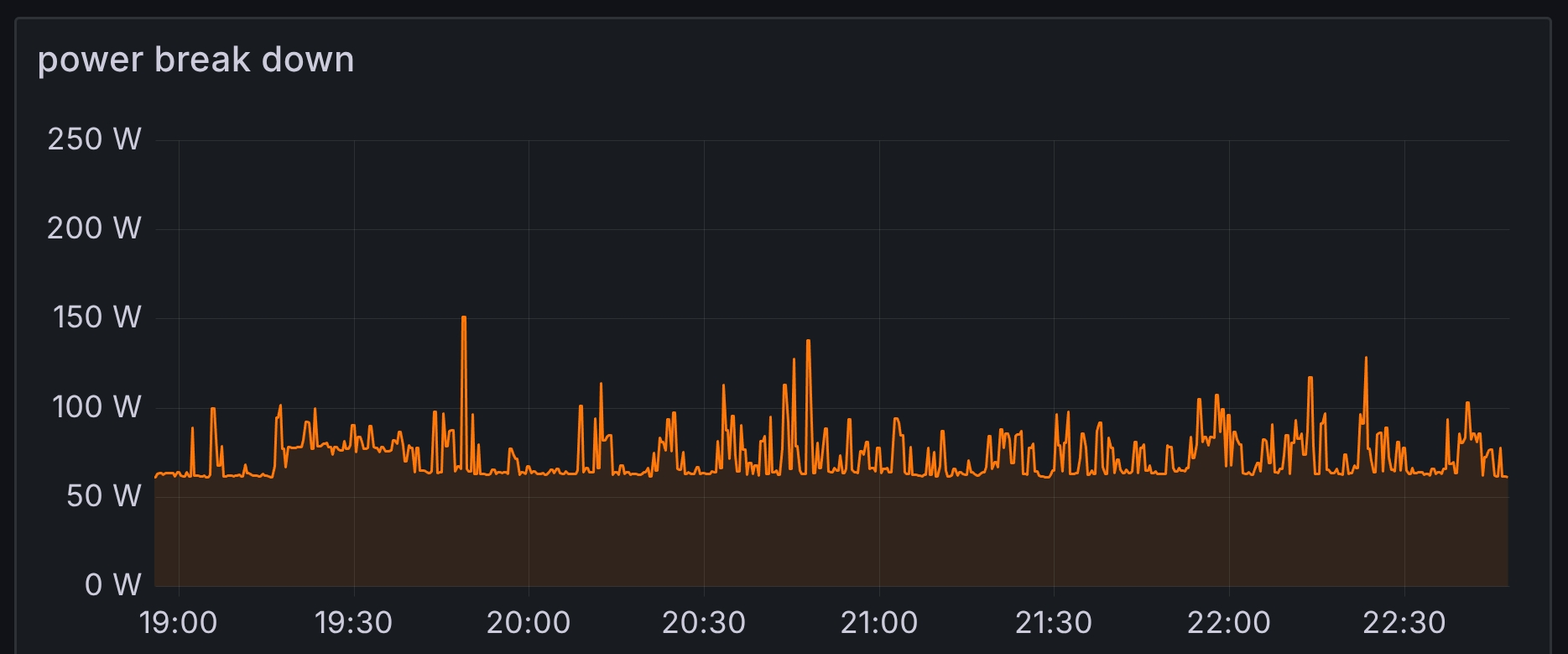
Looking at two typical evenings, here is the power consumption of the Intel 285K (measured using a myStrom WiFi switch smart plug, which comes with a REST API):
…and here is the same PC setup, but with the AMD 9950X3D:
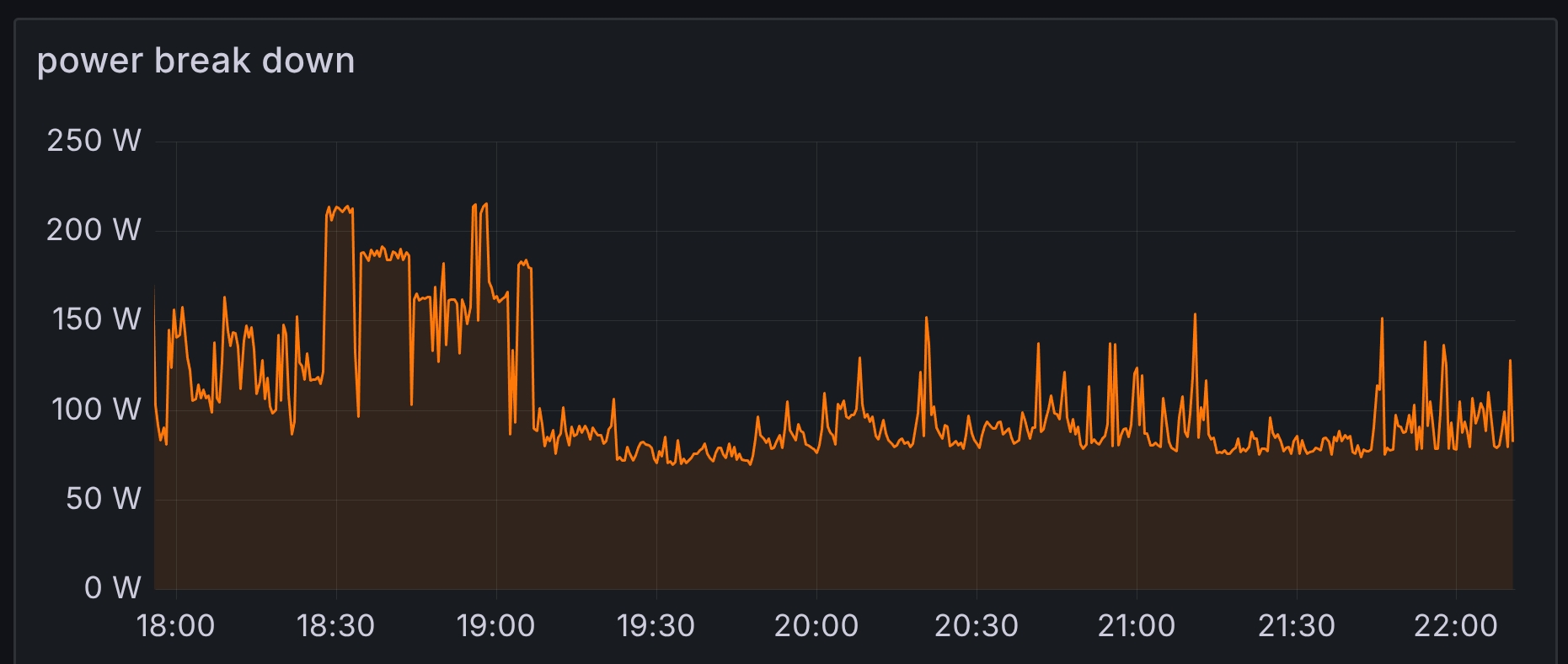
I get the general impression that the AMD CPU has higher power consumption in all regards: the baseline is higher, the spikes are higher (peak consumption) and it spikes more often / for longer.
Looking at my energy meter statistics, I usually ended up at about 9.x kWh per day for a two-person household, cooking with induction.
After switching my PC from Intel to AMD, I end up at 10-11 kWh per day.
Conclusion
I started buying Intel CPUs because they allowed me to build high-performance computers that ran Linux flawlessly and produced little noise. This formula worked for me over many years:
- Back in 2008, I bought a mobile Intel CPU in a desktop case (article in German).
- Then, in 2012, I could just buy a regular Intel CPU (i7-2600K) for my Linux PC, because they had gotten so much better in terms of power saving.
- Over the years, I bought an i7-8700K, and later an i9-9900K.
- The last time this formula worked out for me was with my 2022 high-end Linux PC.
On the one hand, I’m a little sad that this era has ended. On the other hand, I have had a soft spot for AMD since I had one of their K6 CPUs in one of my early PCs and in fact, I have never stopped buying AMD CPUs (e.g. for my Ryzen 7-based Mini Server).
Maybe AMD could further improve their idle power usage in upcoming models? And, if Intel survives for long enough, maybe they succeed at stabilizing their CPU designs again? I certainly would love to see some competition in the CPU market.
Did you like this post? Subscribe to this blog’s RSS feed to not miss any new posts!
I run a blog since 2005, spreading knowledge and experience for over 20 years! :)
All of my content is human-authored. I do use LLMs for research and knowledge work, and even to review my posts, but all writing is my own, every word is my own voice.