





惯性聚合 高效追踪和阅读你感兴趣的博客、新闻、科技资讯
阅读原文 在惯性聚合中打开

推荐订阅源

T
Tor Project blog
B
Blog RSS Feed
M
MIT News - Artificial intelligence
WordPress大学
WordPress大学
H
Hackread – Cybersecurity News, Data Breaches, AI and More
罗磊的独立博客
GbyAI
GbyAI
N
Netflix TechBlog - Medium
博客园 - 司徒正美
cs.AI updates on arXiv.org
Threat Intelligence Blog | Flashpoint
宝玉的分享
宝玉的分享
W
WeLiveSecurity
Stack Overflow Blog
Stack Overflow Blog
Y
Y Combinator Blog
SecWiki News
SecWiki News
V
Vulnerabilities – Threatpost
Google DeepMind News
C
CERT Recently Published Vulnerability Notes
T
Tailwind CSS Blog
OSCHINA 社区最新新闻
OSCHINA 社区最新新闻
The Register - Security
Cisco Talos Blog
Cisco Talos Blog
Martin Fowler
Martin Fowler
A
About on SuperTechFans
S
Security @ Cisco Blogs
T
Tenable Blog
C
Check Point Blog
N
News and Events Feed by Topic
S
SegmentFault 最新的问题
The GitHub Blog
The GitHub Blog
C
Cyber Attacks, Cyber Crime and Cyber Security
Attack and Defense Labs
美团技术团队
奇客Solidot–传递最新科技情报
奇客Solidot–传递最新科技情报
C
Cisco Blogs
P
Palo Alto Networks Blog
V
V2EX
博客园 - 聂微东
Project Zero
Project Zero
酷 壳 – CoolShell
酷 壳 – CoolShell
D
Docker
N
News | PayPal Newsroom
Cyber Security Advisories - MS-ISAC
小众软件
小众软件
Application and Cybersecurity Blog
人人都是产品经理
人人都是产品经理
V2EX - 技术
V2EX - 技术
I
Intezer
L
LINUX DO - 最新话题

VictoriaMetrics: Simple & Reliable Monitoring for Everyone on VictoriaMetrics

Operator now has Long-Term Support (LTS) version Multi-tiered Observability: A Practical Way to Handle Diverse Workloads VictoriaMetrics April 2026 Ecosystem Updates Not All Telemetry Requires Premium Pricing VictoriaMetrics at KubeCon Amsterdam: Community Highlights What's new in VictoriaMetrics Anomaly Detection (Q1 2026) What's New in VictoriaMetrics Cloud Q1 2026? Logs, MCP Server, Better Alerting, and... a Secret Project VictoriaMetrics at KubeCon: Optimizing Tail Sampling in OpenTelemetry with Retroactive Sampling VictoriaMetrics March 2026 Ecosystem Updates Observability Lessons From OpenAI Benchmarking Kubernetes Log Collectors: vlagent, Vector, Fluent Bit, OpenTelemetry Collector, and more VictoriaMetrics February 2026 Ecosystem Updates VictoriaMetrics at FOSDEM, Cloud Native Days France, and CfgMgmtCamp Ghent VictoriaLogs in VictoriaMetrics Cloud: Fast, Cost-Effective Log Management is Here What’s new in VictoriaMetrics Anomaly Detection (2025) VictoriaMetrics January 2026 Ecosystem Updates VictoriaLogs Basics: What You Need to Know, with Examples & Visuals What's New in VictoriaMetrics Cloud Q4 2025? New tiers, more deployment options, IaC and alerting rules. Vibe coding tools observability with VictoriaMetrics Stack and OpenTelemetry How a US Software Provider Improved Traffic Alerting with VictoriaMetrics Anomaly Detection VictoriaMetrics 2025 Developer Experience: A Year in Review Spotify’s performance & control across large monitoring environments with VictoriaMetrics VictoriaMetrics Achieves Red Hat OpenShift Operator Certification Our latest updates across the VictoriaMetrics Observability ecosystem New Capacity Tiers in VictoriaMetrics Cloud Announcing 1B+ Downloads & Product Development With Logs, Traces, Metrics AI Agents Observability with OpenTelemetry and the VictoriaMetrics Stack Discarding gRPC-Go: The Story Behind OTLP/gRPC Support in VictoriaTraces What's New in VictoriaMetrics Cloud Q3 2025? From new region in Asia to proactive alerts How DreamHost Slashed Memory Usage by 80% and Scaled to 76 Million Time Series Upcoming Conferences & Meetups: Where to Meet Our Team VictoriaMetrics Long-Term Support (LTS): H2 2025 Update Creating a Sustainable Open Source Business Model - Introduction Full-Stack Observability with VictoriaMetrics in the OTel Demo Alerting Best Practices vmanomaly Deep Dive: Smarter Alerting with AI (Tech Talk Companion) VictoriaLogs Practical Ingestion Guide for Message, Time and Streams Monotonic and Wall Clock Time in the Go time package Hello Singapore! VictoriaMetrics Cloud Expands to Asia Pacific MCP Server Integration & Much More: What's New in VictoriaMetrics Cloud Q2 2025 FIPS 140-3 Compatible Builds for VictoriaMetrics Enterprise Components VictoriaLogs Unleashed: Cluster Version Now Available for Exceptional, Linear Scaling Integrations made easy with VictoriaMetrics Cloud Developer's Note: Research on Distributed Tracing, Comparing With Tempo and ClickHouse vmagent: Key Features Explained in Under 15 Minutes Go synctest: Solving Flaky Tests vmalert: Maximize Your Monitoring (Tech Talk Companion) Celebrating 14K Stars on GitHub: Spring Update vmalert: Maximize Your Monitoring VictoriaMetrics Connects with the Open Source Community at LinuxFest Northwest 2025 Graceful Shutdown in Go: Practical Patterns VictoriaLogs: Gaps, Gains & Growth Prometheus Monitoring: Functions, Subqueries, Operators, and Modifiers VictoriaMetrics Cloud: What's New in Q1 2025? Don’t default to microservices: You’ll thank us later! Container CPU Requests & Limits Explained with GOMAXPROCS Tuning gRPC in Go: Streaming RPCs, Interceptors, and Metadata From Chaos to Clarity with VictoriaLogs Prometheus Alerting 101: Rules, Recording Rules, and Alertmanager Heading to London: Meet Our Team at KubeCon Europe 2025 Inside vmselect: The Query Processing Engine of VictoriaMetrics Meet Our Team at Scale 22x Practical Protobuf - From Basic to Best Practices VictoriaLogs Status Update: Heading Towards the Cluster Version 24th of February 2025 Statement: VictoriaMetrics Stands with Ukraine! Prometheus Metrics Explained: Counters, Gauges, Histograms & Summaries Prometheus Monitoring: Instant Queries and Range Queries Explained 300%+ Growth in 2024: Join Our Team in 2025! FOSDEM 2025 recap How Protobuf Works—The Art of Data Encoding OpenTelemetry, Prometheus, and More: Which Is Better for Metrics Collection and Propagation? How vmstorage Handles Query Requests From vmselect How vmstorage's IndexDB Works VictoriaMetrics Tech Talk Stream: A Deep Dive into Blackbox Monitoring How HTTP/2 Works and How to Enable It in Go VictoriaMetrics Cloud: What's New in Q4 2024? How vmstorage Processes Data: Retention, Merging, Deduplication,... How vmstorage Handles Data Ingestion From vminsert When Metrics Meet vminsert: A Data-Delivery Story From net/rpc to gRPC in Go Applications Piros | VictoriaMetrics Partner Allenta | VictoriaMetrics Partner CloudRaft | VictoriaMetrics Partner Sensedia & VictoriaMetrics: API-compatible Efficient Storage Scalable Prometheus: Why DSV Chose VictoriaMetrics Sensor Factory | VictoriaMetrics Partner Erythix | VictoriaMetrics Partner Groove X & VictoriaMetrics: Faster Device Health Monitoring Scaled & Performant Monitoring at Spotify with VictoriaMetrics Grammarly & VictoriaMetrics: 10× Lower Costs & Direct Access Zelarsoft | VictoriaMetrics Partner DFKI & VictoriaMetrics: Efficient Long-Term Metric Storage Niubits | VictoriaMetrics Partner Megazone Cloud | VictoriaMetrics Partner Cogito Software | VictoriaMetrics Partner Bajau | VictoriaMetrics Partner Find Out Why Dig Security Chose VictoriaMetrics! Ness | VictoriaMetrics Partner Alpha Data | VictoriaMetrics Partner SIOS Technology | VictoriaMetrics Partner
Monitoring benchmark: how to generate 100 million samples/s of production-like data
Roman Khavronenko · 2023-01-16 · via VictoriaMetrics: Simple & Reliable Monitoring for Everyone on VictoriaMetrics

One of the latest benchmarks we did was for OSMC 2022 talk VictoriaMetrics: scaling to 100 million metrics per second - see the video and slides.

While the fact that VictoriaMetrics can handle data ingestion rate at 100 million samples per second for one billion of active time series is newsworthy on its own, the benchmark tool used to generate that kind of load is usually overlooked. This blog post explains the challenges of scaling the prometheus-benchmark tool for generating such a load.

The prometheus-benchmark tool has been already mentioned in Benchmarking Prometheus-compatible time series databases and Grafana Mimir and VictoriaMetrics: performance tests blog posts.


Why data matters

#

The most crucial part of any database benchmark is the data. The efficiency of the read queries, indexes, compression, and even CPU usage would depend on the “shape of data” used during the tests. For public benchmarks, people usually pick a neutral data set and perform all the tests on it. For example, the New York City Taxi data set is heavily used for testing and comparing analytical databases.

But what if public data sets aren’t fitting your needs: are too big or too small; too specific or too broad? The answer is usually “to generate the data yourself”! While it may sound like a simple solution, data generation is a very complex task since data never exists apart from the application area.

For example, we want our database to store meter readings. We can generate a data set of N meters, each having M readings. But how do we choose the values for each reading? Would it be random? No, random data isn’t a good idea in most cases, since it is too far from real-world data seen in production.

Meters aren’t showing random values: each type of meter has its own distribution nature of values (aka “data shape”). For example, temperature readings are usually related to each other and have a sinusoidal shape over days, while voltage readings are more “chaotic”:
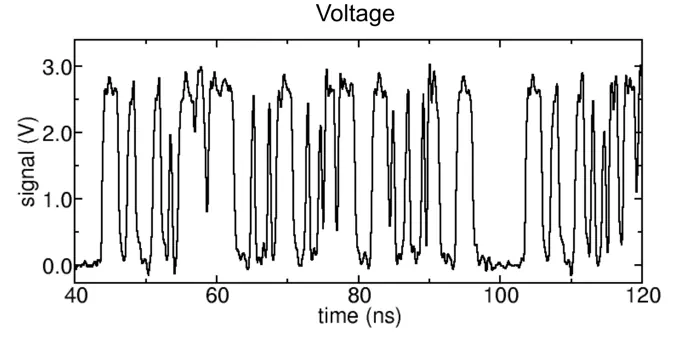
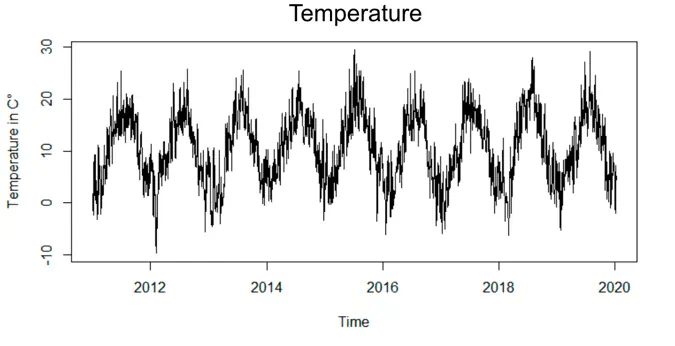
Images for voltage and temperature time series are captured from the public resources as example.

But the “chaotic” voltage data isn’t random too - it is, at least, bounded by min and max values, speed of change, etc. So think twice before writing your own data generator from scratch.

TSBS - Time Series Benchmark Suite

#

One of the most popular benchmark suites for time series data is TSBS. VictoriaMetrics is represented in the suite as well, but we stopped using it long ago. TSBS was no match for our purposes due to the following reasons:

  • TSBS ingests “random” data into the tested system. Such a data is far from most real-world cases.
  • TSBS requires pre-generated data to run the benchmark on it. This means TSBS cannot be used as a continuous benchmark, which runs over long periods of time.
  • TSBS tries ingesting the data to the tested system at the maximum possible speed, while the data in production is usually ingested at some fixed speed.
  • The “read” query tests in TSBS are far from typical PromQL or MetricsQL queries used in production.

The way how the TSBS works assumes that the user completes the following actions one by one:

  1. Pre-generate the data.
  2. Ingest generated data into the tested database at the maximum possible speed.
  3. Run “read” queries at the maximum possible speed.

But this is not how “real world” works. In reality, steps 2 and 3 are simultaneous and rate-limited: the database constantly processes the ingestion load and serves read queries at the same time. It is very important to understand how these two processes affect each other and how the database manages the given resources.

Another important point is tests duration: checking how the tested database behaves under constant pressure over long periods of time. For example, in Scaling Grafana Mimir to 500 million active series the benchmark was running for 72h, and the authors detected an anomaly in the queries error rate with 2 hours interval. It appeared, that the errors were caused by the scheduled compaction process that occurs every 2 hours. Such things could reveal themselves only during continuous tests.

Benchmark for Prometheus-compatible systems

#

So how could the benchmark be done better? From our experience, both Prometheus and VictoriaMetrics are mostly used for hardware monitoring. The most popular Prometheus metrics exporter is node-exporter, so we built a benchmark tool that uses it as a source of data. The benefits of such an approach are the following:

  • The produced data is very similar to “production” data.
  • The data is endless - there is no need in pre-generating it in advance.
  • It is easy to scale by just deploying more node-exporter instances.

We needed something very efficient and transparent from a monitoring perspective for delivering the data from node-exporter to the tested database. So we used vmagent - a swiss army knife for metrics collection. It is optimized for speed and it comes along with a Grafana dashboard for monitoring.

For read load, we use vmalert configured with typical alerting rules used in production for the node-exporter metrics. vmalert captures latency and success rate of executed queries, and also provides a Grafana dashboard for monitoring.

Altogether, these components form a tool that can ingest production-like data as long as it is needed. It can be easily scaled from a thousand samples/s to 100 million samples/s with the configured number of unique time series (aka cardinality). The source of metrics - node-exporter - can be easily replaced with any other exporter or application to provide a different set of metrics. The same goes for read load, which can be easily adjusted by changing the list of alerting rules and the interval of their execution.
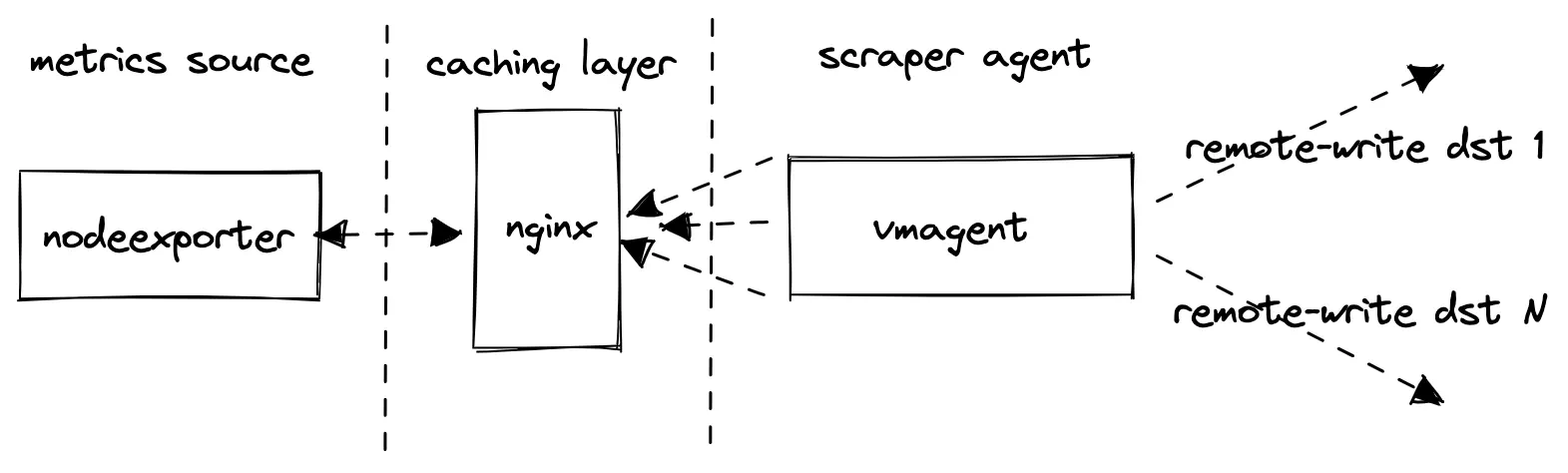
Prometheus remote write benchmark architecture diagram. Prometheus remote write benchmark architecture diagram.

More details can be found here.

The 100M benchmark

#

So how did it work for the 100M benchmark? To generate 100M samples/s for a billion of active time series, our benchmark suite used 16 replicas, 8 vCPU and 25GB RAM each.
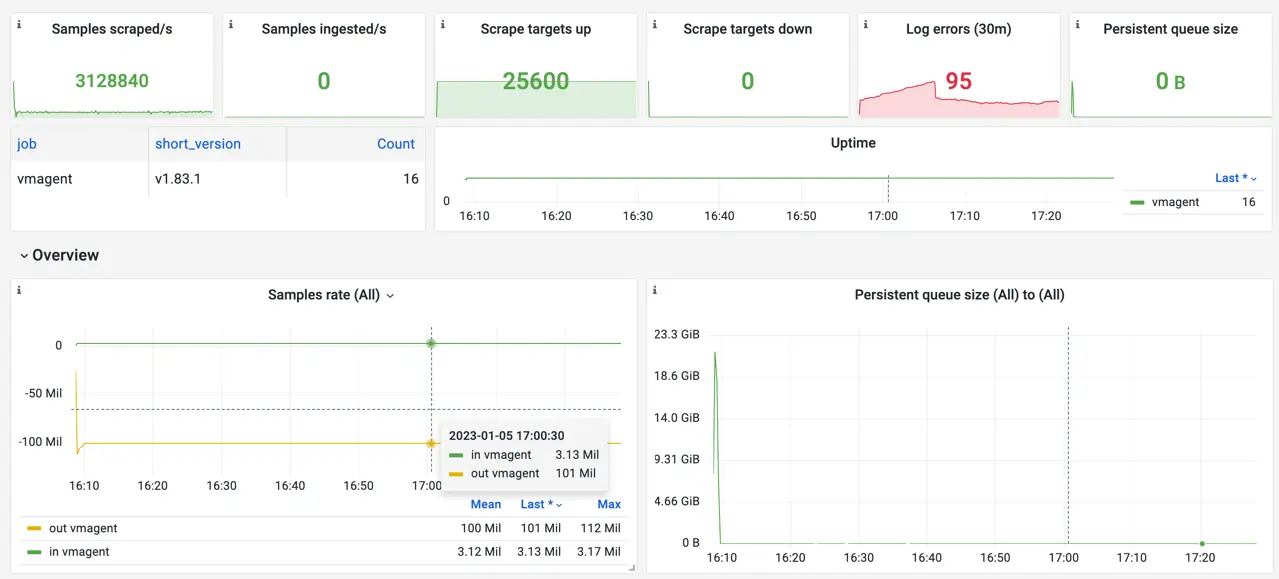
Screenshot of the official Grafana dashboard for VictoriaMetrics vmagent during the benchmark. Screenshot of the official Grafana dashboard for VictoriaMetrics vmagent during the benchmark.

The most CPU-intensive part of the work for vmagent is the parsing of the scraped data. Each scrape also generates additional pressure on Nginx and node-exporter processes. So in order to save some resources, we decided to benefit from VictoriaMetrics API enhancements. Adding extra_label param to the remote write URL instructs VictoriaMetrics to add an extra label to all the received data via this URL. This made it possible to introduce a writeURLReplicas: N benchmark config, which makes vmagent fan-out the scraped data N times, each with a unique url_replica label in URL. This is why vmagent scrapes 3.13M samples/s from node-exporter instances, but writes 3.13 * 32 replicas = 101M samples/s to the remote storage.

This is cheating a bit, but it has no significant effect on VictoriaMetrics itself. All the written data remains unique thanks to url_replica label, so the database can’t apply any optimizations here. On the other hand, it helps save a lot of resources on the benchmark suite and provides a sustainable level of write load.

In total, the benchmark was able to sustain a stable 2 GB/s data stream to the configured remote storage:
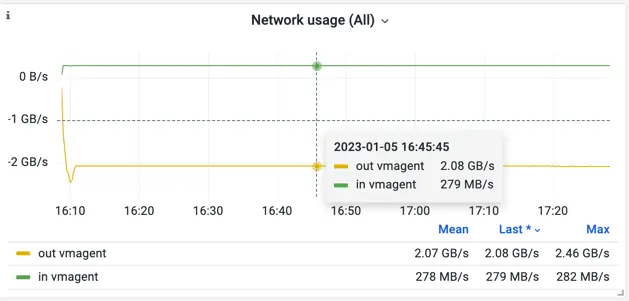
Screenshot of the official Grafana dashboard for VictoriaMetrics vmagent during the benchmark. Network. Screenshot of the official Grafana dashboard for VictoriaMetrics vmagent during the benchmark. Network.

You can find a snapshot of the vmagent dashboard during one of the test rounds here.

Conclusion

#

We’re pretty happy with the prometheus-benchmark tool. It helps us not only perform benchmarks on a tremendous scale, but also helps us constantly test VictoriaMetrics releases internally.

Thanks to the infinite source of data, we can run benchmarking constantly and get results very close to what we observe in various production environments. All VictoriaMetrics components are shipped with alerting rules and Grafana dashboards, so once something is wrong we’re getting notifications immediately. Good observability for benchmarking is critical and we’re glad it helps us to keep everything transparent.

If you are evaluating different Prometheus-compatible monitoring solutions, then try testing them with the prometheus-benchmark tool on the expected workload. This will help determining the best solution for your needs.

Check other relevant blog posts: