








前面分享了无客户端的VNC,SSH开源解决方案,按照这个节奏,接下来要介绍无客户端的RDP解决方案,无奈没找到单独的针对RDP的web方案,不过意外的发现一个更给力的,多合一的远程桌面网关,针对多种主流远程管理协议,一网打尽。
官网宣传效果
Guacamole 0.9.4 Demo from Michael Jumper on Vimeo.
自己搭建后效果
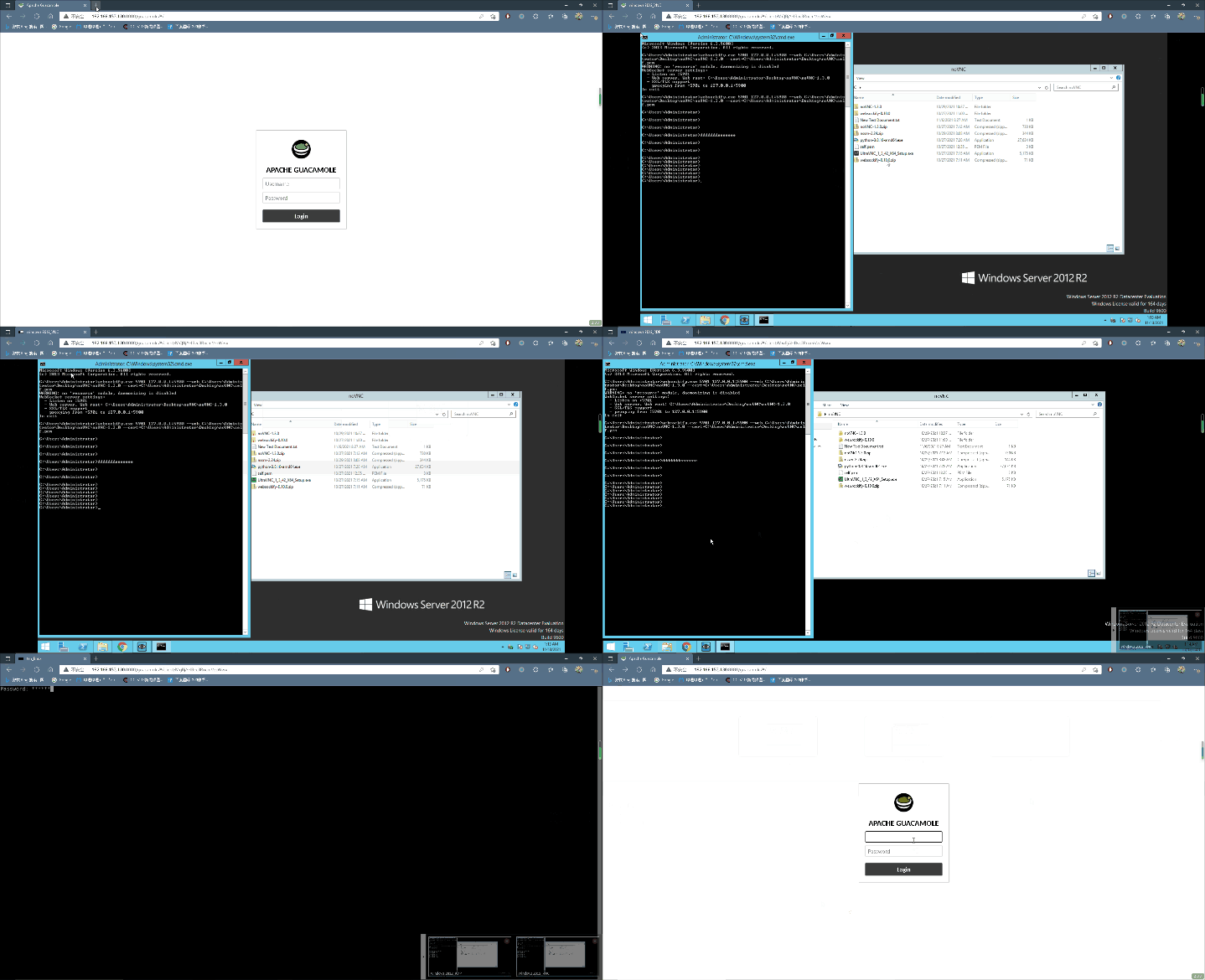
Apache Guacamole 是一个无客户端的远程桌面网关,它支持众多标准管理协议,例如 VNC(RFB),RDP,SSH 等等。通过名字知道该项目是Apache基金会旗下的一个开源项目,也从侧面表明该项目是一个较高标准,并具有广泛应用前景的项目,值得了解一下。
当Guacamole被部署在服务器上后,用户通过浏览器即可访问已经开启 VNC(RFB),RDP,SSH 等远程管理服务的主机,屏蔽用户使用环境差异,跨平台,另外由于Guacamole本身被设计为一种代理工作模型,方便对用户集中授权监控等管理,,也被众多堡垒机项目所集成,例如‘jumpserver’,‘next-terminal’。
Guacamole由两部分组成,guacamole-server 和 guacamole-client 。
guacamole-client是用户用浏览其直接访问的web app,当然guacamole-client组件还自带一个web server,上面运行这个web app, 所以guacamole-client实际是一个web app和web server的集合体,用户认证层也是在这个组件内实现;
guacamole-server组件是接受并处理guacamole-client发送来的请求,然后翻译并转换这个请求,动态的调用遵循那些标准管理协议开发的开源客户端,例如FreeRDP,libssh2,LibVNC,代为连接Remote Desktops,最后回传数据给guacamole-client,guacamole-client回传数据给web browser,。整个过程中,翻译转换,动态调用是guacamole-server最核心的组件,称之为guacd,而那些开源的客户端被称为client plugins,client plugins这种方式是灵活的,加载什么就具备某种实现,前提是Guacamole protocol已经适配。
Guacamole protocol是专为Guacamole项目设计的协议,用于web browser与guacamole-client, guacamole-client与guacamole-server之间通信,它负责web browser侧 显示渲染和事件传输,guacamole-client不理解任何remote desktop protocol,它只理解Guacamole protocol,当web browser(用户)选择某种协议以及附带的参数时,经由Guacamole protocol编码,在http或https或websocket隧道基础上传输到guacamole-client,然后传输到guacamole-server,由guacamole-server解码,动态选择使用何种remote desktop client连接到Remote Desktops,并带上具体的参数,guacamole-server也不理解任何remote desktop protocol,它只理解Guacamole protocol。
PS:Guacamole protocol的开发,在项目早期,websocket彼时还未被信任,所以是基于http/https之上,现在也已经支持websocket,但是基于http/https的 并未被弃用,当由于某些原因,websocket无法使用时,会自动切换到基于http/https的旧版。
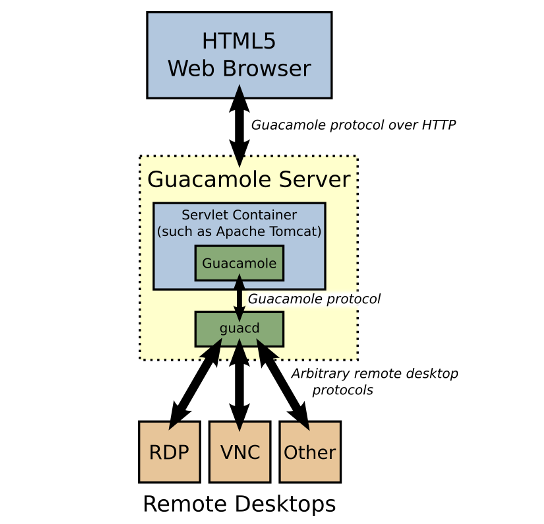
只要Guacamole protocol设计的字段足够多,是可以原生支持remote desktop client的能力。
guacamole-server项目的被设计为一种标准化的api调用,完全独立guacamole-client,guacamole-client只是官方给的一个基于Java,JS的‘前端’样例,确实是非常简陋,如果你有需求,当然可以用其他语言和环境去构造。
了解了Apache Guacamole的high-level架构和工作流程,可以来对比下之前分享的noVNC的架构
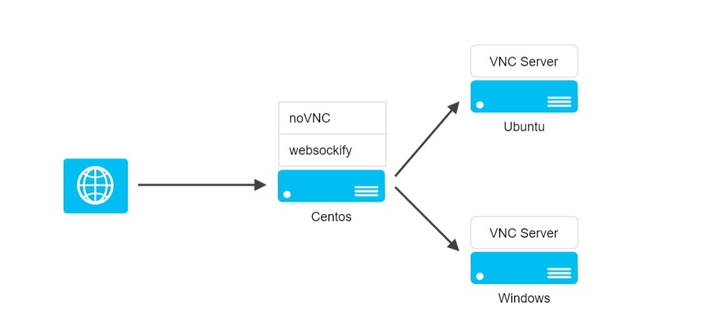
guacamole-client与noVNC扮演角色完全一样
guacamole-server是相比websockify增加了一个抽象层,自身不支持任何remote desktop protocol,引入client plugins来增加对多协议的支持,扩展性也更强,配套增加了Guacamole protocol,而websockify自身实现了VNC client的功能,且只支持VNC
来实际部署试试:
原生部署太麻烦,这里选择全docker环境部署,且所有container在一台服务器的同一个bridge:docker0,也就是在同一个docker网段
docker run --name some-guacd -d guacamole/guacd后面guacamole-client的container通过docker –link方式与之通信 所以无需对外暴露端口,guacamole-server默认监听tcp 4822
这里需要部署一个数据库,用于登录guacamole-client的用户认证
拉取docker image:
docker pull postgres
docker image list
初始化一个psotgresql container:为psotgresql设置密码,默认用户名为postgres,且默认创建了一个postgres db。默认监听端口TCP 5432
docker run --name mypostgres -d -p 5432:5432 -e POSTGRES_PASSWORD=123456 postgres进入默认的postgres db,创建一个新的用户名guacamole_user,密码为guacamole_user,创建一个新的数据库guacamole_db,并把权限赋予新用户(注意分号)
docker exec -it mypostgres psql -U postgres -d postgres

CREATE USER guacamole_user WITH PASSWORD 'guacamole_user';
CREATE DATABASE guacamole_db OWNER guacamole_user;
GRANT ALL ON DATABASE guacamole_db TO guacamole_user;
exit
guacamole-client为我们准备好了初始化guacamole_db的脚本,生成该脚本并拷到container内
docker run --rm guacamole/guacamole /opt/guacamole/bin/initdb.sh --postgres > initdb.sql
dir
pwd
docker cp /xxxx/initdb.sql mypostgres:/
docker exec -it mypostgres /bin/bash
dir
exit
以新用户进入guacamole_db, 执行initdb.sql文件
docker exec -it mypostgres psql -U guacamole_user -d guacamole_db
\i /initdb.sql
在最新的postgresql版本中,需要更改postgresql pg_hba.conf的配置,降低用户认证时的加密级别,与guacamole-client匹配
docker cp mypostgres:/var/lib/postgresql/data/pg_hba.conf /home/centos/
更改文件最后一行 host all all all scram-sha-256 为 host all all all trust
docker cp xxxx/pg_hba.conf mypostgres:/var/lib/postgresql/data/
重启containerguacamole-client 通过docker –link与guacamole-server通信,在环境变量里面指定要连接的SQL信息,注意POSTGRES_HOSTNAME地址为宿主机地址,–link some-guacd:guacd,guacd这个别名不能更改,docker link本质是通过传递环境变量,写入hosts文件,域名访问
docker run --name some-guacamole \
    --link some-guacd:guacd         \
    -e POSTGRES_DATABASE=guacamole_db \
    -e POSTGRES_HOSTNAME=x.x.x.x \
    -e POSTGRES_USER=guacamole_user \
    -e POSTGRES_PASSWORD=guacamole_user \
    -d -p 8080:8080 guacamole/guacamole
docker log xxxx 查看日志信息,如无异常,
http://x.x.x.x:8080/guacamole/
默认用户名密码为 guacadmin,
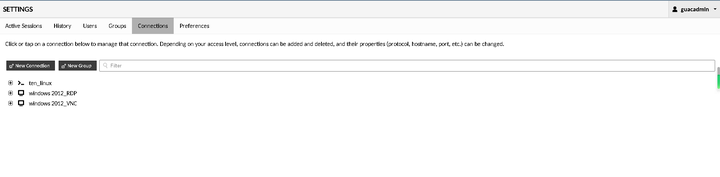
添加connection即可,当然实际使用可以通过部署反向代理,https访问
更细节的设置参考官网手册:
https://guacamole.apache.org/doc/gug/guacamole.apache.org/doc/gug/
以上。
Post Views: 4,434
此内容由惯性聚合(RSS阅读器)自动聚合整理,仅供阅读参考。 原文来自 — 版权归原作者所有。