












Introduction
While building a CVE assessment agent, I ran into an orchestration issue that looked trivial at first—but turned out to be instructive.
The agent was implemented with LangGraph and (conceptually) structured like this:
--- config: theme: 'base' themeVariables: primaryColor: '#BB2528' primaryTextColor: '#fff' primaryBorderColor: '#7C0000' lineColor: '#F8B229' secondaryColor: '#006100' tertiaryColor: '#fff' --- graph TD Start((__start__)) --> GetCVE[get_cve_data] Start --> GetCVSS[get_cvss_data] GetCVE --> GenASD[generate_asd_data] GetCVSS --> GetStmt[get_cvss_statement_data] GenASD --> Normalize[normalize_cvss_data] GetStmt --> Normalize Normalize --> GenVector[generate_cvss_vector] GenVector --> End((__end__))
Then the logs started to feel… off:
2025-12-24 12:07:16|x-sec|INFO|./core/agents/mimora/cvss_vector_agent.py:504|_generate_cvss_vector|开始完成CVE风险评估并生成CVSS向量
2025-12-24 12:07:16|x-sec|INFO|./core/agents/mimora/cvss_vector_agent.py:401|_normalize_cvss_data|开始归一化CVSS向量数据
2025-12-24 12:07:26|x-sec|INFO|./core/agents/mimora/cvss_vector_agent.py:527|_generate_cvss_vector|Generated CVSS Vector Response
2025-12-24 12:07:26|x-sec|DEBUG|./core/agents/mimora/cvss_vector_agent.py:528|_generate_cvss_vector|Response content: {
    "cvss_vector": "CVSS:3.1/AV:L/AC:L
2025-12-24 12:07:26|x-sec|INFO|./core/agents/mimora/tools/tool_utils.py:19|wrapper|开始执行工具: _calculate_cvss_score, 参数: ('CVSS:3.1/AV:L/AC:L/PR:N/UI:R/S:U/C:H/I:H/A:H',), {}
2025-12-24 12:07:26|x-sec|INFO|./core/agents/mimora/tools/cvss_tool.py:107|_calculate_cvss_score|开始计算CVSS评分: version=3.0, vector=CVSS:3.1/AV:L/AC:L/PR:N/UI:R/S:U/C:H/I:H/A:H...
2025-12-24 12:07:26|x-sec|INFO|./core/agents/mimora/tools/cvss_tool.py:170|_calculate_cvss_score|成功计算CVSS评分: version=3.1, base_score=7.8, base_severity=High
2025-12-24 12:07:26|x-sec|INFO|./core/agents/mimora/tools/tool_utils.py:22|wrapper|工具 _calculate_cvss_score 执行成功,耗时: 0.00s
2025-12-24 12:07:26|x-sec|INFO|./core/agents/mimora/cvss_vector_agent.py:504|_generate_cvss_vector|开始完成CVE风险评估并生成CVSS向量
2025-12-24 12:07:26|x-sec|INFO|./core/agents/mimora/cvss_vector_agent.py:568|_generate_cvss_severity|开始生成CVSS严重性等级
2025-12-24 12:07:35|x-sec|INFO|./core/agents/mimora/cvss_vector_agent.py:527|_generate_cvss_vector|Generated CVSS Vector Response
2025-12-24 12:07:35|x-sec|DEBUG|./core/agents/mimora/cvss_vector_agent.py:528|_generate_cvss_vector|Response content: {
    "cvss_vector": "CVSS:3.1/AV:L/AC:L
2025-12-24 12:07:35|x-sec|INFO|./core/agents/mimora/tools/tool_utils.py:19|wrapper|开始执行工具: _calculate_cvss_score, 参数: ('CVSS:3.1/AV:L/AC:L/PR:N/UI:R/S:U/C:H/I:H/A:H',), {}
2025-12-24 12:07:35|x-sec|INFO|./core/agents/mimora/tools/cvss_tool.py:107|_calculate_cvss_score|开始计算CVSS评分: version=3.0, vector=CVSS:3.1/AV:L/AC:L/PR:N/UI:R/S:U/C:H/I:H/A:H...
2025-12-24 12:07:35|x-sec|INFO|./core/agents/mimora/tools/cvss_tool.py:170|_calculate_cvss_score|成功计算CVSS评分: version=3.1, base_score=7.8, base_severity=High
2025-12-24 12:07:35|x-sec|INFO|./core/agents/mimora/tools/tool_utils.py:22|wrapper|工具 _calculate_cvss_score 执行成功,耗时: 0.00s
2025-12-24 12:07:42|x-sec|INFO|./core/agents/mimora/cvss_vector_agent.py:596|_generate_cvss_severity|Generated CVSS Severity Response
The output was unstable. My first instinct was the usual scapegoat—LLM hallucination.
But a graph runtime is supposed to reduce this kind of unpredictability, not amplify it.
After tracing the execution path, I found the culprit: _generate_cvss_vector was being scheduled twice. That directly contradicted my intended topology.
I’ll skip the play-by-play debugging here. What matters is what the anomaly triggered: a deeper look into agent orchestration—and the design patterns that fall out of it.
Rethinking Agent Orchestration
0:00
/0:44

Where today’s orchestration starts to crack
As systems evolve from “generative AI” (single-shot text) into autonomous agents, architecture becomes the real stability lever—more than prompts, more than model choice.
Early paradigms favored chains: linear prompt sequences that work well for small, bounded tasks.
But once an agent needs to plan, call tools, reflect, and iterate, a linear DAG (Directed Acyclic Graph) becomes a poor fit.
An agent is not a clean input–output pipeline. It is a loop of Perception → Reasoning → Action → Observation, repeated until termination—if termination exists at all. That cyclic nature violates the “acyclic” assumption. Meanwhile, many systems are drifting toward multi-agent setups: planners, executors, critics, and retrievers collaborating in parallel, all sharing and mutating context.
At that point, you inherit the problems of distributed systems: race conditions, state consistency, cyclic dependencies, and fault tolerance.
So the question becomes: what orchestration model can represent cycles and parallel collaboration without turning the runtime into a guessing game?
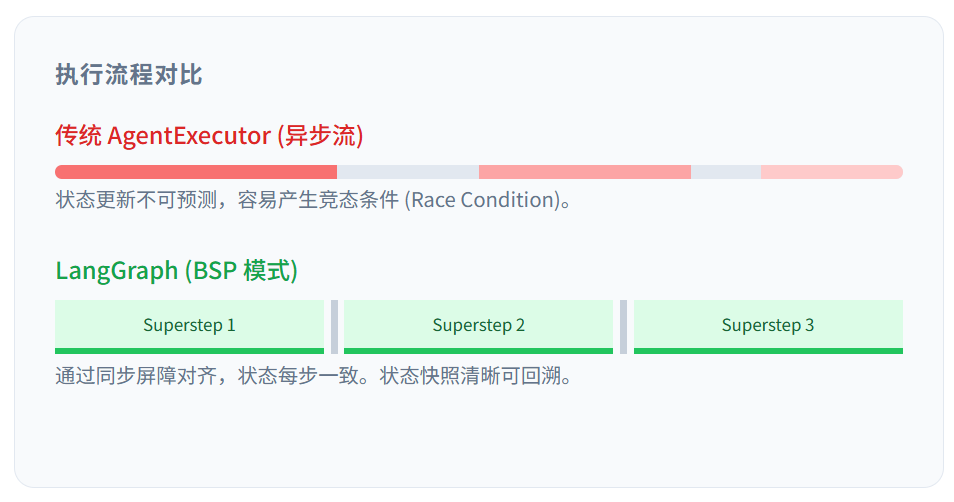
LangGraph’s bet is to bring the BSP (Bulk Synchronous Parallel) model—battle-tested in HPC and big-data graph computing—into agent orchestration.
Why graph computing models?
Traditional software models systems as services or objects. An agent system behaves closer to a state machine traversing a graph, where state is the asset and transitions are the work.
- Cycles are the default, not the exception
ReAct is basicallyThink → Act → Observe → Think. DAGs can express this only indirectly (recursion, outer loops, manual re-entry), which tends to complicate call stacks and context handling. BSP treats cycles naturally: a loop is simply an ongoing sequence of supersteps. - State is the center of gravity
In agent systems, context is not “data passing through”—it is the system. Decisions are functions of the current state. BSP forces explicit state management and versioning, which aligns unusually well with LLM-based workflows. - Parallelism needs a first-class synchronization primitive
Patterns like Map-Reduce fan-out or supervisor/worker collaboration require parallel work that later converges. BSP’s barrier gives you that synchronization point natively—without ad-hocasyncio.gather, locks, or fragile ordering assumptions.
Google Pregel & the BSP model
The Pregel framework
Pregel can be summarized in three ideas:
- How it computes: a vertex state machine — decide whether to work or to sleep
- How it runs: the BSP execution model — decide how the system synchronizes
- How it propagates: message passing — move values across edges
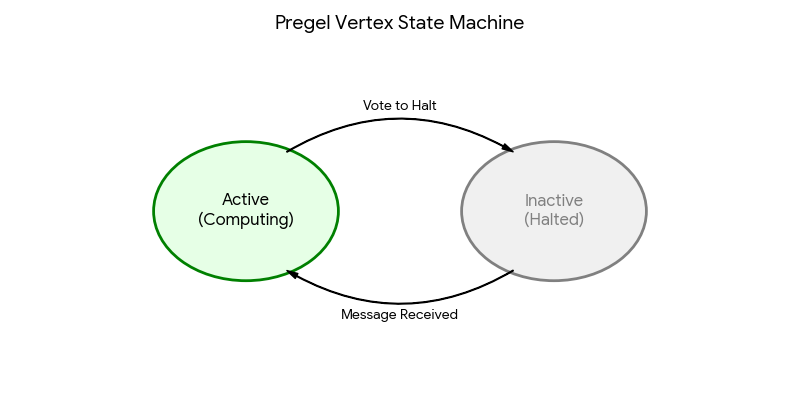
This is the core intuition behind “think like a vertex.” Each vertex has two key states:
- Active: the vertex runs
compute(), processes incoming messages, updates its value, and sends messages to neighbors. - Inactive (halted): the vertex “sleeps” after it votes to halt.
- Wake-up: receiving a message brings a halted vertex back to Active.
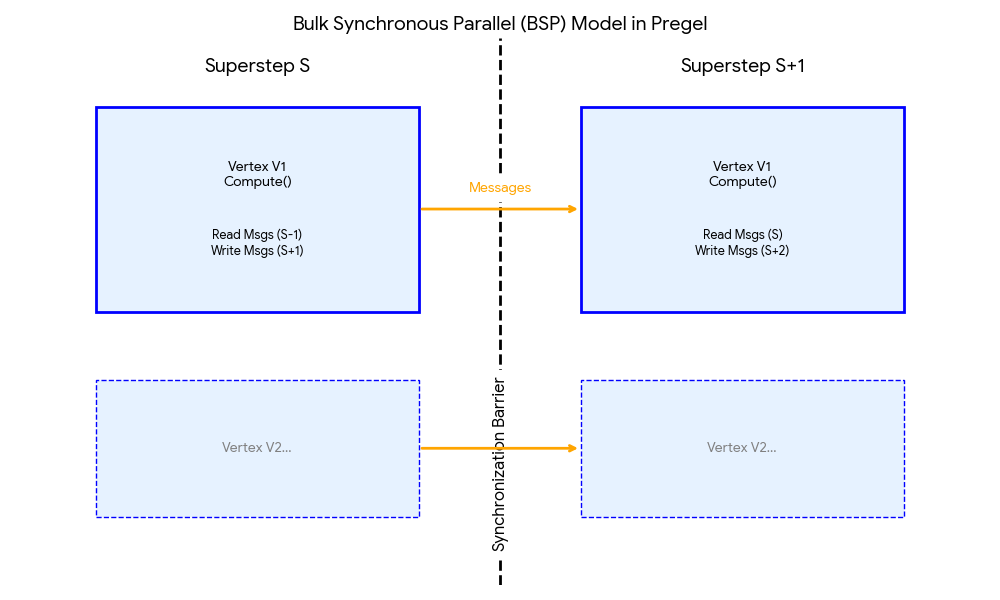
On a cluster, computation is sliced into supersteps:
- Compute: all active vertices run in parallel (read messages from step
S-1→ compute → send messages for stepS+1) - Messages: values are in flight
- Barrier: everyone must finish step
S—and messages must be delivered—before anyone enters stepS+1
No one runs ahead; no one is left behind. That rhythm eliminates a large class of race conditions.
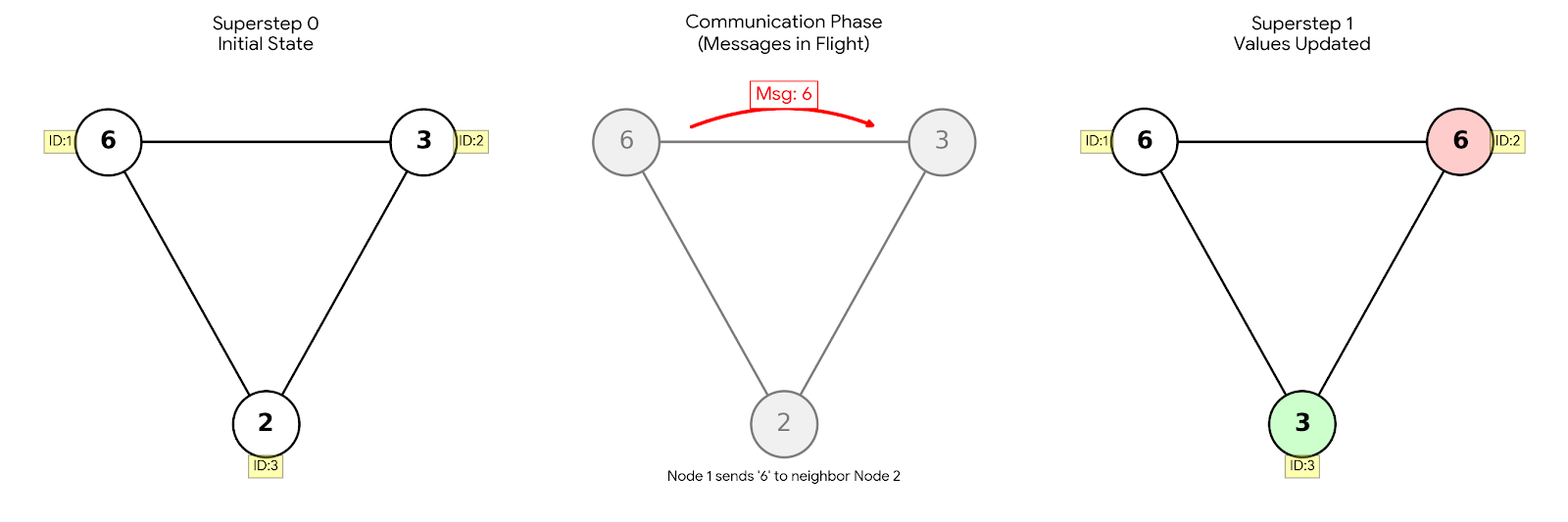
Example: spreading the maximum value (6) across a graph.
- Superstep 0: Node 1 holds the value 6.
- Message: Node 1 tells Node 2: “I have a 6.”
- Superstep 1: Node 2 receives 6, compares it with its own value (3), updates to 6, and propagates further.
- Result: the maximum spreads through the graph like a contagion.
The BSP model
Proposed by Leslie Valiant, Bulk Synchronous Parallel (BSP) divides execution into sequential supersteps. In each superstep, three things happen:
- Local computation: each processor computes independently on local data.
- Communication: processors send messages, but those messages are not visible until the next step.
- Barrier synchronization: everyone waits until computation and communication complete.
This tames the chaos: because messages are only visible after the barrier, every unit observes a globally consistent state from the previous step. For the programmer, the mental model is simpler: write logic that alternates between compute and communicate, bounded by a barrier.
0:00
/0:51

Decoding the LangGraph runtime
So how does LangGraph implement BSP? The core engine is the PregelLoop.
StateGraph & message passing
Everything begins with state. You define a schema (often a TypedDict or a Pydantic model) representing the data that flows through the graph.
from typing import TypedDict, Annotated
import operator

class AgentState(TypedDict):
    messages: Annotated[list[str], operator.add]
    summary: str
The key detail is Annotated[list[str], operator.add]: it defines a channel and its reducer.
Channels: decoupling reads from writes
In BSP, nodes don’t mutate shared memory directly. They publish updates to channels.
- LastValue (default): keep the latest value (good for overwrites).
- BinaryOperatorAggregate: the backbone of safe parallel updates. A binary operator (e.g.
operator.add) merges updates at the barrier. If multiple nodes emit updates in the same superstep, the runtime aggregates them deterministically—no lost updates, no races. - Topic: a pub/sub-like channel for transient events.
PregelLoop: the lifecycle of a superstep
The heartbeat is PregelLoop.tick.
Phase 1: Plan
At the start of a superstep, the runtime checks channel versions.
- It’s data-driven: if a node subscribes to a channel updated in the previous step, that node becomes active.
- If the previous step ended on a conditional edge, the routing function decides which nodes are activated next.
Phase 2: Execute (local computation)
Active nodes run in parallel.
- Read isolation: each node reads a snapshot of state captured at the start of the step. Even if Node A emits updates, Node B (running concurrently) still sees the old snapshot.
- Write buffering: node outputs are buffered; they are not applied immediately.
Phase 3: Update & barrier
Once all active nodes finish:
- collect buffered writes
- apply reducers (e.g.
old_messages + new_A + new_B) - increment channel versions
- checkpoint: serialize the full state into storage
Only after this does the barrier lift and the next superstep begin.
LangGraph source code (conceptual)
State and channels
State behavior is defined by the underlying channel type.
| Channel class | Update logic | Typical use |
|---|---|---|
| LastValue | value = new_value (overwrite) |
flags, latest query |
| BinaryOperatorAggregate | value = reducer(value, new_value) |
chat history (add_messages), parallel results |
| Topic | append to a queue | pub/sub, event streams |
# BinaryOperatorAggregate (reducer channel type)
class BinaryOperatorAggregate(BaseChannel):
    def __init__(self, operator, initial_value):
        self.operator = operator  # e.g., operator.add
        self.value = initial_value

    def update(self, values):
        if not values:
            return False

        for new_val in values:
            if isinstance(new_val, Overwrite):
                self.value = new_val.value
            else:
                # Apply reducer: old + new -> updated
                self.value = self.operator(self.value, new_val)
        return True
Pregel loop and supersteps (simplified)
class PregelLoop:
    def execute(self, initial_state):
        # 1. Initialize channels
        self.channels = self.initialize_channels(initial_state)

        # 2. Superstep loop
        while not self.is_terminated():

            # --- Phase A: Plan ---
            tasks = []
            for node in self.nodes:
                # Trigger: input channel updated in the previous step
                if self.check_trigger(node, self.channels):
                    # Read snapshot (immutable)
                    input_snapshot = self.read_channels(node.inputs)
                    tasks.append((node, input_snapshot))

            if not tasks:
                break

            # --- Phase B: Execute (parallel) ---
            # Nodes cannot observe each other's writes within the same step
            results = await parallel_execute(tasks)

            # --- Phase C: Update (barrier) ---
            for node, result in results:
                writes = self.parse_writes(node, result)
                for channel, values in writes:
                    self.channels[channel].update(values)

            # --- Phase D: Checkpoint ---
            self.checkpointer.put(self.channels.snapshot())

            self.step += 1
Checkpointer and “time travel”
A checkpoint is not just a save file; it’s a logical clock.
It stores both channel_values (user data) and channel_versions (synchronization metadata). That enables “time travel”: load any previous checkpoint, replay execution, or fork a new branch from a past state. For debugging multi-step agent behavior, this is not a nice-to-have—it changes what is possible.
Interrupts
In standard Python, pausing mid-await and serializing the suspended execution context is painful.
In BSP, the barrier between supersteps is a natural pause point. When an interrupt is configured (e.g. interrupt_before=["node_A"]), the runtime simply stops scheduling at the barrier, persists state, and exits. Resuming is just: reload checkpoint → continue with the next superstep.
Framework comparison
| Feature | LangGraph (BSP) | Native asyncio | Notes |
|---|---|---|---|
| Control flow | step-wise: read → run → write → sync | continuous callbacks / awaits | BSP is structured and easier to reason about; asyncio can be faster but harder to audit |
| Consistency | strong: reducers resolve conflicts at the barrier | fragile: easy to introduce races | BSP reduces the need for locks |
| Debugging | time travel: replay from any step | logs only | snapshots make global reconstruction feasible |
| Runaway loops | explicit guardrails (e.g., recursion / step limits) | implicit (hangs / starvation) | BSP makes “termination policy” a first-class concern |
Versus other agent frameworks:
- CrewAI: great for high-level “role-playing teams,” but harder to control granular state or implement rigorous rollback.
- AutoGen: conversation-centric; state is often scattered across agent histories rather than centralized, which makes global undo and replay harder.
Advanced patterns
BSP unlocks patterns that are awkward in other architectures.
1) Map-Reduce (dynamic fan-out)
When batch size is unknown until runtime:
- Map (step 1): a dispatcher emits
Sendobjects - Process (step 2): the runtime spawns $N$ parallel workers dynamically
- Reduce (step 3): a reducer triggers only when all parallel outputs have arrived and been aggregated at the barrier
--- config: theme: 'base' themeVariables: primaryColor: '#BB2528' primaryTextColor: '#fff' primaryBorderColor: '#7C0000' lineColor: '#F8B229' secondaryColor: '#006100' tertiaryColor: '#fff' --- graph LR A[Planner Node] -->|Generate| B(Send Packet 1) A -->|Generate| C(Send Packet 2) A -->|Generate| D(Send Packet 3) B -.->|Dynamic Spawn| W1 C -.->|Dynamic Spawn| W2 D -.->|Dynamic Spawn| W3 W1 -->|Write to| R W2 -->|Write to| R W3 -->|Write to| R R -->|Trigger| S
import operator
from typing import Annotated, TypedDict
from langgraph.graph import StateGraph, START, END
from langgraph.types import Send

# 1. 定义状态
class OverallState(TypedDict):
    topic: str
    sub_results: Annotated[list[str], operator.add] # 聚合所有 Worker 的结果

class WorkerState(TypedDict):
    section: str

# 2. 定义节点
def planner(state: OverallState):
    # 动态生成 3 个子任务
    sections =
    # 返回 Send 对象列表。这不会立即运行,而是安排在下一超步并行运行。
    return

def worker(state: WorkerState):
    # 并行执行的逻辑
    return {"sub_results": [f"Finished section: {state['section']}"]}

def reducer(state: OverallState):
    # 当所有 Worker 完成后,本节点被触发
    # 由于 sub_results 是 operator.add,这里能看到完整的列表
    return {"final_summary": "\n".join(state["sub_results"])}

# 3. 构建图
graph = StateGraph(OverallState)
graph.add_node("planner", planner)
graph.add_node("worker_node", worker)
graph.add_node("reducer", reducer)

# 动态扇出:使用 add_conditional_edges
graph.add_conditional_edges("planner", lambda x: x) # 直接返回 Send 列表
graph.add_edge("worker_node", "reducer") # Fan-in: 所有 worker 写完后触发 reducer
graph.add_edge("planner", END) # 只是为了图完整性,实际流向由 Send 控制
graph.set_entry_point("planner")

app = graph.compile()
2) Subgraphs (fractal composition)
A graph can be wrapped as a node inside another graph. The parent graph pauses while the child graph advances through its own supersteps. This supports modularity and isolation—useful when you want complex agents without a monolith.
--- config: theme: 'base' themeVariables: primaryColor: '#BB2528' primaryTextColor: '#fff' primaryBorderColor: '#7C0000' lineColor: '#F8B229' secondaryColor: '#006100' tertiaryColor: '#fff' background: '#f4f4f4' --- graph LR subgraph Parent Graph Start --> Router Router -->|Complexity High| SubGraphNode Router -->|Complexity Low| SimpleNode SubGraphNode --> End SimpleNode --> End end subgraph SubGraphNode [Child Graph execution] direction LR S_Start((Start)) --> Agent1 Agent1 --> Critiques Critiques -->|Reject| Agent1 Critiques -->|Approve| S_End((End)) end
# 定义子图 (Child Graph)
child_builder = StateGraph(MessagesState)
child_builder.add_node("child_agent", call_model)
child_builder.add_edge(START, "child_agent")
child_builder.add_edge("child_agent", END)
child_graph = child_builder.compile()

# 定义父图 (Parent Graph)
parent_builder = StateGraph(ParentState)
parent_builder.add_node("router", router_node)

#!!! 关键点:将编译后的子图作为节点加入父图!!!
# 在 BSP 运行时看来,这只是一个耗时较长的普通节点
parent_builder.add_node("nested_workflow", child_graph)

parent_builder.add_edge(START, "router")
parent_builder.add_conditional_edges(
    "router",
    route_logic,
    {"complex": "nested_workflow", "simple": "simple_node"}
)
3) Human-in-the-loop (HITL)
Because state is decoupled from execution, you can “freeze” the world, let a human edit state (e.g., correct a bank transfer amount), and then resume as if the world had always been consistent.
# Demo 说明:
# Agent负责处理敏感的转账请求:
# - 输入分析: 提取金额和收款人。
# - 风险评估: 如果金额 > 1000,需要人工审批。
# - 执行转账: 调用银行 API。

# Demo 代码示意实现:
## 定义状态
class State(TypedDict):
    amount: int
    recipient: str
    status: str

## 节点 1: 风险检查
def risk_check(state: State):
    if state["amount"] > 1000:
        # 触发中断
        decision = interrupt(f"Approve transfer of {state['amount']}?")
        if decision!= "approve":
            return {"status": "rejected"}
    return {"status": "approved"}

## 节点 2: 执行
def execute_transfer(state: State):
    if state["status"] == "approved":
        print(f"Transferring to {state['recipient']}")
    return {}

## 构建图
workflow = StateGraph(State)
workflow.add_node("risk_check", risk_check)
workflow.add_node("execute_transfer", execute_transfer)
workflow.add_edge(START, "risk_check")
workflow.add_edge("risk_check", "execute_transfer")
workflow.add_edge("execute_transfer", END)

app = workflow.compile(checkpointer=MemorySaver())
Back to reality: the Agent implementation
Returning to the original bug, I applied these ideas in the agent development.
Speed and isolation
I used parallel execution for data fetching (get_cve_data, get_cvss_data) to reduce latency.
To avoid context pollution—where a large context from one branch (e.g., ASD generation) bleeds into another—I used subgraphs to isolate execution contexts.
class CVSSVectorAgent:
    """CVSS Vector Agent"""

    def __init__(self):
        self.data_agent = CVEDataAgent()
        self.asd_agent = MitreASDAgent()
        self.llm = ChatTongyi(name="cvss-vector-agent-llm", model="qwen3-max")
        self.prompt_manager = CVSSVectorPrompts()
        self.memory = MemorySaver()
        self.agent = self._build_graph()
        self.logger = get_logger()

    def _build_graph(self):
	    ...
	    # 添加边
        # get_cve_data, get_cvss_data, generate_asd_data 是并行节点用于加速agent执行
        builder.add_edge(START, "get_cve_data")
        builder.add_edge(START, "get_cvss_data")
An explicit synchronization barrier
To resolve the scheduling/synchronization issue, I added a no-op barrier node.
# No-op node to synchronize paths
def sync_barrier(state: CVSSVectorState):
    return {}

builder.add_node("sync_barrier", sync_barrier)

# ... route conditional edges to sync_barrier ...

# Only proceed after the barrier
builder.add_edge("sync_barrier", "normalize_cvss_data")
By making the topology explicitly respect the BSP rhythm, the “double execution” vanished. The runtime returned to a predictable cadence: compute, wait, advance.
Closing thoughts
“Knowing the tool” is the first step. “Knowing the model behind the tool” is where leverage comes from.
Moving from chains to graphs is not just a syntax upgrade—it changes how we think about time, state, and consistency in agent systems. Once you see the barrier as a clock, many problems stop being mysterious.
References
- Pregel: a system for large-scale graph processing
- Graph API overview - Docs by LangChain
- Pregel | LangGraph.js API Reference - GitHub Pages
- LangGraph runtime - Docs by LangChain
- Building AI Agents Using LangGraph: Part 8 — Understanding Reducers and State Updates | by HARSHA J S
- LangGraph overview - Docs by LangChain
- Use the graph API - Docs by LangChain
- Application structure - Docs by LangChain
- CompiledStateGraph | LangGraph.js API Reference - GitHub Pages
- StateGraph | LangGraph.js API Reference - GitHub Pages
- LangGraph 101: Let's Build A Deep Research Agent | Towards Data Science
- Building Event-Driven Multi-Agent Workflows with Triggers in LangGraph - Medium
- Channels | LangChain Reference
- if there are two nodes(one node has a prenode) go to same one 4th node , then that 4th node will run twice · Issue #5979 · langchain-ai/langgraph - GitHub
- Duplicate node execution when using conditionals - LangGraph - LangChain Forum
- Graph execution goes back to a previous node - LangGraph - LangChain Forum
- Graph execution goes back to a previous node - #3 by ignacio - LangChain Forum
- The Evolution of Graph Processing: From Pregel to LangGraph | by ...
- LangGraph: Multi-Agent Workflows - LangChain Blog
- How Build.inc used LangGraph to launch a Multi-Agent Architecture for automating critical CRE workflows for Data Center Development. - LangChain Blog
- Building LangGraph: Designing an Agent Runtime from first principles - LangChain Blog
- Pregel | LangChain Reference - LangChain Docs
- LangGraph Execution Semantics. | by Christoph Bussler - Medium
- 基于LangGraph开发复杂智能体一则 - 博客园
- Sink node issue, if multiple subgraphs are used in parallel · Issue #1964 · langchain-ai/langgraph - GitHub
- Mastering LangGraph State Management in 2025 - Sparkco
- LangGraph Multi-Agent Orchestration: Complete Framework Guide + Architecture Analysis 2025 - Latenode
- Functional API overview - Docs by LangChain
- My experience using Langgraph for deterministic workflow : r/LangChain - Reddit
- Building Smarter Agents with LangGraph: Tools, Memory & Workflows - GoPenAI
- Comparing AI agent frameworks: CrewAI, LangGraph, and BeeAI - IBM Developer
- LangGraph vs CrewAI: Let's Learn About the Differences - ZenML Blog
- Leveraging LangGraph's Send API for Dynamic and Parallel Workflow Execution
- LangGraph's Execution Model is Trickier Than You Might Think - Atomic Spin
- How does state work in LangGraph subgraphs? - LangChain Forum