





Last night, I was rejected from yet another pitch night. It was just the pre-interview, and the problem wasn't my product. I already have MRR. I already have users who depend on it every day.
The feedback was simply: "What do you even need funding for?"
I hear this time and time again when I try to grow my ideas. Running lean is in my DNA. I've built tools you might have used, like websequencediagrams.com, and niche products you probably haven't, like eh-trade.ca. That obsession with efficiency leads to successful bootstrapping, and honestly, a lot of VCs hate that.
Keeping costs near zero gives you the exact same runway as getting a million dollars in funding with a massive burn rate. It's less stressful, it keeps your architecture incredibly simple, and it gives you adequate time to find product-market fit without the pressure of a board breathing down your neck.
If you are tired of the modern "Enterprise" boilerplate, here is the exact playbook of how I build my companies to run on nearly nothing.
The naive way to launch a web app in 2026 is to fire up AWS, provision an EKS cluster, set up an RDS instance, configure a NAT Gateway, and accidentally spend $300 a month before a single user has even looked at your landing page.
The smart way is to rent a single Virtual Private Server (VPS).
First thing I do is get a cheap, reliable box. Forget AWS. You aren't going to need it, and their control panel is a labyrinth designed to extract billing upgrades. I use Linode or DigitalOcean. Pay no more than $5 to $10 a month.
1GB of RAM sounds terrifying to modern web developers, but it is plenty if you know what you are doing. If you need a little breathing room, just use a swapfile.
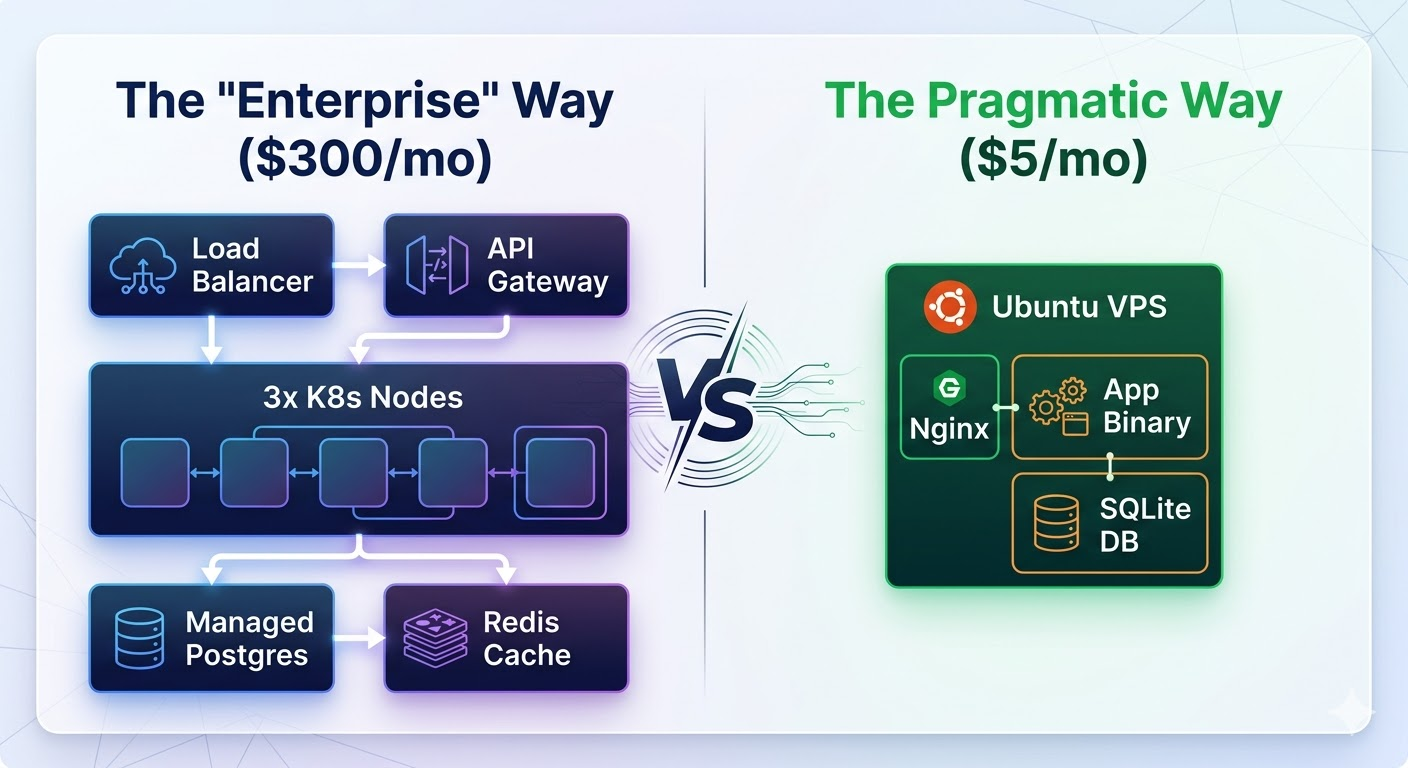
The goal is to serve requests, not to maintain infrastructure. When you have one server, you know exactly where the logs are, exactly why it crashed, and exactly how to restart it.
Now you have constraints. You only have a gigabyte of memory. You could run Python or Ruby as your main backend language—but why would you? You'll spend half your RAM just booting the interpreter and managing gunicorn workers.
I write my backends in Go.
Go is infinitely more performant for web tasks, it's strictly typed, and—crucially for 2026—it is incredibly easy for LLMs to reason about. But the real magic of Go is the deployment process. There is no pip install dependency hell. There is no virtual environment. You compile your entire application into a single, statically linked binary on your laptop, scp it to your $5 server, and run it.
Here is what a complete, production-ready web server looks like in Go. No bloated frameworks required:
package main

import (
    "fmt"
    "net/http"
)

func main() {
    http.HandleFunc("/", func(w http.ResponseWriter, r *http.Request) {
        fmt.Fprintf(w, "Hello, your MRR is safe here.")
    })

    // This will comfortably handle 10,000s of requests per second
    // on a potato.
    http.ListenAndServe(":8080", nil)
}
If you have a graphics card sitting somewhere in your house, you already have unlimited AI credits.
When I was building eh-trade.ca, I had a specific problem: I needed to perform deep, qualitative stock market research on thousands of companies, summarizing massive quarterly reports. The naive solution is to throw all of this at the OpenAI API. I could have paid hundreds of dollars in API credits, only to find a logic bug in my prompt loop that required me to run the whole batch over again.
Instead, I'm running VLLM on a dusty $900 graphics card (an RTX 3090 with 24GB of VRAM) I bought off Facebook Marketplace. It’s an upfront investment, sure, but I never have to pay a toll to an AI provider for batch processing again.
For local AI, you have a distinct upgrade path:
ollama run qwen3:32b) and lets you try out dozens of models instantly. It's the perfect environment for iterating on prompts.To manage all this, I built laconic, an agentic researcher specifically optimized for running in a constrained 8K context window. It manages the LLM context like an operating system's virtual memory manager—it "pages out" the irrelevant baggage of a conversation, keeping only the absolute most critical facts in the active LLM context window.
I also use llmhub, which abstracts any LLM into a simple provider/endpoint/apikey combo, gracefully handling both text and image IO whether the model is running under my desk or in the cloud.
You can't do everything locally. Sometimes you need the absolute cutting-edge reasoning of Claude or ChatGPT for user-facing, low-latency chat interactions.
Instead of juggling billing accounts, API keys, and rate limits for Anthropic, Google, and OpenAI, I just use OpenRouter. You write one OpenAI-compatible integration in your code, and you instantly get access to every major frontier model.
More importantly, it allows for seamless fallback routing. If Anthropic's API goes down on a Tuesday afternoon (which happens), my app automatically falls back to an equivalent OpenAI model. My users never see an error screen, and I don't have to write complex retry logic.
New, insanely expensive models are being released every week. I constantly hear about developers dropping hundreds of dollars a month on Cursor subscriptions and Anthropic API keys just to have an AI write their boilerplate.
Meanwhile, I'm using Claude Opus 4.6 all day and my bill barely touches $60 a month. My secret? I exploit Microsoft's pricing model.
I bought a GitHub Copilot subscription in 2023, plugged it into standard VS Code, and never left. I tried Cursor and the other fancy forks when they briefly surpassed it with agentic coding, but Copilot Chat always catches up.
Here is the trick that you might have missed: somehow, Microsoft is able to charge per request, not per token. And a "request" is simply what I type into the chat box. Even if the agent spends the next 30 minutes chewing through my entire codebase, mapping dependencies, and changing hundreds of files, I still pay roughly $0.04.
The optimal strategy is simple: write brutally detailed prompts with strict success criteria (which is best practice anyway), tell the agent to "keep going until all errors are fixed," hit enter, and go make a coffee while Satya Nadella subsidizes your compute costs.
I always start a new venture using sqlite3 as the main database. Hear me out, this is not as insane as you think.
The enterprise mindset dictates that you need an out-of-process database server. But the truth is, a local SQLite file communicating over the C-interface or memory is orders of magnitude faster than making a TCP network hop to a remote Postgres server.
"But what about concurrency?" you ask. Many people think SQLite locks the whole database on every write. They are wrong. You just need to turn on Write-Ahead Logging (WAL). Execute this pragma once when you open the database:
PRAGMA journal_mode=WAL;
PRAGMA synchronous=NORMAL;
Boom. Readers no longer block writers. Writers no longer block readers. You can now easily handle thousands of concurrent users off a single .db file on an NVMe drive.
Since implementing user authentication is usually the most annoying part of starting a new SQLite-based project, I built a library: smhanov/auth. It integrates directly with whatever database you are using and manages user signups, sessions, and password resets. It even lets users sign in with Google, Facebook, X, or their own company-specific SAML provider. No bloated dependencies, just simple, auditable code.
The tech industry wants you to believe that building a real business requires complex orchestration, massive monthly AWS bills, and millions in venture capital.
It doesn't.
By utilizing a single VPS, statically compiled binaries, local GPU hardware for batch AI tasks, and the raw speed of SQLite, you can bootstrap a highly scalable startup that costs less than the price of a few coffees a month. You add infinite runway to your project, giving yourself the time to actually solve your users' problems instead of sweating your burn rate.
If you are interested in running lean, check out my auth library and agent implementations on my GitHub. I’ll be hanging around the comments—let me know how you keep your server costs down, or tell me why I'm completely wrong.
Follow me on Linkedin for posts on AI, Agism, and Go-To-Market strategy in the age of AI.
此内容由惯性聚合(RSS阅读器)自动聚合整理,仅供阅读参考。 原文来自 — 版权归原作者所有。