



惯性聚合 高效追踪和阅读你感兴趣的博客、新闻、科技资讯
阅读原文 在惯性聚合中打开

推荐订阅源

Forbes - Security
Forbes - Security
CTFtime.org: upcoming CTF events
F
Fortinet All Blogs
B
Blog
T
The Blog of Author Tim Ferriss
Engineering at Meta
Engineering at Meta
GbyAI
GbyAI
Y
Y Combinator Blog
Microsoft Azure Blog
L
LangChain Blog
Recent Announcements
U
Unit 42
Martin Fowler
Martin Fowler
M
MIT News - Artificial intelligence
让小产品的独立变现更简单 - ezindie.com
The Register - Security
Recorded Future
Recorded Future
C
Check Point Blog
V
V2EX
奇客Solidot–传递最新科技情报
奇客Solidot–传递最新科技情报
Hugging Face - Blog
Hugging Face - Blog
WordPress大学
WordPress大学
Google DeepMind News
酷 壳 – CoolShell
酷 壳 – CoolShell
F
Full Disclosure
小众软件
小众软件
A
About on SuperTechFans
云风的 BLOG
云风的 BLOG
宝玉的分享
宝玉的分享
Last Week in AI
Last Week in AI
有赞技术团队
有赞技术团队
MongoDB | Blog
MongoDB | Blog
爱范儿
爱范儿
P
Proofpoint News Feed
罗磊的独立博客
量子位
D
Docker
博客园_首页
D
DataBreaches.Net
Project Zero
Project Zero
博客园 - 司徒正美
Threat Intelligence Blog | Flashpoint
博客园 - Franky
Security Latest
Security Latest
cs.AI updates on arXiv.org
N
Netflix TechBlog - Medium
K
KPMG report finds enterprise disconnect between AI and its ROI | CIO
博客园 - 三生石上(FineUI控件)
H
Hackread – Cybersecurity News, Data Breaches, AI and More
大猫的无限游戏
大猫的无限游戏

WangDeer

非机动车交通规则测验 微软 50 周年壁纸是在 macOS上设计的? 「转」西二旗折叠:蜂巢经济学启示录 难得空明 Ubuntu Clean ApidocJs apigroup Support Chinese int(10)里面的10是什么意思? 5-3 会话 2021-03-25 「PHP架构师」面试准备 Laravel 上传 Docx 文件,表单验证不通过 4-4 发送信号 4-3 信号集 4-2 编写中断信号处理程序 2022-03-10 面试复盘 4-1 什么是中断信号(软中断) 3-7 进程查看 3-6 SUID特权进程 3-5多进程编写 3-4进程调度 3-3进程exec 3-2进程退出和回收 3-1进程标识与fork 2-3解释器文件 2-2命令行参数与环境参数表 2-1程序与进程 1-1课程介绍 终极复盘 第八章 传承篇 第七章 自由篇 第六章 品牌篇 第五章 作品篇 第四章 定位篇 第三章 金钱篇 第二章 富人篇 第一章 财务自由篇 财富思维觉醒课前作业 This Set Cookie Was Blocked Because It Was Not Sent Over a Secure Connection 「转」Windows11右键恢复至Windows10模式 Ecshop 4.0 微信登录 一直循环授权登录 PHP判断指定日期是否为工作日 PHP Ajax 跨域请求允许多个域名 返回键劫持,强制跳转到指定链接 Chromium Adobe Flash Player下载 批量检查并清除BOM头 Ecshop之smarty与js冲突问题 Ecshop 广告位宽度值必须在1 1024之间 修改方法 PHP获取指定时区当前时间-PHP获取世界时钟 phpcms 更新栏目缓存 `PHP Has Encountered a Stack Overflow` 解决办法 php判断是否手机访问-php判断访问终端类型 丢了 如果昨天是明天的话就好了,这样今天就周五了 Ecshop自定义调用指定广告位 Destoon修改商务便签文字 Ecshop首页获取指定分类的推荐商品 QQ空间如何屏蔽好友刷屏广告 Css实现文字竖排 英尺(inch)、厘米(cm) JS转换 网页禁止鼠标右键 Destoon 选择支付方式 可单独关闭对联广告两枚 网页打开不是在最顶部,而是跳到中间位置解决方法 Ecmall iis 伪静态规则 Destoon 复制商城模块 QQ在线客服设置 QQ开启临时会话教程 Ecshop加入购物车js报错 IE浏览器“浏览器模式”和“文本模式” 网站图片在IE浏览器下不显示 Ecshop 去掉头部版权信息 echsop “transport.js/run() error:'process_request' 未定义”-解决方法 Ecshop Deprecated:Assigning the Return Value of New by Reference Is Deprecated in 报错解决方法 PHPCMS全局循环调用二级类目导航 如何使EditPlus打开tpl文件高亮显示代码 Ecshop前台英文后台中文实现方法 Ecshop安装报错warning:date_default_timezone_get() 1970年1月1日(00:00:00 GMT)Unix时间戳(Unix Timestamp) 黑莓bb微信 2.6 for os5 黑莓微信内测版问题总结及开发建议 360安全卫士卸载过程 管理距离AD值(Administrative Distance) 思科在中国的总代及金牌、银牌代理商 黑莓7100T拆机全程实录 CCNA静态路由配置实例 8700G国产壳白色,太粗糙了 黑莓7100T玉照曝光 黑莓手机电池的正确使用和保养 51啦统计不能打开,求分析,求解释 处女作,黑莓8707G4.2主题出炉 我的2011 Xweibo手机版底部版权修改 常用ping地址,逗逗搜索引擎,SEO必备 飞飞影视系统快播播放列表前缀修改 飞飞影视系统title修改 这才整明白啥叫被跨省,上网有风险,发帖需谨慎 为emlog添加Gravatar头像服务功能 路由器的基本配置 路由器接口类型及连接方式 19岁双IE 谈Cisco认证 Secondary IP-Address 用途 儿童节NA战报 CCNA疑难解析之network x.x.x.x
三层交换机实现VLAN间通信
王二 · 2011-10-27 · via WangDeer

实际局域网划分VLAN后,每个VLAN是一个单独的广播域,所以在默认情况下,不同VLAN中的计算机无法通信。允许此类计算机之间通信的一种方法是VLAN间路由,它是使用三层设备(如三层交换或路由器)从一个VLAN向另一个VLAN转发流量的过程。

VLAN与网络中唯一的IP子网相关联,VLAN中的每个设备配置一个相同网段的IP地址,不同的VLAN使用不同网段的IP地址。这种子网VLAN关联简化了多VLAN环境中的路由处理。三层交换机属于三层设备,因此,它是实现VLAN间设备通信的良好选择。

为了使第三层交换机执行路由功能,交换机上的VLAN接口需配置合适的IP地址,该地址就是VLAN中主机的网关地址。

下面通过一个实例来看三层交换机如何实现VLAN间路由。

下图所示是一个校园网的网络拓扑,要求所有计算机能够通过域名 ncxyol.com 访问web服务器,并且不同VLAN间的计算机可以相互通信。
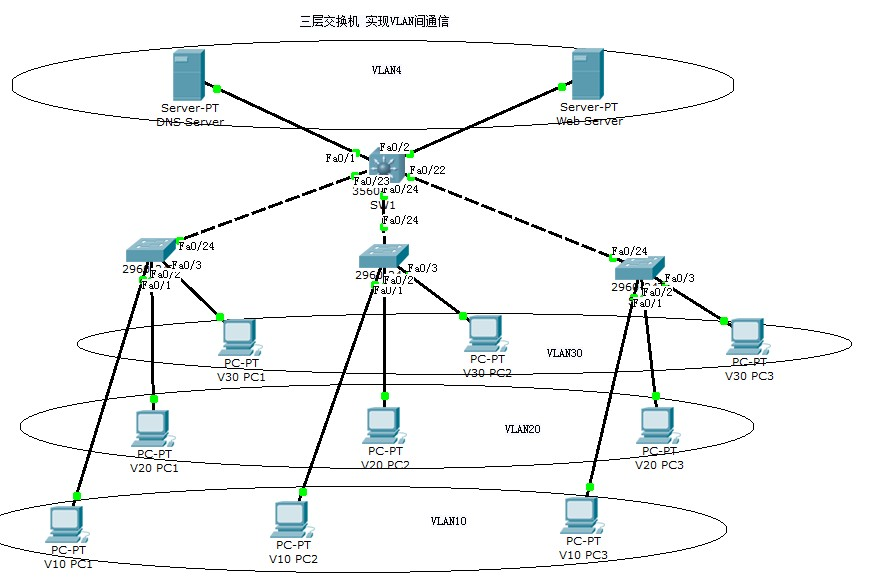
拓扑图

VLAN划分如下:

VLAN10:

PC1:192.168.1.1

PC2:192.168.1.2

PC3:192.168.1.3

默认网关:192.168.1.254

DNSserver:192.168.40.1

VLAN20:

PC1:192.168.2.1

PC2:192.168.2.2

PC3:192.168.2.3

默认网关:192.168.2.254

DNSserver:192.168.40.1

VLAN30:

PC1:192.168.3.1

PC2:192.168.3.2

PC3:192.168.3.3

默认网关:192.168.3.254

DNSserver:192.168.40.1

VLAN40:

DNS服务器:192.168.40.1

在DNS服务器上添加一A条记录即web服务器的域名解析:ncxyol.com  192.168.40.2

Web服务器:192.168.40.2

默认网关:192.168.40.254

交换机配置如下:

SW1(三层交换机)

en

config t

vtp mode server

vtp domain jxdy

vlan 10

name jxdy1

vlan 20

name jxdy2

vlan 30

name jxdy3

vlan 40

name jxdy4

int range f0/22 - 24

sw mode trunk

no sh

int range f0/1 - 2

swit mode acc

sw acc vlan 40

no shut

int vlan 10

ip add 192.168.1.254 255.255.255.0

no shut

int vlan 20

ip add 192.168.2.254 255.255.255.0

no shut

int vlan 30

ip add 192.168.3.254 255.255.255.0

no shut

int vlan 40

ip add 192.168.40.254 255.255.255.0

no shut

SW2

en

config t

vtp mode cli

vtp domain jxdy

int f0/24

swit mod trunk

no sh

exit

int f0/1

swit mode acc

swit acc vlan 10

no shut

int f0/2

swit mode acc

swit acc vlan 20

no shut

int f0/3

swit mode acc

swit acc vlan 30

no shut

SW3

en

config t

vtp mode cli

vtp domain jxdy

int f0/24

swit mod trunk

no sh

exit

int f0/1

swit mode acc

swit acc vlan 10

no shut

int f0/2

swit mode acc

swit acc vlan 20

no shut

int f0/3

swit mode acc

swit acc vlan 30

no shut

SW4

en

config t

vtp mode cli

vtp domain jxdy

int f0/24

swit mod trunk

no sh

exit

int f0/1

swit mode acc

swit acc vlan 10

no shut

int f0/2

swit mode acc

swit acc vlan 20

no shut

int f0/3

swit mode acc

swit acc vlan 30

no shut

按照如上方法配置成功以后,在SW1(三层交换机)上 show ip route 会发现四个直连路由:

Switch#show ip route

Codes: C - connected, S - static, I - IGRP, R - RIP, M - mobile, B - BGP

       D - EIGRP, EX - EIGRP external, O - OSPF, IA - OSPF inter area

       N1 - OSPF NSSA external type 1, N2 - OSPF NSSA external type 2

       E1 - OSPF external type 1, E2 - OSPF external type 2, E - EGP

       i - IS-IS, L1 - IS-IS level-1, L2 - IS-IS level-2, ia - IS-IS inter area

       * - candidate default, U - per-user static route, o - ODR

       P - periodic downloaded static route

Gateway of last resort is not set

C    192.168.1.0/24 is directly connected, Vlan10

C    192.168.2.0/24 is directly connected, Vlan20

C    192.168.3.0/24 is directly connected, Vlan30

C    192.168.40.0/24 is directly connected, Vlan40

配置就绪以后测试就会发现不同VLAN间可以通信了。

详细实验见附件:

三层交换机实现VLAN通信.zip