


用了很久的自建 Ghost 博客系统不知道从哪个版本开始,页面加载速度忽然变慢了很多。看了下加载的资源,发现多了很多走 jsdelivr cdn 的资源,加载速度竟然长达半分钟。。。
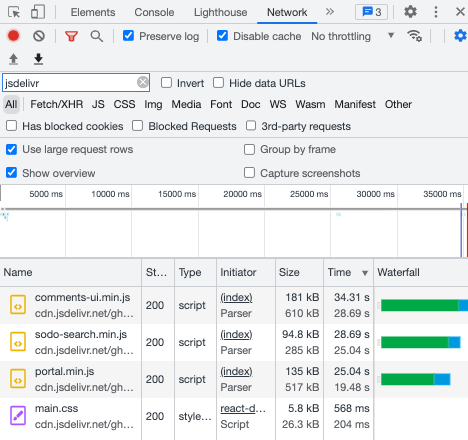
本来选择自建博客系统的重要目的之一就是为了页面加载速度可控,尽量避免加载不可靠、容易被墙的第三方资源。结果没想到 Ghost 官方又在核心模块里引用了第三方的 CDN。
不过还好 Ghost 项目本身的配置化做的还是不错的,大年初六上班摸个鱼的时间解决了一下。
仔细看了下,新加入的走 CDN 的资源主要是 会员系统(portal)+评论系统(comments)+页面搜索 (sodo-search),因此在某次支持这些系统的更新前都是没问题的。不过考虑到目前的主题已经集成了这些系统,所以这些功能也不能禁用掉。
参考 Ghost Forum 的这篇讨论,可以通过在 config.[env].json 中修改配置,将 url 等替换成 self-hosted 的版本。不过这里的讨论中提到的配置来源并不清晰,在源码中搜索了一番发现了端倪(这里的 /var/lib/ghost 目录是我这 docker 里的 ghost 安装目录):
root@1f7b379a87f4:/var/lib/ghost/current# grep -r 'cdn.jsdelivr.net/ghost' *
core/shared/config/defaults.json:        "url": "https://cdn.jsdelivr.net/ghost/portal@~{version}/umd/portal.min.js",
core/shared/config/defaults.json:        "url": "https://cdn.jsdelivr.net/ghost/sodo-search@~{version}/umd/sodo-search.min.js",
core/shared/config/defaults.json:        "styles": "https://cdn.jsdelivr.net/ghost/sodo-search@~{version}/umd/main.css",
core/shared/config/defaults.json:        "url": "https://cdn.jsdelivr.net/ghost/comments-ui@~{version}/umd/comments-ui.min.js",
core/shared/config/defaults.json:        "styles": "https://cdn.jsdelivr.net/ghost/comments-ui@~{version}/umd/main.css",
可见这些配置都来源于 core/shared/config/defaults.json 这个文件,涉及到 CDN 的相关配置如下:
{

    ...

    "portal": {
        "url": "https://cdn.jsdelivr.net/ghost/portal@~{version}/umd/portal.min.js",
        "version": "2.23"
    },
    "sodoSearch": {
        "url": "https://cdn.jsdelivr.net/ghost/sodo-search@~{version}/umd/sodo-search.min.js",
        "styles": "https://cdn.jsdelivr.net/ghost/sodo-search@~{version}/umd/main.css",
        "version": "1.1"
    },
    "comments": {
        "url": "https://cdn.jsdelivr.net/ghost/comments-ui@~{version}/umd/comments-ui.min.js",
        "styles": "https://cdn.jsdelivr.net/ghost/comments-ui@~{version}/umd/main.css",
        "version": "0.12"
    },

    ...

 }
为了自托管这些文件,我们首先将这些文件下载到静态文件夹下,然后在想办法将 config.[env].json 配置好即可。
不过问题来了,静态文件夹有哪些?如果想当然的放在 /var/lib/ghost/content/public 下,肯定是要吃瘪的。正解应该是要看下 /var/lib/ghost/current/core/frontend/web/site.js 这里启动 express 的地方:
module.exports = function setupSiteApp(routerConfig) {
    debug('Site setup start', routerConfig);

    const siteApp = express('site');

    //...

    // Serve sitemap.xsl file
    siteApp.use(mw.servePublicFile('static', 'sitemap.xsl', 'text/xsl', config.get('caching:sitemapXSL:maxAge')));

    // Serve stylesheets for default templates
    siteApp.use(mw.servePublicFile('static', 'public/ghost.css', 'text/css', config.get('caching:publicAssets:maxAge')));
    siteApp.use(mw.servePublicFile('static', 'public/ghost.min.css', 'text/css', config.get('caching:publicAssets:maxAge')));

    // Card assets
    siteApp.use(mw.servePublicFile('built', 'public/cards.min.css', 'text/css', config.get('caching:publicAssets:maxAge')));
    siteApp.use(mw.servePublicFile('built', 'public/cards.min.js', 'application/javascript', config.get('caching:publicAssets:maxAge')));

    // Comment counts
    siteApp.use(mw.servePublicFile('built', 'public/comment-counts.min.js', 'application/javascript', config.get('caching:publicAssets:maxAge')));

    // Member attribution
    siteApp.use(mw.servePublicFile('built', 'public/member-attribution.min.js', 'application/javascript', config.get('caching:publicAssets:maxAge')));

    // Serve site images using the storage adapter
    siteApp.use(STATIC_IMAGE_URL_PREFIX, mw.handleImageSizes, storage.getStorage('images').serve());
    // Serve site media using the storage adapter
    siteApp.use(STATIC_MEDIA_URL_PREFIX, storage.getStorage('media').serve());
    // Serve site files using the storage adapter
    siteApp.use(STATIC_FILES_URL_PREFIX, storage.getStorage('files').serve());

    //...
};
显然,这里 public 文件夹下的文件都是单独配置绑定的,不是整个文件夹的绑定。额外添加文件的话是不会映射到外部路径上的。这样一来,我们只能绑定在 images , media , files 这些路径下。再 check 下这些具体的变量,就会得知这些路径映射到的外部路径:
root@1f7b379a87f4:/var/lib/ghost/current# grep -r 'STATIC_.*_URL_PREFIX' *
...
node_modules/@tryghost/constants/index.js:    STATIC_IMAGES_URL_PREFIX: 'content/images',
node_modules/@tryghost/constants/index.js:    STATIC_MEDIA_URL_PREFIX: 'content/media',
node_modules/@tryghost/constants/index.js:    STATIC_FILES_URL_PREFIX: 'content/files'
我这里就选择放在 files 文件夹下,这里新建一个 self-host 文件夹:
root@1f7b379a87f4:/var/lib/ghost/content/files/self-host# ls
comments-ui-0.12.css  comments-ui-0.12.min.js  portal-2.23.min.js  sodo-search-1.1.css  sodo-search-1.1.min.js
由于我是通过 docker-compose 部署,相比于修改 config 文件,直接通过环境变量配置更为方便,变量名跟 config 中的 json 格式一一对应,这里不得不夸奖下 Ghost 的配置自动映射做的挺方便:
version: "3.8"
services:
  ghost:
  image: ghost:5.27
  container_name: "ghost"
  environment:
    ...
    portal__url: /content/files/self-host/portal-2.23.min.js
    sodoSearch__url: /content/files/self-host/sodo-search-1.1.min.js
    sodoSearch__styles: /content/files/self-host/sodo-search-1.1.css
    comments__url: /content/files/self-host/comments-ui-0.12.min.js
    comments__styles: /content/files/self-host/comments-ui-0.12.css
  ...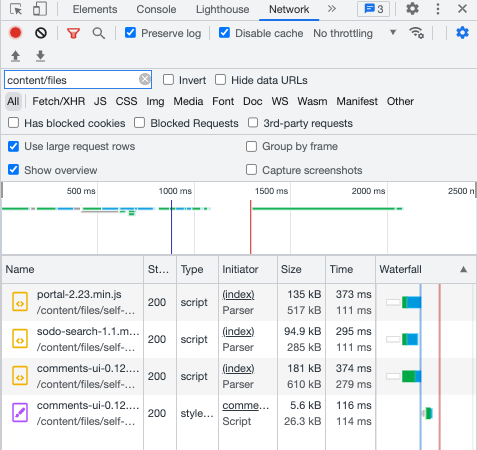
首次加载速度直接从 30s 优化到了 300ms ,优化效果十分感人。。。
考虑到 Ghost 经常会更新,每次都复制文件怪麻烦的,于是搭建了一个简单的 jsdelivr 代理 :
https://cdn.mythsman.com/jsdelivr/{path_to_jsdelivr}这样只要在 docker-compose 做如下配置就好:
ghost:
    image: ghost:5.69.3
    container_name: "ghost"
    restart: always
    depends_on:
        - "mariadb"
    environment:
        # ...
        portal__url: https://cdn.mythsman.com/jsdelivr/ghost/portal@~2.37/umd/portal.min.js
        sodoSearch__url: https://cdn.mythsman.com/jsdelivr/ghost/sodo-search@~1.1/umd/sodo-search.min.js
        sodoSearch__styles: https://cdn.mythsman.com/jsdelivr/ghost/sodo-search@~1.1/umd/main.css
        comments__url: https://cdn.mythsman.com/jsdelivr/ghost/comments-ui@~0.16/umd/comments-ui.min.js
        # ...
    volumes:
        - ./ghost/:/var/lib/ghost/content
    expose:
        - "2368"
此内容由惯性聚合(RSS阅读器)自动聚合整理,仅供阅读参考。 原文来自 — 版权归原作者所有。