惯性聚合 高效追踪和阅读你感兴趣的博客、新闻、科技资讯
阅读原文 在惯性聚合中打开

推荐订阅源

Forbes - Security
Forbes - Security
T
Tailwind CSS Blog
Hugging Face - Blog
Hugging Face - Blog
Blog — PlanetScale
Blog — PlanetScale
WordPress大学
WordPress大学
aimingoo的专栏
aimingoo的专栏
Y
Y Combinator Blog
U
Unit 42
I
InfoQ
CTFtime.org: upcoming CTF events
V
Visual Studio Blog
B
Blog RSS Feed
Vercel News
Vercel News
F
Fortinet All Blogs
Know Your Adversary
Know Your Adversary
T
Troy Hunt's Blog
博客园 - 【当耐特】
MongoDB | Blog
MongoDB | Blog
大猫的无限游戏
大猫的无限游戏
A
About on SuperTechFans
Jina AI
Jina AI
小众软件
小众软件
T
Threatpost
有赞技术团队
有赞技术团队
人人都是产品经理
人人都是产品经理
The Hacker News
The Hacker News
T
The Exploit Database - CXSecurity.com
C
CXSECURITY Database RSS Feed - CXSecurity.com
Exploit-DB.com RSS Feed
Microsoft Azure Blog
Recent Announcements
酷 壳 – CoolShell
酷 壳 – CoolShell
Scott Helme
Scott Helme
B
Blog
腾讯CDC
Last Week in AI
Last Week in AI
P
Proofpoint News Feed
S
Schneier on Security
N
News and Events Feed by Topic
Microsoft Security Blog
K
Kaspersky official blog
G
Google Developers Blog
T
Tor Project blog
PCI Perspectives
PCI Perspectives
S
Secure Thoughts
Google Online Security Blog
Latest news
Latest news
Google DeepMind News
MyScale Blog
MyScale Blog
罗磊的独立博客

Phpmyadmin on 轻风云

phpMyAdmin 4.7.x CSRF 漏洞利用
centos7安装phpmyadmin
2018-03-25 · via Phpmyadmin on 轻风云

首先服务器要有web 环境

有时候会安装不成功,提示没有可用软件包,则需要安装Remi源

1
2
yum install epel-release
rpm -ivh http://rpms.famillecollet.com/enterprise/remi-release-7.rpm

修改配置

1
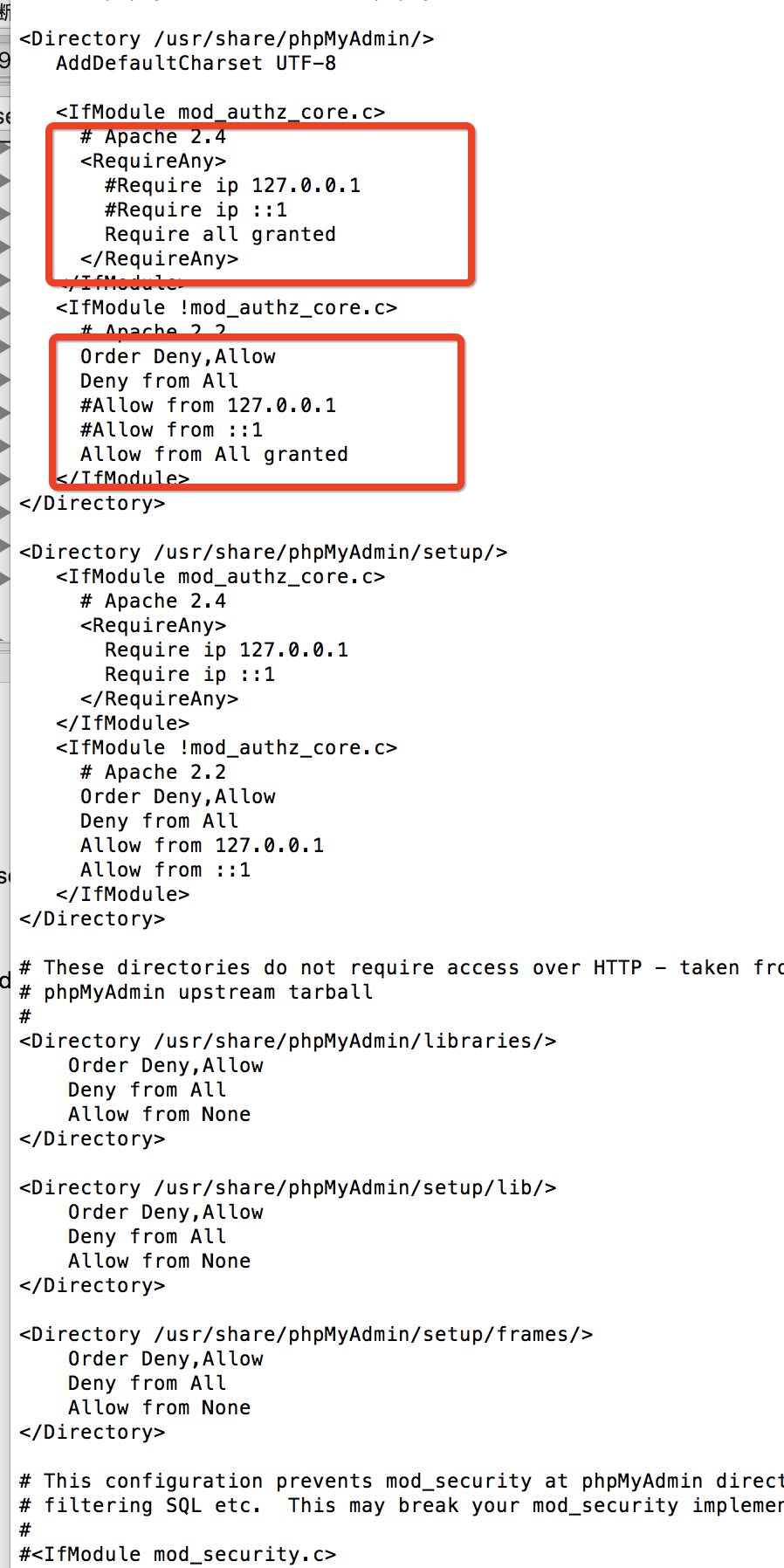
vim /etc/httpd/conf.d/phpMyadmin.conf

Require ip 127.0.0.1 Require ip ::1 注释
添加Require all granted

即可在浏览器本地通过localhost/phpmyadmin 访问
img

修改配置

1
vim /etc/phpMyAdmin/config.inc.php
 1
 2
 3
 4
 5
 6
 7
 8
 9
10
11
$cfg['Servers'][$i]['host'] = 'localhost';
//设定MySQL所在的主机名或IP地址。如127.0.0.1这步很重要

$cfg['Servers'][$i]['auth_type'] = 'cookie';
// 设定进入phpMyAdmin管理MySQL的方式,共有三个选项:config、http、cookie。config是按配置文件登录,为默认方式, 无需任何确认;http是使用HTTP登录管理,在Apache模块安装下才能支持;cookie是最通用的管理方式。后两种方式的用户名和密码都是直接到数据库中验证。

$cfg['Servers'][$i]['user'] = 'root' ;
//设定管理MySQL的账号。

$cfg['Servers'][$i]['password'] = '' ;
//设定管理MySQL的密码。 

设置完成后,保存config.inc.php文件,重启Apache,测试:访问http://localhost/phpMyAdmin/

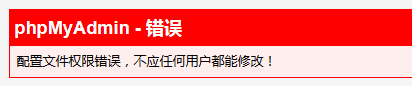
如果访问报错如下图:
img

不慌这种情况是给phpMyAdmin目录的权限太高,给755权限就不会报错了

1
chmod -R 755 /etc/phpMyadmin

