


This section documents all changes to the Typst language and compiler between Typst 0.14.2 and 0.15.0. If you are migrating an existing document to Typst 0.15, make sure to check out the Migration guide. It walks you through changes you may need to make to your existing documents to ensure compatibility with Typst 0.15.
within selector simplifies many introspection use casesdivider element represents a thematic break that templates can stylepath type, project-relative paths can be passed to packagestypst eval CLI subcommand supersedes typst query
Added file path type that is now accepted in all places where paths were previously only represented as strings
Collections
Calculation
Date & time handling
Conversions
panic function now displays strings as-is instead of showing their repr, making it more suitable for friendly, user-facing messages repr of styles and locations to be more distinct divider element representing a thematic break that templates can style Bundle-related elements
Bibliography management
Footnotes
Numbering
par.first-line-indent property will now fold, meaning that partial dictionaries across different set rules or par calls are combined Added list.marker-align property for defining how to align list markers
end alignment (horizontally)Added support for variable fonts
ital, slnt, wght, wdth, and opsz are automatically set based on text weight, stretch, style, and sizevariations parameter of the text function (Minor breaking change)Font features
context text.font did not reflect the covers field lorem function would not produce the exact number of requested words , Portuguese , Czech , Latvian , Slovak , Polish , Vietnamese , Finnish , and Welsh Updated New Computer Modern fonts to version 8.1.0
show math.equation: set text(stylistic-set: 6)Updated Unicode components
Layout
Text handling
class function now applies the class only to its direct body rather than recursively (Minor breaking change)chevron.l) are now callable to produce an lr element (Minor breaking change)$pi(1, 2)$, since pi is not a function) codex 0.3.0 changelog for a full listing.Baseline information is now retained in many more parts of the layout engine (Breaking change)
box with an inset is now aligned with the text surrounding the boxbox would shift its baselineblock in an equation will keep the baseline intactlist or enum are now properly baseline-aligned with the first line of the item even if the item is vertically larger than a normal line Page layout
Paragraph layout
Tilings
Gradients
Various improvements to SVG image handling (see the resvg 0.46 and 0.47 changelogs); in particular:
xmlns attributefont-variation-settings CSS propertyVarious improvements to PDF image handling (see the commits between d0b540f and 3483462 on hayro); in particular:
JPXDecode) and JBIG2 (JBIG2Decode) imagesAdded new, experimental bundle export target
Mathematical equations are now automatically exported to MathML (thanks to @mkorje)
html.frame to render equations to SVG, try MathML output. Switching to it will improve the accessibility of your document (though rendering will be somewhat less consistent across browsers).The box and block elements’ purpose is now aligned with paged export (Breaking change)
The rules of how paragraphs are grouped in HTML have been adjusted to fix cases where paragraphs would appear unexpectedly (Breaking change)
display: none)box or block as appropriate<div>) do not immediately force adjacent inline-level Typst content to be wrapped in a paragraph; rather, they are considered neutral for paragraph groupingblock elements to force adjacent inline content into paragraphs. Package authors should do the same to ensure paragraph creation is consistent between HTML and paged export.target function can now be used without the html feature flag (the rest of HTML export remains feature-flagged) DOM structure and built-in show rules
Serialization
--pretty CLI flag or the checkbox in the web app to pretty-print it HTML elements
Whitespace handling
path element, use curve instead (Breaking change)pattern type, use tiling instead (Breaking change)pdf.embed element, use pdf.attach instead (Breaking change)cbor.decode, csv.decode, json.decode, toml.decode, xml.decode, yaml.decode, and image.decode; directly pass bytes to the top-level functions instead (Breaking change)This section walks you through changes you may need to make to your existing documents to ensure compatibility with Typst 0.15.
Typst 0.15 removes definitions from the Typst standard library that were already deprecated in previous Typst versions. If you are still relying on those, also refer to the Typst 0.14 and Typst 0.13 migration guides.
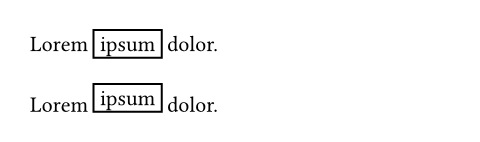
Typst now retains baseline information in more parts of the layout engine (most importantly for boxes, blocks, list items, and equations). This may lead to silent layout shifts. These are generally improvements, but if you’ve previously counter-acted bad-looking output through explicit adjustments, you may need to revisit those.
In particular, Typst will now set the baseline of a box to the baseline of its first line of content and use it to align the box with its surrounding text. This yields better-looking output out of the box.
// Typst 0.15+
Lorem #box(inset: 0.3em, stroke: 1pt)[ipsum] dolor.

// Typst 0.14 and below
Lorem #box(inset: 0.3em, stroke: 1pt)[ipsum] dolor.
If you are using Typst on Windows, you may have used backslashes in your file paths. This syntax is not supported anymore. Consistent use of forward slashes ensures your document compiles on all supported platforms.
// Typst 0.15+ ✅
#include "chapters/introduction.typ"

// Typst 0.14 and below ❌
#include "chapters\\introduction.typ"
Moreover, the Typst CLI does not support non-Unicode input paths anymore. Such paths are exceedingly rare today.
In mathematical typesetting, glyphs frequently need to be stretched to the size of some part of an equation. This primarily applies to brackets, but also accents, arrows, and more. In Typst, this happens implicitly through matched delimiters or explicitly through the lr and stretch functions.
Typst 0.15 makes some adjustments to how ratios passed to these functions are resolved. Previously, a size of 200% passed to lr.size or stretch.size would be interpreted relative to a glyph size that was potentially already affected by display sizing. Now, ratios are always resolved relative to the base glyph size. In practice, this means that, to retain the same appearance, you may need to increase the target sizes you’ve configured for glyphs that are already larger out of the box in display style (e.g. integrals).
In Typst’s math mode, various symbols defined in General Symbols can be called like a function, either to be applied as an accent or to delimit body content. Typst 0.15 extends this handling to additional delimiters like chevron.l. This can change the output of existing calls, which would previously fall back to displaying the parentheses (which would rarely have produced desirable output in the case of delimiters).
// Typst 0.15+ ✅
$ chevron.l(x) $

// Typst 0.14 and below ⚠️
$ chevron.l(x) $

The class function defines how part of an equation should be laid out (primarily the spacing around it). In Typst 0.14 and below, the class function applied recursively: If applied to a larger piece of content, all items in it would receive the class. In Typst 0.15, the class is only applied to the directly wrapped content. This is mostly a bug fix, but can lead to subtle layout changes.
With the update to New Computer Modern Math 8.1.0, the default calligraphic letterforms were changed. The previous letterforms can still be accessed by selecting stylistic set 6.
// Typst 0.15, default style.
$ R != cal(R) $

// Typst 0.15, with stylistic set 6.
// Reproduces the default style from Typst 0.14 and below.
#show math.equation: set text(stylistic-set: 6)
$ R != cal(R) $

Typst automatically collects inline-level content into paragraphs. In Typst 0.14 and below, the exact same rules were used to collect inline-level HTML elements (e.g. a <span>) into Typst paragraphs, which in turn result in <p> elements. This had the unfortunate effect that even use of the low-level typed HTML API could result in <p> elements appearing automatically. Consider the example below:
#html.div({
  html.span[Hello]
  html.div[World]
})
Where Typst 0.14 would insert an unexpected additional <p> element, Typst 0.15 yields the expected result:
<!-- Typst 0.14 and below ⚠️ -->
<div>
  <p><span>Hello</span></p>
  <div>World</div>
</div>

<!-- Typst 0.15+ ✅ -->
<div>
  <span>Hello</span>
  <div>World</div>
</div>
This change in output is achieved through a few new rules for how paragraphs are collected in HTML export. Previously, Typst would always categorize elements into either inline-level or block-level. It would then force inline-level elements into a paragraph whenever at least one block-level element was present in the same flow of content. In Typst 0.15, elements can instead be considered inline-level, block-level, or neutral:
box elements and HTML phrasing content (elements that are allowed as children of <p> elements) are considered inline-level1block elements are considered block-levelNeutral elements don’t force adjacent inline-level content into paragraphs. They can co-exist with inline-level content in a mixed flow. This ensures that usage of the typed HTML API does not result in extraneous paragraphs.
Meanwhile, Typst elements that are block-level out of the box (e.g. heading) now explicitly use a block in their default show rule to ensure that they still force adjacent inline-level elements into paragraphs. This ensures consistency in paragraph grouping across paged and HTML export. Package authors should also explicitly use blocks when creating HTML components that Typst should consider block-level.
To make this change possible, the way boxes and blocks behave in HTML export has been adjusted: Instead of unconditionally wrapping their contents in a <span> or <div>, they now do just what is necessary to ensure their contents are considered inline- or block-level by browsers. If they contain multiple children, they still create a wrapper element, but for just a single child, they instead configure the CSS display property. And if the single child already has the appropriate display property by default, it is fully omitted. Then, the effect of the box or block is limited to influencing Typst’s paragraph grouping.
script and style elementsThe typed HTML functions for the HTML script and style element previously accepted arbitrary body content and then only failed during HTML serialization if the content resulted in non-textual elements. In Typst 0.15, they instead only accept strings in the first place. Note that you can also use them with raw syntax by accessing the .text field.
// Typst 0.15+ ✅
#html.style("a { color: red }")
#html.style(
  ```css
  a { color: red }
  ```.text
)

// Typst 0.14 ❌
#html.style[
  a { color: red }
]Typst 0.14 and below would generate the class attributes typst-frame, typst-doc, typst-group, typst-shape, and typst-text on SVG elements in SVG export. These are no longer emitted. If you are using the typst-frame class to style html.frame elements in HTML export, you’ll need to adapt your style sheet.
Typst aims to unify different fonts from the same family under a single family name. To that effect, it automatically trims common style suffixes like “Bold” or “Condensed” from font family names. Instead of selecting these through the name, they should be accessed through Typst’s built-in mechanisms (such as the weight and stretch parameters).
In Typst 0.15, the additional suffixes “Variable”, “Var”, and “VF” are trimmed to unify static and variable fonts into a single family. If you’ve previously used a font with any of these suffixes in its family name, you should now omit the suffix when specifying the font.
In the next Typst version, we will make a change to how raw language tags are parsed. Should this upcoming change have an effect on your document, the compiler will already warn you today and suggest how to adjust your document to future-proof it against the change.
Not all numbering systems can express the number zero. In Typst 0.14 and below, those would silently fall back to Arabic numerals for 0. This behavior is deprecated in Typst 0.15. Using zero with these systems will become a hard error in the future.
The array.slice function, str constructor, and text.features parameter now perform stricter validation on their inputs. If you’ve previously passed invalid or nonsensical input, you will now receive an error.
Typst 0.15 renames some citation styles to stay aligned with upstream CSL changes. If you are relying on any of these, the compiler will warn you and suggest the new name.
Typst 0.15 also renames a few symbols in General Symbols. If you are using any of these, the compiler will warn you and suggest the new name.
Thanks to everyone who contributed to this release!


<script> are considered phrasing content by the HTML specifications, but don’t make sense in paragraphs as they default to display: none.此内容由惯性聚合(RSS阅读器)自动聚合整理,仅供阅读参考。 原文来自 — 版权归原作者所有。