



惯性聚合 高效追踪和阅读你感兴趣的博客、新闻、科技资讯
阅读原文 在惯性聚合中打开

推荐订阅源

Vercel News
Vercel News
SecWiki News
SecWiki News
WordPress大学
WordPress大学
小众软件
小众软件
博客园 - 司徒正美
酷 壳 – CoolShell
酷 壳 – CoolShell
V
Visual Studio Blog
Y
Y Combinator Blog
freeCodeCamp Programming Tutorials: Python, JavaScript, Git & More
云风的 BLOG
云风的 BLOG
MyScale Blog
MyScale Blog
K
Kaspersky official blog
T
The Exploit Database - CXSecurity.com
腾讯CDC
Scott Helme
Scott Helme
I
InfoQ
Cyberwarzone
Cyberwarzone
Cyber Security Advisories - MS-ISAC
Security Latest
Security Latest
The Register - Security
Project Zero
Project Zero
F
Fortinet All Blogs
C
CERT Recently Published Vulnerability Notes
A
Arctic Wolf
C
Cisco Blogs
L
LINUX DO - 热门话题
P
Privacy International News Feed
IT之家
IT之家
U
Unit 42
P
Privacy & Cybersecurity Law Blog
H
Help Net Security
K
KPMG report finds enterprise disconnect between AI and its ROI | CIO
C
Cyber Attacks, Cyber Crime and Cyber Security
P
Palo Alto Networks Blog
F
Full Disclosure
宝玉的分享
宝玉的分享
Simon Willison's Weblog
L
Lohrmann on Cybersecurity
Google DeepMind News
cs.CL updates on arXiv.org
H
Hacker News: Front Page
Know Your Adversary
Know Your Adversary
PCI Perspectives
PCI Perspectives
Hugging Face - Blog
Hugging Face - Blog
AWS News Blog
AWS News Blog
MongoDB | Blog
MongoDB | Blog
S
Schneier on Security
Recent Announcements
Forbes - Security
Forbes - Security
Cisco Talos Blog
Cisco Talos Blog

Replicate's blog

How to make remarkable videos with Seedance 2.0 – Replicate blog How to prompt Seedream 5.0 – Replicate blog Recraft V4: image generation with design taste – Replicate blog Run Isaac 0.1 on Replicate – Replicate blog Run FLUX.2 on Replicate – Replicate blog How to prompt Nano Banana Pro – Replicate blog Retro Diffusion's pixel art models are now on Replicate – Replicate blog Replicate is joining Cloudflare – Replicate blog Extract text from documents and images with Datalab Marker and OCR – Replicate blog How to prompt Veo 3.1 – Replicate blog IBM's Granite 4.0 is now on Replicate – Replicate blog Which image editing model should I use? – Replicate blog Introducing our new search API – Replicate blog Torch compile caching for inference speed – Replicate blog Announcing Replicate's remote MCP server – Replicate blog How to prompt Veo 3 with images – Replicate blog Open source video is back – Replicate blog Generate consistent characters – Replicate blog Bria is now on Replicate – Replicate blog How we optimized FLUX.1 Kontext [dev] – Replicate blog Compare AI video models – Replicate blog The FLUX.1 Kontext hackathon – Replicate blog How to prompt Veo 3 for the best results – Replicate blog Get the most from Google Veo 3 – Replicate blog FLUX.1 Kontext from the community – Replicate blog Use FLUX.1 Kontext to edit images with words – Replicate blog Generate incredible images with Google's Imagen 4 – Replicate blog Run OpenAI’s latest models on Replicate – Replicate blog NVIDIA H100 GPUs are here – Replicate blog Run 30,000+ LoRAs on Hugging Face with Replicate – Replicate blog Ideogram 3.0 on Replicate – Replicate blog Run MiniMax Speech-02 models with an API – Replicate blog Easel AI is now on Replicate – Replicate blog Stylized video with Wan2.1 – Replicate blog Creative roundup: avatars, lightsabers, and LoRA tricks – Replicate blog Wan2.1: generate videos with an API – Replicate blog Wan2.1 parameter sweep – Replicate blog You can now fine-tune open-source video models – Replicate blog Generate short videos with the Replicate playground – Replicate blog AI video is having its Stable Diffusion moment – Replicate blog FLUX fine-tunes are now fast – Replicate blog FLUX.1 Tools – Control and steerability for FLUX – Replicate blog NVIDIA L40S GPUs are here – Replicate blog Ideogram v2 is an outstanding new inpainting model – Replicate blog Stable Diffusion 3.5 is here – Replicate blog FLUX is fast and it's open source – Replicate blog FLUX1.1 [pro] is here – Replicate blog Using synthetic training data to improve Flux finetunes – Replicate blog Fine-tune FLUX.1 with an API – Replicate blog Fine-tune FLUX.1 to create images of yourself – Replicate blog Replicate Intelligence #12 – Replicate blog Replicate Intelligence #11 – Replicate blog Fine-tune FLUX.1 with your own images – Replicate blog Replicate Intelligence #10 – Replicate blog FLUX.1: First Impressions – Replicate blog Replicate Intelligence #9 – Replicate blog Run FLUX with an API – Replicate blog Replicate Intelligence #8 – Replicate blog Run Meta Llama 3.1 405B with an API – Replicate blog Replicate Intelligence #7 – Replicate blog Replicate Intelligence #6 – Replicate blog Replicate Intelligence #5 – Replicate blog How to get the best results from Stable Diffusion 3 – Replicate blog Run Stable Diffusion 3 on your Apple Silicon Mac – Replicate blog Push a custom version of Stable Diffusion 3 – Replicate blog Replicate Intelligence #4 – Replicate blog Run Stable Diffusion 3 on your own machine with ComfyUI – Replicate blog H100s are coming to Replicate – Replicate blog Run Stable Diffusion 3 with an API – Replicate blog Replicate Intelligence #3 – Replicate blog Replicate Intelligence #2 – Replicate blog Replicate Intelligence #1 – Replicate blog Shared network vulnerability disclosure – Replicate blog Run Snowflake Arctic with an API – Replicate blog Run Meta Llama 3 with an API – Replicate blog Run Code Llama 70B with an API – Replicate blog Clone your voice using open-source models – Replicate blog Businesses are building on open-source AI – Replicate blog How to run Yi chat models with an API – Replicate blog Scaffold Replicate apps with one command – Replicate blog Using open-source models for faster and cheaper text embeddings – Replicate blog Generate music from chord progressions and text prompts with MusicGen-Chord – Replicate blog Generate images in one second on your Mac using a latent consistency model – Replicate blog How to use retrieval augmented generation with ChromaDB and Mistral – Replicate blog Fine-tune MusicGen to generate music in any style – Replicate blog Jet-setting with Llama 2 + Grammars – Replicate blog How to run Mistral 7B with an API – Replicate blog Make smooth AI generated videos with AnimateDiff and an interpolator – Replicate blog Fine-tuned models now boot in less than one second – Replicate blog Painting with words: a history of text-to-image AI – Replicate blog We're cutting our prices in half – Replicate blog A guide to prompting Llama 2 – Replicate blog Streaming output for language models – Replicate blog Fine-tune SDXL with your own images – Replicate blog Run Llama 2 with an API – Replicate blog Run SDXL with an API – Replicate blog A comprehensive guide to running Llama 2 locally – Replicate blog Fine-tune Llama 2 on Replicate – Replicate blog What happened with Llama 2 in the last 24 hours? 🦙 – Replicate blog Make any large language model a better poet – Replicate blog
How to create an AI narrator for your life – Replicate blog
2023-12-06 · via Replicate's blog

Posted December 6, 2023 by

A couple of weeks ago, Sir David Attenborough watched me drink a cup of water.

David Attenborough is now narrating my life

Here's a GPT-4-vision + @elevenlabsio python script so you can star in your own Planet Earth: pic.twitter.com/desTwTM7RS

— Charlie Holtz (@charlieholtz) November 15, 2023

Or at least, a clone of him did. I recorded the video in a library on a whim, congested and with a bunch of background noise, and it went viral. It hit the top of Hacker News, Business Insider and Ars Technica wrote about it, and the nearly 4 million people watched an AI David Attenborough describe my blue shirt as part of my “mating display.”

You might be surprised (I am constantly) by all the things you can build now. I’ve experimented with building a posture checker and productivity coach that takes screenshots of my laptop screen and yells (constructive) criticism.

In this post, I’ll explain the concepts behind making your own AI narrator. At the end I’ll link you to some code you can use to make your own.

In the past I’ve described AI models as “magic boxes” that take input, transform it, and give us an output. We can use these magic boxes without having to deeply understand how they work.

Our code is going to need three magic boxes:
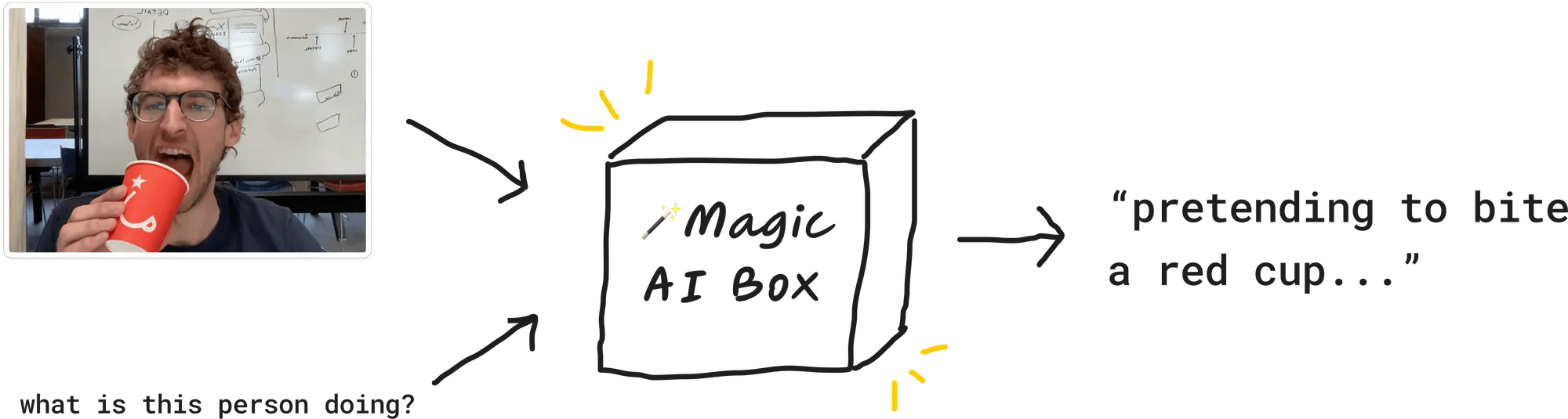
  • A vision model that can “see” through our computer camera and describe what we’re seeing.
  • A language model that writes our script (in my case, in the style of David Attenborough).
  • A text-to-speech model that takes words as input and outputs a spoken audio file.

A model that sees

Pasted image 20231201120324.png

Our first step is finding a vision model that can “see.” Many of the models we’re used to take text as an input, like ChatGPT or stable diffusion. We send the model text, and we get back text, images, or video. But for our life narrator, we want a model that can take images as input, and can then answer questions about those images.

We have two inputs for our vision model: an image and a text prompt. The model then returns a text response.

We have a few options here, and be warned that I am biased.

Llava 13B

Llava 13B is an open-source vision model. It’s cheap, and fast enough for our purposes. This is what I’d recommend. Llava runs on an A40 GPU and costs $0.000725 per second to run.

Here’s an example Llava 13B prediction:

what is this person doing?
Prompt: What is this person doing?

Llava gives us this response:

The person in the image is holding a red cup up to their mouth, opening their mouth wide, and pretending to take a bite or drink from the cup.

A Llava prediction takes 1.5-3 seconds to return a response, so each request will cost about $0.0017.

GPT-4-Vision

This is the model I used in my demo video. It’s smarter than Llava, but it’s slightly slower and more expensive to run.

If we prompt it with the same image and question as above (“What is this person doing?”), we get this (in 2.5-4 seconds):

The person in the image is holding a red cup to their open mouth, as if they are about to eat or drink from it. They’re looking directly at the camera, and the expression on their face could be perceived as playful or humorous. They are not actually consuming the cup, but the pose suggests a mock action, perhaps for a lighthearted photo or joke.

GPT-4-Vision is a bit complicated. It’s priced by image resolution plus per token. A 250px by 140px image costs $0.00255 and $0.03 per $1K output tokens. You’ll also need to be off their waitlist to try it.

Feed the model

We also need a way to feed input images to these vision models. I’d recommend using your computer’s webcam. Here’s a script I wrote (with GPT-4’s major help) that takes a photo from your webcam every 5 seconds and saves it to a local file. It also downsizes the images — this is important, because it makes it faster (and cheaper) for our image models to read.

We have something for our model to “see”. Let’s wire up a function that can describe the image we’re seeing live.

A model that writes a script

a model that writes a script

Next, we want a model to write our script to be narrated. The output of this magic box is the words that David Attenborough speaks in my video.

Here’s an example of how to do this with Mistral 7B.. Our prompt is:

The description here is the output from our vision model in the step before. Our response looks something like:

Prediction ID

I’d recommend limiting the max tokens returned to somewhere around 128. We want as fast a response time as possible. The output above took 2.7s, so right now we’re at 5-6ish second total response time.

Note we can also use GPT-4-Vision to return our response. And we can actually skip a step––we don’t need to ask for a description of an image and then translate that into a David Attenborough style script. We can do both in one prediction. GPT-4-Vision is smart enough to do both at once.

Here’s the system prompt I used:

The GPT-4-Vision API returns a response in 3.5-8 seconds (but generally closer to 3).

A model that speaks

Finally, we want our model to speak. And speak with style! We don’t want a robotic voice. We want some gusto.

Pasted image 20231201142650.png

There are a bunch of options here. The highest quality output you’re going to get is through ElevenLabs’s voice cloning feature. A cheaper, open source equivalent for voice cloning is XTTS-v2. Both allow you to upload text for your speaker to say, and audio for your speaker to sound like. Then you get an output that sounds like your speaker audio.

If you’re using Eleven, use their Turbo v2 model —it has 400ms latency. Check out my play_audio() function here.

The world is weird now

Our full workflow now looks like this:
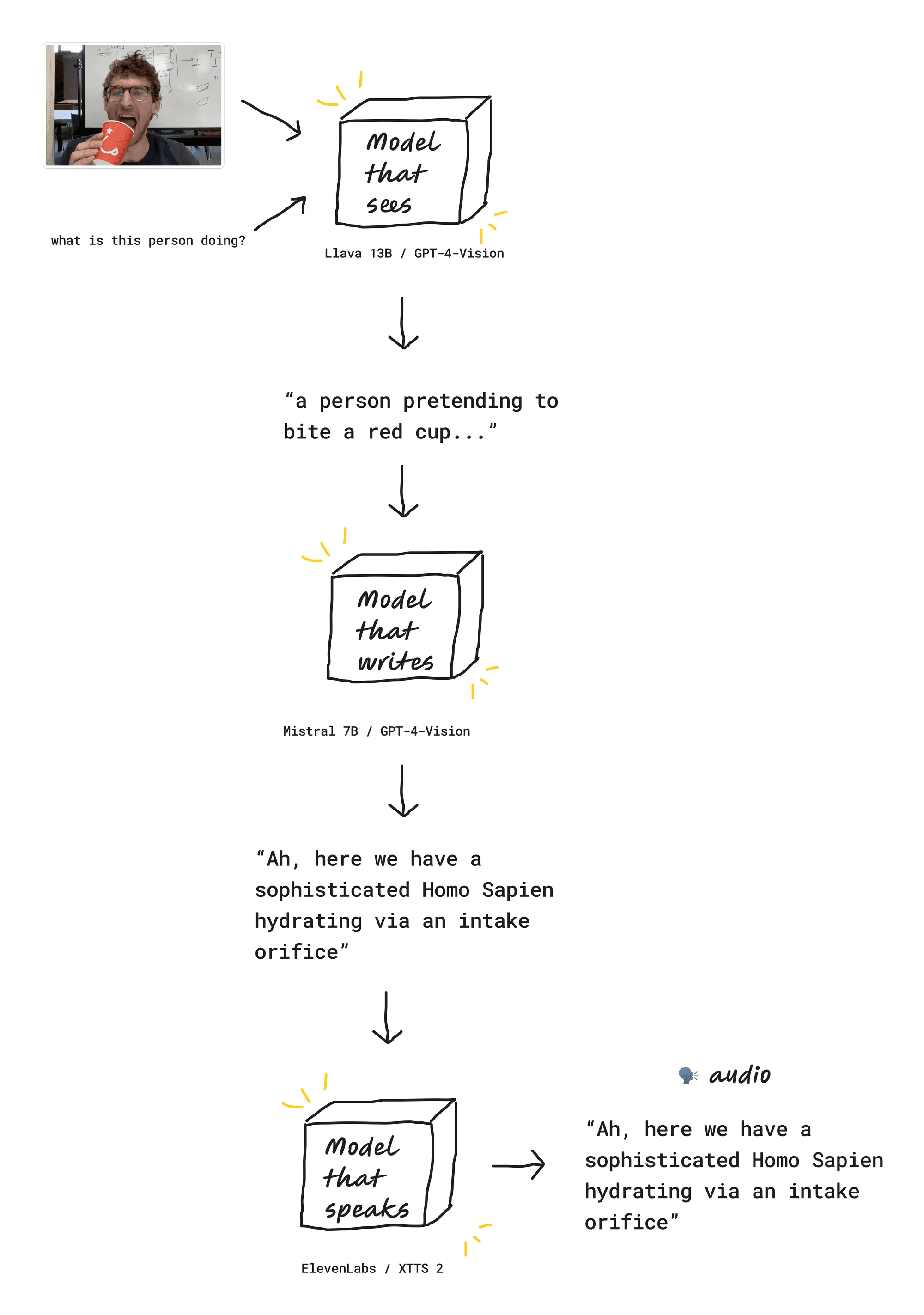
narrator pipeline

And that’s it! You now know how to make your own interactive voice clone. There are a lot of cool things that are now possible. Like I mentioned, I’ve experimented with building a posture checker and productivity coach. A few days ago OthersideAI released a “Self-Operating Computer Framework” that takes screenshots of your screen to control your computer:

The world is weird now. In a good way. Happy hacking!

Keep up to speed