


MariaDB 的由来(历史)
谈起新秀MariaDB,或许很多人都会感到陌生吧,但若聊起享誉开源界、业界知名的关系型数据库——Mysql,想必混迹于互联网的人们(coder)无不知晓。
其实mariaDB是由Mysql分支出来的一个项目,而且同属于同一个作者(Michael Widenius)。或许你会纳闷,既然Mysql如此优秀,作者而又为什么再次创造出一个新的数据库呢?
谈起mariadb的诞生,那就不得不说Mysql那命运多舛的际遇咯!起初,Mysql以开源的形式瞬间火爆互联网圈,这其中就包括创造出 Java 的公司—— sun,彼时的他们亟需一套小巧且功能强大的数据库,来摆脱其他商业化数据库。故而,sun 公司看准了时机,斥巨资收购了彼时还处在蓬勃发展的Mysql。
时间一晃,来到了2009年,号称全球数据库巨头 Oracle以当时看来是天价的价格收购了sun 公司,作为sun 公司的附庸品,当然也卖身到新雇主,Mysql再次改投公司,并非它所愿,实是无奈之举。
倘若sun 公司没被Oracle收购,或许不会出现mariaDB,毕竟sun 公司创造出了java这一从它诞生以来稳居于年度 program language(编程语言)排行榜前三,毫不夸张的说,它影响了一代的互联网的进程。
可事与愿违,sun 公司终将被oracle 公司收购了。自打oracle公司并购了sun 公司,全球数以千万计的Java Engineer,便开始为Java是否还会开源起了忧虑之心。
果不其然,oracle 公司还是向java开刀了,他们修改了java的一些开源策略,如:商业授权……
也正源于此,作为Mysql的作者,不得不为mysql的未来而担忧。然而,现在的mysql已经属于Oracle 公司,看似开源出来,但Oracle 公司随时都有可能将它闭源化。可他唯一能做的就是从开源的mysql开出一个分支,构建出一个新的数据库,而它将改进Mysql所出现的问题,虽然mariadb是由mysql作者主导的,但主要还是靠开源社区来贡献代码。
安装前准备
我们知道大多数开源软件,多多少少会使用第三方(开源工具类库)软件包。虽然,你的项目大可不必依赖第三方类库,完全由自己着手编码来实现,那也是没问题,但在编写完这些工具库时,你的项目引入之前,你总得为你所编写的类库做unit test吧!
工具类库代码量不是非常庞大的话,由你自己编写,亲自做unit test,这都没什么,毕竟自己从零开始实现一个与第三方相似的工具类库,给自己带来的不单单是一种炫技感,更多的是成就感、喜悦感。
可倘若工具类库代码行数达到上万,甚至十来万行呢?此时的你,再想从头写起与第三方类库类似的功能,怕是力不从了吧!且不说编写那十来万行的代码所消耗的时间,而是在接下来的事,是需要对它做unit test,将会让你开始怀疑人生。
一个开源项目/产品能赢得越来越多用户的追捧,其中最为重要的一点莫过于产品的迭代更新速度是否快于竞争对手/友商。
为了能使产品在迭代更新上快于他人,产品的研发团队往往会将项目中公共模块抽取出来,形成一个工具类库,或是使用了第三方开源类库,从而降低了花在这上面的时间以及精力4,以便能够全身心的着眼于产品本身。
安装所需的软件包
至于安装mariaDB前,为何要安装software-properties-common这个软件包呢?其实你也是可以不安装这个依赖库,而是直接安装MariaDB,那也是没问题的!只是在安装MariaDB过程中,会出现Error,最终导致无法正常的安装MariaDB,而出现错误的原因却是当前Linux发行版还未安装某个软件包。
为了使MariaDB能够继续的安装下去,你便按照error提示,安装MariaDB所需的第三方类库。
既然是这样的话,我们何不将MariaDB所需的软件包提前安装呢!
apt install software-properties-common -y

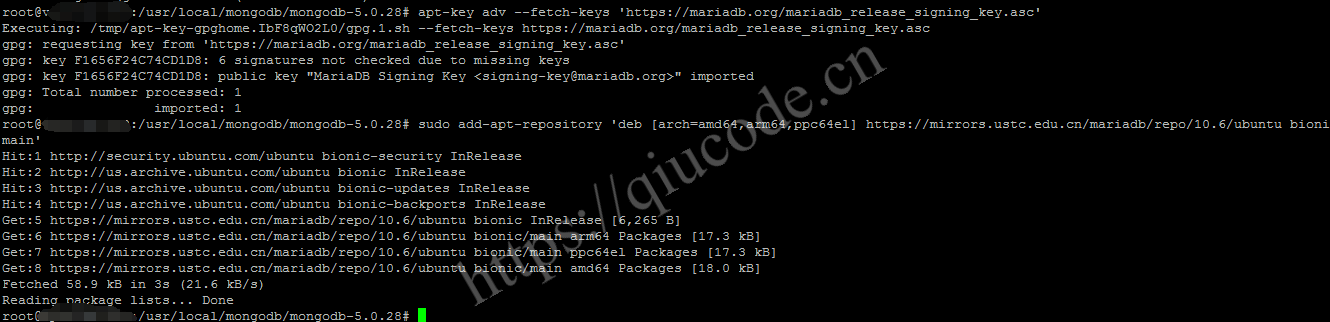
添加 MariaDB 镜像仓库
无论你当前系统属于哪个Linux 发行版,使用在线安装软件时,总是会在当前系统的镜像库搜寻,以此来下载软件。
当然咯,系统里的镜像仓库的软件版本或许有些旧,毕竟某些软件更新迭代快,以至于Linux 发行版来不及去更新镜像仓库内的软件版本。
故而,我们可以将需要下载哪个版本的MariaDB添加到系统镜像仓库里面。
至于那个MariaDB key 是官方所要求的,你将它下载下来就对咯!
apt-key adv --fetch-keys 'https://mariadb.org/mariadb_release_signing_key.asc'
sudo add-apt-repository 'deb [arch=amd64,arm64,ppc64el] https://mirrors.ustc.edu.cn/mariadb/repo/10.6/ubuntu bionic main'
安装 mariadb-server 和 mariadb-client
热身的差不多了,是该真正露出本领的时刻了,此处应有振聋发聩的掌声,不绝于耳的那种掌声。
使用以下命令来安装MariaDB的server和client。
apt install mariadb-server mariadb-client

设置 Mariadb 的安全信息
在安装完MariaDB后,我们需要对它做些必要性的安全措施,比如:root密码、是否使用unix socket登陆、是否开启远程登陆……
mariadb-secure-installation
mariaDB的root密码默认是空,所以在出现这句Enter current password for root (enter for none):提示时,你就直接按键盘上的Enter,也就是回车键。
随后的Switch to unix socket authentication [Y/n],便是询问你是否开启unix socket 认证。
紧接着一句Change the root password? [Y/n],问你是否改变root密码,毫无疑问,root密码是需要修改的!
接下来的便是Remove anonymous users?[Y/n] 这么一句,它问你是否移除匿名用户。
之后的一句Disallow root login remotely? [Y/n]n,则是是否禁止 root 远程登陆。
再者便是Remove test database and access to it? [Y/n],征求你是否需要移除test 数据库和数据的许可。
尾随其后的Reload privilege tables now? [Y/n] Y,还是寻求你是否现在来重新加载 privilege表,以此来更新你上述所做的修改。
root0XXX:~# mariadb-secure-installation
NOTE: RUNNING ALL PARTS OF THIS SCRIPT IS RECOMMENDED FOR ALL MariaDB
SERVERS IN PRODUCTION USE! PLEASE READ EACH STEP CAREFULLY!
In order to log into MariaDB to secure it, we'll need the current
password for the root user. If you've just installed MariaDB, and
haven't set the root password yet, you should just press enter here.
Enter current password for root (enter for none): #直接按 Enter 键
OK, successfully used password, moving on...
Setting the root password or using the unix socket ensures that nobody
can log into the MariaDB root user without the proper authorisation.
You already have your root account protected, so you can safely answer 'n'.
Switch to unix socket authentication [Y/n] Y
Enabled successfully!
Reloading privilege tables..
... Success!
You already have your root account protected, so you can safely answer 'n'.
Change the root password? [Y/n] Y
New password:
Re-enter new password:
Password updated successfully!
Reloading privilege tables..
...Success!
By default, a MariaDB installation has an anonymous user, allowing anyone
to log into MariaDB without having to have a user account created for
them. This is intended only for testing, and to make the installation
go a bit smoother. You should remove them before moving into a
production environment.
Remove anonymous users?[Y/n] Y
...Success!
Normally, root should only be allowed to connect from 'localhost', This
nsures that
someone cannot guess
the root
password from the
network.
Disallow root login remotely? [Y/n]n
... skipping.
By default, MariaDB comes with a database named 'test' that anyone can
access. This is also intended only for testing, and should be removed
before moving into a production environment.
Remove test database and access to it? [Y/n] n
... skipping.
Reloading the privilege tables will ensure that all changes made so far
will take effect immediately.
Reload privilege tables now? [Y/n] Y
... Success!
Cleaning up...
All done! If you've completed all of the above steps, your MariaDB
installation should now be secure.
Thanks for using MariaDB!
root@XXX:~#
查看 Mariadb 服务状态
我们可以使用以下命令来查看当前MariaDB服务的状态,虽然目前我们知道MariaDB正处于running中。
我们从下面的输出信息,也是可以看出当前的MariaDB服务正处于running中。
root@XXX:~# systemctl status mariadb
* mariadb.service - MariaDB 10.6.15 database server
   Loaded: loaded (/1ib/systemd/system/mariadb.service; enabled; vendor preset:enabled)
  Drop-In: /etc/systemd/system/mariadb.service.d
           |_migrated-from-my.cnf-settings.conf
   Active: active (running) since Sat 2024-08-31 15:03:05 +08; 22min ago
     Docs: man:mar1adbd(8)
		  https://mariadb.com/kb/en/library/systemd/
Main PID: 701 (mariadbd)
   Status: "Taking your SQL requests now..."
     Tasks: 8 (limit:4915)
   CGroup: /system.slice/mariadb.service
           |_701 /usr/sbin/mariadbd
Aug 31 15:03:05 vps74437279.hosteons.com mariadbd[701):2024-08-31 15:03:05 0 [Note]
 InnoDB: File'./ibtmpl' size is now 12 MB.
Aug 31 15:03:05 vps74437279.hosteons.com mariadbd[701]: 2024-08-31 15:03:05 0 [Note]
InnoDB: 10.6.15 started; log sequence number 42114; transaction id 14
Aug 31 15:03:05 vps74437279.hosteons.com mariadbd[701]: 2024-08-31 15:03:05 0[Note] Plugin'FEEDBACK' is disabled.
Aug 31 15:03:05 vps74437279.hosteons.com mariadbd[701]: 2024-08-31 15:03:05 0[Note)
InnoDB: Loading buffer pool(s) from /var/lib/mysql/ib buffer pool
Aug 31 15:03:05 vps74437279.hosteons.com mariadbd[701): 2024-08-31 15:03:05 0 [Note] InnoDB: Buffer pool(s) load completed at 240831 15:03:05
Aug 31 15:03:05 vps74437279.hosteons.com mariadbd[701]:2024-08-31 15:03:05 0[Warning] You need to use --log-bin to make --expire-logs-days or --binlog-expire-logs-sec
Aug 31 15:03:05 vps74437279.hosteons.com mariadbd[701]:2024-08-31 15:03:05 0[Note] Server socket created on IP:'127.0.0.1'.
Aug 31 15:03:05 vps74437279.hosteons.com mariadbd[701):2024-08-31 15:03:05 0 [Note] /usr/sbin/mariadbd: ready for connections.
Aug 31 15:03:05 vps74437279.hosteons.com mariadbd[701]:Version: '10.6.15-MariaDB-1:10.6.15+maria~ubu1804'socket: '/run/mysqld/mysqld.sock'port: 3306mariadb.org b
Aug 31 15:03:05 vps74437279.hosteons.com systemd[1]: Started MariaDB 10.6.15 database server.
lines 1-23/23 (END)
设置开机自启动
查看 mariadb 版本
当你在Terminal输入mysql -u root -p的时候,你的脑袋是不是有那么一瞬间的迷糊,不禁纳闷,“我明明安装的是MariaDB,怎么会去使用mysql的命令呢?”
对于你的疑惑,作为MariaDB非官方人员的我,给出了这样的解释:
- 1、上面有讲到
MariaDB是由mysql分支而来的,难免有些命令还在使用mysql。 - 2、或许他们懒得将
mysql命令修改成mariaDB了,毕竟MariaDB这都更新迭代了多少个版本,要改的话早就改了。(或许是旧版本还没改,新版本可能改了,也未可知。)

添加用户及授权
grant all privileges on *.* to 'root'@'%' identified by 'YourPasswd';
flush privileges;