
惯性聚合 高效追踪和阅读你感兴趣的博客、新闻、科技资讯
阅读原文 在惯性聚合中打开

推荐订阅源

C
Check Point Blog
aimingoo的专栏
aimingoo的专栏
Jina AI
Jina AI
Microsoft Security Blog
IT之家
IT之家
V
Visual Studio Blog
量子位
OSCHINA 社区最新新闻
OSCHINA 社区最新新闻
freeCodeCamp Programming Tutorials: Python, JavaScript, Git & More
博客园 - 聂微东
Cyber Security Advisories - MS-ISAC
大猫的无限游戏
大猫的无限游戏
Y
Y Combinator Blog
Stack Overflow Blog
Stack Overflow Blog
D
Docker
MyScale Blog
MyScale Blog
小众软件
小众软件
云风的 BLOG
云风的 BLOG
美团技术团队
Microsoft Azure Blog
酷 壳 – CoolShell
酷 壳 – CoolShell
Last Week in AI
Last Week in AI
Apple Machine Learning Research
博客园 - 【当耐特】

Netlify Changelog

Gemini 3.5 Flash now available in Agent Runners 4 Nuxt CVEs: what Netlify users need to know Gemini 3.5 Flash now available in AI Gateway Agent Runners workflow improvements Next.js & React security release (May 2026): what to know Block project transfers out of your team Gemini 3.1 Flash-Lite now available in AI Gateway OpenAI GPT-5.5 Instant now available in AI Gateway New `netlify logs` CLI command Deploy to Netlify with Stripe Projects Netlify Database is now generally available OpenAI GPT-5.5 and GPT-5.5 Pro in AI Gateway & Agent Runners Rename an agent run GPT Image 2 now available in AI Gateway New frontend-design skill for Agent Runners Claude Opus 4.7 now available in AI Gateway and Agent Runners Pricing updates for Credit-based plans New sorting and filter controls on the Members page Netlify Database GA coming soon, no new databases for now Deploy logs streaming is now faster Netlify CLI adds prompt-based creation and anonymous deploys Deploy from Codex with the Netlify Plugin Hydrogen with React Router 7 now supported on Netlify Monitor credit usage by day Invoices for Enterprise Available on the Billing Page AI app development on production infrastructure with Netlify Introducing Prompt Templates OpenAI GPT-5.4 Nano and GPT-5.4 Mini in AI Gateway Change your pricing plan Internal Builder Role & Project Access Controls
Deploy Preview screenshots in agent runs
2026-03-04 · via Netlify Changelog

Starting today, all completed agent runs show a screenshot of your Deploy Preview. This makes it easier to quickly see the result of an agent run and keep track of agent run sessions without opening the full preview.
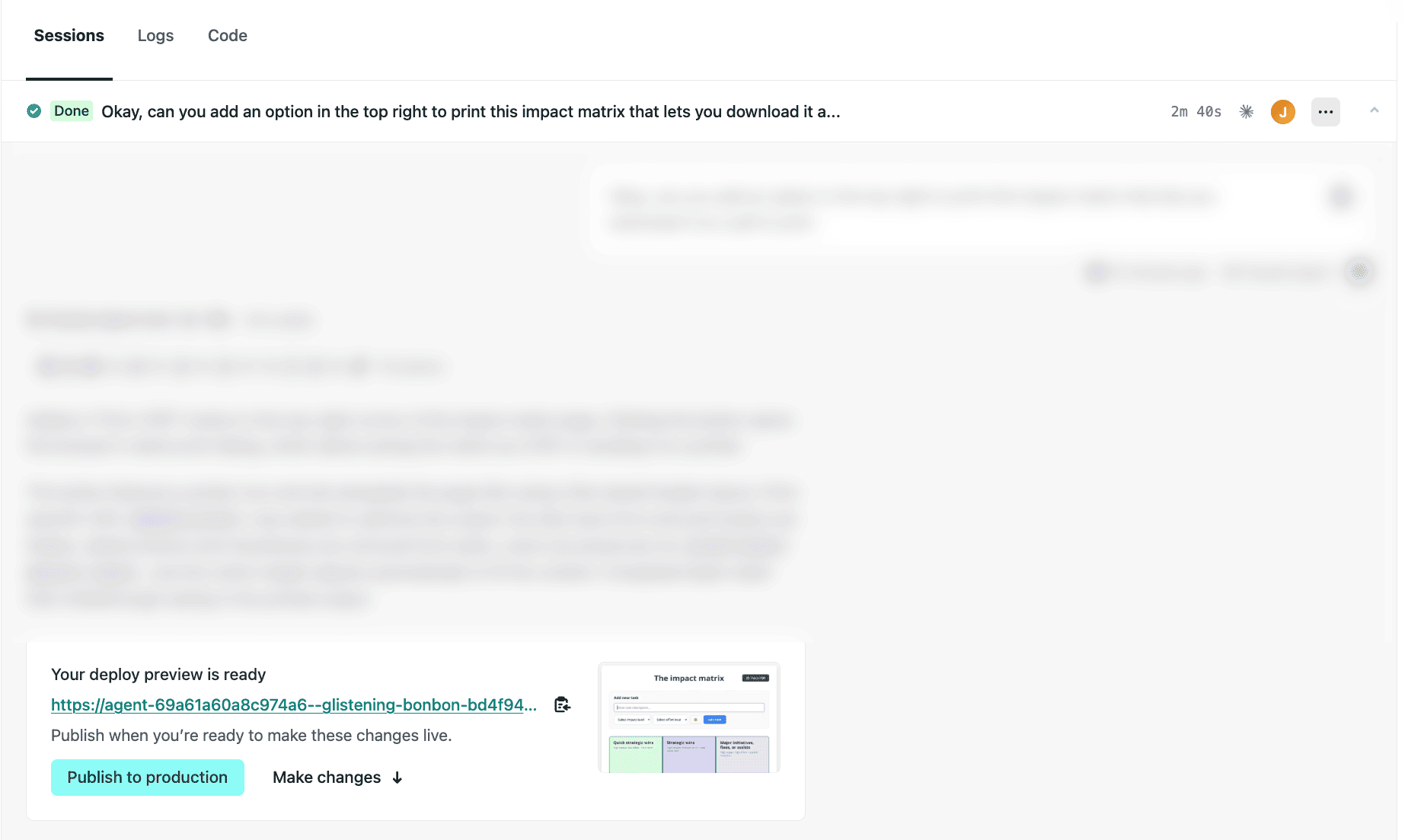
Screenshot of the agent runs dashboard showing a completed run with a Deploy Preview screenshot

Test it out today:

  1. Go to your Netlify project dashboard.
  2. On the left, select Agent runs, then choose an existing agent run or start a new one by entering a prompt and selecting Run task.
  3. At the bottom of your agent run sessions, you’ll find a screenshot of your Deploy Preview. The screenshot is taken from the main page of your project.

Note: If you’ve set up private deploys or password protection, the screenshot will show a sign-in page instead. Learn more about Password protection.

Learn more about getting started with Agent Runners.