
惯性聚合 高效追踪和阅读你感兴趣的博客、新闻、科技资讯
阅读原文 在惯性聚合中打开

推荐订阅源

C
Cisco Blogs
Schneier on Security
T
Tor Project blog
Threat Intelligence Blog | Flashpoint
T
Tenable Blog
C
Cyber Attacks, Cyber Crime and Cyber Security
T
Threat Research - Cisco Blogs
C
CERT Recently Published Vulnerability Notes
Security Latest
Security Latest
Exploit-DB.com RSS Feed
NISL@THU
NISL@THU
L
Lohrmann on Cybersecurity
Scott Helme
Scott Helme
Webroot Blog
Webroot Blog
Project Zero
Project Zero
Google Online Security Blog
The Last Watchdog
The Last Watchdog
Spread Privacy
Spread Privacy
Hacker News: Ask HN
Hacker News: Ask HN
PCI Perspectives
PCI Perspectives
cs.CL updates on arXiv.org
W
WeLiveSecurity
Attack and Defense Labs
D
Darknet – Hacking Tools, Hacker News & Cyber Security
N
News | PayPal Newsroom
Help Net Security
Help Net Security
The Hacker News
The Hacker News
H
Heimdal Security Blog
O
OpenAI News
S
Security @ Cisco Blogs
N
News and Events Feed by Topic
Cyberwarzone
Cyberwarzone
Simon Willison's Weblog
G
GRAHAM CLULEY
www.infosecurity-magazine.com
博客园 - 叶小钗
K
KPMG report finds enterprise disconnect between AI and its ROI | CIO
Hacker News - Newest:
Hacker News - Newest: "LLM"
T
Tailwind CSS Blog
大猫的无限游戏
大猫的无限游戏
A
Arctic Wolf
I
Intezer
钛媒体:引领未来商业与生活新知
钛媒体:引领未来商业与生活新知
S
Security Affairs
P
Proofpoint News Feed
S
Secure Thoughts
腾讯CDC
Google DeepMind News
量子位
罗磊的独立博客

AI

Connect more of your apps to Search Create, edit and star in videos with two Google Vids updates Celebrating 25 years of visual search innovation Expanding Managed Agents in Gemini API: background tasks, remote MCP and more The latest AI news we announced in June 2026 New York City educators and industry leaders gathered at Google’s offices to shape the future of AI in classrooms. Unlocking Britain’s next era of productivity: Building a nation of AI trailblazers Ask an AI expert: What exactly is the full stack? Our latest Google Finance upgrades, including a new app New research shows how AMIE, our medical AI, could help manage health conditions. We’re strengthening our presence in Alabama through new investments and community support. Our new community investments in Virginia support local jobs and expand energy affordability. The latest AI news we announced in May 2026 5 ways Google Search can level up your thrift and vintage shopping How we used Gemini to build Google I/O 2026 Take our I/O 2026 quiz, vibe coded in Google AI Studio. 9 demos of Gemini Omni and Gemini 3.5 in action Check out real-life AI prototypes from the Futures Lab. Catch up on 12 major I/O 2026 moments Catch up on the Dialogues stage at Google I/O 2026. We’re announcing new community investments in Missouri. 100 things we announced at I/O 2026 A new experiment brings better group meetings to Google Beam I/O 2026 How AI Mode is changing the way people search in the U.S. New ways to create and get things done in Google Workspace I/O 2026: Welcome to the agentic Gemini era Everything new in our Google AI subscriptions, fresh from I/O 2026 Gemini 3.5: frontier intelligence with action A new era for AI Search The new AI-powered Google Finance is expanding to Europe. See what happens when creative legends use AI to make ads for small businesses. 5 gardening tips you can try right in Search Google is partnering with XPRIZE and Range Media Partners on the $3.5 million Future Vision film competition. The latest AI news we announced in April 2026 Reduce friction and latency for long-running jobs with Webhooks in Gemini API Celebrating 20 years of Google Translate: Fun facts, tips and new features to try Join the new AI Agents Vibe Coding Course from Google and Kaggle 8 Gemini tips for organizing your space (and life) Here’s how our TPUs power increasingly demanding AI workloads. We're launching two specialized TPUs for the agentic era. 3 new ways Ads Advisor is making Google Ads safer and faster 7 ways to travel smarter this summer, with help from Google A new way to explore the web with AI Mode in Chrome New ways to create personalized images in the Gemini app Bringing people together at AI for the Economy Forum Create, edit and share videos at no cost in Google Vids New ways to balance cost and reliability in the Gemini API We’re creating a new satellite imagery map to help protect Brazil’s forests. The latest AI news we announced in March 2026 Build with Veo 3.1 Lite, our most cost-effective video generation model Watch James Manyika talk AI and creativity with LL COOL J. Transform your headphones into a live personal translator on iOS. Search Live is expanding globally Build with Lyria 3, our newest music generation model Bringing the power of Personal Intelligence to more people Our latest investment in open source security for the AI era How AI is helping improve heart health in rural Australia Gemini in Google Sheets just achieved state-of-the-art performance. How our open-source AI model SpeciesNet is helping to promote wildlife conservation The latest AI news we announced in February Use Canvas in AI Mode to get things done and bring your ideas to life, right in Search. Create new worlds in Project Genie with these 4 tips
Ask a Techspert: How does AI understand my visual searches?
Molly McHugh-Johnson · 2026-03-06 · via AI

Your browser does not support the audio element.

Listen to article

This content is generated by Google AI. Generative AI is experimental

[[duration]] minutes

We’ve all been there: You see a photo of a perfectly styled living room or a well-curated street-style outfit, and you want to know where everything came from. Until recently, visual search was a one-item-at-a-time process. But a major update to Circle to Search and Lens now allows Google to break down and search for multiple objects within a single image simultaneously. This means if you use Circle to Search on Android to search for an entire outfit, you’ll see results for every component of a look, not just one piece at a time. In recent months, we’ve also launched several updates that enhance both visual search and image results in AI Mode, so you can better find inspiration as you search.
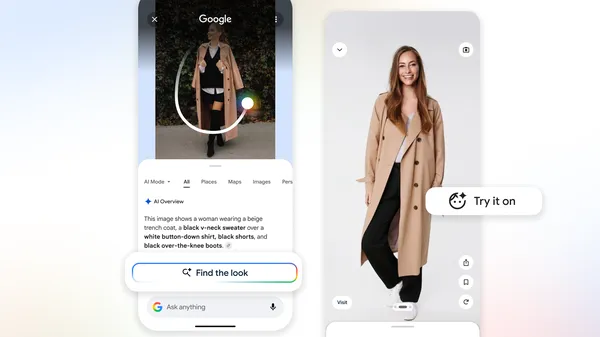
FTL + Try On Social feed

To better understand these breakthroughs, we talked to Search Senior Engineering Director Dounia Berrada.

What part of Search do you work on?

I focus on multimodal search, aka Google Lens — essentially, enabling Google to help with your most complex questions about images, PDFs and anything you see. Visual search is redefining how we interact with information; Lens should be intelligent enough to understand the "why" behind your search, making it effortless to get help with what you see on your screen, or in the world around you. That means building a tool that can just as easily explain a complex math problem as it can identify a rare succulent or help you track down a pair of shoes you love.

How does it do that?

Imagine you’re redesigning a room so you upload a photo of a mid-century modern space for inspiration. You probably aren’t just looking for the side table; you want to recreate the entire vibe. Previously, you’d have to search for the lamp, then the rug, then the chair individually. Now, AI Mode can break down that complex image, identify each individual piece and issue multiple visual searches simultaneously. You can see this in action right now using Circle to Search.

What powers these types of visual search responses?

Our advanced Gemini models make AI Mode possible, and its multimodal capabilities benefit from the visual expertise we've built into Lens over the years. When you search with an image, Gemini analyzes the image alongside your question to decide which tools to use. Let's say you're scrolling on your phone and see an outfit on social media that you love. When you search it, the model knows to use Lens to retrieve image results for the hat, shoes and jacket of the outfit simultaneously. It then weaves those individual results into one easy-to-read response.

Think of it this way: The AI model acts as the "brain" that can “see” the image, while the visual search backend acts as the "library" containing billions of web results. The AI performs multi-object reasoning to understand what you’re looking at. Then it uses a "fan-out" technique which triggers multiple searches at once, reads through the results and presents a single, cohesive response with helpful links — all in seconds.

Can you explain the fan-out technique?

AI Mode is basically doing a dozen searches for you in the time it takes to do one. If you upload a photo of a garden you admire, you might have several questions: Will these plants survive in the shade? Are they right for my climate? How much maintenance do they need?

Before, you’d ask those one by one. Now, AI Mode identifies all those necessary "fan-out" searches. This way, it gathers care requirements for every plant in the photo using helpful web results, breaks down the info and even suggests next steps you might want to take. Since AI Mode is uncovering more visual results from a single search, it's easier than ever to find just what you're looking for, and stumble upon something new that sparks your interest.

Do you have to start with an image to get this kind of help in AI Mode?

Not at all! You can start with a simple text search in AI Mode, like "visual inspo for work outfits." When you see a result you like, you can just say, "Show me more options like the second skirt." The system immediately takes that specific image and begins the fan-out process from there.

It definitely seems great for shopping — what else could you use it for?

You could take a photo of a wall at a museum and ask for explanations of each painting. Or take a photo of a bakery window and ask what all the different pastries are. It’s about moving from "What is this one thing?" to "Explain this entire scene to me."

Sounds like I’ve got some photos to take and a lot more to discover. I'm off to put these tools to the test!

Get more stories from Google in your inbox.

Done. Just one step more.

Check your inbox to confirm your subscription.

You are already subscribed to our newsletter.

You can also subscribe with a