1. InfiniBand 网络
InfiniBand(缩写 IB),是一个用于高性能计算的计算机网络通信标准,它具有极高的吞吐量和极低的延迟,用于计算机与计算机之间的数据互连。InfiniBand 也用作服务器与存储系统之间的直接或交换互连,以及存储系统之间的互连。
InfiniBand 网络需要专属的软硬件环境,包括 InfiniBand 网卡、光纤连接和支持 InfiniBand 的交换机,以提供高速无损的互联网络。InfiniBand 协议通过高效的数据传输能力,尤其是远程直接内存访问(RDMA),使得在多节点环境中实现极优的数据传输速率,通常能达到 200 Gbps 以上。
2. InfiniBand 组网
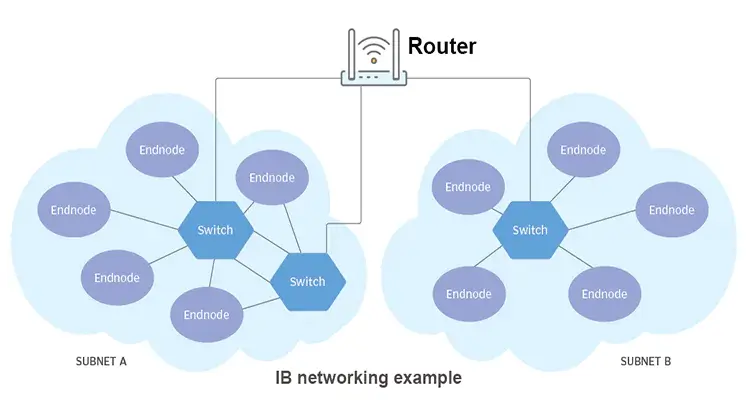
InfiniBand 的网络分为两层:
- 第一层是由 End Node 和 Switch 组成的 Subnet,End Node 一般是插在结点上的 IB 卡上
- 第二层是由 Router 连接起来的若干个 Subnet
Subnet Manager 给每个 Node 和 Switch 分配 Local ID,同一个 Subnet 中通过 LID(Local ID)来路由。
3. 安装 MLNX OFED 驱动
MLNX OFED 用来启用和优化 Mellanox 网卡的网络传输性能。
1
| wget https://content.mellanox.com/ofed/MLNX_OFED-4.9-5.1.0.0/MLNX_OFED_LINUX-4.9-5.1.0.0-ubuntu20.04-x86_64.tgz
|
1
2
3
| tar zxf MLNX_OFED_LINUX-4.9-5.1.0.0-ubuntu20.04-x86_64.tgz
cd MLNX_OFED_LINUX-4.9-5.1.0.0-ubuntu20.04-x86_64
./mlnxofedinstall
|
 1
 2
 3
 4
 5
 6
 7
 8
 9
10
11
12
13
14
15
16
| systemctl status openibd
● openibd.service - openibd - configure Mellanox devices
Loaded: loaded (/lib/systemd/system/openibd.service; enabled; vendor preset: enabled)
Active: active (exited) since Mon 2024-11-04 11:36:29 CST; 2min 35s ago
Docs: file:/etc/infiniband/openib.conf
Process: 45926 ExecStart=/etc/init.d/openibd start bootid=0bc1ef52562f40ba85221c254bfc466e (code=exited, status=0/S>
Main PID: 45926 (code=exited, status=0/SUCCESS)
Tasks: 0 (limit: 9830)
Memory: 13.8M
CGroup: /system.slice/openibd.service
Nov 04 11:36:24 bj6-e-ai-kas-node-a800-gc-01 systemd[1]: Starting openibd - configure Mellanox devices...
Nov 04 11:36:24 bj6-e-ai-kas-node-a800-gc-01 root[45935]: openibd: running in manual mode
Nov 04 11:36:29 bj6-e-ai-kas-node-a800-gc-01 openibd[45926]: [49B blob data]
Nov 04 11:36:29 bj6-e-ai-kas-node-a800-gc-01 systemd[1]: Finished openibd - configure Mellanox devices.
|
4. 安装 MFT 驱动
MFT 用于设备维护和管理场景,升级固件、查看设备的低级信息、修改硬件参数(如设置设备成 SR-IOV 模式)等。
1
2
3
| wget https://www.mellanox.com/downloads/MFT/mft-4.29.0-131-x86_64-deb.tgz
tar zxvf mft-4.29.0-131-x86_64-deb.tgz
bash mft-4.29.0-131-x86_64-deb/install.sh
|
 1
 2
 3
 4
 5
 6
 7
 8
 9
10
11
12
13
14
15
16
17
18
19
20
| mst status -v
MST modules:
------------
MST PCI module is not loaded
MST PCI configuration module loaded
PCI devices:
------------
DEVICE_TYPE MST PCI RDMA NET NUMA
ConnectX6(rev:0) /dev/mst/mt4123_pciconf3 cd:00.0 mlx5_5 net-ibs19 1
ConnectX6(rev:0) /dev/mst/mt4123_pciconf2 96:00.0 mlx5_4 net-ibs18 1
ConnectX6(rev:0) /dev/mst/mt4123_pciconf1 5f:00.0 mlx5_1 net-ibs11 0
ConnectX6(rev:0) /dev/mst/mt4123_pciconf0 1d:00.0 mlx5_0 net-ibs10 0
ConnectX5(rev:0) /dev/mst/mt4119_pciconf0.1 7c:00.1 mlx5_bond_0 net-bond1 0
ConnectX5(rev:0) /dev/mst/mt4119_pciconf0 7c:00.0 mlx5_bond_0 net-bond1 0
|
5. IB 网卡信息查看命令
5.1 查看网卡列表
1
2
3
| ls /sys/class/net/
bond1 eth0 eth1 ibs10 ibs11 ibs18 ibs19
|
这里的 bond1 是用来聚合多个网卡的,从下面的输出可以看到其关联的是 eth0 和 eth1 。其他四个网卡是 IB 网卡。
1
2
3
4
5
6
7
8
9
| cat /proc/net/bonding/bond1
Slave Interface: eth0
MII Status: up
Speed: 25000 Mbps
Slave Interface: eth1
MII Status: up
Speed: 25000 Mbps
|
5.2 查看 IB 网卡信息
1
2
3
4
5
6
7
8
| lspci -D | grep Mellanox
0000:1d:00.0 Infiniband controller: Mellanox Technologies MT28908 Family [ConnectX-6]
0000:5f:00.0 Infiniband controller: Mellanox Technologies MT28908 Family [ConnectX-6]
0000:7c:00.0 Ethernet controller: Mellanox Technologies MT27800 Family [ConnectX-5]
0000:7c:00.1 Ethernet controller: Mellanox Technologies MT27800 Family [ConnectX-5]
0000:96:00.0 Infiniband controller: Mellanox Technologies MT28908 Family [ConnectX-6]
0000:cd:00.0 Infiniband controller: Mellanox Technologies MT28908 Family [ConnectX-6]
|
5.3 ibdev2netdev 查看映射
1
2
3
4
5
6
7
| ibdev2netdev
mlx5_0 port 1 ==> ibs10 (Up)
mlx5_1 port 1 ==> ibs11 (Up)
mlx5_4 port 1 ==> ibs18 (Up)
mlx5_5 port 1 ==> ibs19 (Up)
mlx5_bond_0 port 1 ==> bond1 (Up)
|
5.4 ibstat 查看状态
 1
 2
 3
 4
 5
 6
 7
 8
 9
10
11
12
13
14
15
16
17
18
19
20
21
22
23
24
25
26
27
28
29
30
31
32
33
34
35
36
| ibstat
CA 'mlx5_4'
CA type: MT4123
Number of ports: 1
Firmware version: 20.31.1014
Hardware version: 0
Node GUID: 0xe8ebd30300fd0788
System image GUID: 0xe8ebd30300fd0788
Port 1:
State: Active
Physical state: LinkUp
Rate: 200
Base lid: 33
LMC: 0
SM lid: 1
Capability mask: 0x2651e848
Port GUID: 0xe8ebd30300fd0788
Link layer: InfiniBand
CA 'mlx5_bond_0'
CA type: MT4119
Number of ports: 1
Firmware version: 16.34.1002
Hardware version: 0
Node GUID: 0xe8ebd30300bbf454
System image GUID: 0xe8ebd30300bbf454
Port 1:
State: Active
Physical state: LinkUp
Rate: 25
Base lid: 0
LMC: 0
SM lid: 0
Capability mask: 0x00010000
Port GUID: 0xeaebd3fffebbf454
Link layer: Ethernet
...
|
ibstat 会列出所以的 InfiniBand 设备,从字段 Link layer 可以看到有的处于 InfiniBand 模式,有的处于普通网卡的 Ethernet 模式。
5.5 sminfo 查询子网信息
1
2
3
| sminfo
sminfo: sm lid 1 sm guid 0x946dae030082fd9a, activity count 113412031 priority 0 state 3 SMINFO_MASTER
|
6. IB 监控测试命令
6.1 ibv_asyncwatch 监听异步事件
1
2
3
4
| ibv_asyncwatch
mlx5_0: async event FD 4
...
|
6.2 ibv_devices 简要信息
1
2
3
4
5
6
7
8
9
| ibv_devices
device node GUID
------ ----------------
mlx5_0 e8ebd30300d90228
mlx5_1 e8ebd30300d93038
mlx5_4 e8ebd30300d8f4a8
mlx5_5 e8ebd30300d8fe84
mlx5_bond_0 1070fd0300d218ee
|
6.3 ibv_devinfo 详细信息
 1
 2
 3
 4
 5
 6
 7
 8
 9
10
11
12
13
14
15
16
17
18
19
20
| ibv_devinfo
hca_id: mlx5_0
transport: InfiniBand (0)
fw_ver: 20.31.1014
node_guid: e8eb:d303:00d9:0228
sys_image_guid: e8eb:d303:00d9:0228
vendor_id: 0x02c9
vendor_part_id: 4123
hw_ver: 0x0
board_id: MT_0000000223
phys_port_cnt: 1
port: 1
state: PORT_ACTIVE (4)
max_mtu: 4096 (5)
active_mtu: 4096 (5)
sm_lid: 1
port_lid: 17
port_lmc: 0x00
link_layer: InfiniBand
|
6.4 ibv_rc_pingpong 测试连通性
ibv_rc_pingpong、ibv_srq_pingpong、ibv_ud_pingpong 分别使用 RC 连接、SRQ 或 UD 连接测试节点之间的连通性。
1
2
3
| ibv_rc_pingpong -d mlx5_0
local address: LID 0x0023, QPN 0x000069, PSN 0x7b3a43, GID ::
|
1
2
3
4
5
6
| ibv_rc_pingpong x.x.x.x
local address: LID 0x0011, QPN 0x00004c, PSN 0xf6c0af, GID ::
remote address: LID 0x0023, QPN 0x000068, PSN 0x7fd96b, GID ::
8192000 bytes in 0.01 seconds = 12752.68 Mbit/sec
1000 iters in 0.01 seconds = 5.14 usec/iter
|
7. IB 性能测试命令
7.1 ib_read_bw 读带宽测试
使用 RDMA 读取(Read)操作,将数据从远程内存读取到本地内存。
1
| ib_read_bw -d mlx5_0 -a
|
 1
 2
 3
 4
 5
 6
 7
 8
 9
10
11
12
13
14
15
16
17
18
19
20
21
22
23
| ib_read_bw x.x.x.x
---------------------------------------------------------------------------------------
RDMA_Read BW Test
Dual-port : OFF Device : mlx5_0
Number of qps : 1 Transport type : IB
Connection type : RC Using SRQ : OFF
PCIe relax order: Unsupported
ibv_wr* API : ON
TX depth : 128
CQ Moderation : 1
Mtu : 4096[B]
Link type : IB
Outstand reads : 16
rdma_cm QPs : OFF
Data ex. method : Ethernet
---------------------------------------------------------------------------------------
local address: LID 0x11 QPN 0x00d7 PSN 0x3f4202 OUT 0x10 RKey 0x007757 VAddr 0x007fdd661f3000
remote address: LID 0x23 QPN 0x006f PSN 0xc92b7f OUT 0x10 RKey 0x00640e VAddr 0x007fa486e28000
---------------------------------------------------------------------------------------
#bytes #iterations BW peak[MB/sec] BW average[MB/sec] MsgRate[Mpps]
Conflicting CPU frequency values detected: 3000.001000 != 2592.026000. CPU Frequency is not max.
65536 1000 23479.18 23478.83 0.375661
---------------------------------------------------------------------------------------
|
平均带宽约 25 GB/s
7.2 ib_read_lat 读延迟测试
1
| ib_read_lat -d mlx5_0 -a
|
 1
 2
 3
 4
 5
 6
 7
 8
 9
10
11
12
13
14
15
16
17
18
19
20
21
22
23
24
| ib_read_lat x.x.x.x
---------------------------------------------------------------------------------------
RDMA_Read Latency Test
Dual-port : OFF Device : mlx5_0
Number of qps : 1 Transport type : IB
Connection type : RC Using SRQ : OFF
PCIe relax order: Unsupported
ibv_wr* API : ON
TX depth : 1
Mtu : 4096[B]
Link type : IB
Outstand reads : 16
rdma_cm QPs : OFF
Data ex. method : Ethernet
---------------------------------------------------------------------------------------
local address: LID 0x11 QPN 0x00d8 PSN 0xfb6eb4 OUT 0x10 RKey 0x02f8d8 VAddr 0x0056038e7f1000
remote address: LID 0x23 QPN 0x0070 PSN 0xed7a89 OUT 0x10 RKey 0x007354 VAddr 0x007fefa803d000
---------------------------------------------------------------------------------------
#bytes #iterations t_min[usec] t_max[usec] t_typical[usec] t_avg[usec] t_stdev[usec] 99% percentile[usec] 99.9% percentile[usec]
Conflicting CPU frequency values detected: 3000.003000 != 2500.000000. CPU Frequency is not max.
Conflicting CPU frequency values detected: 3000.000000 != 2776.822000. CPU Frequency is not max.
2 1000 2.80 3.40 2.88 2.89 0.06 3.24 3.40
---------------------------------------------------------------------------------------
|
平均延迟约 3 usec。
7.3 ib_send_bw 发送带宽测试
使用 IB 发送(Send)操作,将数据通过消息发送的方式传递。
 1
 2
 3
 4
 5
 6
 7
 8
 9
10
11
12
13
14
15
16
17
18
19
20
21
22
23
24
| ib_send_bw x.x.x.x
---------------------------------------------------------------------------------------
Send BW Test
Dual-port : OFF Device : mlx5_0
Number of qps : 1 Transport type : IB
Connection type : RC Using SRQ : OFF
PCIe relax order: Unsupported
ibv_wr* API : ON
TX depth : 128
CQ Moderation : 1
Mtu : 4096[B]
Link type : IB
Max inline data : 0[B]
rdma_cm QPs : OFF
Data ex. method : Ethernet
---------------------------------------------------------------------------------------
local address: LID 0x11 QPN 0x00db PSN 0x4c58fb
remote address: LID 0x23 QPN 0x0073 PSN 0xa9ed43
---------------------------------------------------------------------------------------
#bytes #iterations BW peak[MB/sec] BW average[MB/sec] MsgRate[Mpps]
Conflicting CPU frequency values detected: 3000.000000 != 2500.270000. CPU Frequency is not max.
65536 1000 23452.31 23451.72 0.375227
---------------------------------------------------------------------------------------
|
平均带宽约 25 GB/s
7.4 ib_send_lat 发送延迟测试
1
| ib_send_lat -d mlx5_0 -a
|
 1
 2
 3
 4
 5
 6
 7
 8
 9
10
11
12
13
14
15
16
17
18
19
20
21
22
23
24
| ib_send_lat x.x.x.x
---------------------------------------------------------------------------------------
Send Latency Test
Dual-port : OFF Device : mlx5_0
Number of qps : 1 Transport type : IB
Connection type : RC Using SRQ : OFF
PCIe relax order: Unsupported
ibv_wr* API : ON
TX depth : 1
Mtu : 4096[B]
Link type : IB
Max inline data : 236[B]
rdma_cm QPs : OFF
Data ex. method : Ethernet
---------------------------------------------------------------------------------------
local address: LID 0x11 QPN 0x00dc PSN 0xe1c26
remote address: LID 0x23 QPN 0x0074 PSN 0xaeeb66
---------------------------------------------------------------------------------------
#bytes #iterations t_min[usec] t_max[usec] t_typical[usec] t_avg[usec] t_stdev[usec] 99% percentile[usec] 99.9% percentile[usec]
Conflicting CPU frequency values detected: 3000.000000 != 2650.989000. CPU Frequency is not max.
Conflicting CPU frequency values detected: 2999.996000 != 2499.938000. CPU Frequency is not max.
2 1000 1.45 2.82 1.50 1.50 0.02 1.57 2.82
---------------------------------------------------------------------------------------
|
平均延迟约 1.5 usec
7.5 ib_write_bw 写带宽测试
使用 RDMA 写入(Write)操作,将数据从本地内存写入远程内存
1
| ib_write_bw -d mlx5_0 -a
|
 1
 2
 3
 4
 5
 6
 7
 8
 9
10
11
12
13
14
15
16
17
18
19
20
21
22
23
24
| ib_write_bw x.x.x.x
---------------------------------------------------------------------------------------
RDMA_Write BW Test
Dual-port : OFF Device : mlx5_0
Number of qps : 1 Transport type : IB
Connection type : RC Using SRQ : OFF
PCIe relax order: Unsupported
ibv_wr* API : ON
TX depth : 128
CQ Moderation : 1
Mtu : 4096[B]
Link type : IB
Max inline data : 0[B]
rdma_cm QPs : OFF
Data ex. method : Ethernet
---------------------------------------------------------------------------------------
local address: LID 0x11 QPN 0x00de PSN 0x4a0b65 RKey 0x00bea0 VAddr 0x007fd4f0020000
remote address: LID 0x23 QPN 0x0076 PSN 0xd08359 RKey 0x00c5a5 VAddr 0x007f1dc709a000
---------------------------------------------------------------------------------------
#bytes #iterations BW peak[MB/sec] BW average[MB/sec] MsgRate[Mpps]
Conflicting CPU frequency values detected: 3000.042000 != 2521.873000. CPU Frequency is not max.
65536 5000 23533.15 23532.41 0.376519
---------------------------------------------------------------------------------------
|
平均带宽约 23 GB/s
8.IB 诊断命令
8.1 ibdiagnet 诊断网络



