在前后端分离开发过程中,提供给前端的 API 接口,有的使用 GET 请求,有的使用 POST 请求。为了避免,后端在 views.py 的 request 中取值报错,需要在每个 view 函数中判断请求头的方法。于是,提取了一个公共的函数放在 utils.py 中,以便 view 函数引用。使用时依然繁琐,最后,在 Django 文档中找到了require_http_methods 装饰器轻松解决。本文主要介绍装饰器的基本概念,Django 装饰器实现的方法。
1. 基本概念
装饰器模式允许,动态地扩展额外的功能,而不需要改变原来的结构。下图,表示的就是,装饰器动态扩展功能的特性。
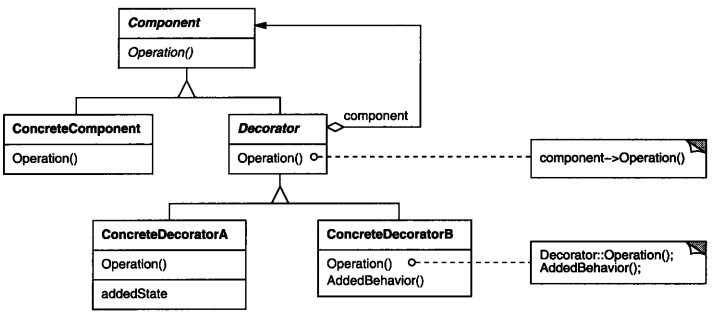
Python装饰器是装饰器模式的Python实现,实际上,就是函数包装器。Python解释器加载函数时,执行包装器。包装器可以修改函数接收的参数和返回值。
2. 对请求方法过滤
如果不使用装饰器,需要实现函数is_post_method_return_true_or_err_resp ,从request中获取请求的方法,进行判断。当判定为否时,返回一个 HttpResponse 对象。
 1
 2
 3
 4
 5
 6
 7
 8
 9
10
11
12
13
14
15
| # -*- coding: utf-8 -*-
import json
from django.http import HttpResponse
def is_post_method_return_true_or_err_resp(request):
if request.method == "POST":
return True, None
else:
return False, HttpResponse(
json.dumps({
"result": False,
"data": [],
"message": u"请使用POST方法",
"code": -1
}), content_type='application/json')
|
在使用时,在 view 函数中,调用 utils 中判断的函数即可。
1
2
3
4
5
| def my_view(request):
checked, error_resp = is_post_method_return_true_or_err_resp(request)
if checked:
return error_resp
pass
|
3. Django装饰器
上面的实现方式,每次调用函数,都需要判断返回值,return 一个 HttpResponse。能不能将这部分也提取出来呢?当然可以,Django 提供了相应的装饰器。
1
2
3
4
5
| from django.views.decorators.http import require_GET
@require_POST
def my_view(request):
pass
|
上面的 @require_POST,是 Python 中使用装饰器的语法糖。只需要一行代码,就给 view 函数,装配上仅限POST方法的功能。
如果使用GET方法访问,Django 会返回给浏览器:
GET YOUR_URL 405 (METHOD NOT ALLOWED)
4. 写一个装饰器
为了更进一步了解装饰器的原理和实现方法,这里使用Python实现一个 my_require_http_methods 装饰器,传入允许的请求方法列表。如果,请求的方法被允许,继续执行,否则返回错误提示。
4.1 一个简单的装饰器
 1
 2
 3
 4
 5
 6
 7
 8
 9
10
11
12
13
14
15
16
17
18
19
20
| import json
from django.http import HttpResponse
def is_post_method(func):
def my_function(request, *args, **kwargs):
if request.method == "POST":
# do somthing
return func(request, *args, **kwargs)
else:
# do something
return HttpResponse(
json.dumps({
"result": False,
"data": [],
"message": u"请使用POST方法",
"code": -1
}), content_type='application/json')
return my_function
|
在 view 函数前面增加 @is_post_method,即可。
1
2
3
| @is_post_method
def my_view(request):
pass
|
上面的调用过程为:
1
| is_post_method(my_view)()
|
被装饰器修饰的 my_view 函数作为参数,调用 is_post_method 函数。首先执行的是,my_function 函数,然后是 my_vew 函数。
4.2 带参数的装饰器
如果装饰器新增的功能,需要传入参数怎么办呢?装饰器可以理解为一个闭包,将函数当做参数,然后返回一个绑定变量的函数。利用闭包,在外层,再定义一个高阶的函数,用于参数的传递。
 1
 2
 3
 4
 5
 6
 7
 8
 9
10
11
12
13
14
15
16
| def required_method(method_list):
def _required_method_decorator(func):
def my_function(request, *args, **kwargs):
if request.method in method_list:
return func(request, *args, **kwargs)
else:
return HttpResponse(
json.dumps({
"result": False,
"data": [],
"message": u"请使用%s方法" % "、".join(method_list),
"code": -1
}), content_type='application/json')
return my_function
return _required_method_decorator
|
在 view 函数前面增加 @required_method,带上允许的方法列表参数,即可。
1
2
3
| @required_method(['POST'])
def my_view(request):
pass
|
上面的调用过程为:
1
| required_method(['POST'])(my_view)()
|
装饰器函数中,method_list=['POST'],func=my_view
4.3 元信息恢复
1
2
3
| @required_method(['GET'])
def home(request):
print home.__name__ # 输出 my_function
|
打印函数名,会发现被装饰器修饰过的函数,name属性被修改。不仅仅是name属性,元信息比如名字、文档字符串、注解和参数签名都丢失了。
为了解决这个问题,Django 的 utils.functional 包提供 wraps 装饰器来恢复元信息。最终的代码如下:
 1
 2
 3
 4
 5
 6
 7
 8
 9
10
11
12
13
14
15
16
17
18
19
20
21
22
| import json
from django.utils.functional import wraps
from django.http import HttpResponse
def required_method(method_list):
def _required_method_decorator(func):
@wraps(func)
def my_function(request, *args, **kwargs):
if request.method in method_list:
return func(request, *args, **kwargs)
else:
return HttpResponse(
json.dumps({
"result": False,
"data": [],
"message": u"请使用%s方法" % "、".join(method_list),
"code": -1
}), content_type='application/json')
return my_function
return _required_method_decorator
|
5. 参考



