





Memory leaks occur when an application allocates memory for an object, but then fails to release the memory when the object is no longer being used. Over time, leaked memory accumulates and results in poor app performance and even crashes. Leaks can happen in any program and on any platform, but they’re especially prevalent in Android apps due to complications with activity lifecycles. Recent Android patterns such as ViewModel and LifecycleObserver can help avoid memory leaks, but if you’re following older patterns or don’t know what to look out for, it’s easy to let mistakes slip through.
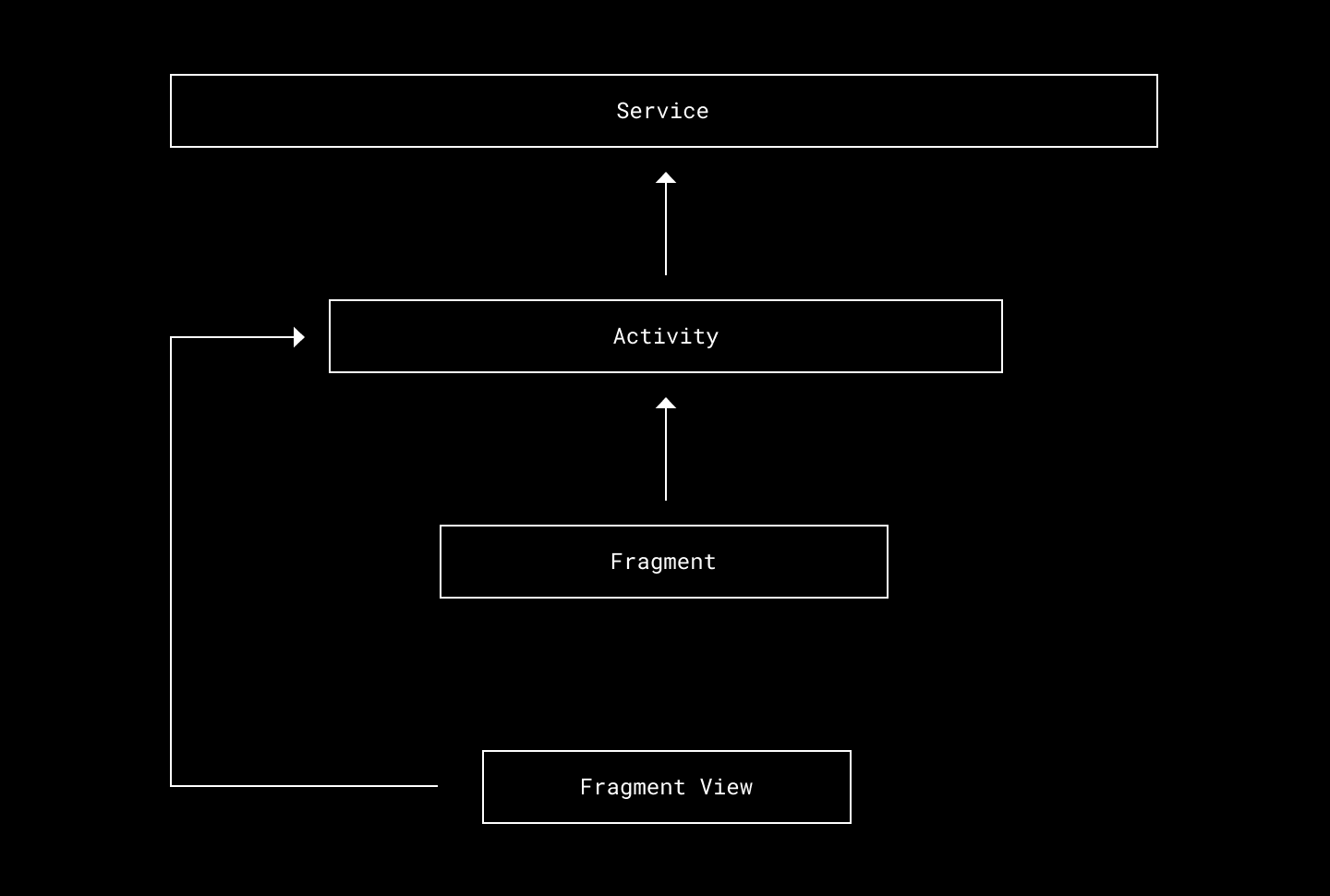
A fragment references an activity which references a long-lived service.
In this case, we have a standard setup with an activity that holds a reference to some long-living service, then a fragment and its view that hold references to the activity. For example, say that the activity somehow creates a reference to its child fragment. Then, for as long as the activity sticks around, the fragment will continue living too. This causes a leak for the duration between the fragment’s onDestroy and the activity’s onDestroy.
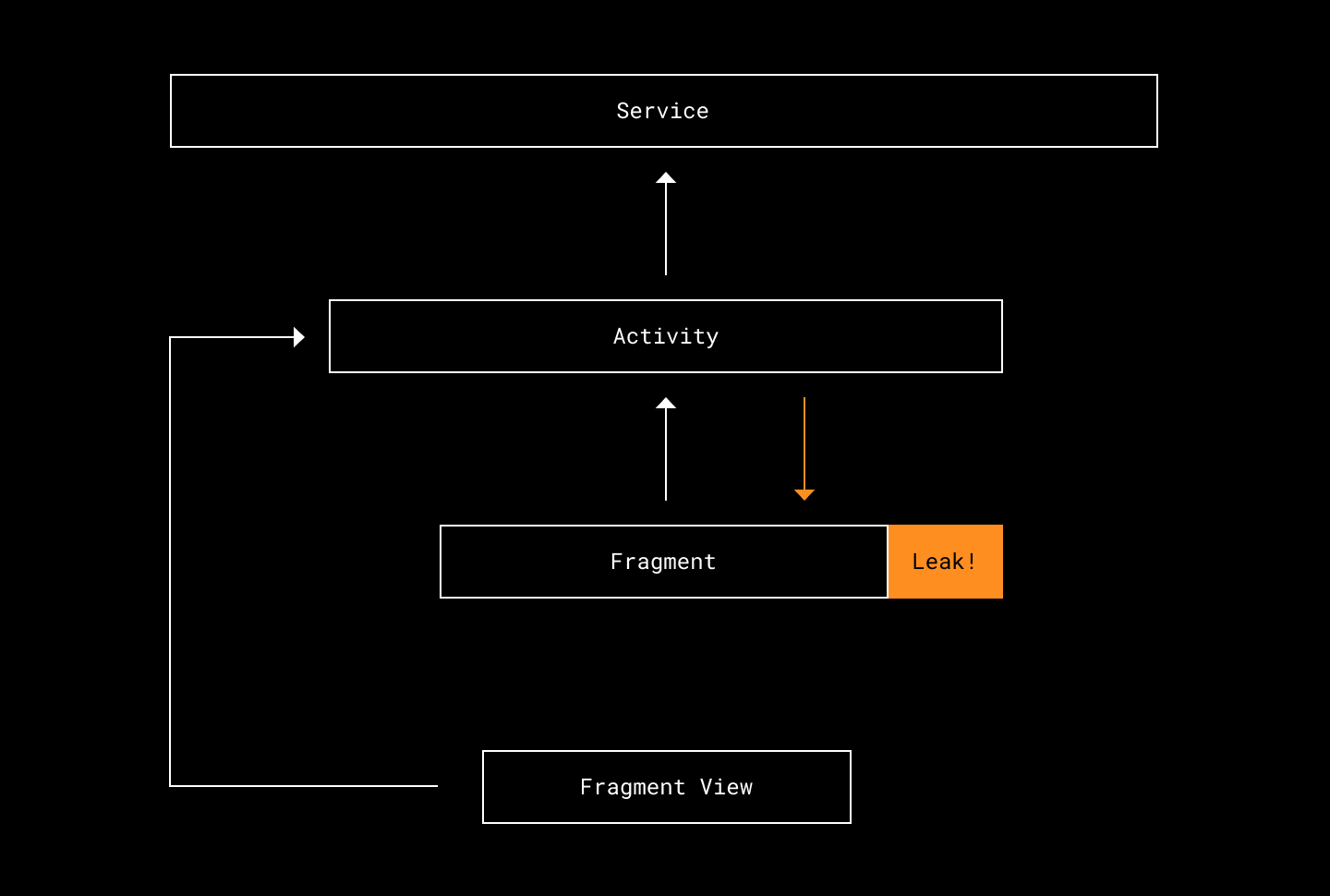
The fragment will never be used again, yet it persists in memory.
What if, in the other direction, the service obtained a reference to the fragment’s view? First, the view would now stay alive for the entire duration of the service. Furthermore, because the view holds a reference to its parent activity, the activity now leaks as well.
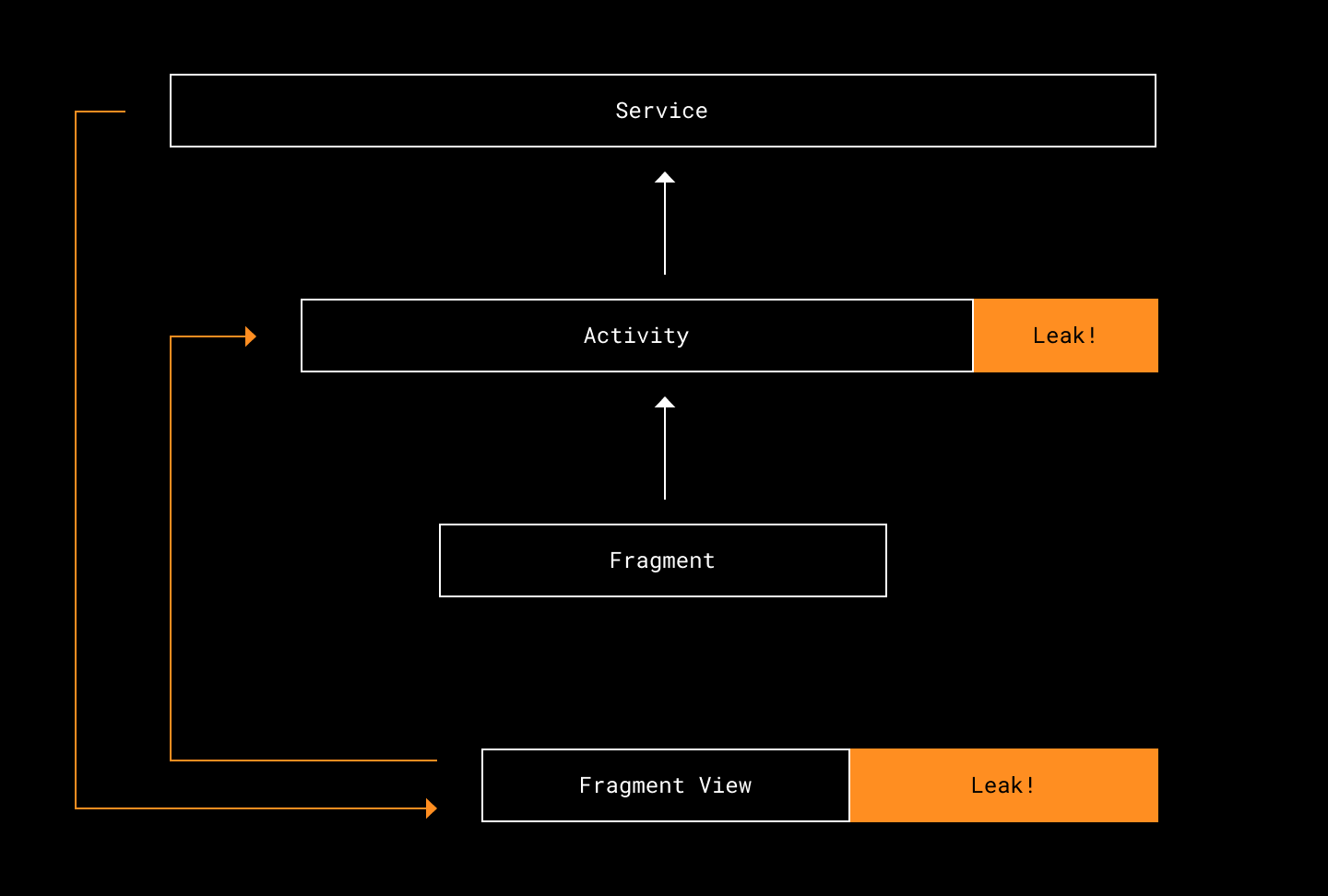
As long as the Service lives, the FragmentView and Activity will squander memory.
Now that we know how memory leaks happen, let’s discuss what we can do to detect them. An obvious first step is to check if your app ever crashes due to OutOfMemoryError. Unless there’s a single screen that eats more memory than your phone has available, you have a memory leak somewhere.

This approach only tells you the existence of the problem—not the root cause. The memory leak could have happened anywhere, and the crash that’s logged doesn’t point to the leak, only to the screen that finally tipped memory usage over the limit.
You could inspect all the breadcrumbs to see if there’s some similarity, but chances are the culprit won’t be easy to discern. Let’s explore other options.
One of the best tools out there is LeakCanary, a memory leak detection library for Android. We simply add a dependency on our build.gradle file. The next time we install and run our app, LeakCanary will be running alongside it. As we navigate through our app, LeakCanary will pause occasionally to dump the memory and provide leak traces of detected leaks.
This one step is vastly better than what we had before. But the process is still manual, and each developer will only have a local copy of the memory leaks they’ve personally encountered. We can do better!
LeakCanary provides a very handy code recipe for uploading found leaks to Bugsnag. We’re then able to track memory leaks just as we do any other warning or crash in the app. We can even take this one step further and use Bugsnag’s integrations to hook it up to project management software such as Jira for even more visibility and accountability.
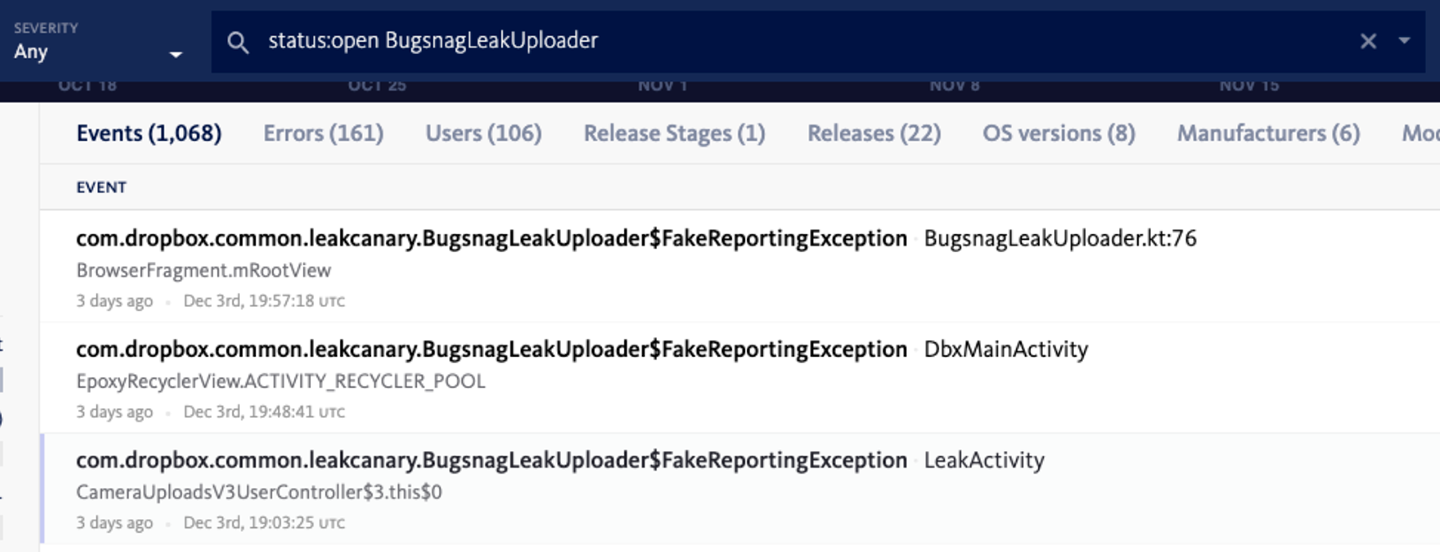
Bugsnag connected to Jira
Another way to improve automation is to hook up LeakCanary to CI tests. Again, we are given a code recipe to start with. From the official documentation:
LeakCanary provides an artifact dedicated to detecting leaks in UI tests which provides a run listener that waits for the end of a test, and if the test succeeds then it looks for retained objects, trigger a heap dump if needed and perform an analysis.
Be aware that LeakCanary will slow down testing, as it dumps the heap after each test to which it listens. In our case, because of our selective testing and sharding set up, the extra time added is negligible.
Our end result is that memory leaks are surfaced just as any other build or test failure on CI, with the leak trace at the time of the leak recorded.
Running LeakCanary on CI has helped us learn better coding patterns, especially when it comes to new libraries, before any code hits production. For example, it caught this leak when we were working with MvRx mocks:
<failure>Test failed because application memory leaks were detected: ==================================== HEAP ANALYSIS RESULT ==================================== 4 APPLICATION LEAKS References underlined with "~~~" are likely causes. Learn more at https://squ.re/leaks. 198449 bytes retained by leaking objects Signature: 6bf2ba80511dcb6ab9697257143e3071fca4 ┬───
│ GC Root: System class
│ ├─ com.airbnb.mvrx.mocking.MockableMavericks class
│ Leaking: NO (a class is never leaking)
│ ↓ static MockableMavericks.mockStateHolder
│                            ~~~~~~~~~~~~~~~
├─ com.airbnb.mvrx.mocking.MockStateHolder instance
│ Leaking: UNKNOWN
│ ↓ MockStateHolder.delegateInfoMap
│                   ~~~~~~~~~~~~~~~
├─ java.util.LinkedHashMap instance
│ Leaking: UNKNOWN
│ ↓ LinkedHashMap.header
│                 ~~~~~~
├─ java.util.LinkedHashMap$LinkedEntry instance
│ Leaking: UNKNOWN
│ ↓ LinkedHashMap$LinkedEntry.prv
│                             ~~~
├─ java.util.LinkedHashMap$LinkedEntry instance
│ Leaking: UNKNOWN
│ ↓ LinkedHashMap$LinkedEntry.key
│                             ~~~
╰→ com.dropbox.product.android.dbapp.photos.ui.view.PhotosFragment instance
   Leaking: YES (ObjectWatcher was watching this because com.dropbox.product.android.dbapp.photos.ui.view.PhotosFragment received Fragment#onDestroy() callback and Fragment#mFragmentManager is null)
   key = 391c9051-ad2c-4282-9279-d7df13d205c3
   watchDurationMillis = 7304
   retainedDurationMillis = 2304 198427 bytes retained by leaking objects
   Signature: d1c9f9707034dd15604d8f2e63ff3bf3ecb61f8
It turned out that we hadn’t properly cleaned up the mocks when writing the test. Adding a few lines of code avoids the leak:
   @After
    fun teardown() {
        scenario.close()
        val holder = MockableMavericks.mockStateHolder
        holder.clearAllMocks()
    }
You may be wondering: Since this memory leak only happens in tests, is it really that important to fix? Well, that’s up to you! Like linters, leak detection can tell you when there’s code smell or bad coding patterns. It can help teach engineers to write more robust code—in this case, we learned about the existence of clearAllMocks(). The severity of a leak and whether or not it’s imperative to fix are decisions an engineer can make.
For tests on which we don’t want to run leak detection, we wrote a simple annotation:
@Retention(RetentionPolicy.RUNTIME)
@Target({ElementType.METHOD, ElementType.TYPE})
public @interface SkipLeakDetection {
    /**
     * The reason why the test should skip leak detection.
     */
    String value();
}
and in our class which overrides LeakCanary’s FailOnLeakRunListener():
override fun skipLeakDetectionReason(description: Description): String? {
    return when {
        description.getAnnotation(SkipLeakDetection::class.java) != null ->
            "is annotated with @SkipLeakDetection"
        description.testClass.isAnnotationPresent(SkipLeakDetection::class.java) ->
            "class is annotated with @SkipLeakDetection"
        else -> null
    }
}
Individual tests or entire test classes can use this annotation to skip leak detection.
Now that we’ve gone over various ways to find and surface memory leaks, let’s talk about how to actually understand and fix them.
The leak trace provided by LeakCanary will be the single most useful tool for diagnosing a leak. Essentially, the leak trace prints out a chain of references associated with the leaked object, and provides an explanation of why it’s considered a leak.
LeakCanary already has great documentation on how to read and use its leak trace, so there’s no need to repeat it here. Instead, let’s go over two categories of memory leaks that I mostly found myself dealing with.
It’s common to see views declared as class level variables in fragments: private TextView myTextView; or, now that more Android code is being written in Kotlin: private lateinit var myTextView: TextView—common enough for us not to realize that these can all cause memory leaks.
Unless these fields are nulled out in the fragment’s onDestroyView, (which you can’t do for a lateinit variable), the references to the views now live for the duration of the fragment’s lifecycle, and not the fragment’s view lifecycle as they should.
The simplest scenario of how this causes a leak: We are on FragmentA. We navigate to FragmentB, and now FragmentA is on the back stack. FragmentA is not destroyed, but FragmentA’s view is destroyed. Any views that are tied to FragmentA’s lifecycle are now held in memory when they don’t need to be.
For the most part, these leaks are small enough to not cause any performance issues or crashes. But for views that hold objects and data, images, view/data binding and the like, we are more likely to run into trouble.
So when possible, avoid storing views in class-level variables, or be sure to clean them up properly in onDestroyView.
Speaking of view/data binding, Android’s view binding documentation tells us exactly that: the field must be cleared to prevent leaks. Their code snippet recommends we do the following:
private var _binding: ResultProfileBinding? = null
// This property is only valid between onCreateView and
// onDestroyView.
private val binding get() = _binding!!

override fun onCreateView(inflater: LayoutInflater, container: ViewGroup?, savedInstanceState: Bundle?
): View? {
    _binding = ResultProfileBinding.inflate(inflater, container, false)
    val view = binding.root
    return view
}

override fun onDestroyView() {
    super.onDestroyView()
    _binding = null
}
This is lot of boilerplate to put in every fragment (also, avoid using !! which will throw a KotlinNullPointerException if the variable is null. Use explicit null handling instead.) We addressed this issue is by creating a ViewBindingHolder (and DataBindingHolder) that fragments can then implement:
interface ViewBindingHolder<B : ViewBinding> {

    var binding: B?

    // Only valid between onCreateView and onDestroyView.
    fun requireBinding() = checkNotNull(binding)

    fun requireBinding(lambda: (B) -> Unit) {
        binding?.let {
            lambda(it)
        }}

    /**
     * Make sure to use this with Fragment.viewLifecycleOwner
     */
    fun registerBinding(binding: B, lifecycleOwner: LifecycleOwner) {
        this.binding = binding
        lifecycleOwner.lifecycle.addObserver(object : DefaultLifecycleObserver {
            override fun onDestroy(owner: LifecycleOwner) {
                owner.lifecycle.removeObserver(this)
                this@ViewBindingHolder.binding = null
            }
        })
    }
}

interface DataBindingHolder<B : ViewDataBinding> : ViewBindingHolder<B>
This provides an easy and clean way for fragments to:
These are leaks that only stick around for a short duration of time. In particular, one that we ran into was caused by an EditTextView's async task. The async task lasted just longer than LeakCanary’s default wait time, so a leak was reported even though the memory was cleaned up properly soon afterward.
If you suspect you are running into a temporal leak, a good way to check is to use Android Studio’s memory profiler. Once you start a session within the profiler, take the steps to reproduce the leak, but wait for a longer period of time before dumping the heap and inspecting. The leak may be gone after the extra time.
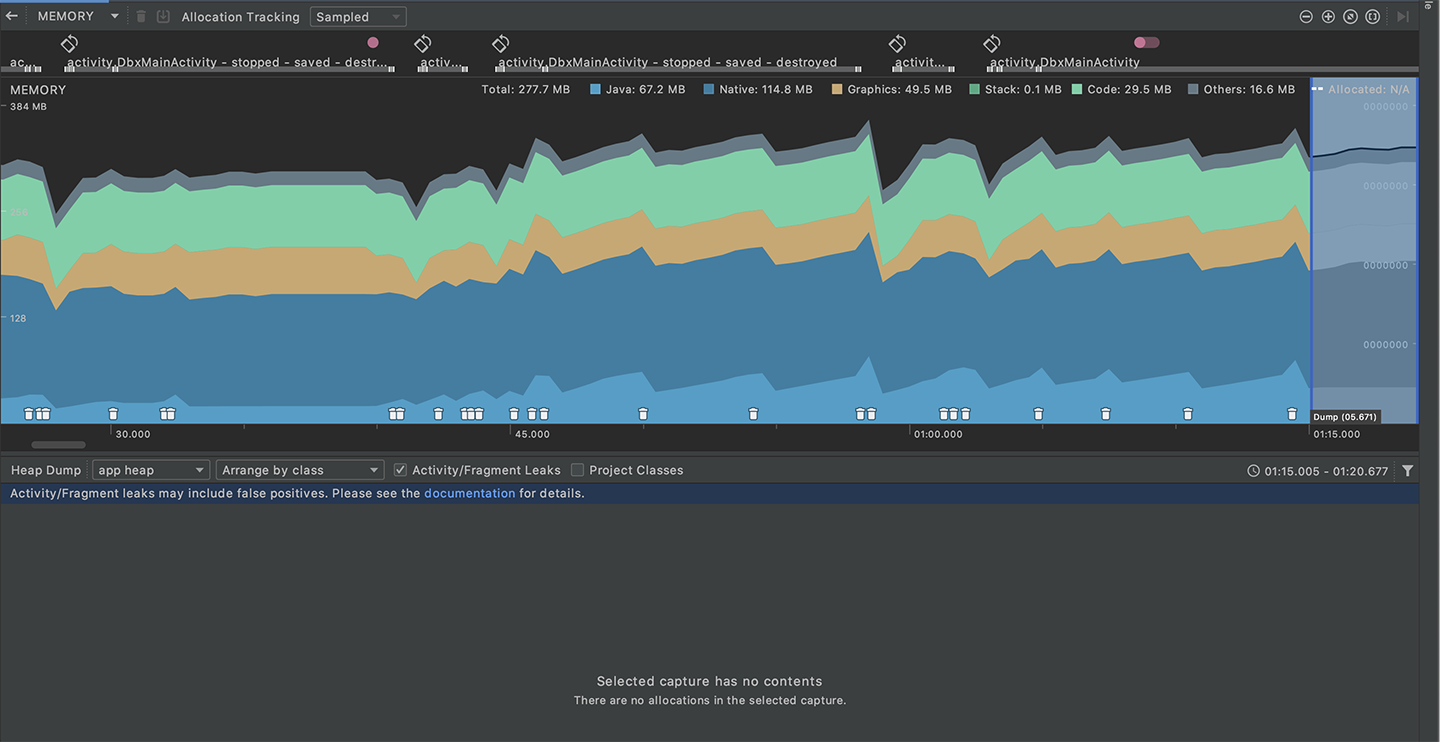
Android Studio’s memory profiler shows the effect of temporal leaks that get cleaned up.
We hope that with this overview, you’ll feel empowered to track down and tackle memory leaks in your own application! Like many bugs and other issues, it’s much better to test often and fix early before a bad pattern gets deeply baked into the codebase. As a developer, it’s important to remember that while memory leaks may not always affect your own app performance, users with lower-end models and lower-memory phones will appreciate the work you’ve done on their behalf. Happy leak hunting!
此内容由惯性聚合(RSS阅读器)自动聚合整理,仅供阅读参考。 原文来自 — 版权归原作者所有。