


"Modernize Java 8 to Java 21" sounds like one task. It is not. It touches the build, the runtime, dependencies, APIs, concurrency, tests, containers, and production behavior, often all at once. Ask an agent to do all of that in one prompt, and you get one enormous merge request that nobody can safely review.
Cursor, an AI coding agent, is good at the focused part of that problem. Give it one failing test or one bounded issue, and it can inspect the implementation, explain what went wrong, propose a fix, and run the tests without pulling us out of the development flow. What it cannot decide on its own is what "safe" means across a multi-step migration.
That is where GitLab comes in, with Duo Agent Platform orchestrating AI workflows in the rest of the software lifecycle, designed to certify the work of coding agents. The issue hierarchy with epics makes the plan durable and reviewable. The GitLab Model Context Protocol (MCP) server brings that software development lifecycle context into Cursor. CI/CD, security scanning, code review, impact analysis and a cross-service test give us the evidence we need before changing production behavior.
In this tutorial, we will walk through three use cases with Cursor and GitLab:
The progression matters: Start small, add project context, and then modernize one boundary. Cursor moves fast inside that boundary. Code Review Flow, Developer Flow, CI/CD, code owner approvals, and impact analysis are what keep that speed safe. They are not optional checkpoints, but the mechanism that holds every agent-created merge request to the same standard as any other.
We are using the Java HTTP metrics collector from the Tanuki IoT Platform for all three use cases. It checks HTTP endpoints, records metrics such as response status and timing, and sends readings to its Rust metrics backend. That gives us a visible application boundary to modernize and a real backend contract to verify. A while back, we developed the Rust backend in the Codex and GitLab tutorial, and it now fits into the production architecture:
flowchart LR
  subgraph sources["HTTP metric sources"]
    direction TB
    health["Health endpoint"]
    maintenance["Maintenance endpoint"]
  end

  java["Java HTTP metrics collector"]
  rust[("Rust metrics-store backend")]

  java -->|"GET"| health
  java -->|"GET"| maintenance
  java -->|"POST /api/metrics"| rust
  rust -->|"HTTP response"| java

  classDef source fill:#f8fafc,stroke:#64748b,stroke-width:2px,color:#0f172a
  classDef focus fill:#dcfce7,stroke:#16a34a,stroke-width:3px,color:#0f172a
  classDef backend fill:#e0f2fe,stroke:#0284c7,stroke-width:2px,color:#0f172a

  class health,maintenance source
  class java focus
  class rust backend
If you want to repeat the workflow in your own environment, start by importing and cloning the project and opening the project in Cursor:
      git clone https://gitlab.com/gitlab-da/demo-environments/tanuki-iot-platform/sensors/java-http-metrics-collector.git
cd java-http-metrics-collector

cursor .
The project includes an AGENTS.md file with repository instructions and Maven commands. Cursor can use these local instructions to understand how the project is organized and how changes should be tested.
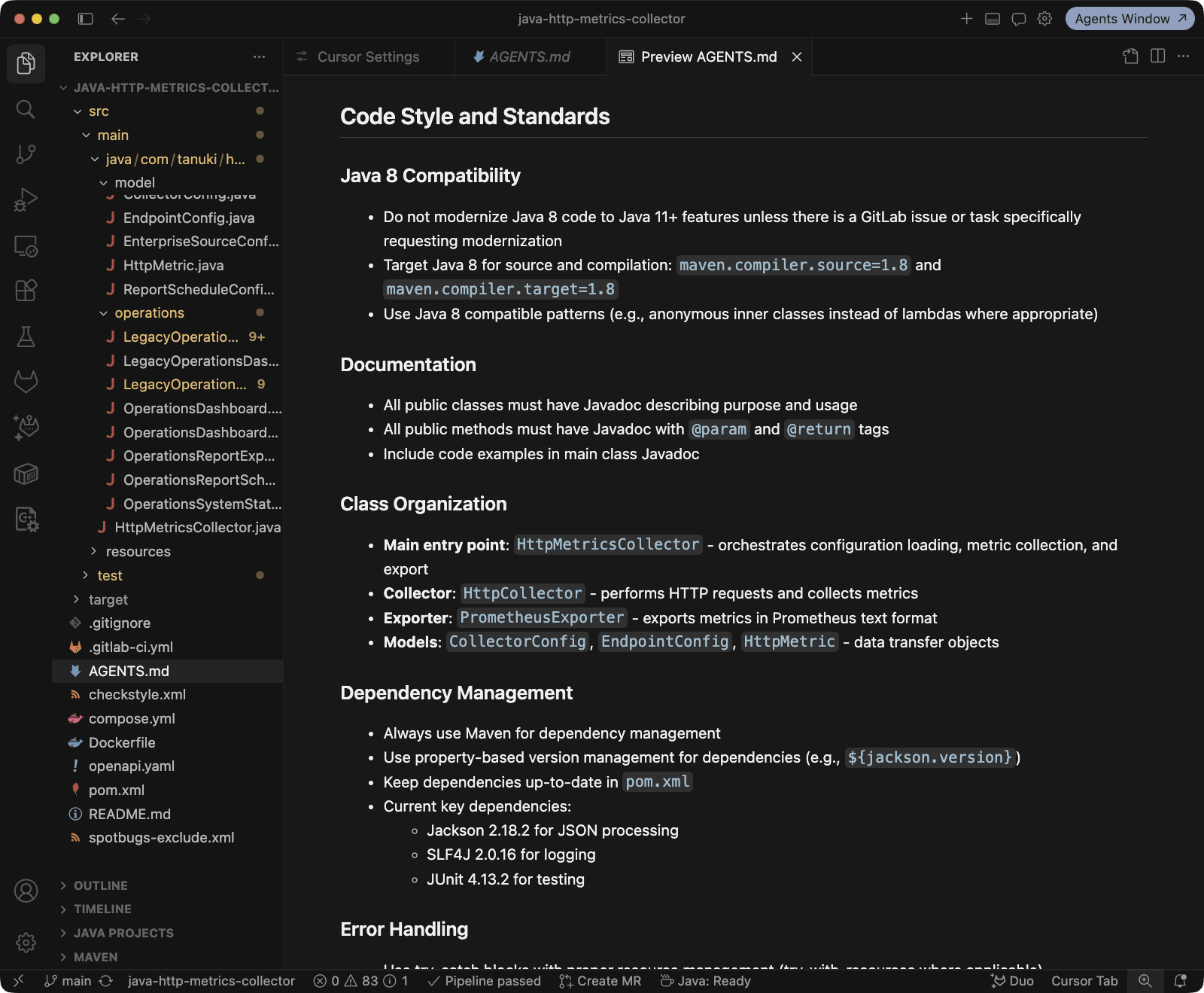
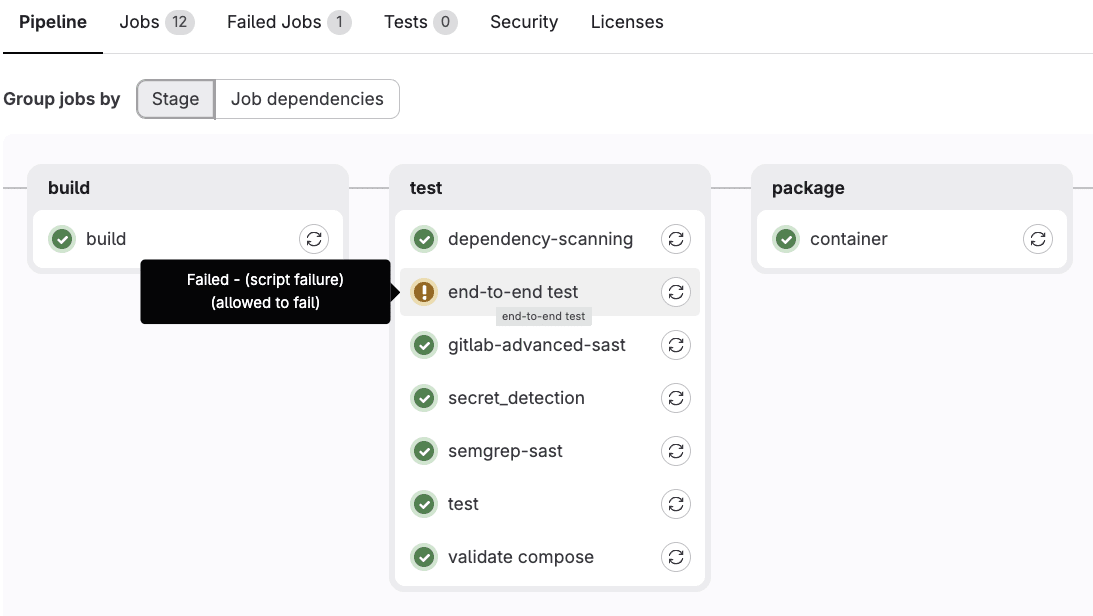
The collector allows users to configure the HTTP status code they expect from an endpoint. The implementation, however, treats every 2xx response as successful, and 503 errors would always fail even when configured as expected.
The end-to-end test already exposes this mismatch, but the CI/CD job is allowed to fail. That has turned a useful signal into accepted background noise.
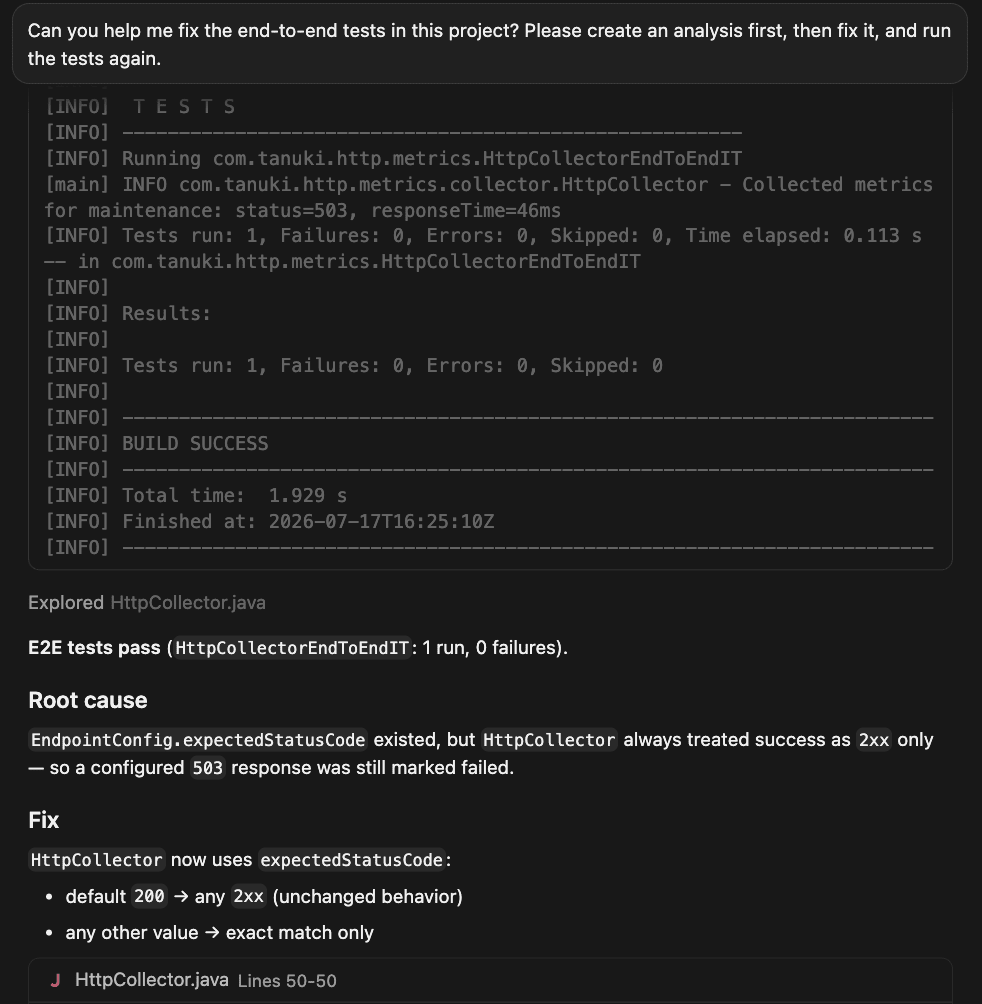
The problem can be reproduced locally. Open the Cursor IDE with a new chat, and start by describing the observable problem directly in the prompt:
Can you help me fix the end-to-end tests in this project? Please create an analysis first, then fix it, and run the tests again.
Cursor starts by tracing the endpoint configuration into HttpCollector and the failing end-to-end test, and identifies the root cause.
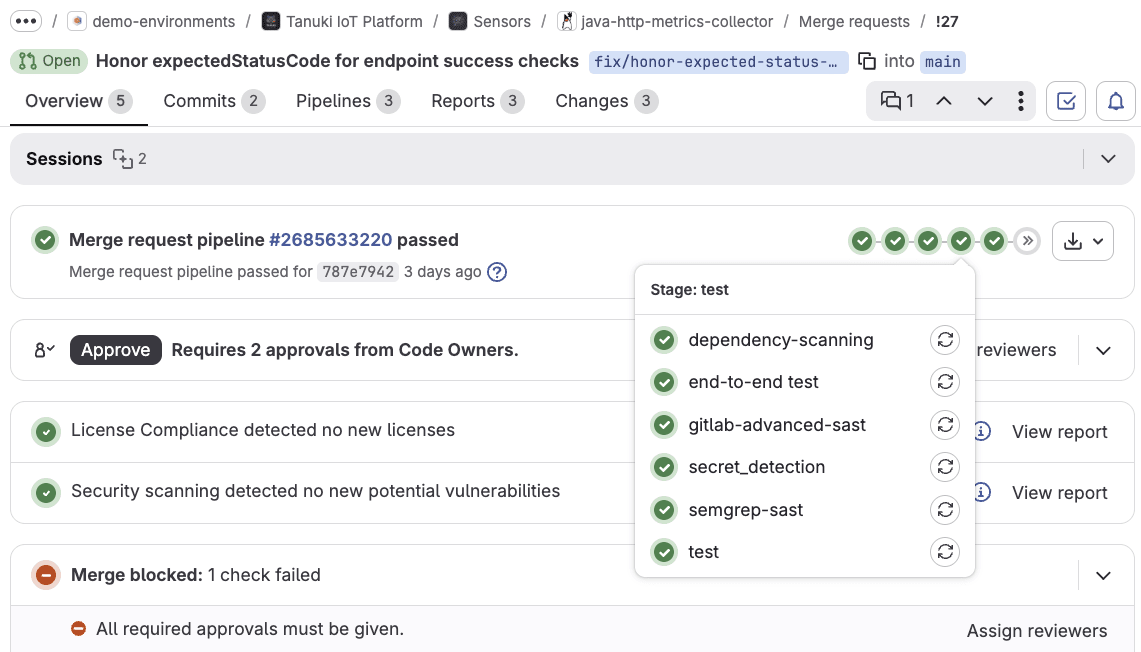
After the focused tests and the full Maven test suite pass, create a branch and merge request. The previously allowed-to-fail end-to-end job can become required when it is deterministic and green.
Can you create a git branch and merge request?
The merge request automatically triggers CI/CD build and tests, and security scanning.
GitLab Duo Code Review then reviews the focused change using the project's Java-specific review instructions.
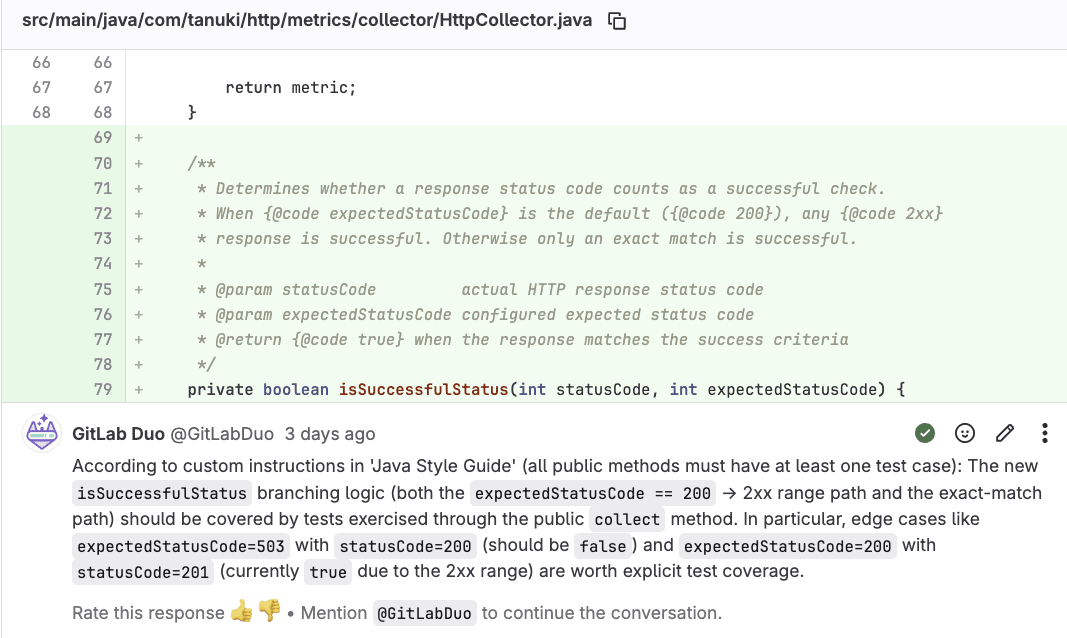
When the review identifies a concrete problem, we address it through the Developer Flow before merging. That is the point: Code Review Flow ensures every agent-created merge request meets the same bar as any other, regardless of how fast Cursor produced it. The merge request remains the collaboration and decision surface.
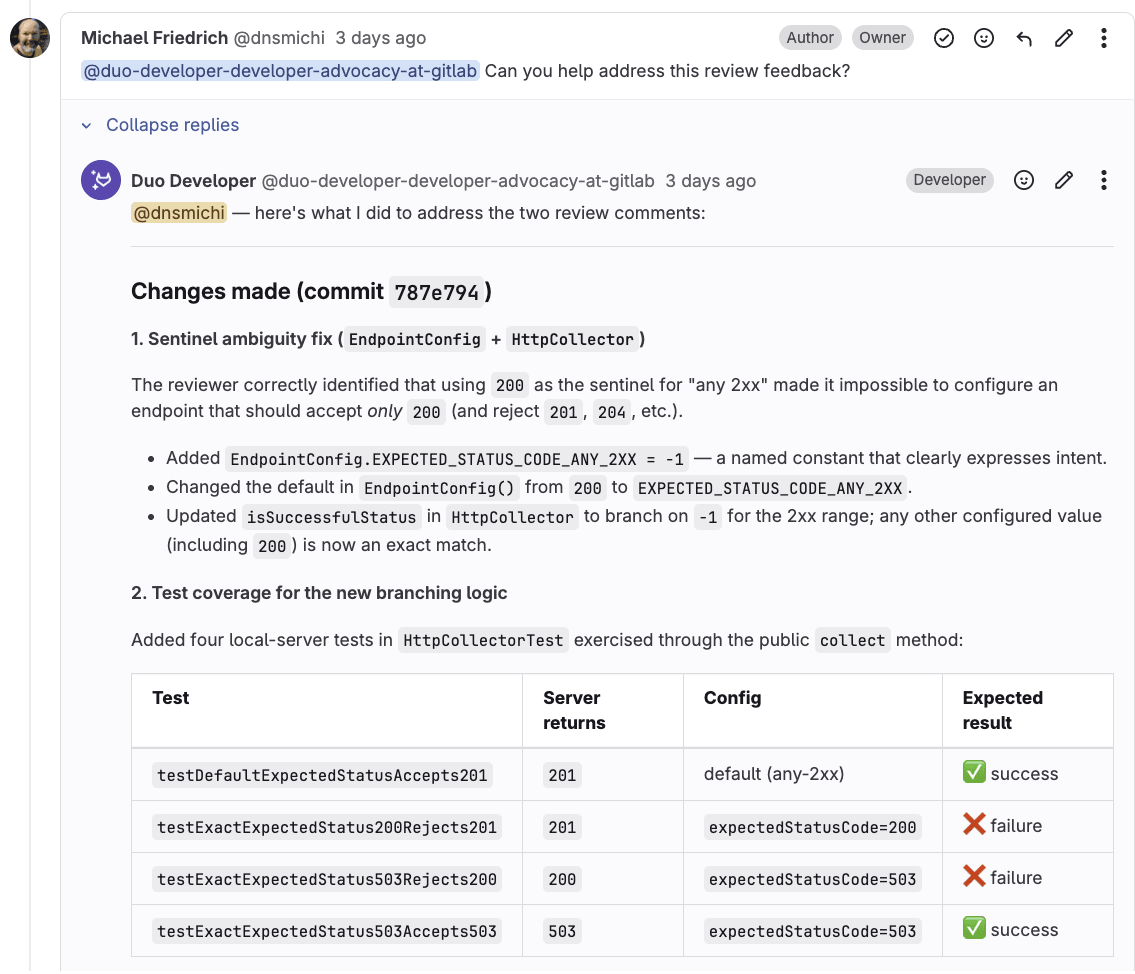
The fix gives us a behavioral baseline. We corrected a real bug without mixing it with a runtime migration, and the tests now protect the expected-status contract during the modernization work that follows.
Watch this video to learn how Cursor investigates and fixes the expected end-to-end tests:
The first fix worked with repository context alone. The next request is much larger: Modernize the collector from Java 8 to Java 21.
That work already has planning context in the Java modernization epic: child work items, team discussions, research with merge requests, pipeline history, dependencies, and security findings. Those details do not live in the local checkout. Instead of copying all of them into one enormous prompt, we can bring the GitLab context into Cursor with MCP.
Ensure that the GitLab MCP server is enabled on your instance or top-level group. Cursor uses HTTP transport to connect directly without additional dependencies.
To connect Cursor to the GitLab MCP server:
mcpServers key in the opened mcp.json file. For GitLab.com, replace <gitlab.example.com> with gitlab.com. For GitLab Self-Managed or Dedicated, use your GitLab instance URL. {
"mcpServers": {
"GitLab": {
"type": "http",
"url": "https://<gitlab.example.com>/api/v4/mcp"
}
}
}
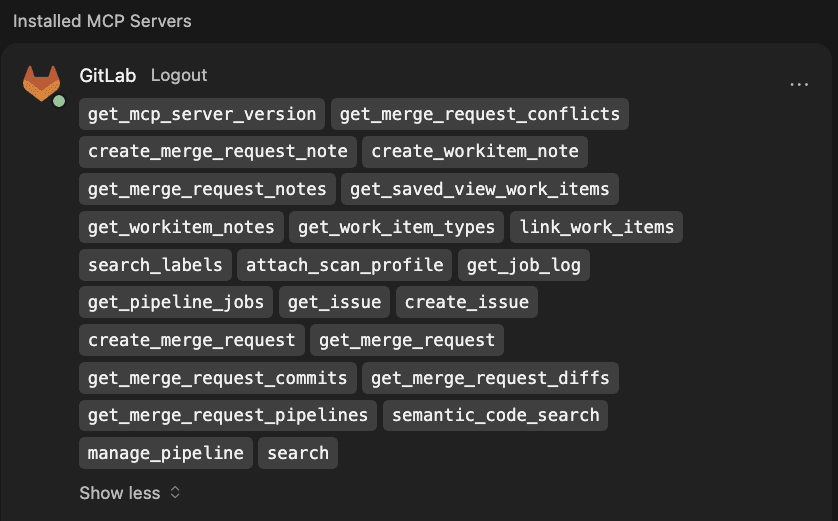
You can now start a new chat and ask a question based on the available GitLab MCP tools.
When Cursor authenticates with GitLab MCP, it acts with your existing GitLab identity. It can only access projects and resources that you can already access. MCP brings approved context into the IDE; it does not bypass GitLab permissions.
The Java 8 to 21 modernization epic breaks down the necessary plan into smaller iterations, each artifact and change being testable on its own.
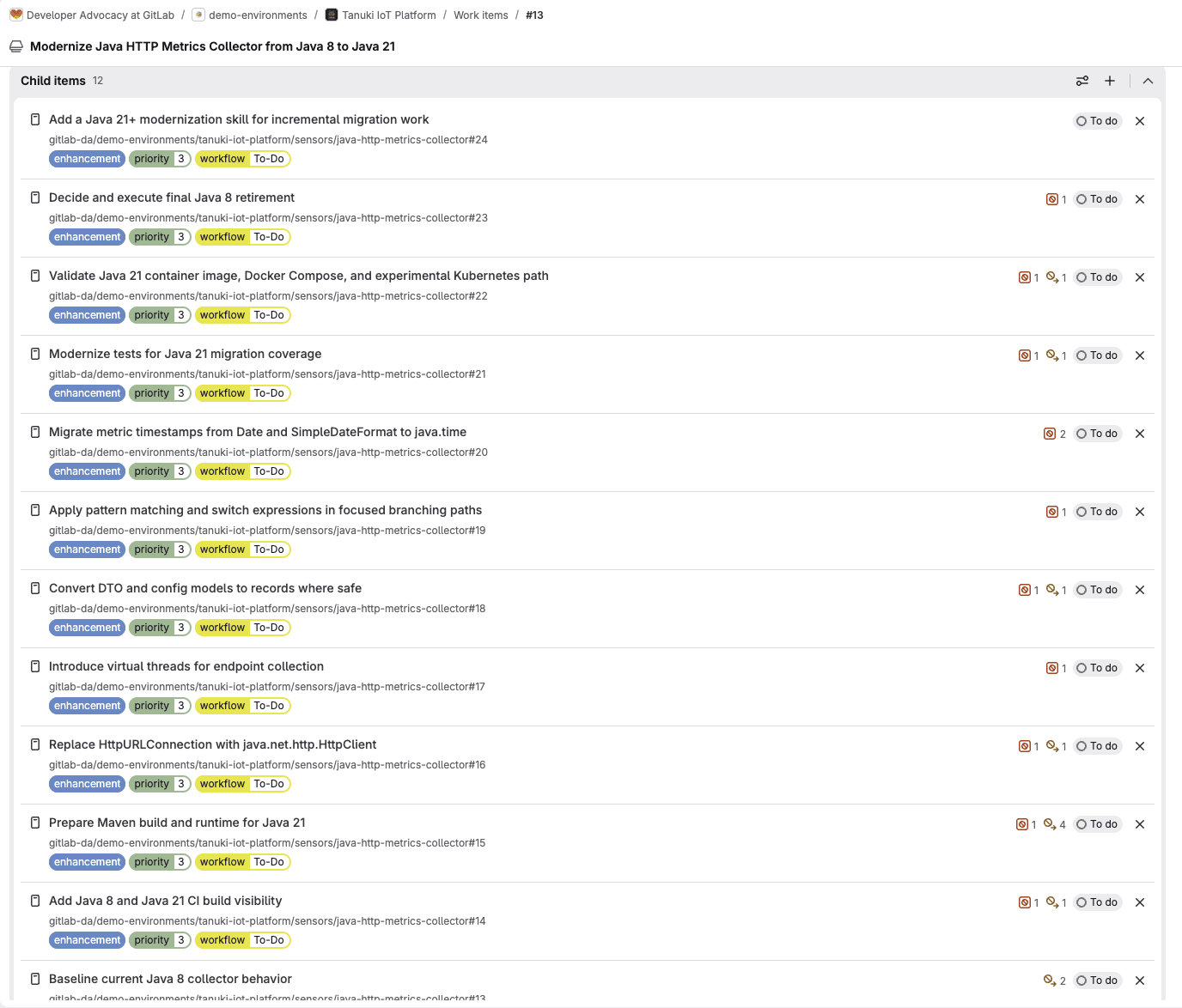
The first step is to ensure that the CI/CD infrastructure tests both Java 8 and 21, in parallel. Increasing the test coverage from the beginning into each modernization task is mandatory, too.
Open the Cursor IDE, and use the following prompt to fetch the planning context:
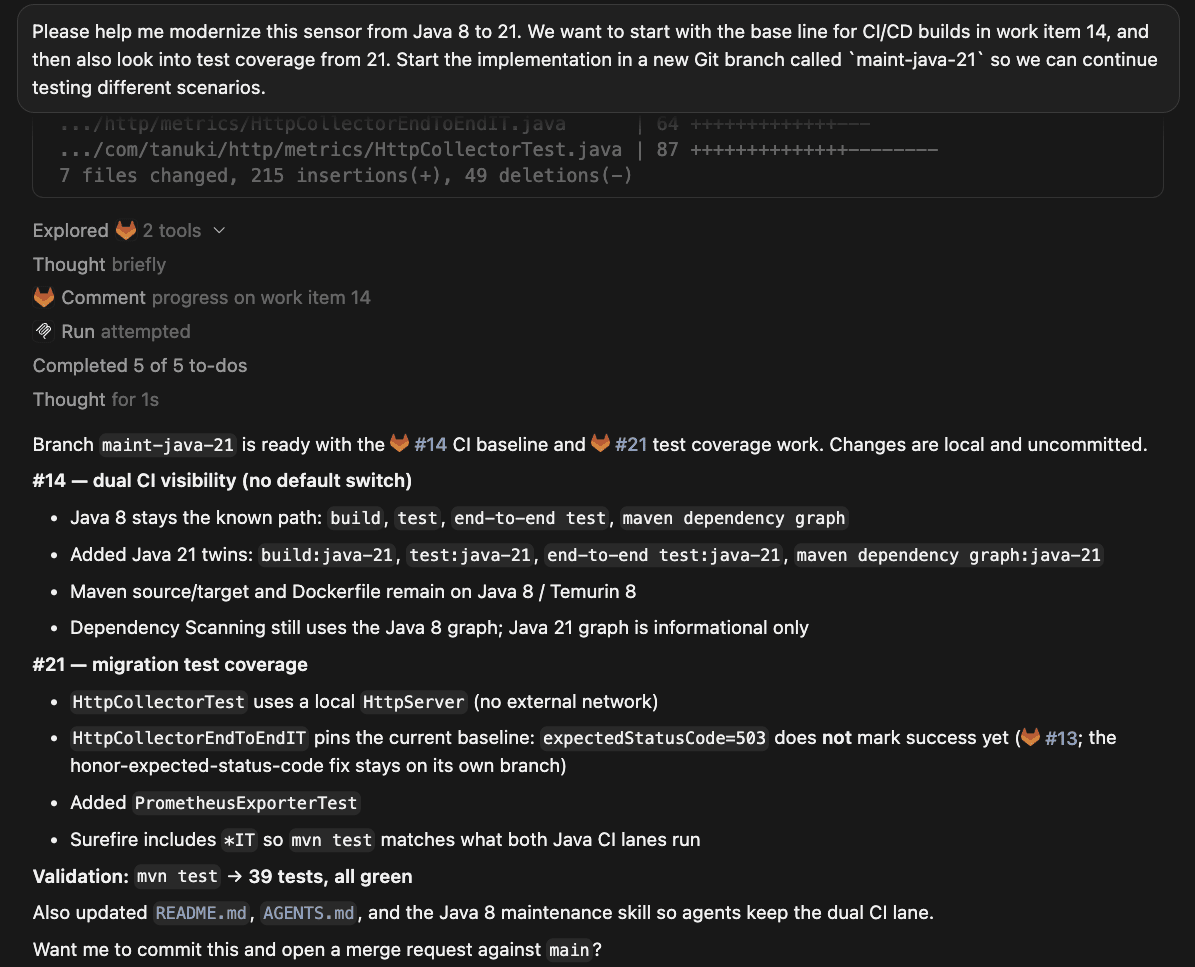
Please help me modernize this sensor from Java 8 to 21. We want to start with the base line for CI/CD builds in work item 14, and then also look into test coverage from 21. Start the implementation in a new Git branch called `maint-java-21` so we can continue testing different scenarios.
After finishing the work on the CI build visibility issue, Cursor can use the create_workitem_note MCP tool to add a summary comment into the issue, too.
The new merge request triggers CI/CD pipelines, and also the Code Review Flow, which leaves comments about the development style guide requiring documentation.
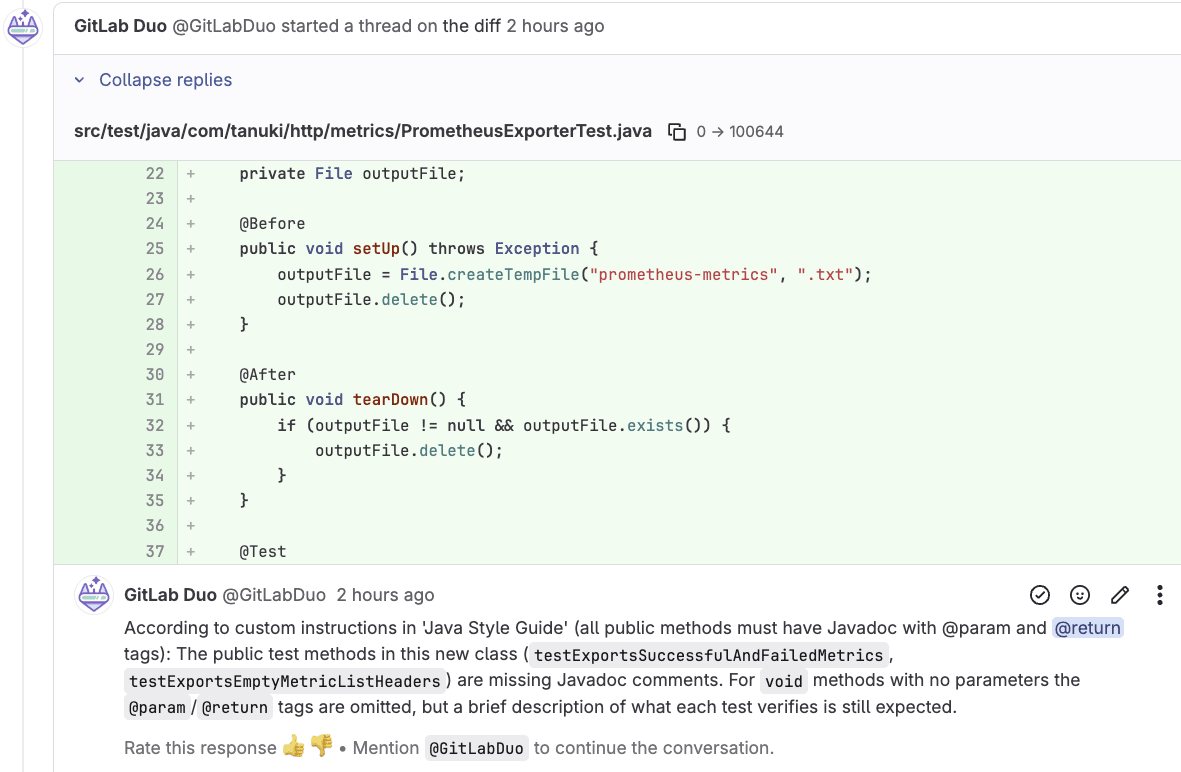
We can immediately address the feedback in the GitLab UI by mentioning the Developer Flow's service account.
@duo-developer-<group-name> Can you help address the review feedback?
This prompt starts a new background session, and we can focus on other tasks meanwhile. Alternatively, we can change back into the Cursor IDE and prompt its chat to address the review feedback in the merge request.
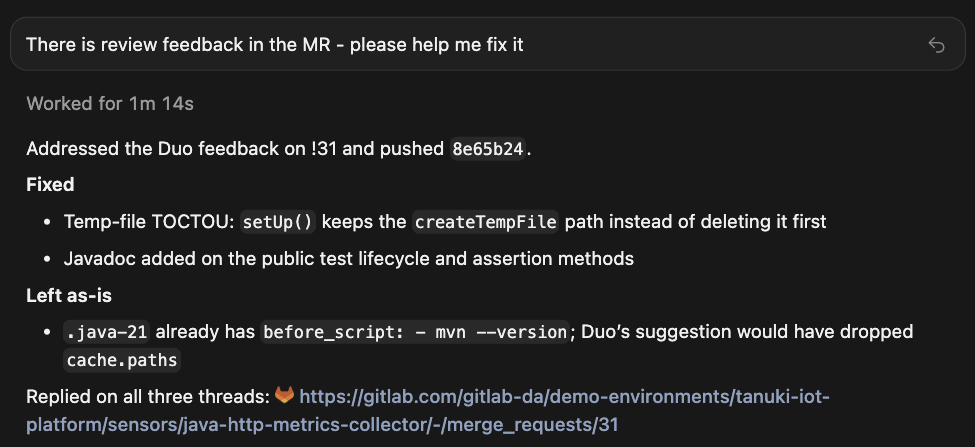
Cursor implements the changes, and adds comments into the merge request threads using the create_merge_request_note MCP tool.
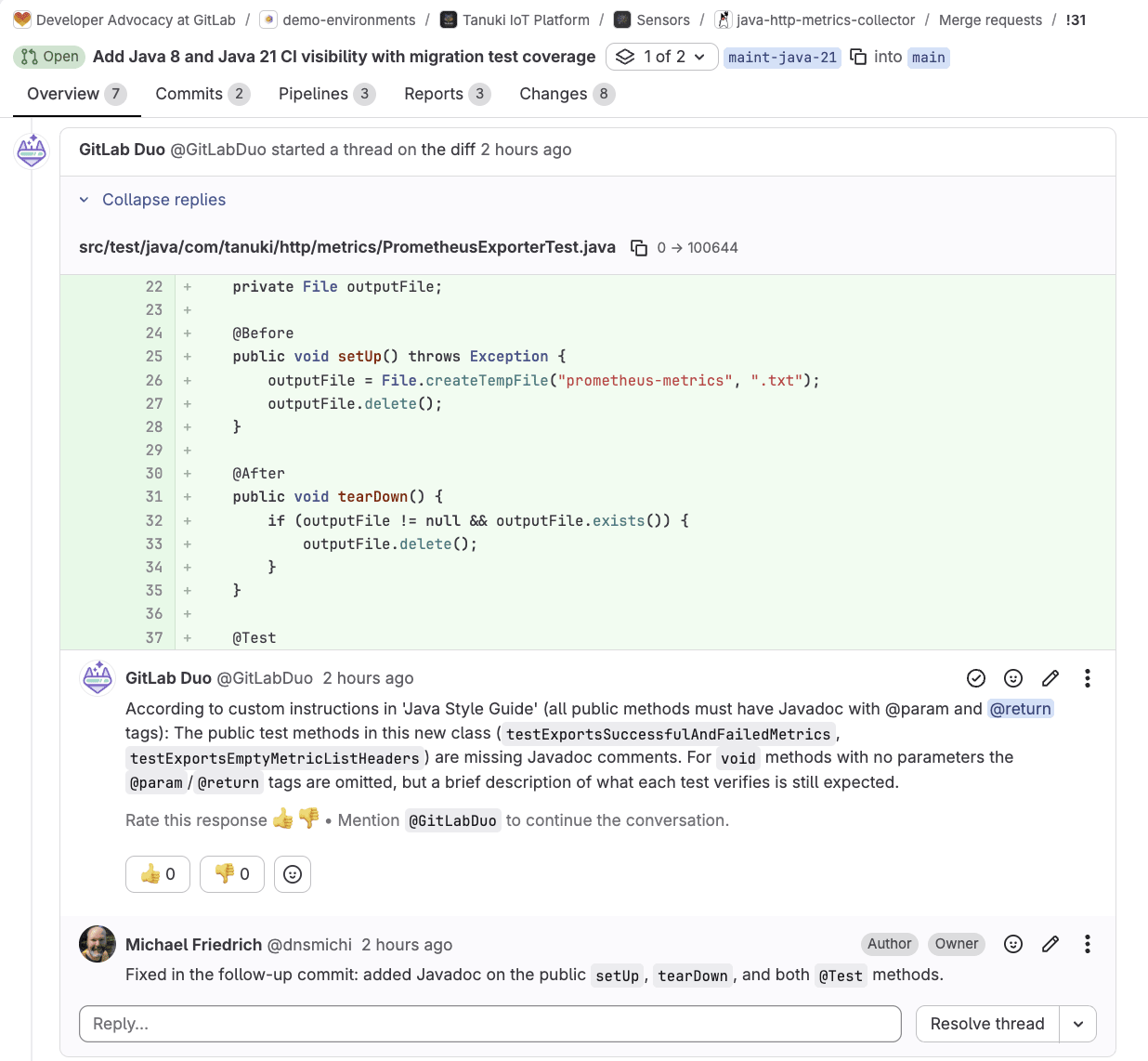
The change keeps the temporary Java 8 baseline and adds distinct Java 21 build and test validation. This change makes compatibility visible in the pipeline before the source starts using Java 21-only APIs. Once these quality gates exist, every subsequent agent-driven change is reviewed, tested, and traceable. That is the same standard we apply to any other merge request, and it is what makes it safe to let Cursor move fast.
Watch this video to learn how Cursor uses GitLab MCP to prepare quality gates and address code review feedback:
The Java HTTP metrics collector currently uses the legacy HttpURLConnection API from Java 8. Java 21 modernized the HTTP library with java.net.http.HttpClient, but this is not just a mechanical rename. Redirects, restricted headers, timeout scope, response bodies, interruption, and connection reuse can all behave differently. That is why the implementation lives in one bounded work item: Replace HttpURLConnection with java.net.http.HttpClient. Let's put that into practice.
Open the Cursor IDE with a new chat, and ask to implement the changes.
Note: For this use case, we want to use a local Docker compose setup to verify the changes. If you want to reproduce the behavior, install Docker and Docker compose, otherwise remove the second prompt.
      We want to continue modernizing the app to Java 21 - use the same maint-java-21 branch, and start implementing issue 16.

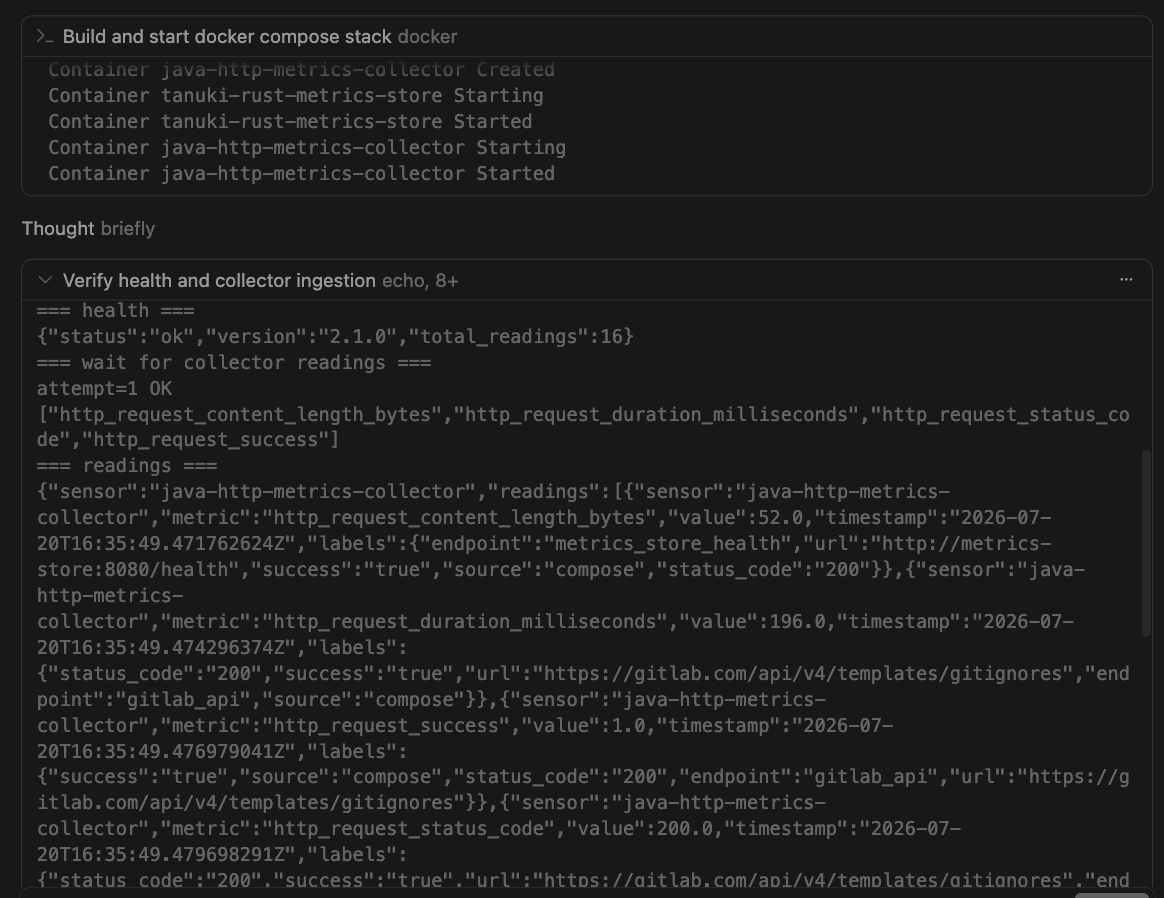
Verify the changes locally using the docker compose setup, after making the changes.
The GitLab MCP server provides the issue context, acceptance criteria, dependencies, and related discussions. The first code modernization issue remains deliberately synchronous and limited. It replaces HttpURLConnection with one reusable HttpClient and does not add virtual threads, change the time model, or remediate unrelated dependencies. Those are valuable follow-ups, but combining them would make behavior changes harder to isolate, review, and roll back.
Focused local HTTP server tests cover methods, headers, expected and unexpected status codes, redirects, timeouts, response metadata, connection failures, and interruption.
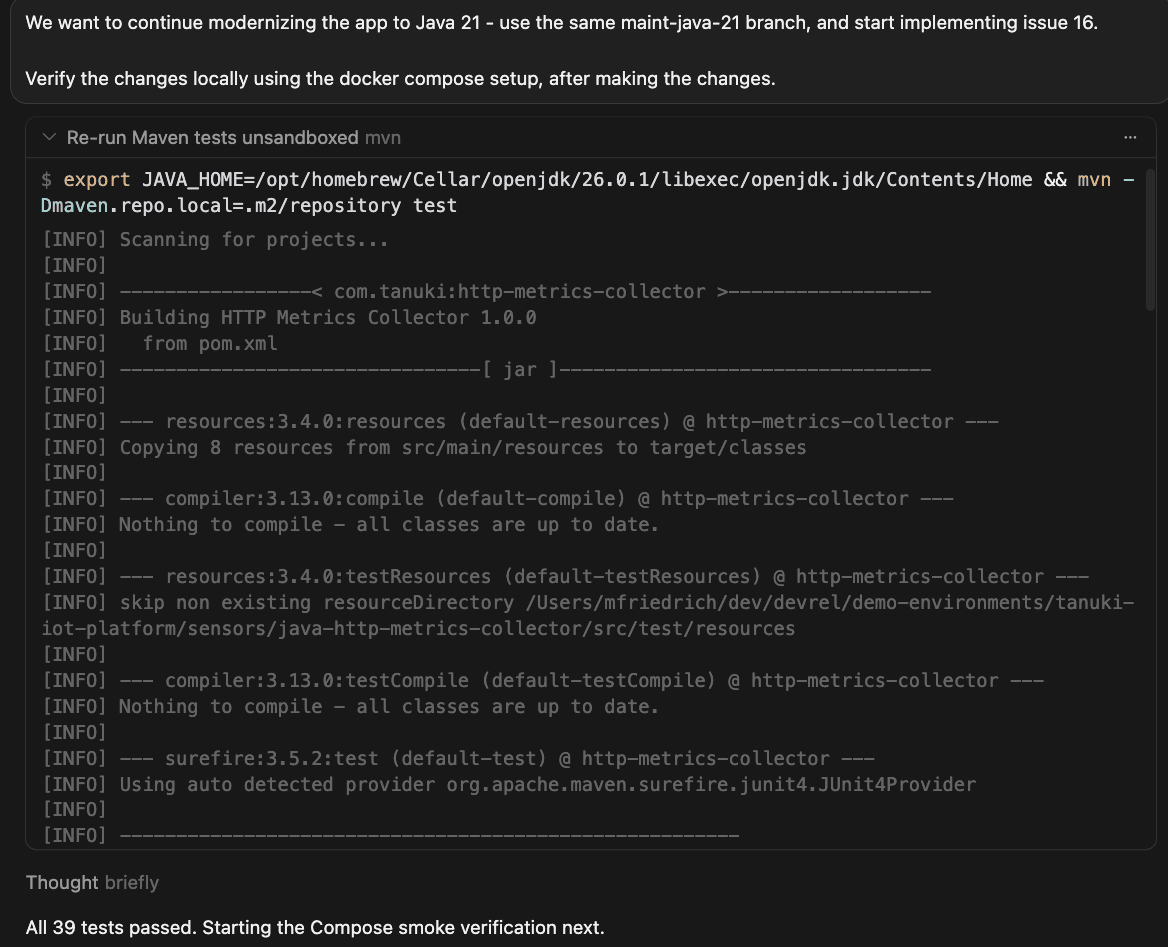
The Docker Compose functional test then proves that authenticated readings still arrive in the rust-metrics-store backend.
If the CI/CD pipelines are failing after the changes, leverage the GitLab MCP server tools to inspect and fix directly in the Cursor IDE without context switching.
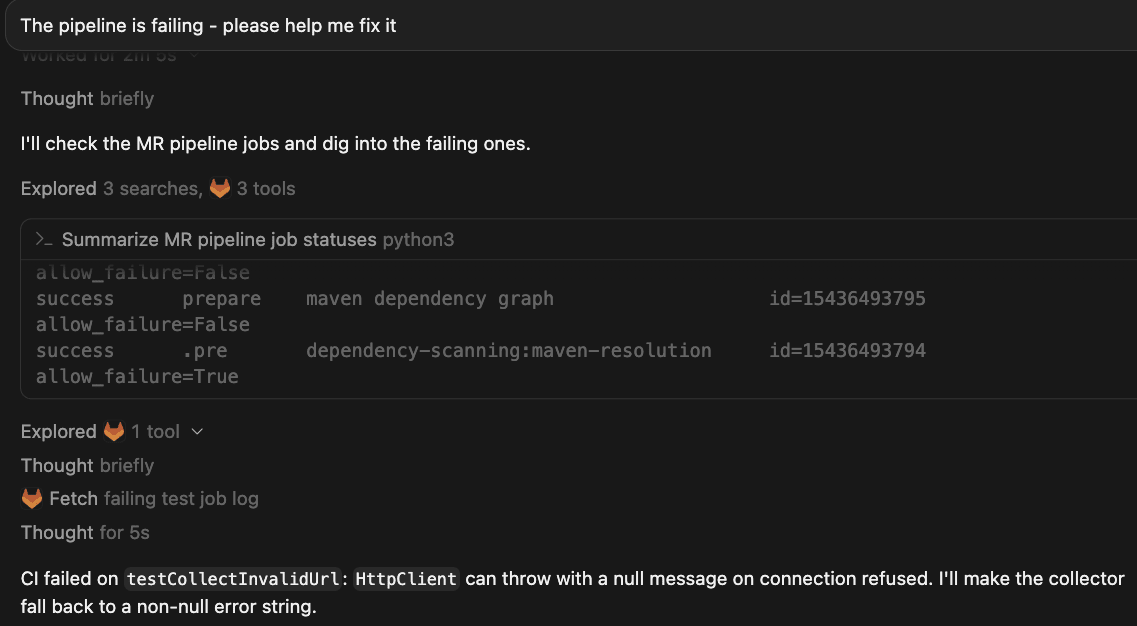
In the GitLab UI, you can use Fix CI/CD Pipeline Flow, or ask the CI Expert agent for help.
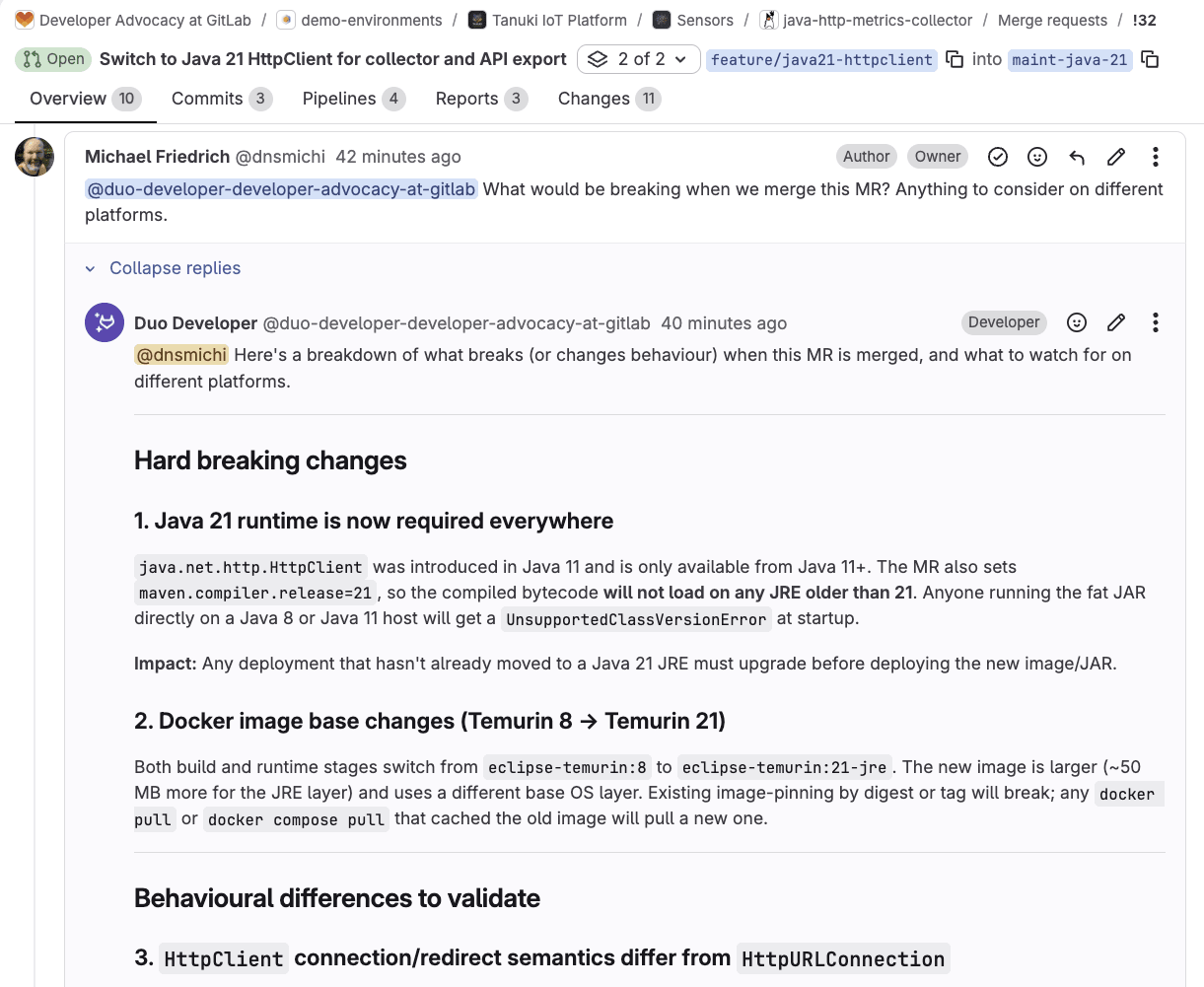
GitLab CI/CD, GitLab Duo Code Review, security scanning, and AI-assisted impact analysis provide the final evidence in the merge request. Human review still matters most at the subtle boundaries: Any intentional behavior difference should be explicit in the merge request, not discovered after deployment.
Watch this video to learn how Cursor and GitLab modernize the collector's HTTP library to Java 21:
Here are some tips to use Cursor and GitLab together.
The third use case shows the Developer Flow conducting a breaking change impact analysis. You can turn this workflow into an automated custom flow that gets triggered when a merge request is ready, or the pipeline is OK. Additional context can be retrieved from GitLab Orbit, which provides a context graph across code, work items, merge requests, vulnerabilities, and more.
You can start inspecting the example flow in the AI Catalog: MR Impact analysis (Orbit). Thanks to my teammate Fatima Sarah Kalid for the inspiration. Custom flows are generally available in GitLab 19.2.
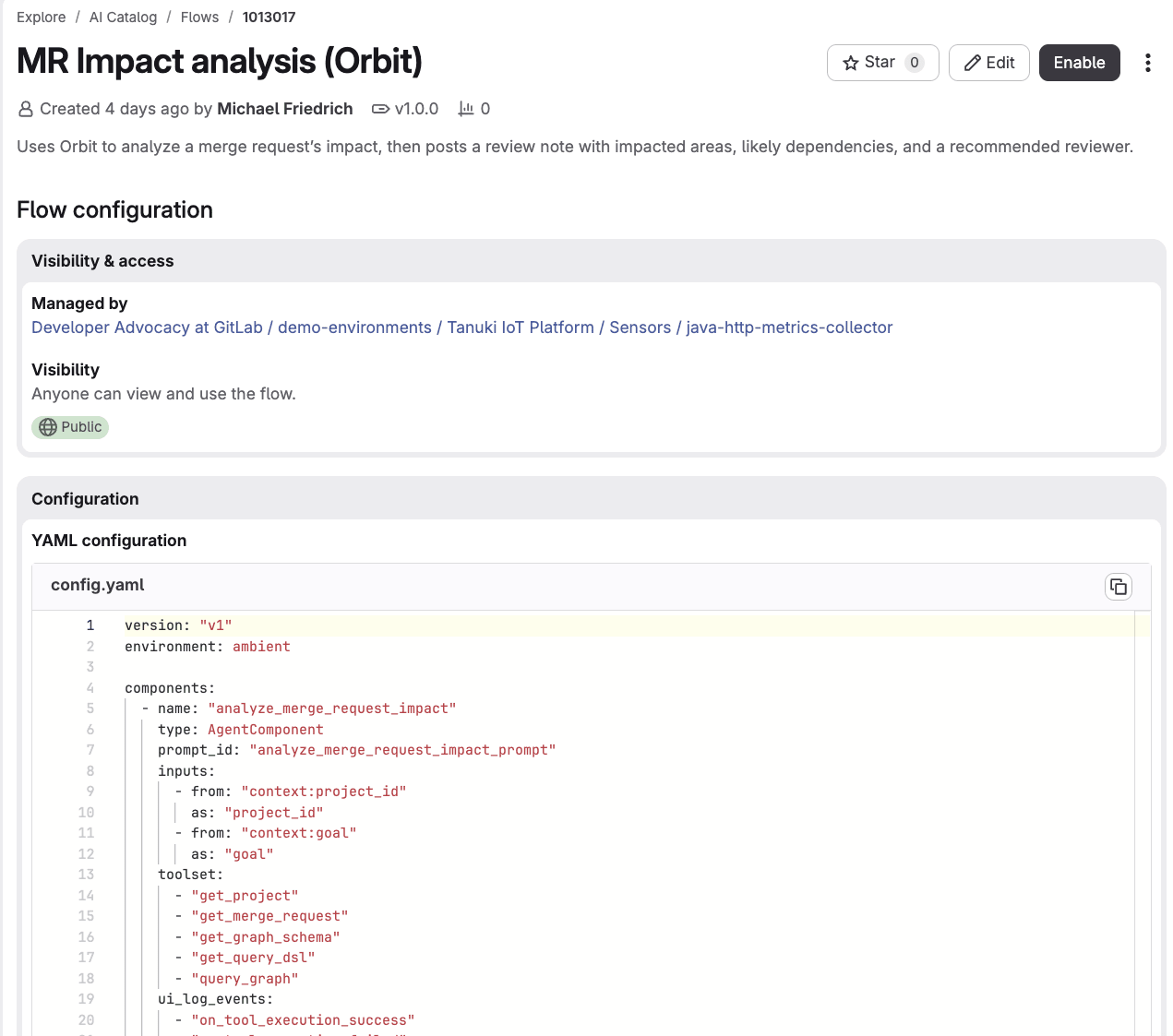
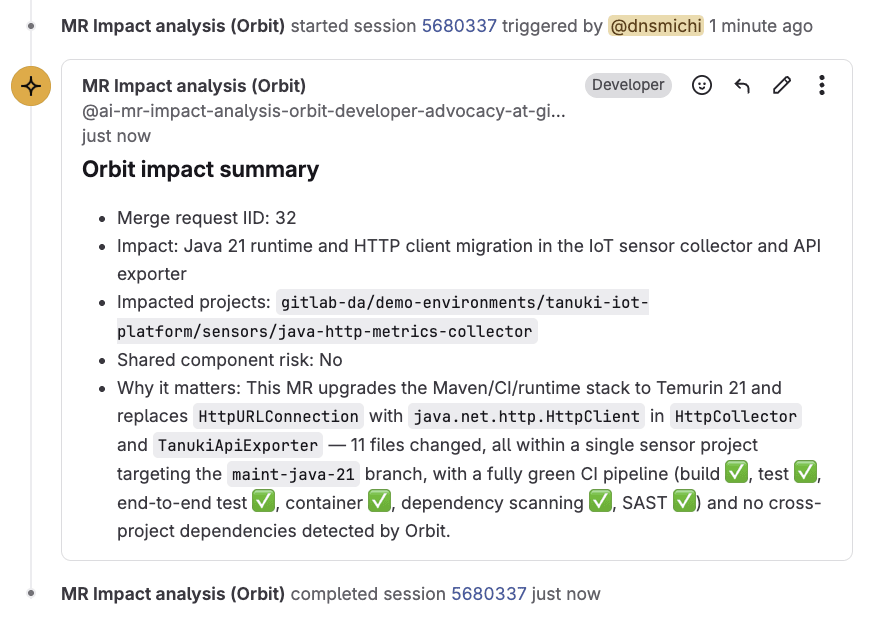
An AGENTS.md file helps Cursor and other coding agents understand the project architecture, commands, code style, testing expectations, and boundaries. Keep these instructions close to the code and make them concrete enough to verify.
Example from the AGENTS.md in the Java HTTP metrics collector project.
      # Java HTTP Metrics Collector - Agent Instructions

## Overview

The Java HTTP Metrics Collector is a REST API metrics collection sensor for the Tanuki IoT Platform. It monitors HTTP endpoints, collects performance metrics (response time, status codes, content length), and exports them in Prometheus text format. The application runs continuously with configurable collection intervals and supports concurrent endpoint monitoring.

## Code Style and Standards

### Java 8 Compatibility

- Do not modernize Java 8 code to Java 11+ features unless there is a GitLab issue or task specifically requesting modernization
- Target Java 8 for source and compilation: `maven.compiler.source=1.8` and `maven.compiler.target=1.8`
- Use Java 8 compatible patterns (e.g., anonymous inner classes instead of lambdas where appropriate)

### Documentation

- All public classes must have Javadoc describing purpose and usage
- All public methods must have Javadoc with `@param` and `@return` tags
- Include code examples in main class Javadoc

### Class Organization

- **Main entry point**: `HttpMetricsCollector` - orchestrates configuration loading, metric collection, and export
- **Collector**: `HttpCollector` - performs HTTP requests and collects metrics
- **Exporter**: `PrometheusExporter` - exports metrics in Prometheus text format
- **Models**: `CollectorConfig`, `EndpointConfig`, `HttpMetric` - data transfer objects

### Dependency Management

- Always use Maven for dependency management
- Use property-based version management for dependencies (e.g., `${jackson.version}`)
- Keep dependencies up-to-date in `pom.xml`

### Error Handling

- Use try-catch blocks with proper resource management (try-with-resources where applicable)
- Log errors using SLF4J Logger
- Gracefully handle configuration loading failures
- Implement proper shutdown hooks for resource cleanup

### Concurrency

- Use `ExecutorService` for concurrent HTTP requests
- Thread pool size is limited to the minimum of endpoint count and 10
- Properly shutdown executor service with timeout handling
- Use `Future` objects to collect results from concurrent tasks
GitLab Duo Code Review Flow helps maintain style guides and boundaries. It expects specific instructions in the .gitlab/duo/mr-review-instructions.yaml file, for example, for Java:
      # Custom instructions for GitLab Duo Code Review

instructions:
  # General guidelines

  - name: Code Review
    instructions: |
      1. Focus on correctness and performance
      2. Ensure code comments and documentation are clear and concise
      3. Be respectful and constructive in comments

  - name: CI/CD Configuration
    fileFilters:
      - ".gitlab-ci.yml"
    instructions: |
      1. Do not use YAML anchors
      2. Always use rules in jobs, avoid using `only`

  # Java style guide

  - name: Java Style Guide
    fileFilters:
      - "**/*.java"
    instructions: |
      1. Do not modernize Java 8 code to Java 11+ features, unless there is a GitLab issue or task specifically requesting modernization
      2. All public classes must have Javadoc describing purpose and usage
      3. All public methods must have Javadoc with @param and @return tags
      4. Include code examples in main class Javadoc
      5. All public methods must have at least one test case
      6. Use httpbun.com for test endpoints (status codes, delays, JSON responses)
In the process of modernizing the code, the first guideline with Java 8 enforcement will need to be updated.
When a specialized workflow becomes repeatable, capture it in an agentic skill. Skills are loaded on demand, not populating the context window by default.
Start with working CI/CD, tests, and reviewed decisions so the agentic skill reflects proven practice rather than an untested plan. Issue 24 in the modernization epic captures the approach in a focused Java 21+ modernization agentic skill. This adds value beyond the current merge request: Future agent sessions can reuse the same safety boundaries instead of reconstructing them from earlier discussions.
Try this example skill implementation, inspired by the existing Java 8 Maven maintenance skill:
      ---
name: java21-modernization
description: >-
  Guide incremental Java 8 to Java 21+ modernization for the HTTP metrics
  collector. Use when a GitLab work item asks for Java 21 CI visibility,
  runtime/image upgrades, HttpClient migration, dependency or source API
  modernization, or review of maint-java-21 style merge requests. Do not use
  for routine Java 8 maintenance; prefer java8-maven-maintenance instead.
compatibility: Requires Maven, Docker Compose, and access to the owning GitLab work item.
---

# Java 21 Modernization

## Overview

Modernize in small, reviewable steps. The owning work item is authoritative.
Preserve collector → Rust metrics-store behavior unless the issue says otherwise.

Companion skill: `skills/java8-maven-maintenance/` for the Java 8 default path.

## Before editing

1. Read the owning issue/epic, `AGENTS.md`, `.gitlab-ci.yml`, `pom.xml`,
   `Dockerfile`, and affected tests.
2. Record the current baseline:
   - `maven.compiler.source` / `target`
   - default CI image vs any `*:java-21` jobs
   - container base image
   - observable CLI/Compose behavior
3. Classify the change into **one** lane:
   - CI visibility only
   - runtime / image switch
   - source / API modernization
   - dependency upgrade
   - tests / contract checks

Do not combine lanes in one MR unless the work item explicitly requires it.

## Workflow

Copy and track:

```text
Modernization progress:
- [ ] Baseline recorded
- [ ] Scoped to owning work item
- [ ] Target-JDK CI evidence available before JDK-only APIs
- [ ] Java 8 lane preserved until exit criteria say otherwise
- [ ] Unit / IT / Compose checks run
- [ ] MR documents risks, rollback, human decisions
```

## Guardrails

- Do not remove Java 8 compatibility unless the work item authorizes it.
- Do not introduce Java 21-only APIs before target-JDK CI evidence exists.
- Do not mix runtime upgrades with unrelated refactors.
- Do not claim performance wins without measurements.
- Preserve the Java → Rust API and authentication contract.
- Stop for a human decision when support policy, rollback, data format, or downstream compatibility is unclear.

## Validation

```bash
mvn -Dmaven.repo.local=.m2/repository test
mvn -Dmaven.repo.local=.m2/repository clean package
```

If Compose or container files change:

```bash
docker compose config --quiet
TANUKI_INGESTION_TOKEN=replace-me docker compose up -d --build
# confirm metric_sample logs and authenticated ingest still work
docker compose down -v
```

## Completion report

In the MR description, include:

1. Baseline before the change
2. Lane changed (CI / runtime / source / deps / tests)
3. Evidence run (commands + CI jobs)
4. Remaining risks and rollback
5. Human decisions still open

## Out of scope

- Broad "modernize everything to Java 21" prompts
- HTTP endpoint semantics unrelated to the JDK migration
  (use `skills/http-endpoint-collector-behavior/`)
- Security triage unrelated to the migration slice
  (use `skills/security-triage-java-sensor/`)
The three use cases in this tutorial build on each other. Cursor fixed an accepted end-to-end test failure using repository context alone. Then the GitLab MCP server brought in the modernization plan, so Cursor could put quality gates in place and close the loop on Duo review feedback directly from the IDE. Finally, Cursor made one bounded Java 21 change, replacing HttpURLConnection with a reusable HttpClient, backed by focused tests, cross-service ingestion runs, pipeline, security scans, software bill of materials, review evidence, and impact analysis.
A legacy Java 8 codebase does not get safer to modernize just because an agent is writing the code. It gets safer because every change is scoped, reviewed, tested against Java 8 and Java 21, and traceable back to a work item with the decisions and evidence behind it. Cursor handles the implementation. GitLab handles the proof. Together, they make the migration something a team can trust.
If you want to try this workflow, start with one test that exposes an accepted failure in a legacy application. Make that test reliable, capture the larger modernization plan in GitLab, and choose one boundary you can change and prove independently. That gives the agent a focused task and gives the team evidence they can review.
If you are not using GitLab Duo Agent Platform today, you can start with a free trial.
If you are already using GitLab in the free tier, you can sign up for GitLab Duo Agent Platform by following a few simple steps.
And if you are an existing subscriber to GitLab Premium or Ultimate, you can get started simply by turning on Duo Agent Platform and start using the GitLab Credits that are included with your subscription.
此内容由惯性聚合(RSS阅读器)自动聚合整理,仅供阅读参考。 原文来自 — 版权归原作者所有。