








Today we are releasing Deno 1.4.0, our largest feature release yet. Here are some highlights:
deno run --watch to automatically reload it on file changesdeno test --coverage to get a summary of your test coverageIf you already have Deno installed you can upgrade to 1.4 by running
deno upgrade. If you are installing Deno for the first time, you can use one
of the methods listed below:
curl -fsSL https://deno.land/x/install/install.sh | sh


iwr https://deno.land/x/install/install.ps1 -useb | iex


brew install deno


scoop install deno


choco install deno
This release adds support for the web standard
WebSocket API,
available in all modern browsers. It can be used to communicate with remote
servers over the WebSocket protocol.
Here is a short example of how it works:
const ws = new WebSocket("ws://echo.websocket.org/");


ws.onopen = () => {
  console.log("WebSocket ready!");


  ws.send("Hello World!");
};
ws.onmessage = (message) => {

  console.log("Received data:", message.data);


  ws.close();
};
ws.onclose = () => console.log("WebSocket closed!");
ws.onerror = (err) => console.log("WebSocket error:", err.error);
You can try it out locally:
deno run --allow-net=echo.websocket.org https://deno.com/blog/v1.4/websocket.js
This release also removes the websocket connect methods from std/ws. Use the
WebSocket API instead.
deno run --watchDeno now has an integrated file watcher that can be used to restart a script when any of its dependencies change.
To use it, run your script like you usually would, but add the --watch flag.
You additionally have to add the --unstable flag because this feature is not
stable yet.
$ echo "console.log('Hello World!')" > mod.ts
$ deno run --watch --unstable mod.ts
Check file:///home/deno/mod.ts
Hello World
Watcher Process terminated! Restarting on file change...

Watcher File change detected! Restarting!
Check file:///home/deno/mod.ts
File watching works!
Watcher Process terminated! Restarting on file change...
The watch flag takes no arguments for directories or files to watch. Instead it automatically determines all of the local imports of your script, and watches those.
Currently file watching is only supported for deno run, but in the future it
will also be added to deno test and possibly other subcommands.
deno test --coverageYou can now find code that is not covered by your tests using the --coverage
flag for deno test. When enabled this will print a summary of your code
coverage per file after all tests are run. You additionally have to add the
--unstable flag because this feature is not stable yet.
$ git clone git@github.com:denosaurs/deno_brotli.git && cd deno_brotli
$ deno test --coverage --unstable
Debugger listening on ws://127.0.0.1:9229/ws/5a593019-d185-478b-a928-ebc33e5834be
Check file:///home/deno/deno_brotli/.deno.test.ts
running 2 tests
test compress ... ok (26ms)
test decompress ... ok (13ms)

test result: ok. 2 passed; 0 failed; 0 ignored; 0 measured; 0 filtered out (40ms)

test coverage:
file:///home/deno/deno_brotli/mod.ts 100.000%
file:///home/deno/deno_brotli/wasm.js 100.000%
Currently the only available output format is the text summary. Other output
formats like lcov and json will be added in the future.
--unstableFor all users using --unstable the isolatedModules and
importsNotUsedAsValues TypeScript compiler options will be switched on by
default now. We will enable these flags by default for everyone in the future.
These flags enable some stricter checks in the TypeScript compiler that will
likely lead to some new errors you have not seen before:
ERROR TS1205: Re-exporting a type when the '--isolatedModules' flag is provided requires using 'export type'.

ERROR TS1371: This import is never used as a value and must use 'import type' because the 'importsNotUsedAsValues' is set to 'error'.
These errors occur when interfaces or type aliases are imported or re-exported.
To fix the error, change your imports and re-exports to use import type and
export type. Example:
import { MyType } from "./mod.ts";
export { MyType } from "./mod.ts";


import type { MyType } from "./mod.ts";
export type { MyType } from "./mod.ts";
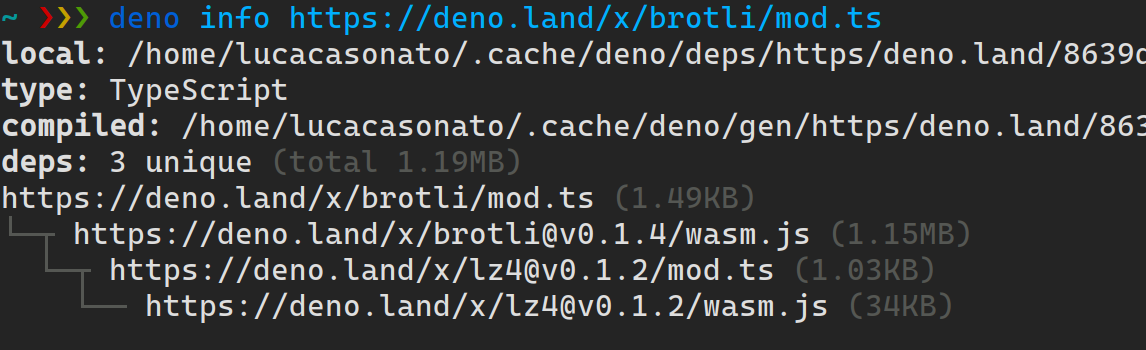
deno info improvementsThe deno info tool for doing dependency analysis has gotten a major overhaul
this update. It is now faster and less buggy. Additionally the file size of
dependencies is now displayed making it very easy to figure out what
dependencies are adding a lot of code to your project.
Most modern browsers support styling console.log messages with CSS. In our
ongoing effort to be as web compatible as possible, Deno now also supports CSS
styling for console.log.
To style a message, add a %c format parameter to your message, and specify the
styles to apply as an argument to console.log:
console.log("%cStop!", "color:red;font-weight:bold");
Deno supports the CSS properties color, background-color, font-weight,
font-style, text-decoration-color, and text-decoration-line. Support for
these properties, and custom rgb, hex, and hsl colors depend on your terminal’s
support for ANSI.
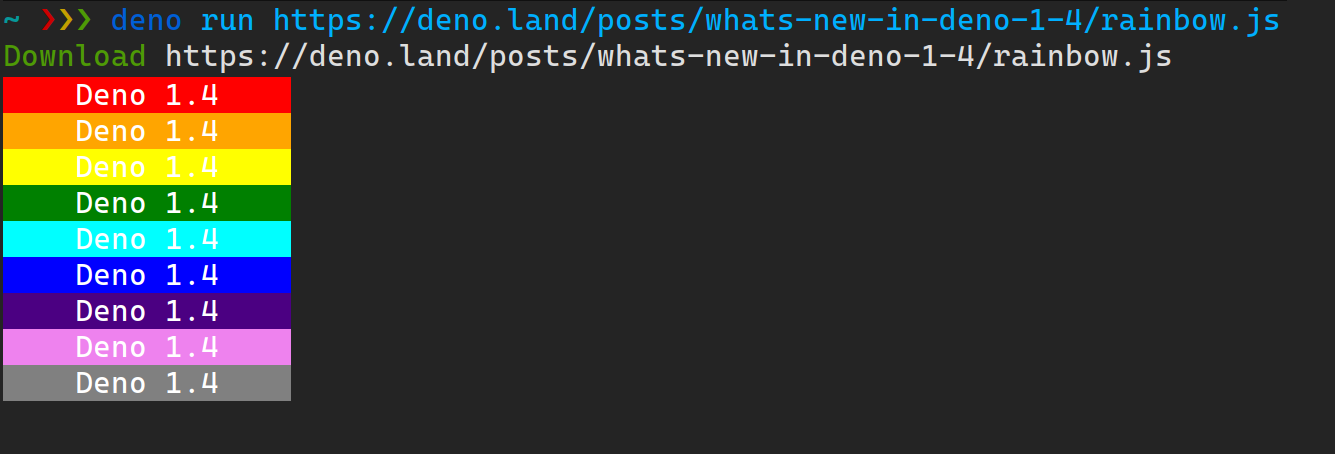 View the source code at https://deno.com/blog/v1.4/rainbow.js
In this release we’ve added support for the final rules required to get
deno lint rules on par with recommended eslint and typescript-eslint
ruleset. This means that deno lint should be able to catch all errors that
@eslint/recommended and @typescript-eslint/recommended can. (At an order of
magnitude better performance.) This is a major step towards stabilizing
deno lint.
deno docdeno doc and https://doc.deno.land has also gotten a round of new features and
fixes this release. Support for the export { foo }; syntax has been added
(exporting a statement after declaration), and re-exports of multiple symbols
with the same name are now supported.
To try out these new features, just browse any module on https://doc.deno.land. It has been updated with the new release already.
In this release the writeJson, writeJsonSync, readJson, and readJsonSync
functions have been removed from the https://deno.land/std/fs. You can easily
switch them out with these functions:
- const accounting = await readJson("accounting.json");
+ const accounting = JSON.parse(await Deno.readTextFile("accounting.json"));

- const accounting = readJsonSync("accounting.json");
+ const accounting = JSON.parse(Deno.readTextFileSync("accounting.json"));

- await writeJson("hello_world.json", { "hello": "world" });
+ await Deno.writeTextFile("hello_world.json", JSON.stringify({ "hello": "world" }));

- writeJsonSync("hello_world.json", { "hello": "world" });
+ Deno.writeTextFileSync("hello_world.json", JSON.stringify({ "hello": "world" }));
deno_core Rust APIThe base subsystem for Deno, deno_core, continues to evolve as we improve the
CLI. In 0.57.0, we’ve merged CoreIsoate and EsIsolate into a single struct
called JsRuntime. Also an easier facility for creating ops has been exposed.
Have a look at the
example.
to see how these APIs fit together.
The VS Code extension for Deno has had some major feature releases recently. Here is a quick summary:
A great new feature of the extension is IntelliSense for deno.land imports. It gives you autocomplete suggestions for module names on deno.land/x, all of their versions, and their full directory listing. All of this is done without actually downloading the module source code, instead it is all powered by the recent updates to deno.land/x.
deno lint diagnosticsdeno lint is now fully integrated with the extension. To enable it, just set
the deno.unstable and deno.lint settings in the extension to true. After
doing this you will get inline real-time diagnostics for your code:
The full release notes, including bug fixes, can be found at https://github.com/denoland/deno/releases/tag/v1.4.0.
此内容由惯性聚合(RSS阅读器)自动聚合整理,仅供阅读参考。 原文来自 — 版权归原作者所有。