


惯性聚合 高效追踪和阅读你感兴趣的博客、新闻、科技资讯
阅读原文 在惯性聚合中打开

推荐订阅源

Exploit-DB.com RSS Feed
Cisco Talos Blog
Cisco Talos Blog
T
Threat Research - Cisco Blogs
P
Privacy International News Feed
S
Schneier on Security
P
Privacy & Cybersecurity Law Blog
Threat Intelligence Blog | Flashpoint
云风的 BLOG
云风的 BLOG
P
Proofpoint News Feed
Scott Helme
Scott Helme
人人都是产品经理
人人都是产品经理
G
GRAHAM CLULEY
O
OpenAI News
CTFtime.org: upcoming CTF events
PCI Perspectives
PCI Perspectives
GbyAI
GbyAI
宝玉的分享
宝玉的分享
Y
Y Combinator Blog
T
Troy Hunt's Blog
让小产品的独立变现更简单 - ezindie.com
C
CXSECURITY Database RSS Feed - CXSecurity.com
腾讯CDC
C
Check Point Blog
Spread Privacy
Spread Privacy
L
LINUX DO - 最新话题
Recent Announcements
大猫的无限游戏
大猫的无限游戏
P
Palo Alto Networks Blog
Hacker News: Ask HN
Hacker News: Ask HN
M
MIT News - Artificial intelligence
奇客Solidot–传递最新科技情报
奇客Solidot–传递最新科技情报
The Hacker News
The Hacker News
H
Hacker News: Front Page
Microsoft Azure Blog
I
InfoQ
T
Tor Project blog
Martin Fowler
Martin Fowler
博客园 - 叶小钗
罗磊的独立博客
C
Cyber Attacks, Cyber Crime and Cyber Security
H
Heimdal Security Blog
V
Vulnerabilities – Threatpost
Simon Willison's Weblog
Latest news
Latest news
WordPress大学
WordPress大学
G
Google Developers Blog
N
Netflix TechBlog - Medium
S
Security Affairs
S
Secure Thoughts
Know Your Adversary
Know Your Adversary

Deno

Deno 2.8 | Deno Claw Patrol: an open-source security firewall for agents | Deno Fresh 2.3: Zero JS by default, View Transitions, and Temporal support | Deno Deno 2.7: Temporal API, Windows ARM, and npm overrides | Deno Build a dinosaur runner game with Deno, pt. 6 | Deno Build a dinosaur runner game with Deno, pt. 5 | Deno Deno Deploy is Generally Available | Deno Introducing Deno Sandbox | Deno Build a dinosaur runner game with Deno, pt. 4 | Deno Build a dinosaur runner game with Deno, pt. 3 | Deno Build a dinosaur runner game with Deno, pt. 2 | Deno React / Next.js Denial-of-Service Vulnerability: Deno Deploy users protected | Deno Deno 2.6: dx is the new npx | Deno Build a dinosaur runner game with Deno, pt. 1 | Deno React Server Functions / Next.js Vulnerability: Deno Deploy users protected | Deno My highlights from the new Deno Deploy | Deno Deno's Other Open Source Projects | Deno How Deno protects against npm exploits | Deno Help Us Raise $200k to Free JavaScript from Oracle | Deno Deno 2.5: Permissions in the config file | Deno Fresh 2.0 Graduates to Beta, Adds Vite Support | Deno Deno 2.4: deno bundle is back | Deno JavaScript™ Trademark Update | Deno What's coming to JavaScript | Deno A brief history of JavaScript | Deno Reports of Deno's Demise Have Been Greatly Exaggerated | Deno An Update on Fresh | Deno How Plaid migrated 100 services to a new database platform 5x faster with Deno | Deno Deno 2.3: Improved deno compile, local npm packages, and more | Deno Add JSR packages with pnpm and Yarn | Deno Zero-config Debugging with Deno and OpenTelemetry | Deno Exploring Art with TypeScript, Jupyter, Polars, and Observable Plot | Deno Deno v Oracle Update 3: Fighting the JavaScript Trademark | Deno Build a custom RAG AI agent in TypeScript and Jupyter | Deno How to get deep traces in your Node.js backend with OTel and Deno | Deno toranoana.deno #20 登録受付中(2025年3月14日) | Deno Node just added TypeScript support. What does that mean for Deno? | Deno The Dino 🦕, the Llama 🦙, and the Whale 🐋 | Deno Publish a lint rule, get a prize | Deno Deno 2.2: OpenTelemetry, Lint Plugins, node:sqlite | Deno If you're not using npm specifiers, you're doing it wrong | Deno How Deno's documentation is evolving | Deno Oracle justified its JavaScript trademark with Node.js—now it wants that ignored | Deno Introducing the JSR open governance board | Deno Intro to Wasm in Deno | Deno Announcing OpenAI on JSR | Deno Deno in 2024 | Deno Goodbye WinterCG, welcome WinterTC | Deno Build a SolidJS app with Deno | Deno Run your Next.js SSR app on Deno Deploy | Deno Solve Advent of Code 2024 with Deno and Win Prizes! | Deno Deno v. Oracle: Canceling the JavaScript Trademark | Deno Deno 2.1: Wasm Imports and other enhancements | Deno Build a Typesafe API with tRPC and Deno | Deno Self-contained Executable Programs with Deno Compile | Deno Build a Database App with Drizzle ORM and Deno | Deno Introducing your new JavaScript package manager: Deno | Deno Announcing Growthbook on JSR | Deno Build an Astro site with Deno | Deno How to convert CommonJS to ESM | Deno Announcing Deno 2 | Deno The Final Touches: What’s New In v2.0.0-rc.10 | Deno Announcing Stable V8 Bindings for Rust | Deno Deno 2.0 Release Candidate | Deno Secure, efficient private npm registries with Cloudsmith and Deno | Deno Painting the Plane as We Fly It: Designing JSR | Deno Introducing Web Cache API support on Deno Deploy | Deno Deno 1.46: The Last 1.x Release | Deno Protect your cloud spend with new Deno Deploy spend limits | Deno What we got wrong about HTTP imports | Deno Benchmarking AWS Lambda Cold Starts Across JavaScript Runtimes | Deno Announcing Supabase on JSR | Deno Deno 1.45: Workspace and Monorepo Support | Deno Introducing KV Backup for Deno Subhosting | Deno A Gentle Intro to TypeScript | Deno Announcing Hono on JSR | Deno How We Made the Deno Language Server Ten Times Faster | Deno How the Guardian uses Deno to audit accessibility and performance across their 2.7 million articles | Deno Introducing More Flexible Domain Association for Deno Subhosting | Deno The stabilization process of the Standard Library has begun | Deno Deno 1.44: Private npm registries, improved Node.js compat, and performance boosts | Deno How we built a secure, performant, multi-tenant cloud platform to run untrusted code | Deno The Deno Standard Library is now available on JSR | Deno How to document your JavaScript package | Deno Your Low Code Solution Needs an Escape Hatch | Deno Deno 1.43: Improved Language Server performance | Deno How Slack used Deno to save months of engineering effort in launching their new platform | Deno JSR Is Not Another Package Manager | Deno Announcing the Hookdeck SDK on JSR | Deno Announcing the Neon Serverless Driver on JSR | Deno An intro to TSConfig for JavaScript Developers | Deno How we built JSR | Deno How Netlify used Deno Subhosting to build a successful edge functions product | Deno Introducing Simpler Project Creation in Deno Deploy | Deno Deno 1.42: Better dependency management with JSR | Deno Introducing deployctl, the command line interface for Deno Deploy | Deno Introducing JSR - the JavaScript Registry | Deno How to add Monaco to a Next.js app and securely run untrusted user code | Deno Survey Results and Roadmap | Deno Deno 1.41: smaller deno compile binaries | Deno
How to Setup Auth with Fresh | Deno
2022-11-04 · via Deno

Authentication and session management are one of the most fundamental aspects of building a modern web app. It’s necessary for hiding premium content or creating admin-only sections like dashboards.

Fresh is an edge-native web framework that embraces progressive enhancement through server-side rendering and islands architecture, while optimizing for latency and performance. As a result, Fresh apps tend to see higher Lighthouse scores and can function in areas with low internet bandwidth.

Here’s a simple guide to adding authentication into your Fresh app. Follow along below or view source here.

Create a new Fresh app

First, let’s create a new Fresh app.

$ deno run -A -r https://fresh.deno.dev my-auth-app

To keep things simple, let’s remove a bunch of things:

$ rm -rf islands/Counter.tsx routes/api/joke.ts routes/\[name\].tsx

Update index.tsx

First, let’s update our import_map.json to include std lib:

{
  "imports": {
    "$fresh/": "https://deno.land/x/fresh@1.1.2/",
    "preact": "https://esm.sh/preact@10.11.0",
    "preact/": "https://esm.sh/preact@10.11.0/",
    "preact-render-to-string": "https://esm.sh/*preact-render-to-string@5.2.4",
    "@preact/signals": "https://esm.sh/*@preact/signals@1.0.3",
    "@preact/signals-core": "https://esm.sh/*@preact/signals-core@1.0.1",
    "twind": "https://esm.sh/twind@0.16.17",
    "twind/": "https://esm.sh/twind@0.16.17/",
    "std/": "https://deno.land/std@0.160.0/"
  }
}

Next, let’s update /routes/index.tsx to show your logged in status.

We’ll use cookies (with the help of getCookies from std/cookie) to check the user’s status.

import type { Handlers, PageProps } from "$fresh/server.ts";
import { getCookies } from "std/http/cookie.ts";

interface Data {
  isAllowed: boolean;
}

export const handler: Handlers = {
  GET(req, ctx) {
    const cookies = getCookies(req.headers);
    return ctx.render!({ isAllowed: cookies.auth === "bar" });
  },
};

export default function Home({ data }: PageProps<Data>) {
  return (
    <div>
      <div>
        You currently {data.isAllowed ? "are" : "are not"} logged in.
      </div>
    </div>
  );
}

The custom handler simply checks the cookies and sets isAllowed. Our default component will show a different state based on the value of isAllowed. Right now, since we haven’t added any logic to log in or set cookies, it shows:
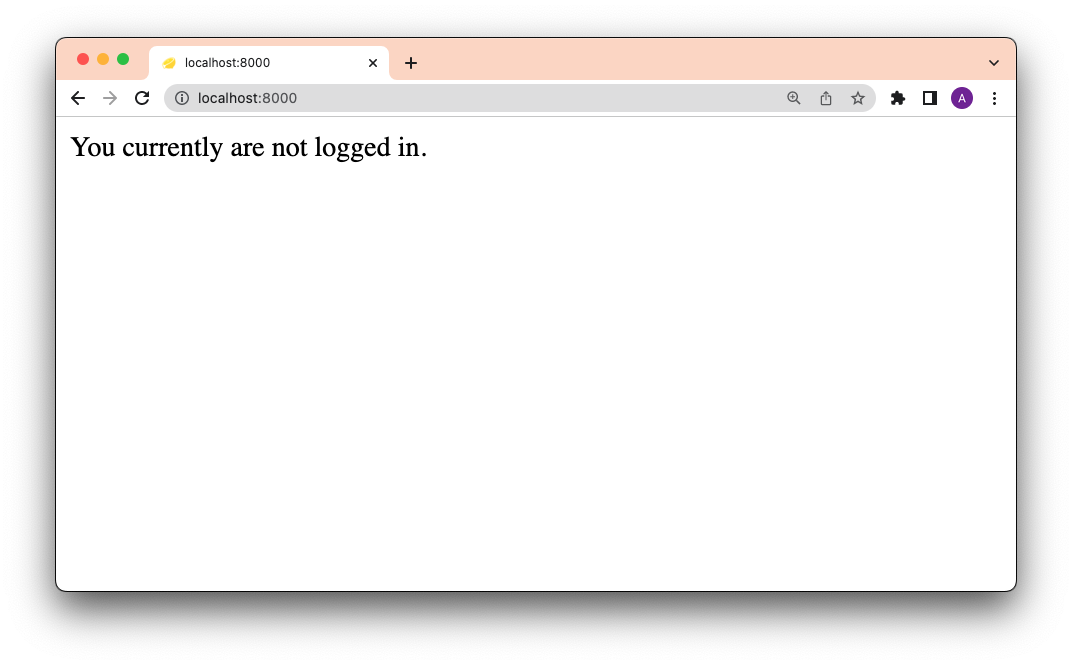
Initial login screen

Next, let’s create the login form as a component called <Login>.

Create the <Login> component

We can create this component right in index.tsx:

function Login() {
  return (
    <form method="post" action="/api/login">
      <input type="text" name="username" />
      <input type="password" name="password" />
      <button type="submit">Submit</button>
    </form>
  );
}

This component will POST the username and password to /api/login, which we’ll define later. Note that the form uses multipart/form-data (as opposed to json), which relies on native browser features where possible and minimizes the need for any client-side JavaScript.

Next, let’s create the actual authentication logic at the /api/login endpoint.

Add login and logout routes

Under /routes/api/, let’s create login.ts:

$ touch /routes/api/login.ts

All of the authentication logic for this endpoint will be contained in the custom handler function.

For simplicity, our username and password will be hardcoded as “deno” and “land”. (In most production situations, you would use authentication strategies, tokens from persistent data storage, etc.)

When a POST request is made to /api/login, the custom handler function will perform the following:

  • pulls username and password from the req request parameter
  • checks against our hardcoded username and password
  • sets the auth cookie to bar (in production, this should be a unique value per session) with a maxAge of 120 (it will expire after 2 minutes)
  • and returns the appropriate HTTP responses (HTTP 303 forces the method back to a GET, preventing weird browser history behavior)

Here’s the code:

import { Handlers } from "$fresh/server.ts";
import { setCookie } from "std/http/cookie.ts";

export const handler: Handlers = {
  async POST(req) {
    const url = new URL(req.url);
    const form = await req.formData();
    if (form.get("username") === "deno" && form.get("password") === "land") {
      const headers = new Headers();
      setCookie(headers, {
        name: "auth",
        value: "bar", 
        maxAge: 120,
        sameSite: "Lax", 
        domain: url.hostname,
        path: "/",
        secure: true,
      });

      headers.set("location", "/");
      return new Response(null, {
        status: 303, 
        headers,
      });
    } else {
      return new Response(null, {
        status: 403,
      });
    }
  },
};

Let’s also create an endpoint for logging out: /routes/logout.ts:

$ touch routes/logout.ts

The logging out logic will delete the cookie set by logging in, and redirect the user to the root page:

import { Handlers } from "$fresh/server.ts";
import { deleteCookie } from "std/http/cookie.ts";

export const handler: Handlers = {
  GET(req) {
    const url = new URL(req.url);
    const headers = new Headers(req.headers);
    deleteCookie(headers, "auth", { path: "/", domain: url.hostname });

    headers.set("location", "/");
    return new Response(null, {
      status: 302,
      headers,
    });
  },
};

Now, let’s tie everything together by going back to /routes/index.tsx and adding our login and logout components.

Add <Login> and logout to index

In the <Home> component of our routes/index.tsx page, let’s add the <Login> component, as well as a button to logout (which sends a request to /logout):


export default function Home({ data }: PageProps<Data>) {
  return (
    <div>
      <div>
        You currently {data.isAllowed ? "are" : "are not"} logged in.
      </div>
      {!data.isAllowed ? <Login /> : <a href="/logout">Logout</a>}
    </div>
  );
}

Checking localhost, now we have login and logout buttons that work:
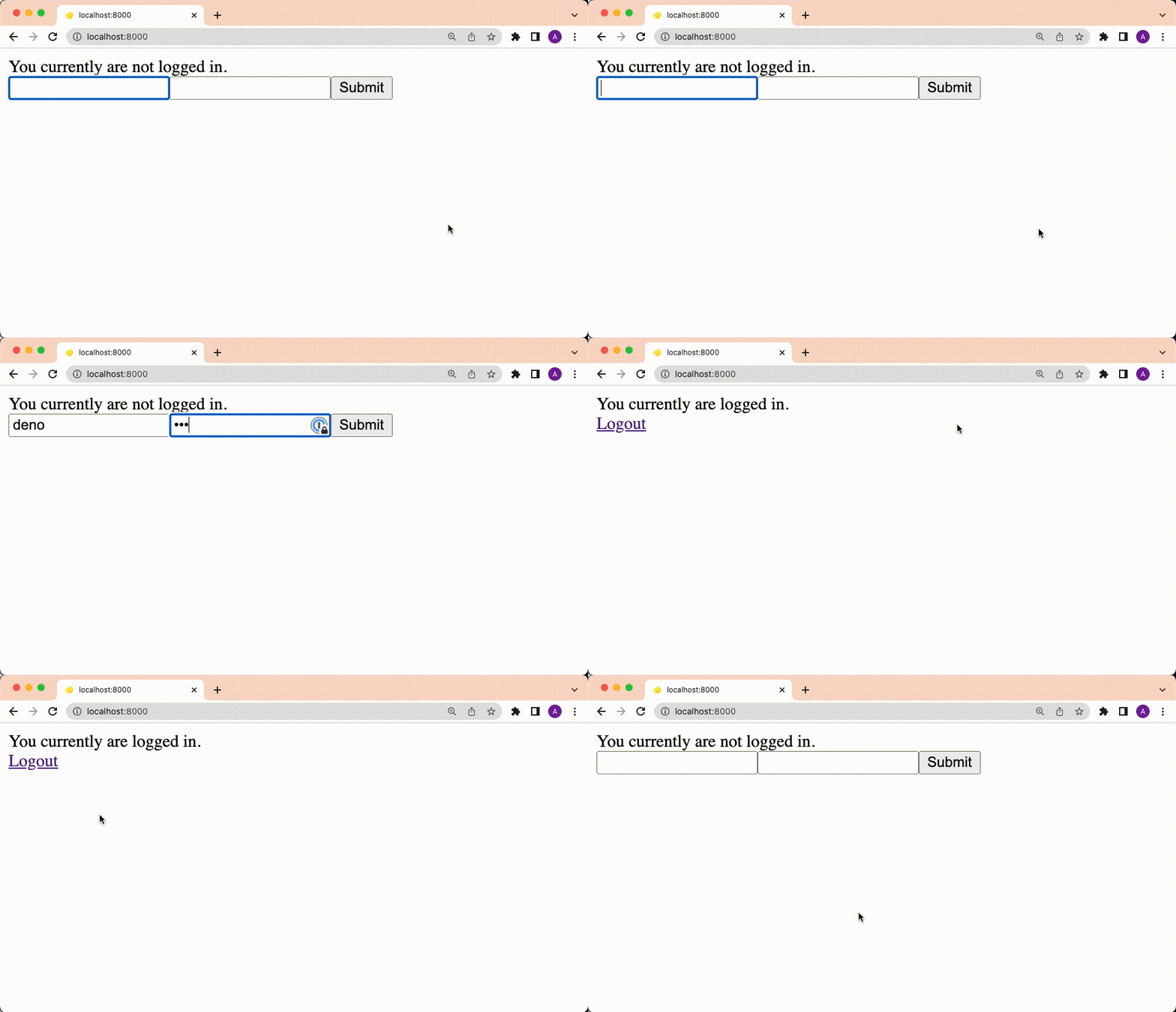
Logging in and logging out

Nice!

Handle non-logged-in users

A lot of paywall sites will automatically redirect a user if they’re not logged in.

We can add this functionality by adding redirect logic in the custom handler:

import type { Handlers } from "$fresh/server.ts";
import { getCookies } from "std/http/cookie.ts";

export default function Home() {
  return (
    <div>
      Here is some secret
    </div>
  );
}

export const handler: Handlers = {
  GET(req, ctx) {
    const cookies = getCookies(req.headers);
    if (cookies.auth === "bar") {
      return ctx.render!();
    } else {
      const url = new URL(req.url);
      url.pathname = "/";
      return Response.redirect(url);
    }
  },
};
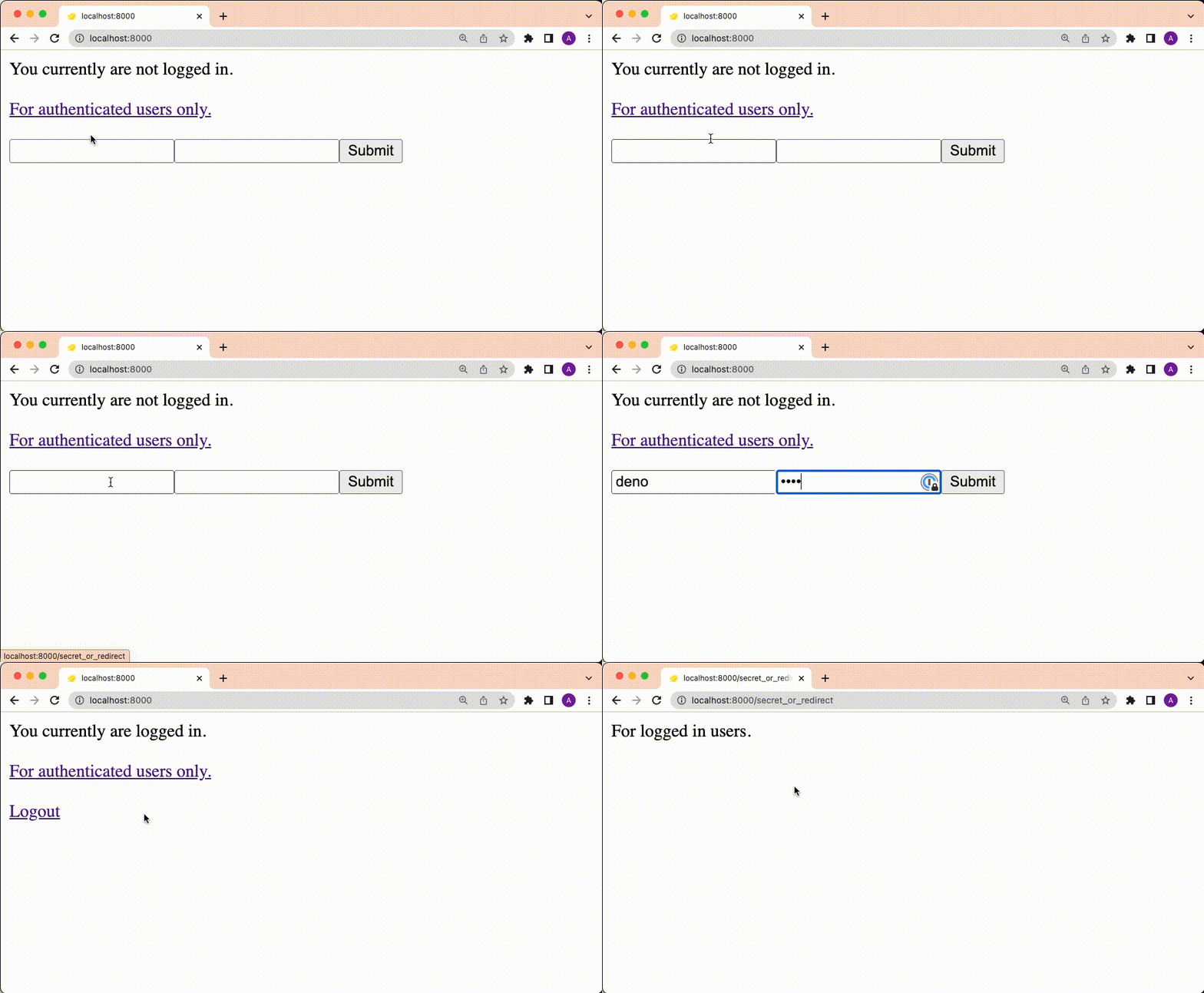
Logging in or getting redirected

Success!

Or, if you don’t want to redirect the user and just show a secret only when the user is authenticated:

import type { Handlers, PageProps } from "$fresh/server.ts";
import { getCookies } from "std/http/cookie.ts";

interface Data {
  isAllowed: boolean;
}

export default function Home({ data }: PageProps<Data>) {
  return (
    <div>
      {data.isAllowed ? "Here is some secret" : "You are not allowed here"}
    </div>
  );
}

export const handler: Handlers<Data> = {
  GET(req, ctx) {
    const cookies = getCookies(req.headers);

    return ctx.render!({ isAllowed: cookies.auth === "bar" });
  },
};

What’s next

This is a bare bones guide to add authentication to your Fresh app. There are plenty of ways to make this more production ready that we plan to explore in future posts:

  • Adding more robust authentication strategies in /routes/api/login.ts
  • Making cookie and session management more secure with unique values
  • Using a persistent data store like MongoDB for user accounts or Redis for session management

We hope this post helped!

Stuck? Ask questions about Fresh and Deno on Twitter or in our Discord.