


A single Bash script to create blogs.
I created it because I wanted a very, very simple way to post entries to a blog by using a public folder on my server, without any special requirements and dependencies. Works on GNU/Linux, OSX and BSD.
How simple? Just type ./bb.sh post and start writing your blogpost.
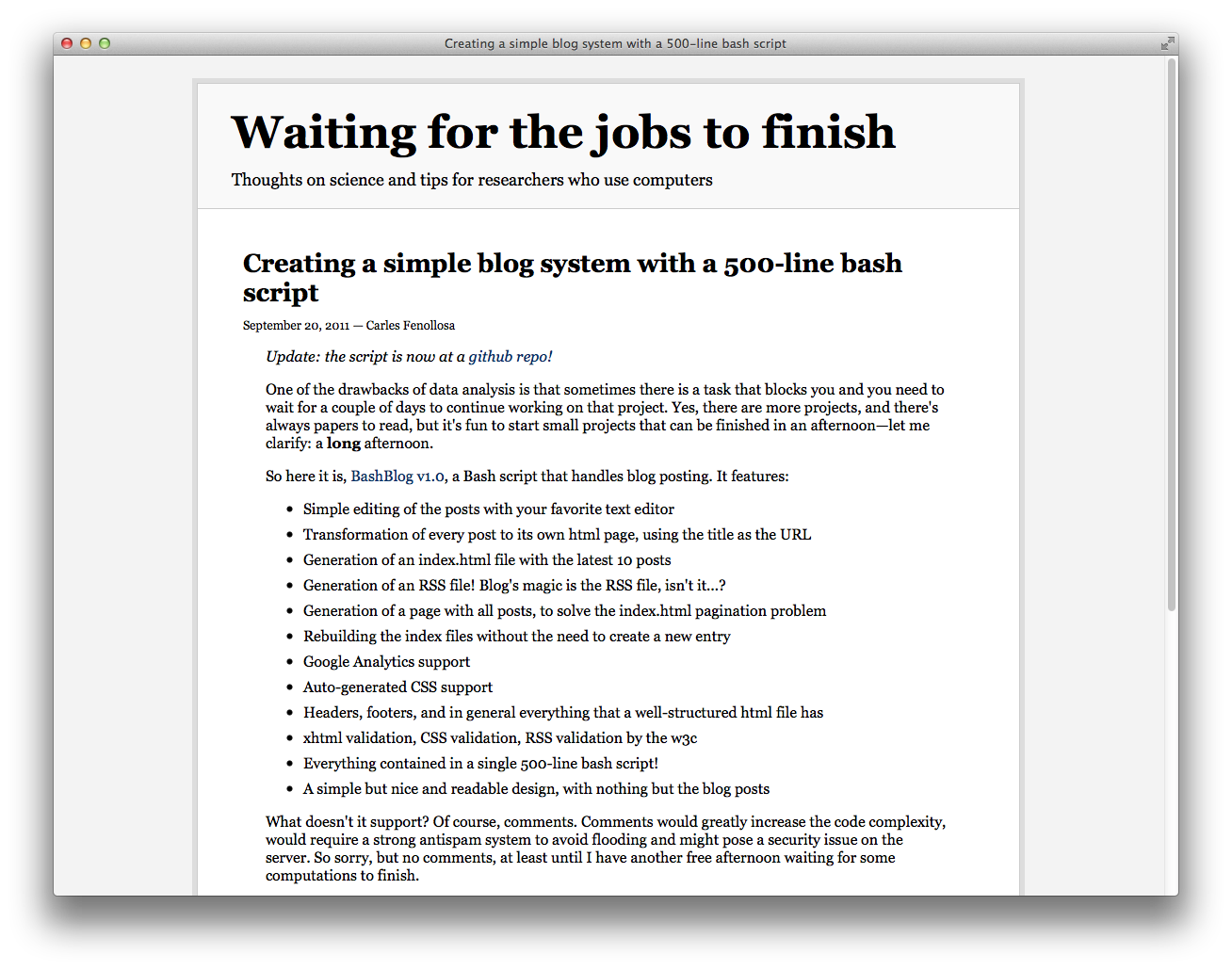
You can see a sample here: read the initial blog post. That page was 100% generated using bashblog, no additional tweaking.
Check out other bashblog users
Usage
Download the code and copy bb.sh into a public folder (for example, $HOME/public_html/blog) and run
This will show the available commands. If the file is not executable, type chmod +x bb.sh and retry.
Before creating your first post, you may want to configure the blog settings (title, author, etc). Read the Configuration section below for more information
To create your first post, just run:
It will try to use Markdown, if installed. To force HTML:
The script will handle the rest.
When you're done, access the public URL for that folder (e.g. http://server.com/~username/blog)
and you should see the index file and a new page for that post!
How to...
Please read the wiki to learn how to use the advanced features of Bashblog, such as headers and footers, static pages, and more.
Features
- Ultra simple usage: Just type a post with your favorite editor and the script does the rest. No templating.
- No installation required. Download
bb.shand start blogging. - Zero dependencies. It runs just on base utils (
date,basename,grep,sed,head, etc) - GNU/Linux, BSD and OSX compatible out of the box, no need for GNU
coreutilson a Mac. It does some magic to autodetect which command switches it needs to run depending on your system. - All content is static. You only need shell access to a machine with a public web folder.
Tip: advanced users could mount a remote public folder via
ftpfsand run this script locally - Allows drafts, includes a simple but clean stylesheet, generates the RSS file automatically.
- Support for tags/categories
- Support for Markdown, Disqus comments, Twitter, Feedburner, Google Analytics.
- The project is still maintained as of 2016. Bugs are fixed, and new features are considered (see "Contributing")
- Everything stored in a single ~1k lines bash script, how cool is that?! ;)
Configuration
Configuration is not required for a test drive, but if you plan on running your blog with bashblog, you will want to change the default titles, author names, etc, to match your own.
There are two ways to configure the blog strings:
- Edit
bb.shand modify the variables in theglobal_variables()function - Create a
.configfile with your configuration values -- useful if you don't want to touch the script and be able to update it regularly with git
The software will load the values in the script first, then overwrite them with the values in the .config file.
This means that you don't need to define all variables in the config file, only those which you need to override
from the defaults.
The format of the .config file is just one variablename="value" per line, just like in the global_variables()
function. Please remember: quote the values, do not declare a variable with the dollar sign, do not use
spaces around the equal sign.
bashblog uses the $EDITOR environment value to open the text editor.
Detailed features
- A simple but nice and readable design, with nothing but the blog posts
- NEW on 2.0 Markdown support via a third-party library.
The easiest method is to download Gruber's Markdown.pl - Post preview
- Save posts as drafts and resume editing later
- HTML page for each post, using its title as the URL
- Configurable number of posts on the front page
- Automatic generation of an RSS file, feedburner support
- Additional page containing an index of all posts
- Automatically generates pages for each tag
- Rebuild all files while keeping the original data
- Comments delegated to Twitter, with additional Disqus support
- An option for cookieless Twitter sharing, to comply with the EU cookie law
- Google Analytics code support
- Contains its own CSS so that everything is reasonably styled by default
- Headers, footers, and in general everything that a well-structured html file needs
- Support to add extra content on top of every page (e.g. banners, images, etc)
- xhtml validation, CSS validation, RSS validation by the w3c
- Automatic backup of the site every time you post (stored as
.backup.tar.gz)
Read the Changelog section for more updates or check out the news on my blog
Contributing
Bashblog started at 500 SLOC and it now has hit the 1000 SLOC barrier. If we want to keep the code minimal and understandable, we need to make the difficult effort to restrain ourselves from adding too many features.
All bugfixes are welcome, but brand new features need to be strongly justified to get into the main tree. Every new request will be honestly and civilly discussed on the comments. As a guideline, pull requests should:
- Fix a use case for some people (e.g. internationalization)
- Add a use case which is arguably very common (e.g. disqus integration for comments)
- Be very small when possible (a couple lines of code)
- Don't require a significant rewrite of the code (Don't break
create_html_file()orwrite_entry(), etc) - It must work on Linux, BSD and Mac. Beware of using GNU coreutils with non-POSIX flags (i.e.
dateorgrep) - Follow the UNIX philosophy: do one thing and do it well, rely on third party software for external features, etc
- Always keep backwards compatibility when using the default configuration
Changelog
- 2.10 Added
global_twitter_card_image - 2.9 Added
body_begin_file_index - 2.8 Bugfixes
Slavic language support thanks to Tomasz Jadowski
Removed the now defunct Twitter JSON API share count
Support for static, not managed by bashblog html files - 2.7 Store post date on a comment in the html file (#96).
On rebuild, the post date will be synchronised between comment date and file date, with precedence for comment date. - 2.6 Support for multiple authors, use a different
.configfor each one - 2.5 Massive code cleanup by Martijn Dekker
'tags' command
The word 'posts' in the tag list (both website and command) now has a singular form, check outtemplate_tags_posts_singular - 2.4 Added Twitter summaries metadata for posts (#36)
- 2.3.3 Removed big comment header.
Added option to display tags for cut articles on index pages (#61)
Cleaned up "all posts" page (#57) - 2.3.2 Option to use topsy instead of twitter for references
- 2.3.1 Cookieless Twitter option
- 2.3 Intelligent tag rebuilding and Markdown by default
- 2.2 Flexible post title -> filename conversion
- 2.1 Support for tags/categories.
'delete' command - 2.0.3 Support for other analytics code, via external file
- 2.0.2 Fixed bug when $body_begin_file was empty.
Added extra line in the footer linking to the github project - 2.0.1 Allow personalized header/footer files
- 2.0 Added Markdown support.
Fully support BSD date - 1.6.4 Fixed bug in localized dates
- 1.6.3 Now supporting BSD date
- 1.6.2 Simplified some functions and variables to avoid duplicated information
- 1.6.1 'date' fix when hours are 1 digit.
- 1.6.0 Disqus comments. External configuration file. Check of 'date' command version.
- 1.5.1 Misc bugfixes and parameter checks
- 1.5 Đurađ Radojičić (djura-san) refactored some code and added flexibility and i18n
- 1.4.2 Now issues are handled at Github
- 1.4.1 Some code refactoring
- 1.4 Using twitter for comments, improved 'rebuild' command
- 1.3 'edit' command
- 1.2.2 Feedburner support
- 1.2.1 Fixed the timestamps bug
- 1.2 'list' command
- 1.1 Draft and preview support
- 1.0 Read http://is.gd/Bkdoru
License
This program is free software: you can redistribute it and/or modify it under the terms of the GNU General Public License as published by the Free Software Foundation, either version 3 of the License, or (at your option) any later version.
This program is distributed in the hope that it will be useful, but WITHOUT ANY WARRANTY; without even the implied warranty of MERCHANTABILITY or FITNESS FOR A PARTICULAR PURPOSE. See the GNU General Public License for more details.
You should have received a copy of the GNU General Public License along with this program. If not, see http://www.gnu.org/licenses/.