









This article describes the entire process of developing an application based on AWS Serverless technology. The infrastructure is built using Serverless Framework and Terraform. The core module of the system is a timed task that is executed once a day: the task obtains a set of ETF index fund price data via Tushare , and after processing, generates a text of the trading signals and stores it in an S3 bucket. After that, a message is sent to the AWS SNS Topic, and users subscribed to the topic will receive an email alert. There is a user email subscription portal on the system’s web page, and you can also access the daily history of trading signals.
This article covers the following:
The final result is available at: Online version.
The source code is available at: Code Repository.
The technology stack is as follows:

You need to register for the following account first:
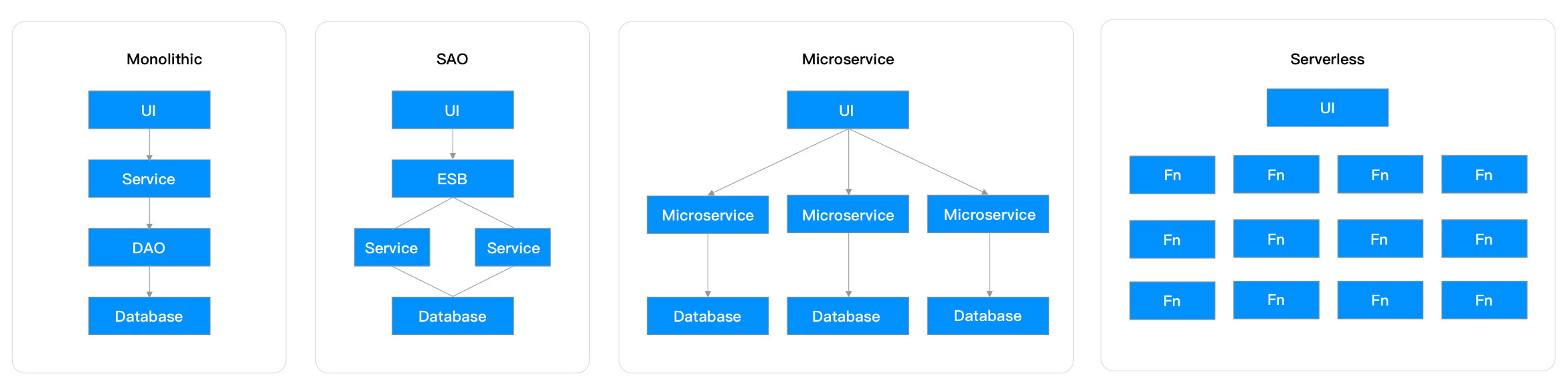
Build and run applications without thinking about servers2
Serverless computing, or serverless for short, is an execution model in which a cloud provider (AWS, Azure, or Google Cloud) is responsible for executing a piece of code by dynamically allocating resources and charging only for the resources used to run the code. The code typically runs in a stateless container and can be triggered by a variety of events including HTTP requests, database events, queue services, monitoring alerts, file uploads, scheduling events (cron tasks), and more. The code that is sent to the cloud provider for execution is typically in the form of a function, and thus serverless computing is sometimes referred to as “function as a service” or FAAS.3
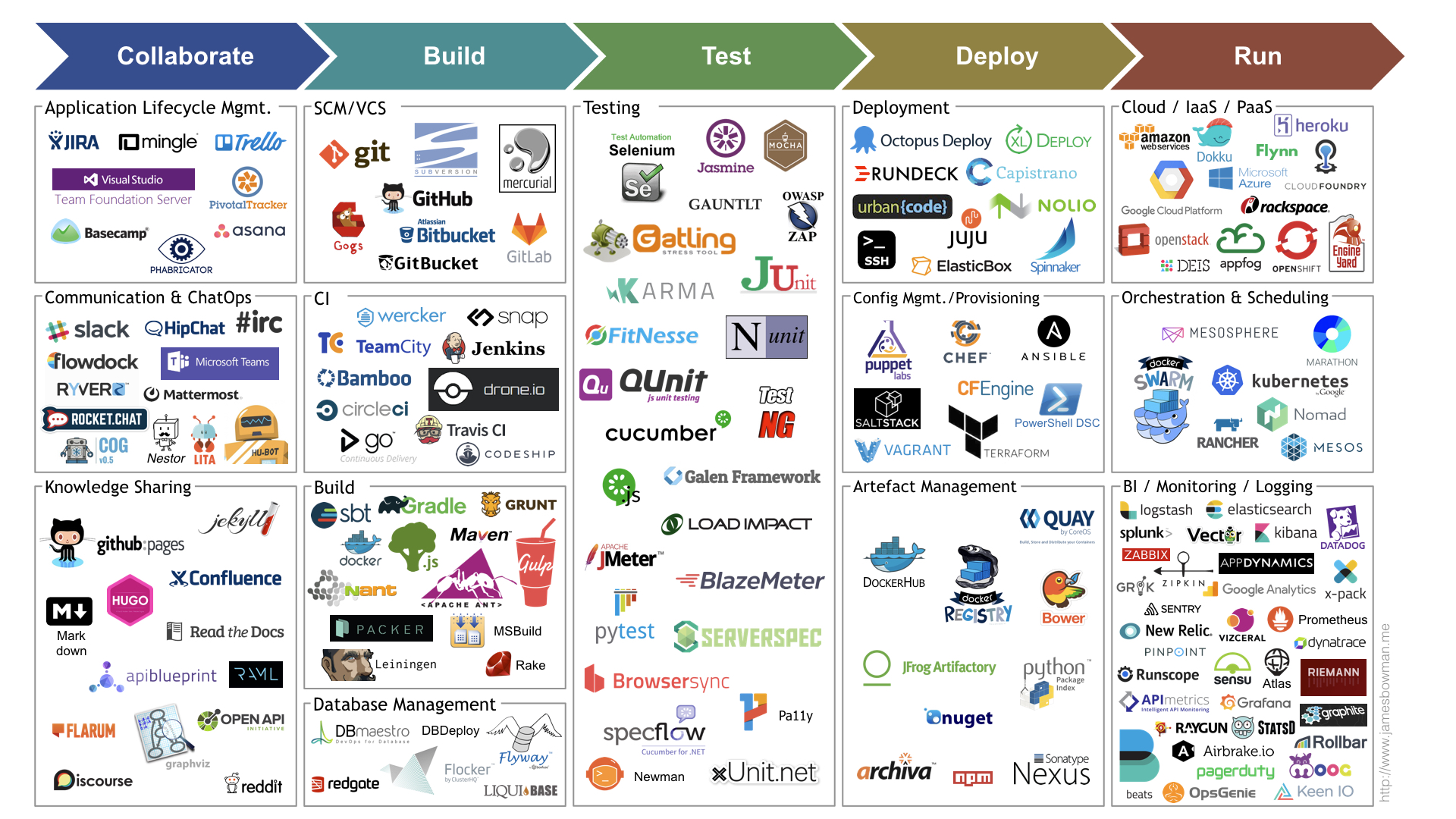
This is a panorama of DevOps tools, and I have used only a small part of them in this application development process, even without testing process. Of course, the application of these tools also need to consider the actual situation of the project, flexible application.

The application is divided into three main modules:
Since you’ll be using a variety of AWS cloud services next, to learn about them see this article AWS Services Explained .
.
├── api # api service
│   ├── serverless.yml
│   └── sns.js # lambda function
├── core # core service
│   ├── Dockerfile
│   ├── Infrastructure
│   │   └── tf-fargate
│   │       ├── cloudwatch.tf
│   │       ├── ecr.tf
│   │       ├── ecs.tf
│   │       ├── iam.tf
│   │       ├── main.tf
│   │       ├── output.tf
│   │       ├── sns.tf
│   │       ├── tasks
│   │       │   └── task_definition.json
│   │       ├── variables.tf
│   │       └── vpc.tf
│   ├── Makefile # CLI entry
│   ├── requirements.txt
│   └── src
│       ├── fund.txt
│       └── main.py # fargate task
└── web # web service
    ├── binaryMimeTypes.js
    ├── client
    │   ├── assets
    │   │   └── styles
    │   │       └── global.less
    │   ├── components
    │   │   └── navbar.vue
    │   ├── layouts
    │   │   └── default.vue
    │   ├── pages
    │   │   └── index.vue
    │   └── plugins
    │       └── iview.js
    ├── index.js
    ├── nuxt.config.js
    ├── nuxt.js # lambda function
    ├── package-lock.json
    ├── package.json
    ├── secrets_example.json
    ├── serverless.yml
    └── yarn.lock
Core Service runs through AWS Fargate, which is better suited than Lambda for running long background tasks. core Service is developed in Python, and to make it run in an AWS ECS environment, a Docker image is first built and then pushed to an AWS ECR repository.
FROM python:3.8-slim-buster

USER root
WORKDIR /tmp

# for source
RUN rm /bin/sh && ln -s /bin/bash /bin/sh

# for compile
RUN  apt-get update \
  && apt-get install -y wget \
  && apt-get install -y build-essential \
  && rm -rf /var/lib/apt/lists/*

# for TA-Lib
RUN pip install numpy && \
  wget http://prdownloads.sourceforge.net/ta-lib/ta-lib-0.4.0-src.tar.gz && \
  tar -xvzf ta-lib-0.4.0-src.tar.gz && \
  cd ta-lib/ && \
  ./configure --prefix=/usr && \
  make && \
  make install
RUN rm -R ta-lib ta-lib-0.4.0-src.tar.gz

# set the working directory in the container
WORKDIR /code
# copy the dependencies file to the working directory
COPY requirements.txt .
# install dependencies
RUN pip3 install -r requirements.txt
# copy the content of the local src directory to the working directory
COPY src/ .
# command to run on container start
CMD [ "python", "./main.py" ]
One thing to keep in mind here is the choice of base image, usually we use the alpine version when choosing a Python image. However, the alpine version requires a lot of compilation when installing some local binary packages, and this compilation will encounter various errors, so I finally chose the buster version, which is based on ubuntu. If you want to know more about it, see this article《Using Alpine can make Python Docker builds 50× slower》。
After obtaining the API Token for Tushare, you need to run Docker locally.
docker build -t invest-alchemy/core . # Build
docker run -t -i -e TUSHARE_API_TOKEN=xxxx invest-alchemy/core # Local Run
The ECR repository is then created in AWS, and the locally built images can then be pushed to the ECR for use by ECS tasks.
aws ecr get-login-password --region us-east-1 | docker login --username AWS --password-stdin replace_with_your_ecr_addr.dkr.ecr.us-east-1.amazonaws.com # Login ECR

docker build -t invest-alchemy/core . # Local Build

docker tag invest-alchemy/core:latest replace_with_your_ecr_addr.dkr.ecr.us-east-1.amazonaws.com/invest-alchemy/core:latest # Add Tag

docker push replace_with_your_ecr_addr.dkr.ecr.us-east-1.amazonaws.com/invest-alchemy/core:latest # Push to Remote Repo
The next step is to build the required infrastructure (ECS/IAM/SNS/VPC/CloudWatch) via Terraform. The main reference for this piece is this《Serverless job scheduling using AWS Fargate》。
See the source code for details, note that set capacity_provider to FARGATE_SPOT can significant cost reduction.
See the source code for details, note that ecs_target/network_configuration can use the default VPC network, be sure to set the assign_public_ip to true, otherwise the container task will not be able to access the external network.
Use the AWS default VPC network. AWS Fargate can run in multiple network modes; the simplest, public subnet mode, is chosen here.

For other scenes see 《CloudFormation Templates for AWS Fargate deployments》.
For further study you can read this article 《Fargate networking 101》.
######################### Role used by the container regulates what AWS services the task has access to, e.g. your application is using a DynamoDB, then the task role must give the task access to Dynamo.
resource "aws_iam_role" "ecs_service_role" {
  name               = "${var.project}_ecs_service_role_${var.env}"
  assume_role_policy = "${data.aws_iam_policy_document.ecs_service_assume_role_policy.json}"
}

resource "aws_iam_role_policy" "ecs_service_policy" {
  name   = "${var.project}_ecs_service_role_policy_${var.env}"
  policy = "${data.aws_iam_policy_document.ecs_service_policy.json}"
  role   = "${aws_iam_role.ecs_service_role.id}"
}

data "aws_iam_policy_document" "ecs_service_policy" {
  statement {
    effect = "Allow"
    resources = ["*"]
    actions = [
        "iam:ListPolicies",
        "iam:GetPolicyVersion"
    ]
  }
}

data "aws_iam_policy_document" "ecs_service_assume_role_policy" {
  statement {
    actions = ["sts:AssumeRole"]
    principals {
      type = "Service"
      identifiers = ["ecs-tasks.amazonaws.com"]
    }
  }
}

resource "aws_iam_role_policy_attachment" "ecs_service_role_policy_attachment" {
  role       = aws_iam_role.ecs_service_role.name
  policy_arn = "arn:aws:iam::aws:policy/AWSLambdaFullAccess" # https://gist.github.com/gene1wood/55b358748be3c314f956
}

######################### Role used by the container enables the service to e.g. pull the image from ECR, spin up or deregister tasks etc

resource "aws_iam_role" "ecs_task_execution_role" {
  name = "${var.project}_ecs_task_execution_role_${var.env}"

  assume_role_policy = <<EOF
{
 "Version": "2012-10-17",
 "Statement": [
   {
     "Action": "sts:AssumeRole",
     "Principal": {
       "Service": "ecs-tasks.amazonaws.com"
     },
     "Effect": "Allow",
     "Sid": ""
   }
 ]
}
EOF
}

resource "aws_iam_role_policy_attachment" "ecs_task_execution_role_policy_attachment" {
  role       = aws_iam_role.ecs_task_execution_role.name
  policy_arn = "arn:aws:iam::aws:policy/service-role/AmazonECSTaskExecutionRolePolicy" # https://gist.github.com/gene1wood/55b358748be3c314f956
}

######################### Role used for ECS Events

resource "aws_iam_role" "ecs_events_role" {
  name               = "${var.project}_ecs_events_role_${var.env}"
  assume_role_policy = "${data.aws_iam_policy_document.ecs_events_assume_role_policy.json}"
}

resource "aws_iam_role_policy_attachment" "ecs_events_role_policy" {
  policy_arn = "${data.aws_iam_policy.ecs_events_policy.arn}"
  role       = "${aws_iam_role.ecs_events_role.id}"
}

data "aws_iam_policy" "ecs_events_policy" {
  arn = "arn:aws:iam::aws:policy/service-role/AmazonEC2ContainerServiceEventsRole" # https://gist.github.com/gene1wood/55b358748be3c314f956
}

data "aws_iam_policy_document" "ecs_events_assume_role_policy" {
  statement {
    actions = ["sts:AssumeRole"]
    principals {
      type = "Service"
      identifiers = ["events.amazonaws.com"]
    }
  }
}
Three roles are defined here.
AmazonEC2ContainerServiceEventsRole role.Applications always need to rely on some sensitive information, such as various api tokens. Core Service relies on Tushare API token, so it needs to be injected through Terraform. Here i refer to this 《A comprehensive guide to managing secrets in your Terraform code》.
The article provides these ways of managing sensitive information.
The first way of environment variables is the simplest, and the next two have a certain cost of use, because the key security requirements are not high, the first simple way is used here.
First define the variables.
variable "TUSHARE_API_TOKEN" {
  description = "Tushare API Token from .env"
  type        = string
}
Then inject this environment variable at the ECS definition.
data "template_file" "task" {
  template = "${file("./Infrastructure/tf-fargate/tasks/task_definition.json")}"

  vars = {
    project             = "${var.project}"
    aws_region          = "${var.aws_region}"
    ecr_image_uri       = "${var.ecr_image_uri}"
    TUSHARE_API_TOKEN = "${var.TUSHARE_API_TOKEN}" # 注入变量
  }
}
Finally, inject this variable into the container at task_definition.json.
"environment": [{"name": "TUSHARE_API_TOKEN", "value": "${TUSHARE_API_TOKEN}"}]
This key needs to be entered each time a change is made, so that the key is not leaked to the code repository.
################ Config ########################
S3_BUCKET ?= invest-alchemy
AWS_REGION ?= us-east-1
ENV ?= dev
ECR := 745121664662.dkr.ecr.us-east-1.amazonaws.com/invest-alchemy-core-ecr-dev # ECR Repository Example: 123456789012.dkr.ecr.eu-west-1.amazonaws.com/{project_name}-ecr-{env}
################################################

################ Artifacts Bucket ##############
artifacts:
	@echo "Creation of artifacts bucket"
	@aws s3 mb s3://$(S3_BUCKET)
	@aws s3api put-bucket-encryption --bucket $(S3_BUCKET) \
		--server-side-encryption-configuration \
		'{"Rules": [{"ApplyServerSideEncryptionByDefault": {"SSEAlgorithm": "AES256"}}]}'
	@aws s3api put-bucket-versioning --bucket $(S3_BUCKET) --versioning-configuration Status=Enabled
################################################


build-docker:
	@echo "run aws ecr get-login --region $(AWS_REGION) first"
	@docker build -t $(PROJECT) .
	@docker tag $(PROJECT) $(ECR)
	@docker push $(ECR)

################ Terraform #####################

init:
	@. .env
	@terraform init \
		-backend-config="bucket=$(S3_BUCKET)" \
		-backend-config="key=$(PROJECT)/terraform.tfstate" \
		./Infrastructure/tf-fargate/

validate:
	@terraform validate ./Infrastructure/tf-fargate/

plan:
	@terraform plan \
		-var="env=$(ENV)" \
		-var="project=$(PROJECT)" \
		-var="description=$(DESCRIPTION)" \
		-var="aws_region=$(AWS_REGION)" \
		-var="artifacts_bucket=$(S3_BUCKET)" \
		./Infrastructure/tf-fargate/

apply:
	@terraform apply \
		-var="env=$(ENV)" \
		-var="project=$(PROJECT)" \
		-var="description=$(DESCRIPTION)" \
		-compact-warnings ./Infrastructure/tf-fargate/

destroy:
	@read -p "Are you sure that you want to destroy: '$(PROJECT)-$(ENV)-$(AWS_REGION)'? [yes/N]: " sure && [ $${sure:-N} = 'yes' ]
	@terraform destroy ./Infrastructure/tf-fargate/
First execute make build-docker to build the image and upload it to ECR, then execute make init to initialize Terraform, then execute make validate && make plan to verify that there are no problems with the infrastructure configuration. If there are no problems, run make apply to build the real infrastructure.
If there are changes to the system code, the following process can be repeated.
make build-dockermake applyThe API Service has only one API for subscribing to SNS topics, which is used to help users subscribe to the topics provided by Core Service.
service: api
app: invest-alchemy
org: madawei2699

provider:
  name: aws
  role: arn:aws:iam::745121664662:role/invest-alchemy-lambda
  runtime: nodejs12.x
  stage: dev
  region: us-east-1

functions:
  subscribe_sns:
    handler: sns.subscribe_sns
    memorySize: 128
    description: Subscribe sns topic.
    environment:
      snsTopicArn: arn:aws:sns:us-east-1:745121664662:trade-signal-topic
    events:
      - http:
          path: subscribe
          method: post
          cors: true
          integration: LAMBDA
The function subscribe_sns is defined here, and we implement it with Javascript, the source code is available at sns.js, so we won’t go over it here.
Note that the code needs to define the SNS topic, so it needs to have the role permission to subscribe to SNS, which we specify in the Serverless configuration as arn:aws:iam::745121664662:role/invest-alchemy-lambda , which has permission to subscribe to the SNS, with the additional policies AWSLambdaBasicExecutionRole and AmazonSNSFullAccess.
Code executed in Lambda can be imported directly into the AWS SDK without having to install it, and there is no need to set AWS Credentials, as the function executes with the permissions attached to the role directly.
The web UI provides user-accessible pages for users to sign up for email subscriptions. Vue.js and Nuxt.js are used in this module to build SEO-friendly Server-Side Rendered web pages. I mainly refer to this article AWS | Vue Nuxt Ssr .
service: web
app: invest-alchemy
org: madawei2699

provider:
  name: aws
  runtime: nodejs12.x
  stage: ${self:custom.secrets.NODE_ENV}
  region: us-east-1
  environment:
    NODE_ENV: ${self:custom.secrets.NODE_ENV}

functions:
  nuxt:
    handler: index.nuxt
    memorySize: 256
    events:
      - http:
          path: /
          method: any
          cors: true
      - http:
          path: /{proxy+}
          method: any
          cors: true

plugins:
  - serverless-apigw-binary
  - serverless-domain-manager
  - serverless-offline

custom:
  secrets: ${file(secrets.json)}
  apigwBinary:
    types:
      - '*/*'
  customDomain:
    domainName: ${self:custom.secrets.DOMAIN}
    basePath: ''
    stage: ${self:custom.secrets.NODE_ENV}
    createRoute53Record: true
Note here that the gateway integrates custom domain names and TLS certificates: you need to first configure the domain name in AWS Route53 and then apply for a TLS certificate in AWS Certificate Manager, please refer to the article mentioned above for the detailed process.
Once the certificate application is successful, you can execute sls create_domain to create the DNS information for the domain name.
Finally, run npm run deploy to deploy to AWS. If you want to debug locally, you can run npm run start-server.
Select the CloudWatch service in the AWS console to view the log group and locate the issue by analyzing the associated logs. If no logs are generated, you can also see if timed task events are generated by viewing the logs in CloudTrail.
One of the major advantages of Serverless is that it is pay-as-you-go, which is cheaper than buying a separate VPS for timed tasks or low traffic sites. It also has extremely high availability and elastic scalability, which is not possible with a single VPS.
To analyze the cost, you can use the AWS Billing service. The billing services we use (excluding some services that have negligible billing on the system such as S3/VPC/CloudFront, etc.) include
All of the above are based on the US East region.
We know from the CloudWatch log set that Lambda execution time per request is 1200 ms per run of the API and Web service; Core service runs 3 minutes per day. The cost of Lambda is: 200000 * 1200 / 100 * 0.0000002083 = $0.5; ECS cost is 3 * 30 / 60 * (0.01289974 + 0.00141649) + 0.00141649) = $0.02. API Gateway costs 200000 / 1000000 = $0.2; SNS assuming 1,000 people subscribe to the email is 1000 * 30 / 100000 = $0.3.
Then the monthly cost is: 0.5 + 0.02 + 0.2 + 0.3 = $1.02. Take vultr VPS for example, the cheapest configuration with 1 vCPU + 512 MB configuration is $2.50 a month, and that doesn’t include the cost of sending emails.
The background timing tasks are not sensitive to the start time, if you are very concerned about the start time can be constantly warmed up by some timing tasks, but this will also lead to higher costs. For further information, please refer to this article 《Solving Serverless Cold Starts with Advanced Tooling》。
Most of the VPC services are not charged, except VPN/NAT Gateway/Endpoints (Gateway is free/Interface is charged), while the Endpoints of Interface are charged very expensive and should be stopped as much as possible when they are not needed, and you have to remove the related AWS services to stop charging.
Note that Endpoints are charged based on available zones, so if an Endpoint is created with 6 available zones, it will be charged 6 times as much.
此内容由惯性聚合(RSS阅读器)自动聚合整理,仅供阅读参考。 原文来自 — 版权归原作者所有。