8 key aspects of a mobile device security audit program |...
Michael Goad·2026-06-29·via Search Security Resources and Information from TechTarget
Article 3 of 3
Part of:Conducting mobile audits
A mobile device audit program helps IT assess endpoint inventory, access controls, encryption, MDM, UEM, BYOD risk, compliance and remediation across mobile endpoints.
To protect corporate data and prevent security incidents, IT must have a program in place to audit the mobile endpoints that access business systems and data.
What falls under the category of "mobile device" for auditing has evolved over the years. While smartphones and tablets might come to mind first, mobile device security audits should also account for laptops, BYOD endpoints and other portable or network-connected devices that can access corporate resources.
A comprehensive mobile device audit program helps IT understand which devices are in use, how they are managed, what data they can access and whether they comply with security policies. Strong security controls are crucial as employees use more devices across office, remote and hybrid work environments.
Why are mobile device security audits important?
Mobile devices store and transmit sensitive data on both managed and unmanaged networks. To mitigate risk, IT departments should conduct a mobile device security audit to systematically evaluate their organization's mobile device security measures.
A mobile device security audit assesses details such as the types of devices, OS versions, policies, access control, software updates and encryption. By examining these features, organizations can figure out how secure corporate resources are against potential data breaches.
A mobile device audit program should give IT a repeatable way to assess mobile risk, not just a one-time checklist.
Mobile auditing in the enterprise is not just about cellphones. It should be narrower than a complete network audit, but broad enough to include the portable and network-connected endpoints that can access corporate resources. That can include smartphones, tablets, laptops, BYOD devices and some IoT devices, depending on how they connect and what data or systems they can reach.
Some devices might seem fixed to one place or only serve one purpose, but they can still pose issues if they connect to Wi-Fi, Bluetooth or corporate networks. The goal is not to treat every connected device the same way, but to decide which devices create mobile or endpoint risk and include them in the right audit scope.
For example, if an organization relies on shared network credentials or weak access controls, an employee or attacker might connect an unmanaged device to the corporate network. IT admins need to know what that device is, what network segment it can reach, whether it is sending data and whether it creates a path to more sensitive systems.
It's important to consider factors such as OS version, manufacturer support, ownership model, patch status, app inventory, network access and network segmentation in a mobile audit. Because network security is a key component of mobile security, IT admins should separate high-risk or unmanaged devices from critical corporate infrastructure through segmentation, access controls and monitoring.
An audit shouldn't be a one-and-done task; it should be a recurrent part of a broader program. Regular audits help IT strengthen cybersecurity measures and keep them up to date, while educating end users on best practices for mobile security.
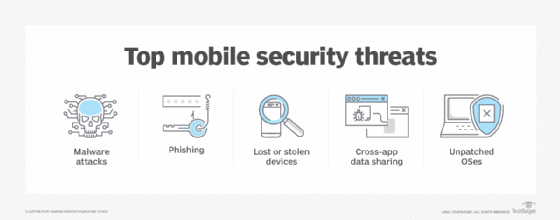
A mobile device audit program should include measures to prevent and address common security threats, including malware, phishing and lost or stolen devices.
8 key aspects of a mobile device security audit program
When conducting an audit, IT should pay attention to unmanaged, underpatched and higher-risk devices that employees bring into the organization. Mobile device management (MDM) and unified endpoint management (UEM) tools are important for inventory, policy enforcement, configuration management and data loss prevention. Mobile threat defense tools can add risk detection for mobile phishing, malicious apps, device compromise and unsafe network connections.
NIST SP 800-124 Rev. 2 provides current guidance for managing mobile device security in the enterprise, including centralized device management and endpoint protection technologies. IT teams can use that guidance, along with internal risk requirements, to decide which controls and tools belong in the audit program.
There are several moving parts involved in a mobile device security audit program. To ensure that it's comprehensive and effective, admins should focus on the following key aspects:
Policies and procedures. Organizations must provide clear, thorough mobile device policies. These policies should cover acceptable use, data handling, passwords and remote access. IT should also regularly review and update security policies.
Access control. Strong authentication methods, such as multifactor authentication, should be in place, along with role-based access control, conditional access policies and least-privilege access for sensitive data. Additionally, monitor and log access attempts, especially from unmanaged, noncompliant or high-risk devices.
Software and updates. IT should follow a rigorous update schedule for OS versions and security patches, with updates for critical vulnerabilities taking priority. Use MDM tools to help automate updates and compliance as well.
MDM and UEM. IT should use mobile device management or unified endpoint management tools for central management, policy enforcement, inventory tracking, compliance checks, remote wiping and app deployment. Management logs should also undergo regular audits.
Encryption. IT should require strong encryption for data at rest and in transit. There should also be clear encryption requirements for sensitive information on devices. Hardware-backed protections, such as Trusted Platform Module and Apple's Secure Enclave, can provide additional protection for supported devices.
Security awareness training. Users should receive education on mobile security and their role in maintaining it. This can include training on password hygiene, phishing, malware and other common threats, as well as instructions for what to do in the event of device loss or theft.
Removable media. Organizations should define policies for using removable media with mobile devices. Enforce encryption for data transfer to and from removable media, and consider restricting access if it isn't essential.
Compliance with NIST and other security standards. NIST guidelines and other relevant data security standards, such as the Payment Card Industry Data Security Standard and HIPAA, must factor into audit programs. Evaluate password policies, encryption methods, incident response procedures, MDM, MTD and other factors against these standards.
Best practices for building an audit program
There isn't a one-size-fits-all audit program that all IT departments can adopt. The specific details to focus on for a mobile device security audit program depend on the following factors:
Organization size. A large organization with a diverse range of mobile devices might need a more comprehensive audit program than a smaller organization with limited devices.
Device types. The types of mobile devices in use within the organization can influence the audit approach. For example, IT might focus on encryption and physical security when auditing laptops, while auditing smartphones might require more focus on access control and app security.
Industry regulations. Organizations in regulated sectors, such as healthcare or finance, often need to follow industry-specific security standards. Their audit programs should reflect this.
Once admins determine the audit objectives and scope, they should create and follow an audit checklist, which should generally include the following steps:
Audit mobile endpoints, including smartphones, tablets, laptops, BYOD devices and relevant IoT devices.
Confirm device ownership, enrollment status, OS version, patch level, app inventory and compliance status.
Ensure appropriate network segmentation and access controls for mobile, BYOD and IoT devices.
Update mobile and IoT devices to the latest supported versions.
Implement MDM or UEM tools for inventory, configuration, policy enforcement and remote wipe.
Implement advanced security tools, including MTD, especially for high-risk organizations.
Review identity controls, including multifactor authentication, conditional access and access removal for lost devices or departing employees.
Document audit findings, assign owners and track remediation through completion.
A mobile device audit program should give IT a repeatable way to assess mobile risk, not just a one-time checklist. The program should help teams understand which devices can access corporate resources, whether those devices meet security requirements and which risks need remediation first.
As mobile, BYOD and IoT use expands, audit programs should evolve with the environment. Regular reviews of device inventory, access controls, security tools and user behavior can help organizations protect sensitive data and reduce the chance that a mobile endpoint becomes a path into critical systems.
Editor's note: This article was updated to improve clarity and include current mobile device audit program considerations around MDM, UEM, BYOD, MTD, access controls and compliance.
Michael Goad is a freelance writer and solutions architect with experience handling mobility in an enterprise setting.