







2019-12-20 09:39 卡车司机 阅读(6897) 评论() 收藏 举报
Summary: in this tutorial, you will learn how to use the SQL Server UPDATE JOIN statement to perform a cross-table update.
UPDATE JOIN syntaxTo query data from related tables, you often use the join clauses, either inner join or left join. In SQL Server, you can use these join clauses in the UPDATE statement to perform a cross-table update.
The following illustrates the syntax of the UPDATE JOIN clause:
|
UPDATE t1 SET t1.c1 = t2.c2, t2.c2 = expression, ... FROM t1 [INNER | LEFT] JOIN t2 ON join_predicate WHERE where_predicate; |
In this syntax:
UPDATE clause.FROM clause.INNER JOIN or LEFT JOIN to join to another table (t2) using a join predicate specified after the ON keyword.WHERE clause to specify rows to be updated.UPDATE JOIN examplesLet’s take a look at some examples of using the UPDATE JOIN statement.
First, create a new table named sales.targets to store the sales targets:
|
1 2 3 4 5 6 7 8 9 10 11 12 13 14 15 16 17 |
DROP TABLE IF EXISTS sales.targets; CREATE TABLE sales.targets ( target_id INT PRIMARY KEY, percentage DECIMAL(4, 2) NOT NULL DEFAULT 0 ); INSERT INTO sales.targets(target_id, percentage) VALUES (1,0.2), (2,0.3), (3,0.5), (4,0.6), (5,0.8); |
If sales staffs achieved the target 1, they will get the ratio of 0.2 or 20% sales commission and so on.
Second, create another table named sales.commissions to store the sales commissions:
|
1 2 3 4 5 6 7 8 9 10 11 12 13 14 15 16 17 18 19 20 21 22 |
CREATE TABLE sales.commissions ( staff_id INT PRIMARY KEY, target_id INT, base_amount DECIMAL(10, 2) NOT NULL DEFAULT 0, commission DECIMAL(10, 2) NOT NULL DEFAULT 0, FOREIGN KEY(target_id) REFERENCES sales.targets(target_id), FOREIGN KEY(staff_id) REFERENCES sales.staffs(staff_id), ); INSERT INTO sales.commissions(staff_id, base_amount, target_id) VALUES (1,100000,2), (2,120000,1), (3,80000,3), (4,900000,4), (5,950000,5); |
The sales.commissions table stores sales staff identification, target_id, base_amount, and commission. This table links to the sales.targets table via the target_id column.
Our goal is to calculate the commissions of all sales staffs based on their sales targets.
UPDATE INNER JOIN exampleThe following statement uses the UPDATE INNER JOIN to calculate the sales commission for all sales staffs:
|
UPDATE sales.commissions SET sales.commissions.commission = c.base_amount * t.percentage FROM sales.commissions c INNER JOIN sales.targets t ON c.target_id = t.target_id; |
Here is the output:
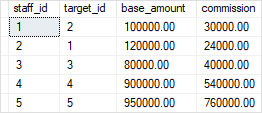
If you query the sales.commissions table again, you will see that the values in the commission column are updated:
|
SELECT * FROM sales.commissions; |
UPDATE LEFT JOIN exampleSuppose we have two more new sales staffs that have just joined and they don’t have any target yet:
|
INSERT INTO sales.commissions(staff_id, base_amount, target_id) VALUES (6,100000,NULL), (7,120000,NULL); |
We assume that the commission for the new sales staffs is 0.1 or 10%, we can update the commission of all sales staffs using the UPDATE LEFT JOIN as follows:
|
UPDATE sales.commissions SET sales.commissions.commission = c.base_amount * COALESCE(t.percentage,0.1) FROM sales.commissions c LEFT JOIN sales.targets t ON c.target_id = t.target_id; |
In this example, we used COALESCE() to return 0.1 if the percentage is NULL.
Note that if you use the UPDATE INNER JOIN clause, just the five rows of the table whose targets are not NULL will be updated.
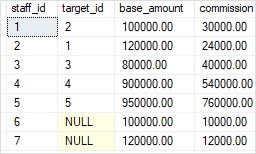
Let’s examine the data in the sales.commissions table:
|
SELECT * FROM sales.commissions; |
The result set is as follows:
In this tutorial, you have learned how to use the SQL Server UPDATE JOIN statement to perform a cross-table update.
此内容由惯性聚合(RSS阅读器)自动聚合整理,仅供阅读参考。 原文来自 — 版权归原作者所有。