
惯性聚合 高效追踪和阅读你感兴趣的博客、新闻、科技资讯
阅读原文 在惯性聚合中打开

推荐订阅源

博客园 - 叶小钗
云风的 BLOG
云风的 BLOG
G
Google Developers Blog
S
SegmentFault 最新的问题
罗磊的独立博客
Hugging Face - Blog
Hugging Face - Blog
美团技术团队
爱范儿
爱范儿
博客园 - 三生石上(FineUI控件)
H
Hackread – Cybersecurity News, Data Breaches, AI and More
D
DataBreaches.Net
F
Fortinet All Blogs
TaoSecurity Blog
TaoSecurity Blog
D
Docker
C
Cybersecurity and Infrastructure Security Agency CISA
K
Kaspersky official blog
宝玉的分享
宝玉的分享
腾讯CDC
Google Online Security Blog
Recorded Future
Recorded Future
T
The Exploit Database - CXSecurity.com
T
The Blog of Author Tim Ferriss
V
V2EX
S
Securelist
K
KPMG report finds enterprise disconnect between AI and its ROI | CIO
C
CERT Recently Published Vulnerability Notes
A
Arctic Wolf
Scott Helme
Scott Helme
L
LINUX DO - 热门话题
Y
Y Combinator Blog
P
Proofpoint News Feed
T
Tor Project blog
AWS News Blog
AWS News Blog
cs.CV updates on arXiv.org
The Last Watchdog
The Last Watchdog
博客园 - 聂微东
T
Threat Research - Cisco Blogs
B
Blog
Attack and Defense Labs
L
Lohrmann on Cybersecurity
C
CXSECURITY Database RSS Feed - CXSecurity.com
阮一峰的网络日志
阮一峰的网络日志
cs.AI updates on arXiv.org
IT之家
IT之家
N
News and Events Feed by Topic
博客园 - 司徒正美
H
Help Net Security
C
Cisco Blogs
C
Check Point Blog
S
Secure Thoughts

博客园 - 深圳大漠

Windows 11 登录后黑屏,只有一个可以移动的鼠标 SqlServer查数据表的记录数 Swagger UI 报错 Flutter升级错误 Error: failed to push some refs to ORA-28040: 没有匹配的验证协议 CS8600错误 如何让MAUI项目打包成apk而不是abb The current Gradle version 5.6.2 is not compatible with the Kotlin Gradle plugin. Please use Gradle 6.1.1 or newer, or the previous version of the Kotlin plugin Flutter常见错误记录 VSCode设置Flutter(Dart)自动折行宽度 analysis_options.yaml Fiddler抓HttpClient的包 VSCode开发WebApi EFCore的坑 百度语音合成调用DEMO Connection closed before full header was received SqlServer报错:指定的网络名不再可用 Flutter Build apk 错误(一) 修改项目语言为C#8.0
Windows Server 2022 安装 SqlServer2000
深圳大漠 · 2025-11-22 · via 博客园 - 深圳大漠

有个客户有个旧系统,只能使用SqlServer2000,但服务器是Windows Server 2022 Standard,安装时有些地方要注意:
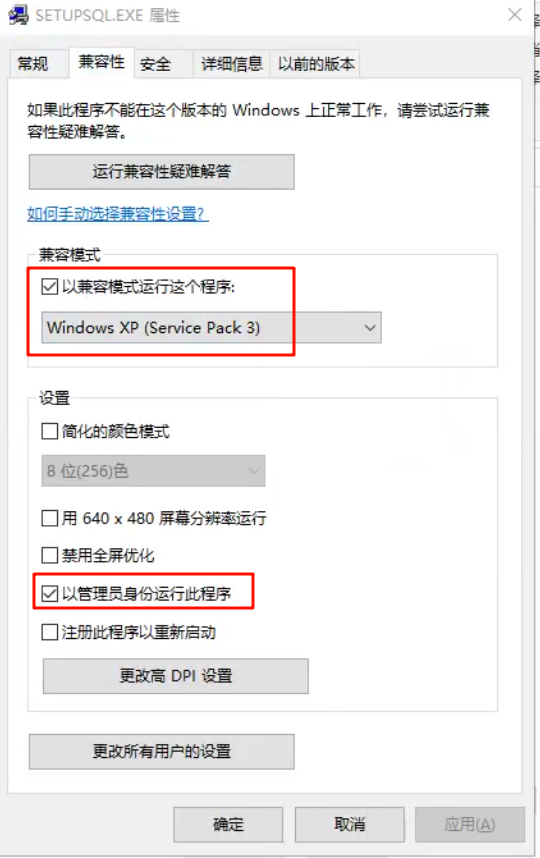
  • SqlServer的安装文件 SQL2000\PERSONAL\X86\SETUP\SETUPSQL.EXE 要设置为“以兼容模式运行这个程序”,且“以管理员身份运行此程序”;

image

  • 安装时报错:无法定位序数 1 于动态链接库 C:\Windows\SYSTEM32\SQLUNIRL.dll 上。
    在PowerShell中执行以下脚本,注意X:\x86\system\SQLUNIRL.dll 路径要替换为你的SqlServer2000的安装路径
    # 以管理员身份运行CMD
    # 从SQL Server 2000安装介质复制缺失的DLL
    copy "X:\x86\system\SQLUNIRL.dll" "C:\Windows\System32\"
    copy "X:\x86\system\SQLUNIRL.dll" "C:\Windows\SysWOW64\"
    
    # 注册DLL文件
    regsvr32 "C:\Windows\System32\SQLUNIRL.dll"
    regsvr32 "C:\Windows\SysWOW64\SQLUNIRL.dll"
  • 如果copy时报错:
    C:\Users\Administrator>copy "X:\X86\SYSTEM\SQLUNIRL.dll" "C:\Windows\SysWOW64\" 覆盖 C:\Windows\SysWOW64\SQLUNIRL.DLL 吗? (Yes/No/All): y 拒绝访问。 已复制 0 个文件。

    用以下方法获得权限:
    # 以管理员身份打开CMD,然后执行:
    takeown /f "C:\Windows\SysWOW64\SQLUNIRL.dll" /a
    icacls "C:\Windows\SysWOW64\SQLUNIRL.dll" /grant administrators:F
    
    takeown /f "C:\Windows\System32\SQLUNIRL.dll" /a  
    icacls "C:\Windows\System32\SQLUNIRL.dll" /grant administrators:F

    然后再重新copy。