








Last month, we announced Pinecone Assistant had been released for public preview. Pinecone Assistant simplifies complex tasks like data chunking, vector search, embedding, and querying while ensuring privacy and security.
Today, let’s take a look at some key improvements we made to the Assistant API:
Let’s explore the details of this update and how it can enhance your application.
Pinecone’s original Assistant was designed to align with OpenAI’s Chat Completion API, offering a familiar structure for developers to integrate chat features into their apps quickly. While this was sufficient for many use cases, some developers needed more control—especially when handling citations and references. This is why we introduced the Chat API.
The Chat API enhances the original setup, providing developers with powerful building blocks for seamless application integration. This API offers structured citations and flexible referencing options, allowing builders to create more customizable and feature-rich solutions.
The Chat API supports both streaming and batch modes. In streaming mode, citations can be presented alongside chat responses in real time or added to the final output, depending on what works best for your product (more on this later in this post).
The Chat API returns citations as structured objects with rich metadata, including file names, URLs, timestamps, and specific pages or highlighted text. This approach offers flexibility in displaying citations, allowing you to customize how they're presented to users. You can include citations within the chat text or manage them separately, adapting to your specific product needs.
Here's how you can benefit from this added control:
Let’s take a deeper look at how citations can be used. Assuming we uploaded this From 10-k filing to our assistant, consider the following request:
{
  "messages": [
    {
      "role": "user",
      "content": "As of December 31, 2015, how many employees Netflix had?"
    }
  ],
  "streaming": false,
}
A Chat API response with citations will look like the following:
{
    "citations": [
        {
            "position": 72,
            "references": [
                {
                    "file": {
                        "id": "c37051e5-ae5f-44f0-8b26-9933c6fbfd97",
                        "name": "netflix-10k.pdf",
                        "created_on": "2024-10-09T19:42:05.275496690Z",
                        "updated_on": "2024-10-09T19:42:29.368229213Z",
                        "status": "Available",
                        "size": 578489.0,
                        "metadata": null,
                        "percent_done": 1.0,
                        "signed_url": "https://storage.googleapis.com/knowledge-prod-files/afc65f18-8844-484e-8b20-018e19f34d6d%2F9778d91f-cfe2-427b-9cbf-6f75ac7bd948%2Fc37051e5-ae5f-44f0-8b26-9933c6fbfd97.pdf[...]"
                    },
                    "pages": [
                        4
                    ]
                }
            ]
        }
    ],
    "finish_reason": "stop",
    "id": "00000000000000007bf29ae4da6a48c1",
    "message": {
        "content": "As of December 31, 2015, Netflix had approximately 3,700 total employees.",
        "role": "\"assistant\""
    },
    "model": "gpt-4o-2024-05-13",
    "usage": {
        "completion_tokens": 29,
        "prompt_tokens": 14452,
        "total_tokens": 14481
    }
}
The answer we get is:
As of December 31, 2015, Netflix had approximately 3,700 total employees.
As you can see in the snippet of the original PDF, the reference to page 4 of the file is indeed where the answer to the question can be found.

Citations are streamed in order, as part of the the overall stream received back from the Chat API. This means you can consume the stream returned from the API without worrying about the correct placement of the citations in the text.
Let’s take a look at how we can use the stream in a Next.js action, using EventSource (full code listing):
export async function chat(messages: Message[]) {
  // Create a streamable value to hold the stream of data
  const stream = createStreamableValue()
  const url = `${process.env.PINECONE_ASSISTANT_URL}/assistant/chat/${process.env.PINECONE_ASSISTANT_NAME}`

  // Create a new EventSource object to handle the streaming response
  const eventSource = new EventSource(url, {
    method: 'POST',
    body: JSON.stringify({
      messages,
      stream: true,
      model: 'gpt-4o',
    }),
    headers: {
      'Api-Key': process.env.PINECONE_API_KEY!,
      'Content-Type': 'application/json',
    },
    disableRetry: true,
  });

  // Listen for messages from the Assistant
  eventSource.onmessage = (event: MessageEvent) => {
    try {
      const data = JSON.parse(event.data);

      switch (data.type) {
        // The Assistant has started sending a message
        case 'message_start':
          stream.update(JSON.stringify({ type: 'start' }));
          break;
        // The Assistant is sending a chunk of the message
        case 'content_chunk':
          if (data.delta?.content) {
            // Update the stream with the chunk of the message
            stream.update(JSON.stringify({ type: 'content', content: data.delta.content }));
          }
          break;
        // The Assistant is sending a citation
        case 'citation':
          // Update the stream with the citation
          stream.update(JSON.stringify({ type: 'citation', citation: data.citation }));
          break;
        // The Assistant has finished sending a message
        case 'message_end':
          if (data.finish_reason === 'stop') {
            // Update the stream to indicate the end of the message
            stream.update(JSON.stringify({ type: 'end' }));
            eventSource.close();
            stream.done();
          }
          break;
        default:
          console.warn('Unexpected message type:', data.type);
      }
    } catch (error) {
      console.error('Error parsing message:', error);
    }
  };

  eventSource.onerror = (error) => {
    console.error('EventSource error:', error);
    eventSource.close();
    stream.error(error);
  };

  return { object: stream.value }
}
When we consume the content, we can weave the citations directly into the content, as well as maintain a reference table:
let currentParts: MessagePart[] = [];
...

const { object } = await chat([{ role: newUserMessage.role, content: newUserMessage.parts[0].content }]);
let newAssistantMessage: Message | null = null;

for await (const chunk of readStreamableValue(object)) {
  const data = JSON.parse(chunk);
  switch (data.type) {
    ... // Handle start of the message

    // Content of the message
    case 'content':
      // Add the content to the current parts
      // If the current parts array is empty or the last part is not a text part, add a new text part
      if (currentParts.length === 0 || currentParts[currentParts.length - 1].type !== 'text') {
        currentParts.push({ type: 'text', content: data.content });
      } else {
        currentParts[currentParts.length - 1].content += data.content;
      }
      // Update the message with the new parts
      setMessages(prevMessages => {
        const updatedMessages = [...prevMessages];

        const lastMessage = updatedMessages[updatedMessages.length - 1];
        if (lastMessage && lastMessage.role === 'assistant') {
					// When we modify lastMessage, we're directly modifying the object in updatedMessages.
          lastMessage.parts = [...currentParts];
        }
        return updatedMessages;
      });
      break;
    // Citation in the message
    case 'citation':
      // Add the citation to the current parts
      const citationIndex = newAssistantMessage!.references!.length;
      currentParts.push({ type: 'citation', content: '', citationIndex });
      // Add the citation to the message
      newAssistantMessage!.references!.push(data.citation);
      // Update the message with the new parts and references
      setMessages(prevMessages => {
        const updatedMessages = [...prevMessages];
        const lastMessage = updatedMessages[updatedMessages.length - 1];
        if (lastMessage && lastMessage.role === 'assistant') {
	        // When we modify lastMessage, we're directly modifying the object in updatedMessages.
          lastMessage.parts = [...currentParts];
          lastMessage.references = [...newAssistantMessage!.references!];
        }
        return updatedMessages;
      });
      break;
  }
}
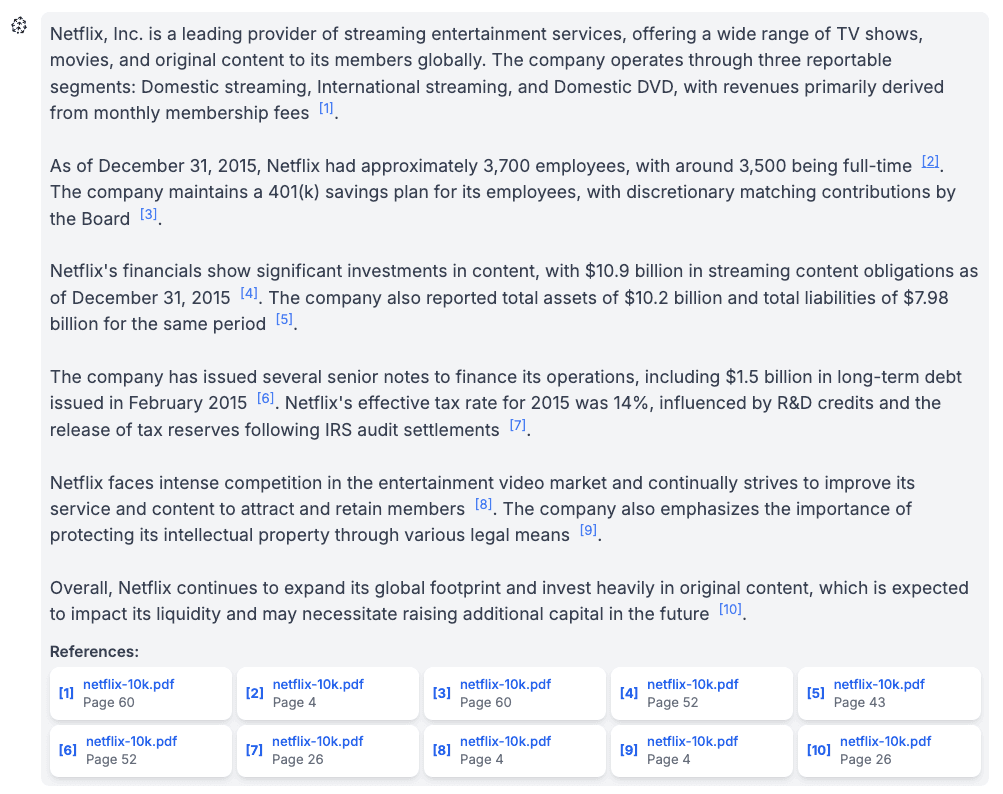
We can then use this information to render the references inline in the design of our choosing. For example:
Custom instructions in Pinecone Assistant allow you to significantly tailor the assistant's responses by defining its role, tone, and focus, effectively acting as the system prompt. For example, instructing the assistant to act as a legal expert will generate authoritative, law-focused answers, while setting it as a customer support agent ensures responses are geared toward troubleshooting and user assistance.
Custom instructions can also dictate the communication style—formal or conversational—and prioritize specific content or policies, such as compliance with industry regulations. By customizing these parameters, you can substantially differentiate the assistant's behavior, ensuring it provides highly relevant and appropriate information for specific use cases.
Some examples use cases for custom instructions include:
You can set the Assistant’s custom instructions when creating it, or any time after that by using the update_assistant method:
# Initialize the Pinecone client
pc = Pinecone()

# Create a new assistant with custom instructions
assistant = pc.assistant.create_assistant(assistant_name, instructions="...")

# Update the instructions after initialization
assistant = pc.assistant.update_assistant(assistant_name, instructions="...")Let’s consider the following question:
“What are the biggest challenges the company is currently facing?”
Let’s take a look at how the different custom instructions affect the generated answer:
Pinecone Assistant's use of file metadata significantly improves its ability to deliver accurate and relevant responses in real-world scenarios. By attaching metadata like topic, date, author, language, or access level to files, the assistant can more effectively filter and prioritize information.
This approach enables:
In the following example, we’ll upload a set a files with associated dates, and direct the assistant to retrieve only a subset of the files based on a date range.
import datetime

files_info = [
    {"file_path": "file-1.pdf", "date": "2023-11-01"},
    {"file_path": "file-2.pdf", "date": "2023-11-02"},
    {"file_path": "file-3.pdf", "date": "2023-11-03"},
    {"file_path": "file-4.pdf", "date": "2023-11-04"},
    {"file_path": "file-5.pdf", "date": "2023-11-05"}
]

# We'll convert the date to a Unix timestamp
for file_info in files_info:
    file_info["timestamp"] = int(datetime.datetime.strptime(file_info["date"], "%Y-%m-%d").timestamp())

# Upload the files
for file_info in files_info:
    response = assistant.upload_file(
        file_path=file_info["file_path"],
        timeout=None,
        metadata={"source": file_info["file_path"], "date": file_info["timestamp"]}
    )
    responses.append(response)

# Then, we can filter the response based on the date associated with the file
metadata_filter = {
    "$and": [
        {"date": {"$gte": 1698969600}},  # Unix timestamp for 2023-11-03
        {"date": {"$lte": 1699142400}}   # Unix timestamp for 2023-11-05
    ]
}

response = assistant.chat_completions(
    messages=chat_context,
    stream=True,
    filter=metadata_filter
)
Read more about filtering the assistant responses based on metadata.
In addition to the Citation API, Pinecone offers the Evaluation API, designed to assess the accuracy and completeness of responses generated by the Assistant or any Retrieval-Augmented Generation (RAG) system. This is especially helpful when you need to measure performance against ground truth answers or benchmark your system.
The Evaluation API allows developers to submit a question, an answer generated by the Assistant, and the ground truth answer for evaluation. The API then returns key metrics like:
To evaluate a single response from the Assistant, you will need to create the following request object:
{
	"question": // The question posed to the assistant
	"answer": // The answer provided by the assistant
	"ground_truth_answer": // The correct answer to the question
}Let's examine a typical request to the Evaluation API. As you’ll see, it includes 3 sets of questions, and their corresponding answers which were created by a human familiar with the data.
qa_data = [
  {
    "question": "What are Netflix’s reportable business segments?",
    "ground_truth_answer": "Netflix has three reportable segments: Domestic Streaming, International Streaming, and Domestic DVD."
  },
  {
    "question": "What competitive threat does Netflix face that is unique to international markets?",
    "ground_truth_answer": "In international markets, Netflix faces unique challenges such as censorship requirements, differing payment processing systems, local piracy, and the need to adapt content for specific cultural and language differences."
  },
  {
    "question": "What are Netflix’s goals for its Domestic Streaming segment contribution margin by 2020?",
    "ground_truth_answer": "Netflix’s target for the Domestic Streaming segment contribution margin is 40% by 2020."
  }
]
Assuming we already initialized our assistant, we’ll iterate over each question, generate an answer, and then evaluate it:
import requests
from pinecone_plugins.assistant.models.chat import Message

for qa in qa_data:
    chat_context = [Message(content=qa["question"])]
    response = assistant.chat(messages=chat_context)

    answer = response.message.content

    eval_data = {
        "question": qa["question"],
        "answer": answer,
        "ground_truth_answer": qa["ground_truth_answer"]
    }

    response = requests.post(
        "https://prod-1-data.ke.pinecone.io/assistant/evaluation/metrics/alignment",
        headers={
            "Api-Key": os.environ["PINECONE_API_KEY"],
            "Content-Type": "application/json"
        },
        json=eval_data
    )
After formatting the results we can see the following:
| Question | Correctness | Completeness | Alignment | # Evaluated Facts |
|---|---|---|---|---|
| What are Netflix’s reportable business segments? | 1.0000 | 1.0000 | 1.0000 | 2 |
| What competitive threat does Netflix face that is unique to international markets? | 1.0000 | 0.8000 | 0.8889 | 5 |
| What are Netflix’s goals for its Domestic Streaming segment contribution margin by 2020? | 1.0000 | 1.0000 | 1.0000 | 1 |
We will also get detailed an entailment analysis for each response: Each fact from the assistant's response is assessed individually for alignment with the ground truth answer.
Here’s an example entailment analysis for our evaluation:
Read more about the Evaluation API.
Pinecone's Assistant API provides a comprehensive toolkit for developers to create smarter, more accurate, and customized AI applications. The Chat API now offers precise citation control, custom instructions for behavior tailoring, and metadata filtering for improved relevance. Additionally, the Evaluation API serves as a powerful tool for assessing performance. With these advancements, developers can build and refine AI assistants that deliver exceptional user experiences across diverse applications while significantly accelerating the development process for AI-powered applications.
此内容由惯性聚合(RSS阅读器)自动聚合整理,仅供阅读参考。 原文来自 — 版权归原作者所有。