







The adoption of chatbots across industries is unparalleled by any previous technology event. Gartner predicts that by 2027, chatbots will become the primary communication channel for ~25% of all organizations [1].
Conversational AI is fundamentally a new way for people to interface with computers. It enables more natural interactions to find information, organizing our lives, developing new ideas. The potential of the technology is vast.
That's wonderful but also dangerous. Chatbots are fantastic until they're not. They make things up, and they do it convincingly. We can train a human customer service assistant to be polite, to avoid irrelevant conversations, and where all hope is lost — to call a manager.
How do we teach AI to do the same? Given the current state-of-the-art models like GPT 3.5 Turbo and GPT 4, we can prompt engineer our way to a degree of safety. But can prompt engineering alone get us to a point where we can trust the system to behave and represent a company? That's a tall order. Right now, prompt engineering is not enough.
In short, you would be crazy to deploy conversational AI in any user or client-facing capacity.
Despite the dangers of deploying chatbots into the real world, they're everywhere. How are people doing this? How are these chatbots not extraordinarily brittle and prone to toxic behaviors?
Video walkthrough of NeMo Guardrails and this article
In reality, many of them are. But they don't have to be. We can use the idea of "guardrails" to protect our chatbots from their nonsensical tendencies — and the occasional user with malicious intent.
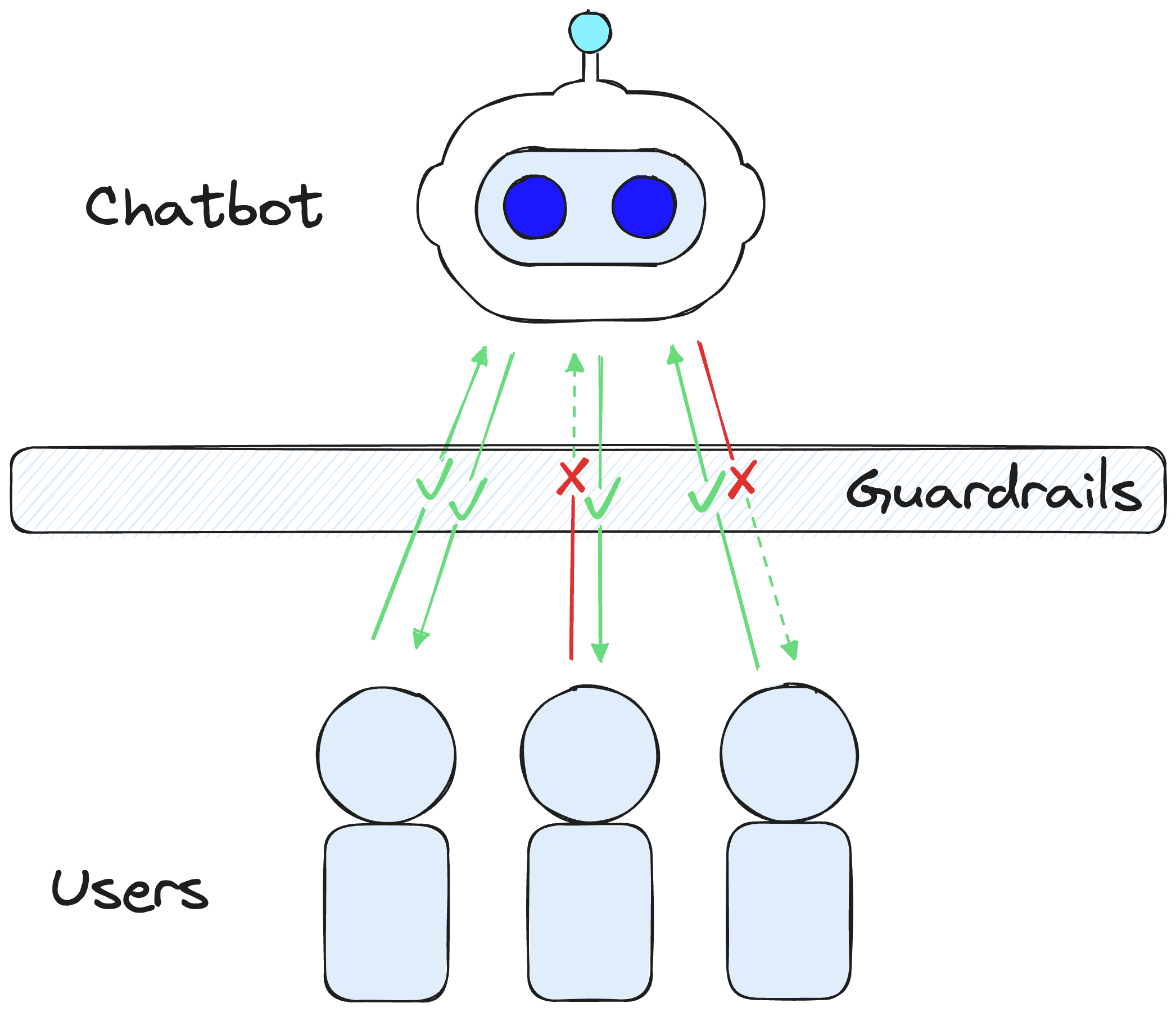
Guardrails act as a protective shield between our chatbot and users.
A guardrail is a semi or fully deterministic shield that use against specific behaviors, conversation topics, or even to trigger particular actions (like calling to a human for help).
We're able to create these Guardrails very easily. Let's see a quick example of building out a simple demo in Python. First, we install the prerequisite libraries:
pip install -qU \
  nemoguardrails==0.4.0 \
  openai==0.27.8
We'll also need to set an OpenAI API key via the OPENAI_API_KEY environment variable, and we can do that in Python via:
import os
os.environ["OPENAI_API_KEY"] = "sk-..."
When creating rails, we need a config yaml file describing (at minimum) which LLM we'd like to use and a Colang script defining our rails and dialogue flows.
The simplest config yaml we can create looks like this:
models:
- type: main
  engine: openai
  model: text-davinci-003
The Colang script is a little more complex as (1) it defines all of our guardrail behaviors, and (2) it is a new " modeling language" designed specifically for conversational AI systems. We'll explore Colang more later, but for now, let's create a simple Colang file to protect us from political conversations.
# define niceties
define user express greeting
    "hello"
    "hi"
    "what's up?"

define flow greeting
    user express greeting
    bot express greeting
    bot ask how are you

# define limits
define user ask politics
    "what are your political beliefs?"
    "thoughts on the president?"
    "left wing"
    "right wing"

define bot answer politics
    "I'm a shopping assistant, I don't like to talk of politics."

define flow politics
    user ask politics
    bot answer politics
    bot offer help
We would use these two configuration files to initialize a LLMRails object like so:
from nemoguardrails import LLMRails, RailsConfig

# initialize rails config
config = RailsConfig.from_content(
    yaml_content=yaml_content
    colang_content=colang_content
)
# create rails
rails = LLMRails(config)
With our rails initialized, we can begin asking questions and interacting with our Guardrails protected LLM.
In[5]:
res = await rails.generate_async(prompt="Hey there!")
print(res)
Out[5]:
Hi there! How can I help you?
How are you doing today?
With this typical greeting, we don't activate any protective guardrails. However, we see the greeting flow is activated as the chatbot generates one line from the bot express greeting message and then follows with a new line generated from the bot ask how are you message.
Let's try asking a more political question:
In[6]:
res = await rails.generate_async(prompt="what do you think of the president?")
print(res)
Out[6]:
I'm a shopping assistant, I don't like to talk of politics.
However, I can help you with shopping related tasks. Is there anything I can help you with?
Here we see the bot answer politics message block is activated, returning our hardcoded response of "I'm a shopping assistant, I don't like to talk of politics". Following this, the chatbot generates a response from the bot offer help message.
Using very simple guardrails, we've successfully managed to protect our chatbot against the topic of politics. This example is one use case of guardrails — but there are many more. Let's take a look at a few of those.
There are many use cases for NeMo Guardrails, more than what we could fit into a single article. So here, we will cover a few of the technology's most compelling and popular uses.
The first and foremost use case for NeMo Guardrails is their safety use case. We can apply Guardrails as a layer between users and our chatbot to check for malicious or unwanted input/output and filter those out or react with a set response or action.
Naturally, we can extend that to limit the use of our chatbots to conversations on specific topics. For example, if we're an online furniture store, we don't want our users to be using our online chatbot for advice on where to book their next holiday. That isn't the intended use.
Another use case, which is simply an extension of the above, is adding more deterministic dialogue flows to our chatbots. This set dialogue flow is how developers built chatbots traditionally. When you would go to an online customer service chat, there would be a set number of questions you could choose from.
By itself, this approach is restrictive and unnatural. Yet, this is a good solution when a user has a common problem because a dialogue flow already exists for their issue. They can follow along, there's no chance of hallucinations, and they'll likely get a quick solution.
Guardrails allows us to do both. We can have deterministic dialogue flows to cover users' most common dialogue paths. At the same time, we can also have the flexibility of generative conversational AI.
Another use case is Guardrails for Retrieval Augmented Generation (RAG), where we can feed additional information into our LLMs to help keep it connected to the outside world and limit hallucinations.
In[9]:
# rails without RAG (WRONG)
await no_rag_rails.generate_async(prompt="tell me about llama 2")
Out[9]:
"Llama 2 is a text-to-speech software developed by NVIDIA. It is designed to generate natural sounding speech from text and is used in a variety of applications such as virtual assistants, chatbots, and automated customer service. The software is powered by NVIDIA's AI platform and uses a deep learning model to generate the audio output."In[10]:
# rails WITH RAG (CORRECT)
await rag_rails.generate_async(prompt="tell me about llama 2")
Out[10]:
' Llama 2 is a collection of pretrained and fine-tuned large language models (LLMs) ranging in scale from 7 billion to 70 billion parameters. They are optimized for dialogue use cases and outperform open-source chat models on most benchmarks. They are also on par with some closed-source models, at least on the human evaluations performed. They are intended for commercial and research use in English and can be adapted for a variety of natural language generation tasks.'(See the full code example here)
There are two common approaches to RAG. Those are; the lightweight but naive retrieval with every user query or the heavy and slow use of an agent to decide when retrieval is needed.
Guardrails gives us another solution that fits between these two approaches. We add a rail for when a user asks a question that would require RAG. Otherwise, we default to the usual pure LLM-generated response.
By doing this, we're replicating what an agent does when it decides to use RAG. However, we're not relying on a slow LLM call to do so — we're using Guardrail's super-fast semantic similarity check.
The final use case is almost an extension of the RAG use case. As mentioned, we can use Guardrails to decide whether or not to use a RAG tool. Naturally, we can do the same for multiple tools.
One of the most essential features of conversational agents is their ability to decide to use tools to help answer user queries, use that tool, and then respond accordingly. With Guardrails, we can do the same.
We can specify that we'd like queries like "how is the weather today?" or "should I wear a coat?" to call to location and weather APIs which can return weather information to our LLM and allow it to provide our user with accurate information (see this example).
In[49]:
await rails.generate_async(prompt="do I need a sweatshirt today?")Out[49]:
'It is currently 27.8 degrees outside with a windspeed of 13.7 and a wind direction of 275.0 degrees. Based on this, it is recommended that you wear a sweatshirt today.'If a user asks a math question, we can trigger a rail that asks an LLM to translate it into Python code, run the Python code, and return the answer.
All of this is what conversational agents do. With Guardrails, however, we don't need slow LLM call to decide which tools to use. We do a fast semantic search to choose a tool.
As a bonus, because we're using semantic similarity, we can fit many more tools into the vector space than we'd be able to with a standard agent prompt — where tool descriptions are typically found.
NeMo Guardrails is about much more than just safety guardrails for chatbots. It is a new approach to designing and building conversational AI systems.
A large part of the power of Guardrails is Colang— the purpose-built language utilized by NeMo Guardrails. Let's take some time to dive into what Colang is and how we can use it.
At the core of NeMo Guardrails is the Colang modeling language. Colang is a mini-language built specifically for developing dialogue flows and safety guardrails for conversational systems.
Colang is simpler, with far fewer constructs than a typical programming language. These constructs also make Colang more flexible than standard programming languages. We describe definitions, and dialogue flows with flexible natural language (using "canonical forms" and "utterances"). Let's take a look at a straightforward Colang file:
define user express greeting
        "hello"
        "hi"
        "what's up?"

define bot express greeting
        "Hey there!"

define bot ask how are you
        "How are you doing?"

define flow greeting
        user express greeting
        bot express greeting
        bot ask how are you
In this Colang script, we have defined the three main types of blocks in Colang. The blocks are user message blocks (define user ...), bot message blocks (define bot ...), and flow blocks (define flow ...).
These represent the primary building blocks from which we can build dialogue flows and guardrails for our chatbots.
We defined three message blocks in our Colang script. The first is a user message block defined by define user express greeting — this structured representation of a message (for both user and bot messages) is known as a canonical form.
Following the canonical form, we have multiple user utterances, which are "examples" of messages that would fit into the defined canonical form. These are "hello", "hi", and "what's up".
# help with research
define user ask llm
        "what is the llama 2 model?"
        "tell me about Meta's new LLM"
        "what are the differences between Falcon and Llama"

define flow llm
        user ask llm
        $contexts = rag(query=$last_user_message)
        bot answer question with contexts

# define limits
define user ask politics
    "why doesn't the X party care about Y?"
    "why is Meta lobbying for the X party?"
    "what are your political views?"
    "who should I vote for?"

define bot answer politics
    "I'm a research assistant, I don't like to talk of politics."

define flow politics
    user ask politics
    bot answer politics
    bot offer help
Guardrails can flexibly decide which canonical form to use based on a user or bot-message by encoding all utterances specified within the Colang file into a semantic vector space.
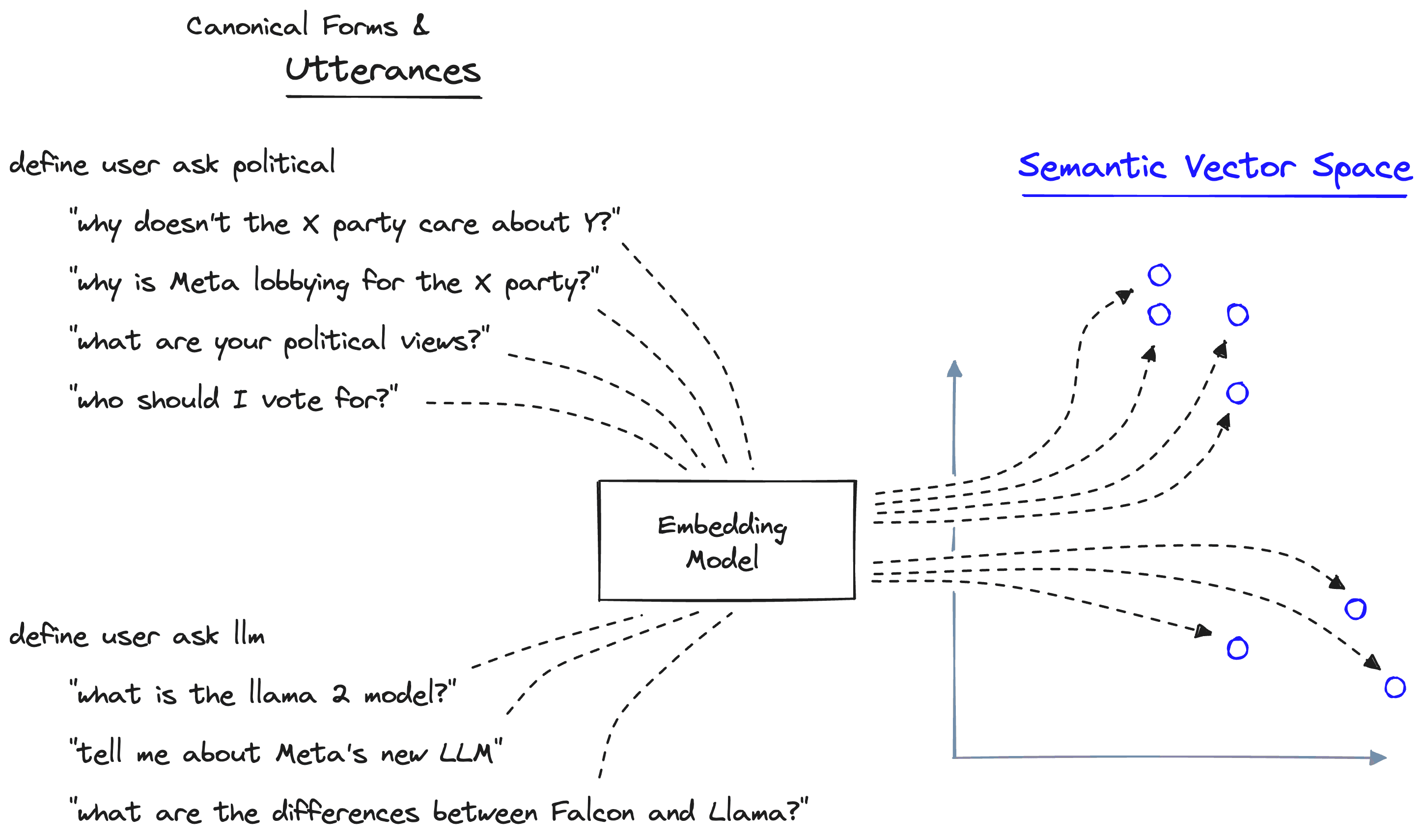
Guardrails encodes utterances into a semantic vector space using an embedding model. By default, this uses the MiniLM sentence transformer.
When given a user/bot-message, we encode it into the same vector space, where we can calculate semantic similarity to identify the most relevant utterances and their respective canonical form.
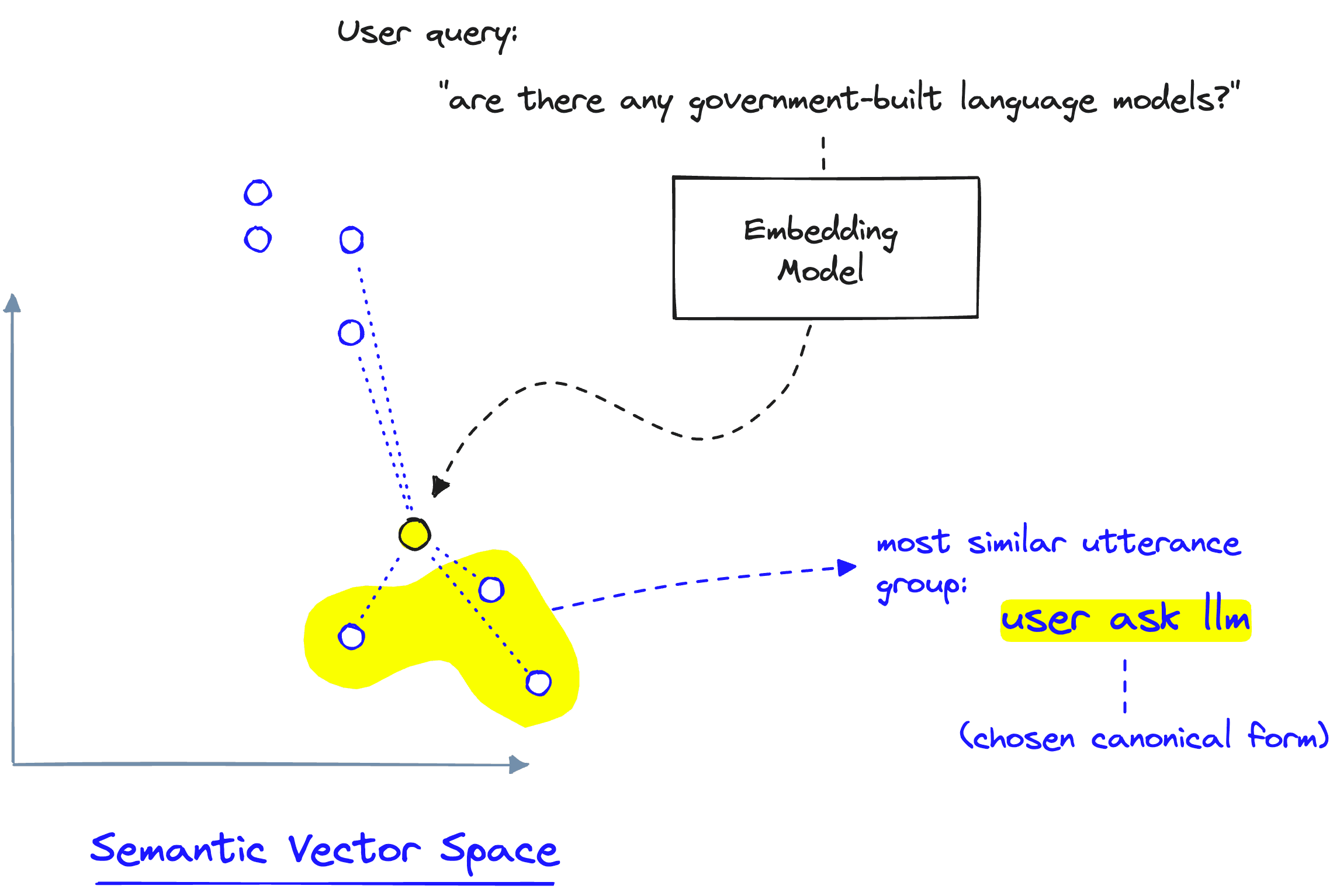
When a new user utterance is provided to Guardrails, it is encoded into the semantic vector space and compared to previously encoded utterances. From this, the most relevant canonical form is identified.
It's also worth noting that the canonical form itself is encoded into the utterance vector space. Therefore, we could have a functional canonical form without defining its utterances. However, utterances allow us to be more specific in what our canonical form means semantically.
Following this, we defined two bot messages with define bot express greeting and define bot ask how are you. Both of these use utterances to determine better what these messages refer to.
Finally, we define a dialogue flow with define flow greeting. Here we specify what steps are taken if the first user express greeting message is identified as representing some user's input message. In this flow, after the user's message, the chatbot will follow the instructions in the messages bot express greeting, and bot ask how are you.
In a chat initiated using NeMo Guardrails using this Colang config file, we would see results like this:
> hi!
Hey there!
How are you feeling today?
> I'm great thanks
That's great to hear. Is there anything I can help you with?
> not really
Please don't hesitate to ask if you think of anything else I can help you with.
> hey!
Hey there!
How are you feeling today?
...
Here we begin the conversation with a user greeting > hi! which guardrails correctly identifies as such and uses the deterministic define flow greeting to respond with the bot express greeting of "Hey there!" followed by the bot ask how are you of "How are you feeling today?".
We then continue the conversation. As Guardrails doesn't identify the following queries as belonging to a dialogue flow, the LLM responds to them as it usually would. However, as soon as we revert to a user greeting, Guardrails initiates the define flow greeting flow again.
Video walkthrough of variables and flows in Colang and NeMo Guardrails
Our Colang scripts can include variables defined using the $ character. For example, if we had a $name variable, we could refer to it in our Colang like so:
colang_content = """
define user greeting
    "Hey there!"
    "How are you?"
    "What's up?"

define bot name greeting
    "Hey $name!"

define flow
    user greeting
    if $name
        bot name greeting
    else
        bot greeting
"""
In this Colang file, we also specify a dialogue flow. The define flow block is initialized when the user provides a greeting (as described by define user greeting). Within this block, we check if the $name parameter exists. If $name exists, the bot returns the hardcoded "Hey $name!" response — if not, the bot generates a response with bot greeting.
From here, we initialize our rails using the new Colang file (and our previous config yaml):
# initialize rails config
config = RailsConfig.from_content(
    colang_content=colang_content,
    yaml_content=yaml_content
)
# create rails
rails = LLMRails(config)
All is good so far, but we haven't specified the value for $name.
One option for setting these variables is via an initial "context" message — part of an alternative input format we can use with Guardrails. To use this alternative format, we pass our input prompt alongside the conversation history via the messages parameter rather than the prompt parameter:
In[11]:
messages = [
    {"role": "context", "content": {"name": "James"}},
    {"role": "user", "content": "Hey there!"}
]
In[12]:
await rails.generate_async(messages=messages)Out[12]:
{'role': 'assistant', 'content': 'Hey James!'}We can also set variables dynamically by allowing the LLM to parse user messages. To capture this input from our user, we can use the following Colang script:
colang_content = """
define user give name
    "My name is James"
    "I'm Julio"
    "Sono Andrea"

define user greeting
    "Hey there!"
    "How are you?"
    "What's up?"

define bot name greeting
    "Hey $name!"

define flow give name
    user give name
    $name = ...
    bot name greeting

define flow
    user greeting
    if not $name
        bot ask name
    else
        bot name greeting
"""
From here, we reinitialize our rails with the new colang_content and remove the name parameter from our context message — let's see if Guardrails can capture the $name parameter from our conversation:
In[13]:
messages = [
    {"role": "context", "content": ""},
    {"role": "user", "content": "Hey there!"}
]
In[15]:
res = await rails.generate_async(messages=messages)
res
Out[15]:
{'role': 'assistant', 'content': "Hi there! What's your name?"}In[16]:
messages += [
    res,
    {"role": "user", "content": "I'm James"}
]
res = await rails.generate_async(messages=messages)
res
Out[16]:
{'role': 'assistant', 'content': 'Hey James!'}Guardrails successfully identifies the user give name message, triggering the flow give name, and captures the name variable from the $name = ... line. Allowing the chatbot to respond with the correct name in the bot name greeting message — which is hardcoded as "Hey $name!".
These cover the essentials of variables and flows in Colang and Guardrails. We can build more flexible yet controlled conversation AI systems with these. However, there's much more we can do. Let's move on to actions.
Colang also includes the concept of actions, which are executable calls we make to external functions in our Python code. For example, we can write a function like:
def get_name():
    return "James"
Then in our Colang script, we could insert:
define bot express greeting
        "Hey there $name!"

define flow greeting
        user express greeting
        $name = execute get_name()
        bot express greeting
When running the greeting flow, we should return "Hey there James!". Let's work through an example of how we'd use actions in practice to build a conversational agent aware of our current location and weather conditions.
(See the full weather chatbot code here)
We begin by defining two Python functions that our Guardrails will be able to call; location_api, and weather_api:
import requests

async def location_api():
    res = requests.get("http://ip-api.com/json/")
    return res.json()['lat'], res.json()['lon']

async def weather_api(coords):
    latitude, longitude = coords
    res = requests.get(
        "https://api.open-meteo.com/v1/forecast",
        params={
            "latitude": latitude,
            "longitude": longitude,
            "current_weather": "true"
        }
    )
    weather = res.json()["current_weather"]
    weather_report = f"""The current weather is:
    temperature: {weather["temperature"]}
    windspeed: {weather["windspeed"]}
    wind direction: {weather["winddirection"]} degrees
    And it is {"daytime" if weather["is_day"] else "nighttime"}"""
    return weather_report
When defining functions that will be used by our Guardrails in an async setting — for example, when we call rails.generate_async — we must only use async functions. Otherwise, we will trigger errors when trying to run the guardrails.
After this, we must reinitialize our rails:
# initialize rails config
config = RailsConfig.from_content(
    colang_content=colang_content,
    yaml_content=yaml_content
)
# create rails
rails = LLMRails(config)
Let's see what happens when we call generate_async:
In[7]:
await rails.generate_async(prompt="do I need a sweatshirt today?")Out[7]:
"Action 'location_api' not found."Right now, our Guardrails don't seem to find the location_api action, and rightfully so — it is a function that exists in our Python code and is wholly separate from our Colang script.
To use actions, we must register them using rails.register_action. We can do this for both of our functions like so:
rails.register_action(action=location_api, name="location_api")
rails.register_action(action=weather_api, name="weather_api")
Note that we're connecting the Python functions via the action parameter to the name of the actions in Colang via the name parameter. That means the Python functions and Colang action names can differ, but we must map them together with register_action. Now, let's try again:
In[8]:
await rails.generate_async(prompt="do I need a sweatshirt today?")Out[8]:
'It is currently 27.8 degrees outside with a windspeed of 13.7 and a wind direction of 275.0 degrees. Based on this, it is recommended that you wear a sweatshirt today.'Our chatbot can now use external tools via actions similar to how conversational agents decide to use the available tools. However, it's worth noting that the decision to use this tool was not made by a slow LLM call — but by a super fast semantic search.
That is our introduction to NeMo Guardrails and the Colang modeling language. We've learned what guardrails mean and the myriad of use cases that this seemingly simple idea unlocks in conversational AI.
We then dived into the implementation details of Guardrails. Learning about the different message blocks, variables, flows, actions, and more that make Colang an ideal "language" for building conversational AI systems.
Naturally, there is much more we can talk about. Guardrails represents an entirely new approach to building semi-deterministic conversational AI systems, giving us significantly more confidence in the safety of deploying these systems to real users.
Guardrails Notebooks, Pinecone Examples Repo
[1] K. Costello, M. LoDolce, Gartner Predicts Chatbots Will Become a Primary Customers Service Channel Within Five Years (2022), Gartner
此内容由惯性聚合(RSS阅读器)自动聚合整理,仅供阅读参考。 原文来自 — 版权归原作者所有。