
惯性聚合 高效追踪和阅读你感兴趣的博客、新闻、科技资讯
阅读原文 在惯性聚合中打开

推荐订阅源

罗磊的独立博客
Recent Announcements
奇客Solidot–传递最新科技情报
奇客Solidot–传递最新科技情报
有赞技术团队
有赞技术团队
J
Java Code Geeks
T
The Blog of Author Tim Ferriss
MyScale Blog
MyScale Blog
人人都是产品经理
人人都是产品经理
aimingoo的专栏
aimingoo的专栏
U
Unit 42
The GitHub Blog
The GitHub Blog
云风的 BLOG
云风的 BLOG
T
Tailwind CSS Blog
H
Hackread – Cybersecurity News, Data Breaches, AI and More
酷 壳 – CoolShell
酷 壳 – CoolShell
博客园 - 三生石上(FineUI控件)
Apple Machine Learning Research
小众软件
小众软件
Hugging Face - Blog
Hugging Face - Blog
博客园 - 司徒正美
腾讯CDC
I
InfoQ
GbyAI
GbyAI
博客园_首页

Pinecone

Pinecone Assistant: A Managed Knowledge Layer for Production AI Applications Multi-domain RAG in n8n: why one knowledge base is not enough Allspice Transforms the Culinary Experience with Semantic Search Powered by Pinecone | Pinecone Building RAG workflows in n8n: choosing the right Pinecone node Knowledge needs a meta-knowledge layer Garbage Day: How Pinecone Safely Deletes Billions of Objects at Scale When "Performance" Means Two Different Things Pinecone BYOC: Pinecone in your AWS, GCP, or Azure account, no vendor access True, Relevant, and Wrong: The Applicability Problem in RAG Use the Pinecone Plugin for Claude Code to develop AI Applications Faster Millions at Stake: How Melange's High-Recall Retrieval Prevents Litigation Collapse Powering High-stakes Patent Search at Scale: How Melange Built a Reliable AI System on Pinecone | Pinecone Pinecone Assistant Node in n8n: Turn Any Data Source Into Knowledge RAG with Access Control Pinecone Dedicated Read Nodes are now in Public Preview Inside Pinecone: Slab Architecture New Bulk Data Operations: Update, Delete, and Fetch by Metadata The Hidden Cost of Building: Lessons from Aquant Simplifying Vector Embeddings with Pinecone Integrated Inference Capabilities Pinecone joins Microsoft Marketplace as a Launch Partner GTM Engineering: Clay + Pinecone for AI-powered Sales Outbound Build an AI knowledge assistant with Google Docs and Pinecone Moving Pinecone forward with Ash Ashutosh as CEO and Edo spearheading our growing AI ambitions as Chief Scientist Pinecone Founder Edo Liberty to Spearhead Pinecone’s Growing AI Ambitions; Appoints Ash Ashutosh as CEO to Expand Vector Database Market Leadership Fast, Accurate Retrieval for Creators at Scale: Delphi’s Path Toward a Million Conversational Agents with Pinecone | Pinecone Announcing Pinecone Pioneers: A Program for Builders, Organizers, and Community Leaders What is Context Engineering? Chunking Strategies for LLM Applications Beyond the hype: Why RAG remains essential for modern AI Obviant Makes 30% More Accurate Defense Acquisition Recommendations Combining Sparse and Dense Retrieval with Pinecone | Pinecone
Organizations: New access controls to makes vector search...
Gibbs Cullen · 2022-12-07 · via Pinecone

Prior to organizations, projects and billing within Pinecone could only be owned and managed by a single user. But when responsibilities change, you may want more than one user to manage projects and billing so operations continue to run smoothly. Or as new projects arise, you may want additional users to make contributions or test out a new application.

With organizations, teams can easily define roles to manage access and billing for a set of projects. Every project is assigned to an organization with an organization owner, and all projects within an organization have the same billing method. In addition, a project’s users can easily transfer ownership amongst themselves and consolidate usage across projects within an organization for billing purposes. Users and teams can now collaborate across projects in a way that works best for them.

As of today, organizations are available to all users and support four predefined roles: Organization Owner, Organization User, Project Owner, and Project User. Note that all existing users and projects have been assigned to an organization by default.

How it works

To get started with organizations, navigate to “Settings” in the left-hand menu of the Pinecone Console, then click on “Organization” to see your current organization. You can then set the desired plan type and billing method using the “Billing” tab under the organization view.
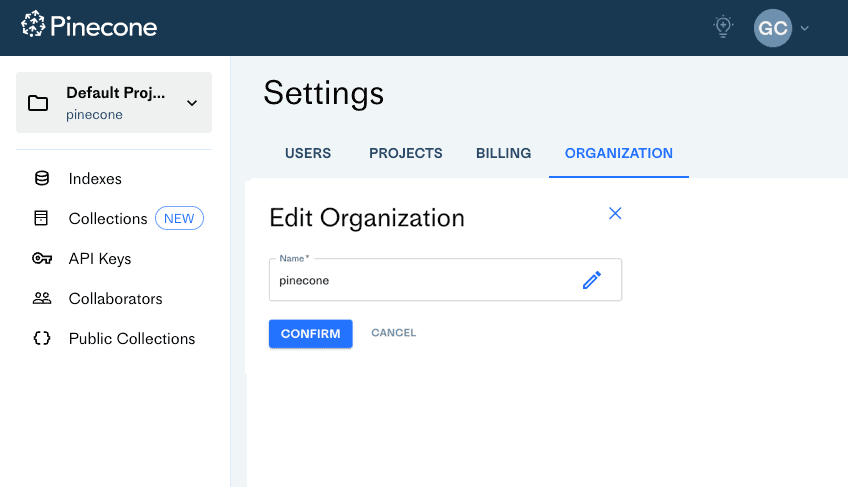
If you are a project or organization owner, you can also add users to organizations and projects with a few easy steps:
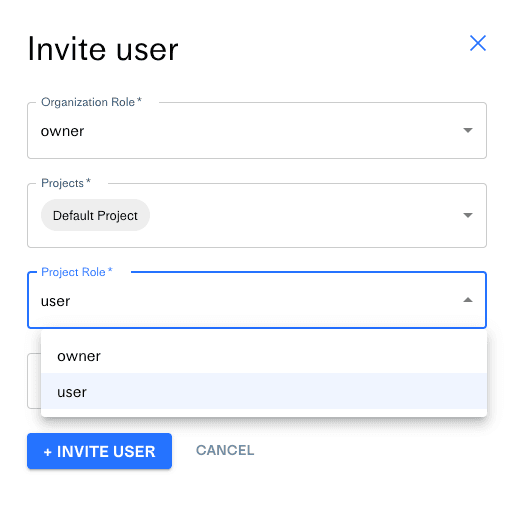
  • In the Settings view, click the “Users” tab.
  • Click “Invite User”.

Each role has a different level of access - at both an organization and project level. Note that everyone within an organization is an organization user by default.

  • Organization owner: Manages organization settings and billing, and creates and manages all project and index settings.
  • Organization user: Read-only access to organization settings, but can create a project within an organization and manage project permissions.
  • Project owner: Manages project settings, API keys, and the index.
  • Project user: Read-only access to API keys, but can manage the index.

Get started

Learn more about this feature and how to get started in our documentation.