惯性聚合 高效追踪和阅读你感兴趣的博客、新闻、科技资讯
阅读原文 在惯性聚合中打开

推荐订阅源

K
Kaspersky official blog
Martin Fowler
Martin Fowler
CTFtime.org: upcoming CTF events
V
Visual Studio Blog
博客园_首页
Engineering at Meta
Engineering at Meta
The Cloudflare Blog
MongoDB | Blog
MongoDB | Blog
Blog — PlanetScale
Blog — PlanetScale
T
The Blog of Author Tim Ferriss
雷峰网
雷峰网
D
Docker
博客园 - 司徒正美
S
SegmentFault 最新的问题
M
MIT News - Artificial intelligence
博客园 - 叶小钗
博客园 - 三生石上(FineUI控件)
U
Unit 42
J
Java Code Geeks
A
About on SuperTechFans
N
Netflix TechBlog - Medium
freeCodeCamp Programming Tutorials: Python, JavaScript, Git & More
S
Security Affairs
I
Intezer
Cisco Talos Blog
Cisco Talos Blog
C
Cyber Attacks, Cyber Crime and Cyber Security
Threat Intelligence Blog | Flashpoint
B
Blog RSS Feed
P
Privacy & Cybersecurity Law Blog
T
Tenable Blog
T
Threatpost
H
Hacker News: Front Page
G
Google Developers Blog
博客园 - 【当耐特】
Hugging Face - Blog
Hugging Face - Blog
Apple Machine Learning Research
L
Lohrmann on Cybersecurity
大猫的无限游戏
大猫的无限游戏
Google DeepMind News
A
Arctic Wolf
S
Secure Thoughts
GbyAI
GbyAI
NISL@THU
NISL@THU
S
Security @ Cisco Blogs
Exploit-DB.com RSS Feed
Webroot Blog
Webroot Blog
C
CXSECURITY Database RSS Feed - CXSecurity.com
O
OpenAI News
Spread Privacy
Spread Privacy
Application and Cybersecurity Blog

博客园 - AlexCube

ILSpy --- baml反编译错误解决方案 Privacy Policy 小工具 --- 英文单词查询 Wave Generator 2.0.1 SQL Server Full Text Search WPF TreeView View Model 使用dynamic 类型动态调用方法 Silverlight, WCF, Windows Authentication - AlexCube .Net 程序运行方式 如何查看Load Assembly 错误日志 License 收集 VLAN WPF 开源程序 .Net 中通过Reflection获得List成员类型 - AlexCube - 博客园 SQL Server 获取字符串的长度 SQL Server 查看 SQL 语句执行时间 WPF RichTextBox 控件 如何获取正确的 AJAX Control Toolkit 客户端控件脚本 用户控件 vs 自定义控件
WPF Layout
AlexCube · 2010-03-11 · via 博客园 - AlexCube

常用的有5种 Layout panels:

  • Grid Panel
  • Stack Panel
  • Dock Panel
  • Wrap Panel
  • Canvas Panel

技巧:

  • 避免使用固定位置 - 多使用Alignment 和 Margin 属性
  • 不要使用固定大小 - 尽可能将Width和Height设置为Auto
  • 不要滥用Canvas Panel, 他只能用于矢量图片
  • 在对话框中使用StackPanel 布置 按钮控件Buttons
  • Use a GridPanel to layout a static data entry form. Create a Auto sized column for the labels and a Star sized column for the TextBoxes.
  • Use an ItemControl with a grid panel in a DataTemplate to layout dynamic key value lists. Use the SharedSize feature to synchronize the label widths.

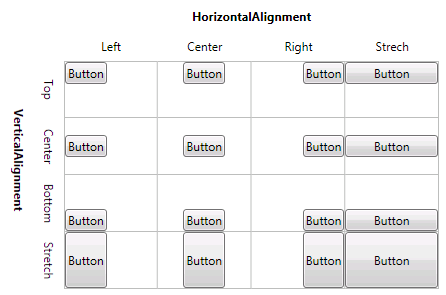
Vertical 和 Horizontal Alignment 属性

v2_alignment

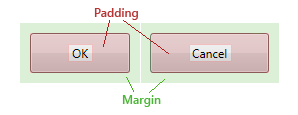
Margin 和 Padding

用于为控件预留空间

  • Margin - 控件外部预留空间
  • Padding - 控件内部预留空间
  • 外面控件的Padding相当于内部控件的Margin

padding_margin

Height 和 Width 属性

不推荐使用,可以用于设置控件的固定大小。最好用MinHeight,MaxHeight,MinWidth 和MaxWidth属性定义可接受的大小范围

Overflow Handling

Clipping

Layout panels typically clip those parts of child elements that overlap the border of the panel. This behavior can be controlled by setting the ClipToBounds property to true or false.
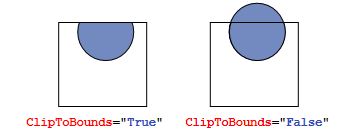
cliptobounds

Scrolling

When the content is too big to fit the available size, you can wrap it into a ScrollViewer. The ScrollViewer uses two scroll bars to choose the visible area.

The visibility of the scrollbars can be controlled by the vertical and horizontal ScrollbarVisibility properties.

<ScrollViewer>
    <StackPanel>
        <Button Content="First Item" />
        <Button Content="Second Item" />
        <Button Content="Third Item" />
    </StackPanel>
</ScrollViewer>

From: http://www.wpftutorial.net/LayoutProperties.html