sbt clean complil
当有一个或者多个文件更新时,可以使用
~ compile编译
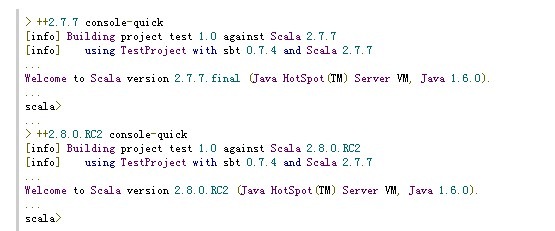
2.使用不同的scala版本:(使用++)来表示

Sbt Actions:
clean: 删除所有生产的文件(在target目录下的)
clean-cache:删除所有下载的artifacts和为用户自动管理的依赖库
clean-lib:删除所有的为该项目管理的库(lib_managed)
clean-plugins:删除所有该项目的plugin
(It should generally be followed by reload. This is useful for developing plugins.)
compile:编译项目文件:(src/main/scala目录下的)
console:包括了已经编译好了的scala文件和所有的lib下的jars包,sbt自动管理的库 scala命令行
退出使用quit, Ctrl+D (Unix), or Ctrl+Z (Windows). Runs test-compile first.
console-quick:基本同上,只不过它不需要先运行任何Action
doc:主要为(src/main/scala)目录下的项目文件生产API文档,必须先运行compile Action
doc-test:
主要是src/test/scala的项目文档,必须先运行test-compile Action
doc-all :运行doc 和doc-test
exec:
Produces a graphviz dot file for the dependency graph between main source directories in target/graph/packages
java <option>* <class-nam>
Runs javap with the given arguments using the runClasspath for the project. Tab completion is provided for main classes generated from the last successful compilation. Examples:
javap your.Clazz
javap –c scala.List
test-javap <option>* <class-name>Runs javap with the given arguments using the testClasspath for the project. Tab completion is provided for test classes generated from the last successful compilation.
jetty-run(只针对web项目) Starts the Jetty server and serves this project as a web application on http://localhost:8080 by default. This variant of starting Jetty is intended to be run from the interactive prompt.
jetty(只针对web项目) Starts the Jetty server and serves this project as a web application on http://localhost:8080 by default. This variant of jetty-run is intended to be run batch-style (such as sbt jetty), so it waits for a keypress before completing.
jetty-stop (只针对web项目) Stops the Jetty server that was started with the jetty-run action.
package For a normal project, creates a jar file containing classes compiled from src/main/scala and the files in src/main/resources after running compile first. For a web application project, creates a war file after running compile and prepare-webapp first.
package-test
Creates a jar file containing classes compiled from src/test/scala and the files in src/test/resources. Runs test-compile first.
package-docs Creates a jar file containing API documentation generated from Scala source files in src/main/scala. Runs doc first.
package-all Runs all package tasks except package-project.
package-project Creates a zip file containing the entire project, excluding generated files.
package-src Creates a jar file containing all main source files and resources. The packaged paths are relative to src/main/scala andsrc/main/resources.
package-test-src Creates a jar file containing all test source files and resources. The
packaged paths are relative to src/test/scala andsrc/test/resources.
run <argument>* Runs the main class for the project in the same virtual machine as sbt. The main class is passed the arguments provided. Please seeRunningProjectCode for details on the use of System.exit and multithreading (including GUIs) in code run by this action. Runscompile first.
sh <argument>* (mixin Exec for this action) Invokes the shell (for unix users) with the command: /bin/sh -c <arguments>. For example:
>sh find src/main/scala –iname *.scala | xargs cat |wc –l
test Runs all tests detected during compilation. Runs test-compile first.
test-failed <test>* Runs the tests provided as arguments if they have not succeeded (either failed on the previous test run or have not been run yet). * is interpreted as a wildcard in the test name.
test-quick <test>* Runs the tests provided as arguments if they have not succeeded (either failed on the previous test run or have not been run yet) or their dependencies changed. * is interpreted as a wildcard in the test name.
test-only <test>* Runs the tests provided as arguments. * is interpreted as a wildcard in the test name.
test-compile Compiles the test sources (in the src/test/scala directory). Runs compile first.
test-javap Like javap, but for test classes.
test-run <argument>* Like run, but for test classes. Runs test-compile first.
update Resolves and retrieves external dependencies as described in LibraryManagement.
编译Action:
exit or quit End the current interactive session or build.
reloadReloads the current interactive session. If the Scala or sbt version has changed, the requested versions are retrieved and used. The project definition is recompiled and reloaded if it needed.
help Displays a help message and lists these interactive actions and their descriptions.
actions List all available actions.
current Print the current project and logging level.
info Set the logging level to info. This is the default logging level.
debug Set the logging level to debug. This logging level is more verbose than info, but does not log stack traces for errors.
trace on | nosbt | off | <integer>
Configures stack trace logging, which is 'on' by default. 'nosbt' prints stack traces up to the first sbt frame. An integer gives the number of frames to show per exception.
warn Set the logging level to warn. This logging level only logs warnings and errors.
error Set the logging level to error. This logging level only logs errors.
set property.name property value If a user property with name property.name exists for the current project, that property is set to value property value (no quotes are required for values with spaces). Otherwise, the system property with name property.name is set to value property value. (SeeProperties for more on properties)
get property.name Shows the value of the property (user or system) with name property.name. (See Properties for more on properties)
projects List all available projects (See SubProjects for more on multiple projects).
project <project name> Change the current project to the project named <project name>. Further operations will be done on the given project. (See SubProjectsfor more on multiple projects)
console-project Enters an interactive session with the project instance bound to the 'current' variable. See ProjectConsole for more information.
~ <command> Executes the project specified action or method whenever source files change. See TriggeredExecution for details.
< filename Executes the commands in the given file. Each command should be on its own line. Empty lines and lines beginning with '#' are ignored
+ <command> Executes the project specified action or method for all versions of Scala defined in the build.scala.versions property.
++<version> <command> Temporarily changes the version of Scala building the project and executes the provided command. <command> is optional. The specified version of Scala is used until sbt exits or ++ is run again. <version> does not need to be listed in the build.scala.versions property, but it must be defined in localScala or be available in a repository.
; A ; B Execute A and if it succeeds, run B. Note that the leading semicolon is required.
* Processor management commands. See Processors for details.
此内容由惯性聚合(RSS阅读器)自动聚合整理,仅供阅读参考。 原文来自 — 版权归原作者所有。