






汉字转拼音需要下载pypinyin第三方的包,百度搜索一下即可下载。
有原始的test.xlsx原始数据如下图:

最后新生成一个test.xls文件,带拼音的,姓名是拼音的全称,后面都是取首字母,结果如下图:
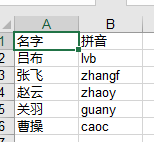
经过测试,对部分多音字处理有问题,比如覃,生成Tan了。
Python实现代码如下:
 1 from pypinyin import Style, lazy_pinyin
 2 from xlutils.copy import copy
 3 import xlrd
 4
 5
 6 def get_NamePY(str_data):
 7     rtn = ''
 8     for i in range(len(str_data)):
 9         if i == 0:
10             rtn = lazy_pinyin(str_data[i], style=Style.NORMAL)
11         else:
12             rtn += lazy_pinyin(str_data[i], style=Style.FIRST_LETTER)
13     # ['zhong','g'] join把列表拼接成字符串,capitalize()后面是把首字母转化成大写
14     rtn = ''.join(rtn)
15     return rtn
16
17
18 rb = xlrd.open_workbook('test.xlsx')
19 r_sheet = rb.sheet_by_index(0)
20 wb = copy(rb)
21 w_sheet = wb.get_sheet(0)
22
23 for row_index in range(1, r_sheet.nrows):
24     row = r_sheet.row_values(row_index)
25     row[1] = get_NamePY(row[0])
26     print(row)
27     w_sheet.write(row_index, 1, row[1])
28
29 wb.save('test.xls')
此内容由惯性聚合(RSS阅读器)自动聚合整理,仅供阅读参考。 原文来自 — 版权归原作者所有。