


一直想着,要系统性的写一些dotweb使用的文章,之前拖延了不少时间,今天,下定决定,算是正式的开始,也请大家一起监督。
dotweb,是一款追求简约大方的go web框架,正如其github项目主页的自我介绍一样:“Simple and easy go web micro framework”,我相信能够坚持贯彻这一点,给大家提供一个用的舒服用的安心的框架:)
框架地址:https://github.com/devfeel/dotweb
目录:
2、dotweb框架之旅 [二] - 常用对象-App(dotweb)
3、dotweb框架之旅 [三] - 常用对象-HttpServer
这一章是开篇,先从著名的“HelloWorld”开始:
1、极客版
package main

import (
    "fmt"
    "github.com/devfeel/dotweb"
)

func main() {
    //初始化DotServer
    app := dotweb.New()

    //注册hello路由
    app.HttpServer.GET("/hello", func (ctx dotweb.Context) error {
        ctx.WriteString("hello world!")
        return nil
    })

    //开始服务
    port := 8080
    err := app.StartServer(port)
    fmt.Println("dotweb.StartServer error => ", err)
}
2、工程版
package main

import (
    "fmt"
    "github.com/devfeel/dotweb"
)

func main() {
    //初始化DotServer
    app := dotweb.New()

    //开启debug模式
    app.SetDevelopmentMode()

    //设置路由
    InitRoute(app.HttpServer)

    //开始服务
    port := 8080
    err := app.StartServer(port)
    fmt.Println("dotweb.StartServer error => ", err)
}

func Hello(ctx dotweb.Context) error {
    ctx.WriteString("hello world!")
    return nil
}

func InitRoute(server *dotweb.HttpServer) {
    server.Router().GET("/hello", Hello)
}
以上两段代码都是实现一样的功能,通过访问http://127.0.0.1:8080/hello 输出“hello world!”字符串。
极客版:一般仅为演示项目何其简介的时候才会这么写,做非常少量的路由时可以这么做,但一般工程项目不建议这么做,会加大维护的难度
工程版:正常项目,请务必剥离路由注册和HttpHandle的实现
项目版:目前为了尽量减少大家在使用dotweb时候的各种纠结,已经启动start项目,可以参考真实项目的一些目录指引 - https://github.com/devfeel/dotweb-start
启动日志:

访问http://127.0.0.1:8080/hello请求情况:

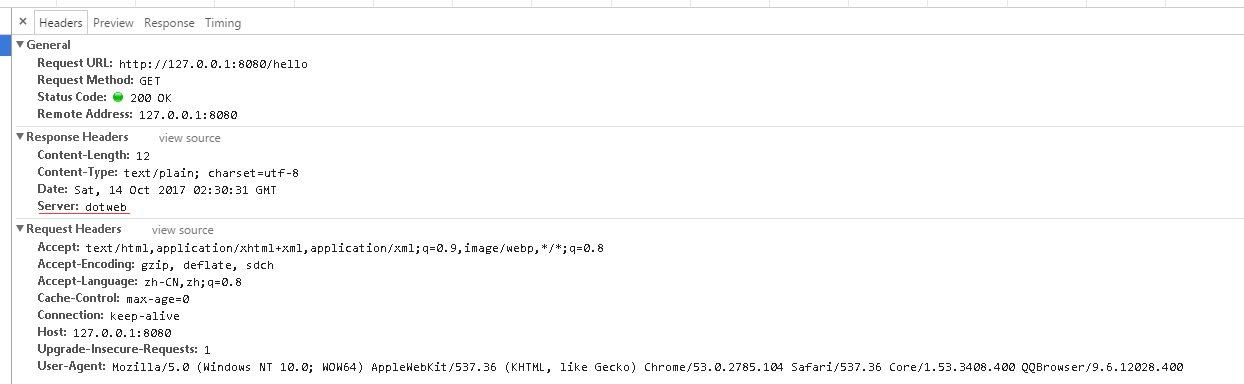
至此,成功达成目标。
如HelloWorld代码,整个Web启动过程分为几步:
1、初始化App容器
2、设置工作模式(development\production)
3、注册路由模快
4、设置端口
5、启动服务
以上五个步骤,其中第二步不是必须,默认为development模式。
希望本文能给大家带来一些帮助。
本文代码地址:https://github.com/devfeel/dotweb-example/blob/master/helloworld/main.go
欢迎各位加入我们的go语言QQ群:193409346
此内容由惯性聚合(RSS阅读器)自动聚合整理,仅供阅读参考。 原文来自 — 版权归原作者所有。