








用Designer控件实现用户自定义报表印刷
环境:
vs2005+ActiveReportsNet2
本节代码:https://files.cnblogs.com/batoosai/SimpleExample12.rar
前面我们所讲的报表,不管简单的还是复杂的,都遵循这样一个流程:
开发人员事先做好模版——〉用户运行程序——〉用户选择相应条件——〉打印或预览帐票——〉程序把用户选择的数据填充到我们的模版上,然后显示
可以说,用户除了选择条件,控制显示的数据之外,能做的控制很少(除非把一些简单的控制放在条件里面)。
本节我就讲讲如何用AR的Designer控件,实现用户自定义帐票印刷。
比如,要打印如下数据:
|
Class: |
A |
|
AttendNo: |
1 |
|
Name: |
Tony |
|
Sex: |
Male |
当然我们可以先做好相应的模版,然后让用户选择数据就可以打印出来了。
但是,万一用户又需要一张类似的帐票,但需要把Name写在Class前面,那我们怎么办?
1)重新做一个。真是个好办法,下面的文章可以不用看了。
2)在用户的条件中加一个条件(比如一个radio button,先显示Class还是先显示Name),然后我们在模版里面判断一下这个条件,根据它来对模版进行相应的调整。
这种方法其实在我们项目也是常常用到的(比如判断显示subject的全称还是简称,就是在条件中放个Check box的条件,模版做相应判断)。
但在本例中却不适用,万一用户又要求把Class和AttendNo放一行上怎么办?用户的需求可是千变万化的。
3)用AR提供的Designer控件,可以实现用户自定义模版。
对于本例来说,用户可以自己把Class,name这些控件,拖到模版上,自己设定大小位置,然后打印。
ok,下面我们就来创建一个最简单的自定义帐票:
1,数据源如下:
|
Class |
AttendNo |
Name |
Sex |
|
A |
1 |
Tony |
male |
|
A |
2 |
Mary |
female |
|
A |
3 |
Tom |
male |
|
A |
4 |
Jack |
male |
|
A |
5 |
Smith |
male |
|
B |
1 |
John |
male |
|
B |
2 |
Li |
female |
|
B |
3 |
Zhang |
female |
|
B |
4 |
Wang |
male |
|
C |
1 |
Gong |
male |
|
C |
2 |
Tian |
female |
2,需要打印出来的帐票也超级简单,就是根据Class来换页的一张普通二维表:
page1:
|
Class |
AttendNo |
Name |
Sex |
|
A |
1 |
Tony |
male |
|
A |
2 |
Mary |
female |
|
A |
3 |
Tom |
male |
|
A |
4 |
Jack |
male |
|
A |
5 |
Smith |
male |
3,创建如下文件:

frmShowAR和前面几个例子一样,用来放view控件显示报表
test.mdb是数据源
ReportDesigner里面放Designer控件,让用户进行自定义操作
4,让我们来看ReportDesigner:

1)左侧放了个Designer控件:

2)右上放一些button控件,包括添加空白label,添加item,预览帐票的按钮。
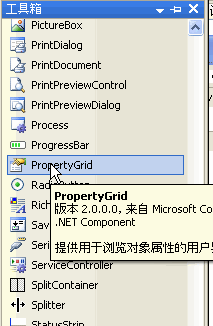
3)右下放一个PropertyGrid控件,可以用来显示和修改Designer中所有控件的public property.
5,添加好几个控件之后,你可以先运行程序看看

哈哈,不错吧,在程序运行当中,你可以直接在模版上添加section了,和我们设计模版时完全一样,这下可以让用户自己来设计帐票了。
6,不过先在还不能在模版上增加控件。先在我们编写代码,使得可以在模版上创建控件,并且用PropertyGrid控件来修改这些控件的属性。最后通过Preview按钮预览帐票。
1)在模版上增加一个控件的方法:
先选中特定section (比如Detail,GroupFooter)
然后就可以用代码:
CType(Me.Designer1.Selection(0), DataDynamics.ActiveReports.PageHeader).Controls.Add(control)
2)预览的实现,把当前Designer的模版传给frmShowAR,然后在frmShowAR中显示这个模版
ReportDesigner.vb
Private Sub btnPreview_Click(ByVal sender As System.Object, ByVal e As System.EventArgs) Handles btnPreview.ClickDim _frm As New frmShowAR()
_frm.Report
= Me.Designer1.Report_frm.ShowDialog(
Me)End SubfrmShowAR.vb
Public Property Report() As DataDynamics.ActiveReports.ActiveReportGetReturn _rptEnd GetSet(ByVal Value As DataDynamics.ActiveReports.ActiveReport)
_rpt
= ValueEnd SetEnd PropertyPrivate Sub frmShowAR_Load(ByVal sender As Object, ByVal e As System.EventArgs) Handles Me.Load_rpt.Run()
Me.Viewer1.Document = _rpt.DocumentEnd Sub完整代码如下:
Public Class ReportDesigner#Region "UI Event"''' <summary>
''' Handles the Click event of the btnAddTextBox control.
''' </summary>
''' <param name="sender">The source of the event.</param>
''' <param name="e">The <see cref="System.EventArgs" /> instance containing the event data.</param>
''' <remarks></remarks>
''' <history>
''' [TonyGong] 3/8/2007 2:17 PM Created
''' </history>
Private Sub btnAddTextBox_Click(ByVal sender As System.Object, ByVal e As System.EventArgs) Handles btnAddTextBox.ClickIf Me.listItem.SelectedIndex = -1 ThenReturnEnd IfDim arControl As New DataDynamics.ActiveReports.TextBoxSelect Case Me.listItem.SelectedItem.ToString()Case "Class"
arControl.DataField
= "Class"Case "AttendNo"arControl.DataField
= "AttendNo"Case "Name"arControl.DataField
= "Name"Case "Sex"arControl.DataField
= "Sex"End SelectMe.addControlToReport(arControl)End Sub''' <summary>_stream.Position
= 0rpt.LoadLayout(_stream)
_stream.Close()
Dim _frm As New frmShowAR()_frm.Report
= rpt_frm.ShowDialog(
Me)End Sub#End Region#Region "Private Method"''' <summary>7,在frmShowAR中给模版设置数据源
Private Sub frmShowAR_Load(ByVal sender As Object, ByVal e As System.EventArgs) Handles Me.Load'Show the table1
Dim conn As String = "Provider=Microsoft.Jet.OLEDB.4.0;Data Source=test.mdb;Persist Security Info=False"Dim cmd As String = "Select * from table1"Dim adapter As New OleDbDataAdapter(cmd, conn)Dim ds As New DataSet
adapter.Fill(ds)
_rpt.DataSource
= ds_rpt.DataMember
= ds.Tables(0).TableName_rpt.Run()
Me.Viewer1.Document = _rpt.DocumentEnd Sub8,ok!我们的工作结束了,接下去用户可以在程序中自己设计模版了
1)用户运行程序,出来如下界面:
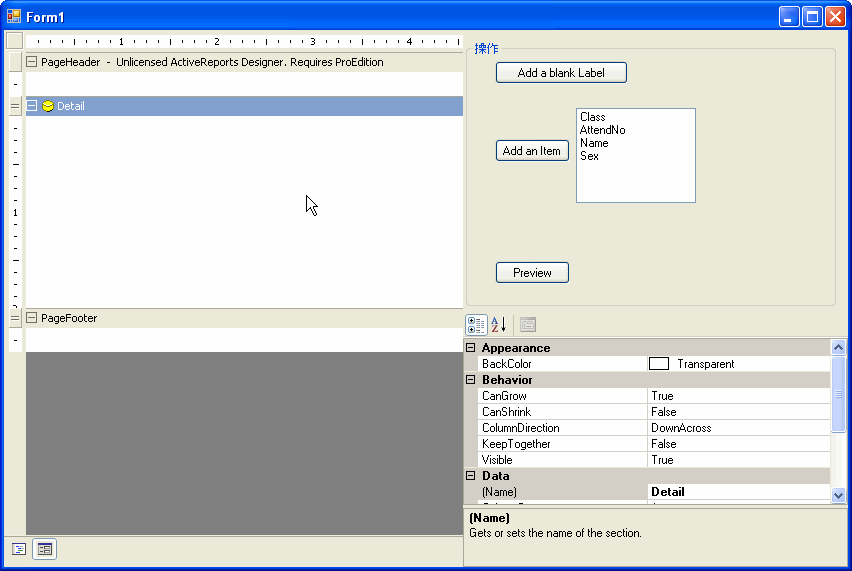
2)用户自己添加group,添加控件,调整大小,增加控件的框线等等,如下:

3)不要忘记给GroupHeader1设置换页字段

4)ok,按Preview吧,看看我们的成果:

9,呵呵,现在用户想怎么打就怎么打了。
也许可能有人要问了,每次运行程序,用户都要去设置模版,都麻烦啊。
恩,我们可以增加一个save和load模版的功能,让用户自己把设计好的模版保存下来,今后直接load。
这个超级简单,只要增加2个控件,编码如下就可以了
Private Sub btnSave_Click(ByVal sender As System.Object, ByVal e As System.EventArgs) Handles btnSave.ClickMe.Designer1.ExecuteAction(DataDynamics.ActiveReports.Design.DesignerAction.FileSave)End SubPrivate Sub btnLoad_Click(ByVal sender As System.Object, ByVal e As System.EventArgs) Handles btnLoad.ClickMe.Designer1.ExecuteAction(DataDynamics.ActiveReports.Design.DesignerAction.FileOpen)End Sub
10,好了,本节就到这。
AR的自定义功能很强大的,运用的好,很多帐票都可以用自定义实现。
当然,文中举的例子比较简单,仅当抛砖引玉。
此内容由惯性聚合(RSS阅读器)自动聚合整理,仅供阅读参考。 原文来自 — 版权归原作者所有。