






BackgroundWorker是微软的在.net Framwork中添加的一个组件,主要对线程的访问提供了一种安全的方式。简单的说就是对Thread的一次封装。
BackgroundWorker位于System.ComponentModel下,是一个继承了Component的组件,微软官方的解释为:Executes an operation on a separate thread.就是说,开始一个新的线程执行操作。
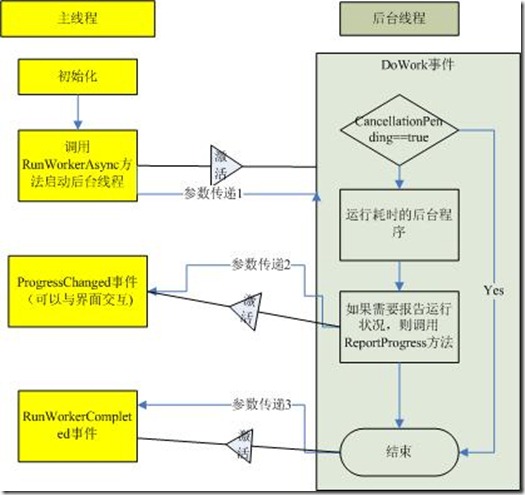
首先介绍一下BackgroundWorker的相关属性和方法:
属性:
WorkerReportsProgress:是否可以报告进度。
WorkerSupportsCancellation:是否允许异步中止。
IsBusy:是否在运行。
CancellationPending:判断BackgroundWorker是否已经异步取消。
方法:
RunWorkerAsync:开始执行任务。触发DoWork事件
ReportProgress:异步提醒,触发ProgressChanged事件,但是这个如果可以使用,必须设置WorkerReportsProgress为True
CancelAsync:取消BackgroundWorker操作。
事件:
DoWork:执行RunWorkerAsync后触发,异步执行的认为。
ProgressChanged:执行ReportProgress时触发,异步获得进度。
RunWorkerCompleted:线程结束时触发,主要有成功结束,发生异常或者取消时发生。
Thread相对来说就简单了,但是使用起来就比较麻烦了。Thread位于System.Threading的名空间下,是一个可以独立创建和操作一个线程,并且对线程进行设置优先级和获得状态的一个不可继承的类。
下面是我做的一个例子,来比较他们两个的使用。
建立一个窗体,放置了两个TextBox,分别为设置开始和结束的Progree的值,放置两个ProgressBar,分别设置为线程的Progressbar和BackGroundWorker的ProgressBar。另外放置按钮为StartBackGroundWorker,StartThread,CancelBackGroundWorker,CancelThread和PauseThread。
BackGroundWorker的使用就非常简单:
/// <summary>
        /// Handles the Click event of the btnBackGroundWorker control.
        /// </summary>
        /// <param name="sender">The source of the event.</param>
        /// <param name="e">The <see cref="System.EventArgs"/> instance containing the event data.</param>
        private void btnBackGroundWorker_Click(object sender, EventArgs e)
        {
            StartFrom = Convert.ToInt32(txtStart.Text);
            EndTo = Convert.ToInt32(txtEnd.Text);

            progressBarThread.Minimum = StartFrom;
            progressBarThread.Maximum = EndTo;

            this.btnBackGroundWorker.Enabled = false;

            this.backgroundWorker.RunWorkerAsync();
        }

        /// <summary>
        /// Handles the DoWork event of the backgroundWorker control.
        /// </summary>
        /// <param name="sender">The source of the event.</param>
        /// <param name="e">The <see cref="System.ComponentModel.DoWorkEventArgs"/> instance containing the event data.</param>
        private void backgroundWorker_DoWork(object sender, DoWorkEventArgs e)
        {
            for (int nValue = StartFrom; nValue <= EndTo; nValue++)
            {
                if (this.backgroundWorker.CancellationPending)
                {
                    e.Cancel = true;
                    return;
                }
                this.backgroundWorker.ReportProgress(nValue);
                Thread.Sleep(200);
            }
        }

        /// <summary>
        /// Handles the ProgressChanged event of the backgroundWorker control.
        /// </summary>
        /// <param name="sender">The source of the event.</param>
        /// <param name="e">The <see cref="System.ComponentModel.ProgressChangedEventArgs"/> instance containing the event data.</param>
        private void backgroundWorker_ProgressChanged(object sender, ProgressChangedEventArgs e)
        {
            this.prgProcessBackGroundWorker.Value = e.ProgressPercentage;
        }

        /// <summary>
        /// Handles the RunWorkerCompleted event of the backgroundWorker control.
        /// </summary>
        /// <param name="sender">The source of the event.</param>
        /// <param name="e">The <see cref="System.ComponentModel.RunWorkerCompletedEventArgs"/> instance containing the event data.</param>
        private void backgroundWorker_RunWorkerCompleted(object sender, RunWorkerCompletedEventArgs e)
        {
            // 取消
            if (e.Cancelled)
            {
                MessageBox.Show("Cancelled");
            }
            // 出现错误
            else if (e.Error != null)
            {
                MessageBox.Show(e.Error.Message + Environment.NewLine + e.Error.StackTrace);
            }
            // 完成
            else
            {
                MessageBox.Show("Completed");
                this.btnBackGroundWorker.Enabled = true;
            }
        }

        /// <summary>
        /// Handles the Click event of the btnCancelBackgroundWoker control.
        /// </summary>
        /// <param name="sender">The source of the event.</param>
        /// <param name="e">The <see cref="System.EventArgs"/> instance containing the event data.</param>
        private void btnCancelBackgroundWoker_Click(object sender, EventArgs e)
        {
            this.backgroundWorker.CancelAsync();
        }
Thread的使用就比较麻烦了,对于尤其是对异步提醒来说,需要写委托,代码量是很多,但是对于BackgroundWorker来说,却没有线程暂停和继续的方法。但是对于一般的来说,这些功能也是不用的,而且在微软的文档中还提到了,Thread的Resume和Suspend已经不推荐使用。
// 声明委托
        delegate void DelegateType(int x);
       DelegateType TheDelegate;

        // ProgressBar的开始和结束值
        int StartFrom, EndTo;

        // 是否线程暂停
        bool IsThreadPaused;

        ManualResetEvent CancelEvent = new ManualResetEvent(false);
        Thread MyThread;

        /// <summary>
        /// 委托的消息事件
        /// </summary>
        /// <param name="nProgress">进度值</param>
        private void MessageHandler(int nProgress)
        {
            lblThreadStatus.Text = "处理: " + Convert.ToString(nProgress);
            progressBarThread.Value = nProgress;

            if (nProgress == progressBarThread.Maximum)
            {
                MessageBox.Show("Completed");
                this.btnTread.Enabled = true;
            }
        }

        /// <summary>
        /// Handles the Click event of the btnTread control.
        /// </summary>
        /// <param name="sender">The source of the event.</param>
        /// <param name="e">The <see cref="System.EventArgs"/> instance containing the event data.</param>
        private void btnTread_Click(object sender, EventArgs e)
        {
            TheDelegate = MessageHandler;

            StartFrom = Convert.ToInt32(txtStart.Text);
            EndTo = Convert.ToInt32(txtEnd.Text);

            progressBarThread.Minimum = StartFrom;
            progressBarThread.Maximum = EndTo;

            btnTread.Enabled = false;

            IsThreadPaused = false;
            MyThread = new Thread(ProcessRoutine);
            MyThread.Start();
        }

        /// <summary>
        /// Processes the routine.
        /// </summary>
        private void ProcessRoutine()
        {
            for (int nValue = StartFrom; nValue <= EndTo; nValue++)
            {
                // 判断是否取消
                if (CancelEvent.WaitOne(0, false) == true)
                {
                    return;
                }
                this.BeginInvoke(this.TheDelegate, nValue);
                Thread.Sleep(200);
            }
        }

        /// <summary>
        /// Handles the Click event of the btnCancelThread control.
        /// </summary>
        /// <param name="sender">The source of the event.</param>
        /// <param name="e">The <see cref="System.EventArgs"/> instance containing the event data.</param>
        private void btnCancelThread_Click(object sender, EventArgs e)
        {
            btnCancelThread.Enabled = false;
            btnPauseThread.Enabled = false;

            CancelEvent.Set();
            MyThread.Join();
        }

        /// <summary>
        /// Handles the Click event of the btnPauseThread control.
        /// </summary>
        /// <param name="sender">The source of the event.</param>
        /// <param name="e">The <see cref="System.EventArgs"/> instance containing the event data.</param>
        private void btnPauseThread_Click(object sender, EventArgs e)
        {
            // Bad approach!
            if (!IsThreadPaused)
            {
                IsThreadPaused = true;
                MyThread.Suspend();
                btnPauseThread.Text = "Resume Thread";

                // Disallow Cancel
                btnCancelThread.Enabled = false;
            }
            else
            {
                IsThreadPaused = false;
                MyThread.Resume();
                btnPauseThread.Text = "Pause Thread";
                btnCancelThread.Enabled = true;
            }
        }
比较起来,两个是完全相同的,对于Thread来说,灵活性就比较好了,BackgroundWorker的使用就相对来说简单了。
此内容由惯性聚合(RSS阅读器)自动聚合整理,仅供阅读参考。 原文来自 — 版权归原作者所有。