







Android 开发者使用Eclipse 新建一个Android 资源文件(xml 文件)时无法正确启动Android XML file wizard。 具体操作如下:
1) 在package explorer 或者文件菜单中,选择新建;
2) 在新建子菜单中选则others....;
3) 在新建向导中选择 Android -> Android XML File;
此时会收到Eclipse 报告的错误:
The selected wizard could not be started.
Plug-in com.android.ide.eclipse.adt was unable to load class com.android.ide.eclipse.editors.wizards.NewXmlFileWizard.
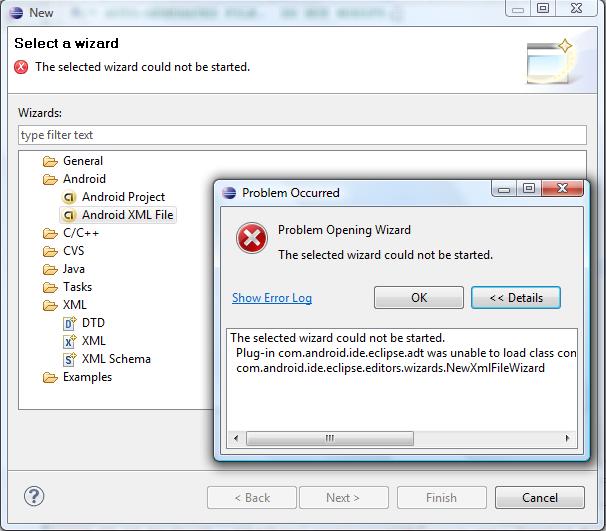
若需启动Android XML File wizard,请使用Eclipse 工具栏上的按钮:
posted @ 2009-08-13 05:10 Michael Lee 阅读(4053) 评论(5) 收藏 举报
此内容由惯性聚合(RSS阅读器)自动聚合整理,仅供阅读参考。 原文来自 — 版权归原作者所有。