






Jamf Threat Labs analyzes how a commercial spyware sample (Predator) operates post-compromise.
Authors: Nir Avraham and Hu Ke
This research is malware analysis documenting how already-deployed commercial spyware (Predator) operates post-compromise.
It is not a vulnerability disclosure.
This research is not revealing a new iOS security flaw that requires patching, rather, it explains how existing spyware works after a device has already been compromised through other means (zero-days, etc.)
This research is intended to help defenders understand the threat and build detection capabilities.
Executive summary
Since iOS 14, Apple has displayed colored status bar indicators when apps access the camera (green dot) or microphone (orange dot) — a critical privacy feature designed to alert users to potential surveillance. This analysis documents how a sample of Predator spyware, developed by Intellexa/Cytrox, surgically defeats these indicators while conducting covert surveillance
The technique outlined in this analysis requires a device to first be fully compromised, including kernel-level access to install hooks and the ability to inject code into system processes. While such compromises have been paired with Predator in the past, this research uncovers no new vulnerabilities or exploitation techniques against the latest versions of iOS.
Through reverse engineering of Predator iOS samples, we have analyzed the malware’s previously undocumented technical mechanisms including:
- Objective-C nil messaging exploitation to silently suppress sensor activity updates
- A single hook that defeats both camera AND microphone indicators simultaneously
- An operational gap where VoIP recording lacks built-in stealth capabilities
- The specific iOS private framework APIs targeted by the spyware
Table of contents
- Background
- Technical analysis
- Detection considerations
- Conclusion
- Indicators of compromise
- References
Background
iOS recording indicators
Apple introduced recording indicators in iOS 14 (2020) as a privacy protection mechanism:
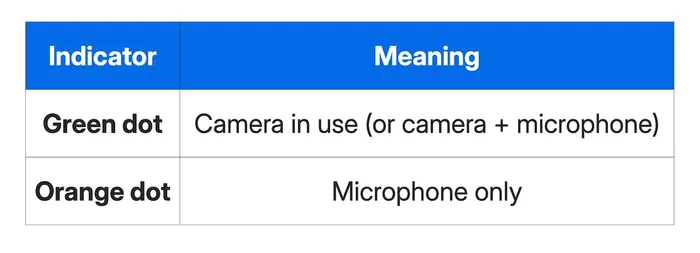
These indicators appear in the status bar and cannot be suppressed by legitimate applications. They are managed by SpringBoard, iOS's home screen and UI controller process, through private framework classes that monitor sensor activity.

Figure 1: An orange dot indicates the microphone is in use (left) | A green dot shows the camera is in use (right)
Prior research: NoReboot
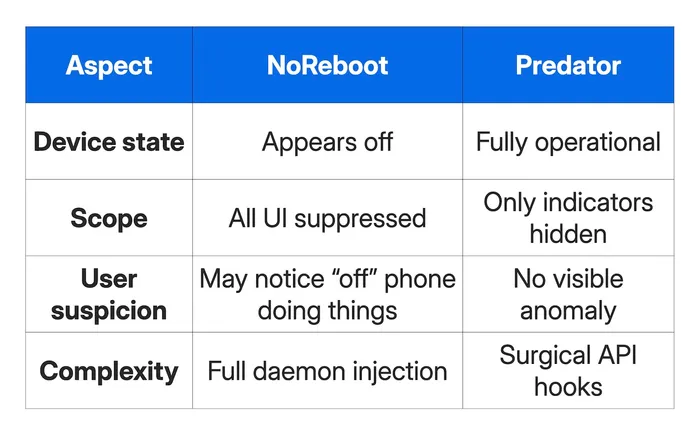
In January 2022, ZecOps (now part of Jamf) published research on "NoReboot" — a technique demonstrating how malware could simulate a device shutdown while maintaining surveillance capabilities. NoReboot worked by:
- Hijacking the shutdown event
- Injecting into SpringBoard and BackBoard daemons
- Blocking SpringBoard from launching (hiding all UI)
- Suppressing all physical feedback (screen, vibration, touch)
This created the illusion of a powered-off device while the camera and microphone remained active.
Predator's different approach
Predator takes a fundamentally different approach. Rather than simulating device shutdown, it selectively suppresses only the recording indicators while the device remains fully operational. This is more subtle — the victim’s phone works normally, but they receive no visual warning that surveillance is occurring.
Technical analysis
Component overview
Predator's helper module implements four independent capabilities:
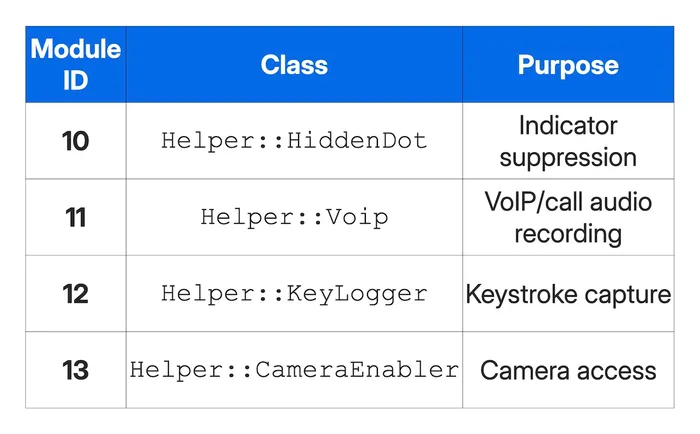
Each module is controlled via a simple command protocol:
X,A,args— Allocate/initialize module XX,E,args— Execute command on module XX,D— Delete/destroy module X
HiddenDot: the indicator suppression mechanism
Hook installation
The HiddenDot::setupHook() function targets SpringBoard's sensor activity data provider:
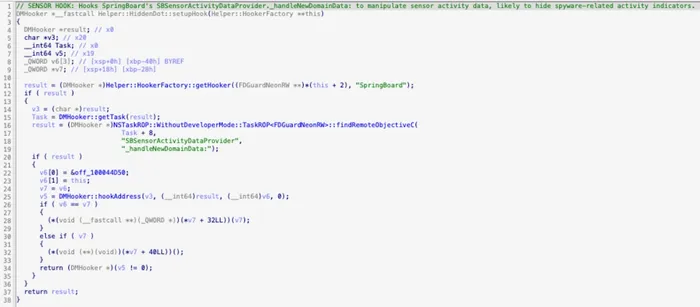
Figure 2: HiddenDot::setupHook() targeting SBSensorActivityDataProvider._handleNewDomainData:
The target method _handleNewDomainData: is called by iOS whenever sensor activity changes — camera turns on, microphone activates, etc. By hooking this single method, Predator intercepts ALL sensor status updates before it can be rendered on screen, preventing the green and orange dots from ever appearing to the user.
The hook callback: Objective-C nil messaging exploitation
The actual suppression mechanism is elegantly simple. The decompiled callback shows the core logic:
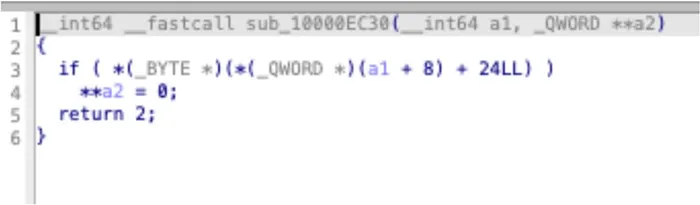
Figure 3: HiddenDot callback pseudocode — sets the self pointer to NULL via **a2 = 0
At the assembly level, this translates to a single STR XZR instruction that writes zero to the thread state:
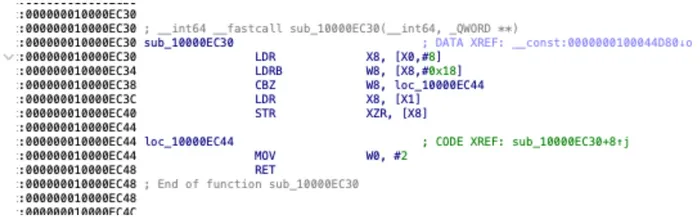
Figure 4: HiddenDot callback assembly — STR XZR, [X8] zeroes the x0 register in thread state
This exploits a fundamental feature of Objective-C: messages sent to nil are silently ignored.
How it works
On ARM64, the calling convention places the self pointer in register x0. When an Objective-C method is called:
[SBSensorActivityDataProvider _handleNewDomainData:newData]
The registers are set up as:
x0= self (the SBSensorActivityDataProvider instance)x1= _cmd (the selector)x2= newData (the domain data argument)
By setting x0 to 0 (NULL) before the method executes, the call becomes:
[nil _handleNewDomainData:newData]
In Objective-C, this simply returns nil/0 without executing any code. The sensor activity update is silently dropped — SpringBoard never learns that the camera or microphone became active, and no indicator appears.
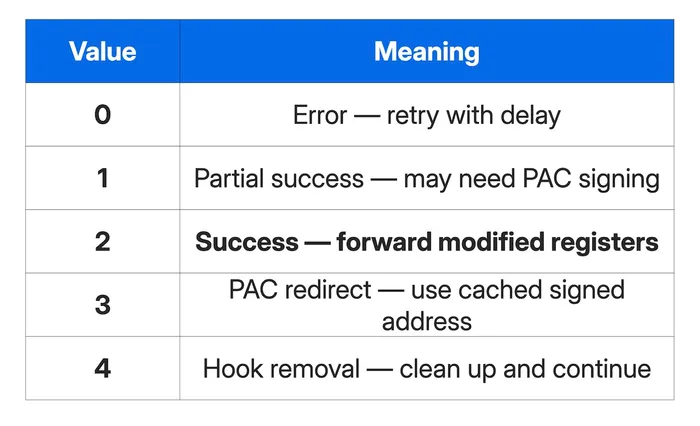
Hook return values
The callback returns 2, which in DMHooker's exception-based hooking system means "continue execution with the modified thread state." The full enum:
Single hook, dual suppression
A critical finding: this single hook suppresses both the green (camera) and orange (microphone) indicators. The SBSensorActivityDataProvider class aggregates all sensor activity before dispatching to the UI layer. By intercepting _handleNewDomainData:, Predator blocks updates for ALL sensor types with one hook.
This is more efficient than the alternative approach we found in dead code (see below), which would require separate hooks for each indicator type.
Dead code: the abandoned approach
During analysis, we discovered a function CSWatcherSpawner::TestHooker() that implements an alternative indicator suppression mechanism — one that directly hooks SBRecordingIndicatorManager:
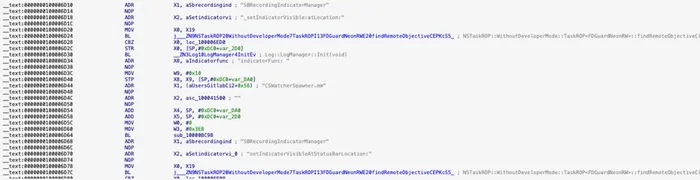
Figure 5: Dead code in TestHooker() showing abandoned SBRecordingIndicatorManager hooks — this function has zero cross-references
This function has zero cross-references — it's never called. It appears to be development/test code that was superseded by the more elegant SBSensorActivityDataProvider approach.
The abandoned approach would have required:
- Two separate hooks (one per method)
- Direct manipulation of indicator visibility
- Potential race conditions with the display system
The production approach via _handleNewDomainData: is cleaner — it stops the data at the source rather than fighting the UI system.
VoIP recording
The VoIP recording module has no indicator suppression capability. It only hooks audio processing functions:
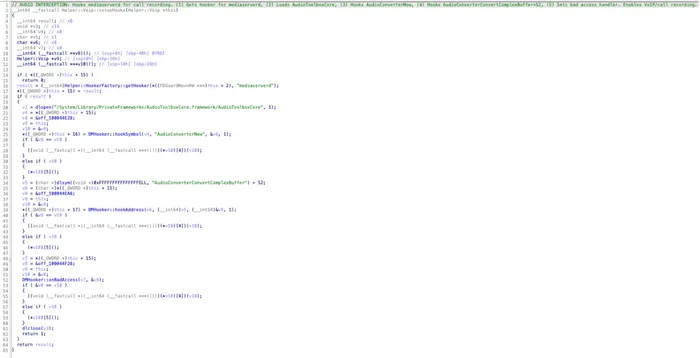
Figure 6: Voip::setupHooks() hooking AudioConverterNew and AudioConverterConvertComplexBuffer+52 — no indicator suppression code present
The audio capture pipeline extracts VoIP call audio by:
- Detecting sample rate from buffer sizes (16kHz, 24kHz, 32kHz, 44.1kHz, 48kHz)
- Converting float32 PCM to int16 using NEON SIMD instructions
- Downmixing from 4-channel to stereo
- Writing to file via
ExtAudioFileWrite()
But there is no code to suppress the orange microphone indicator. The design implies one-time universal suppression, after which VoIP recording (and potentially camera capture) can run without triggering visible indicators.
CameraEnabler: PAC bypass for camera access
The CameraEnabler module uses a different technique — PAC (Pointer Authentication Code) redirection:
Target discovery via pattern matching
Rather than hooking a known symbol, CameraEnabler locates its target function through ARM64 instruction pattern matching:
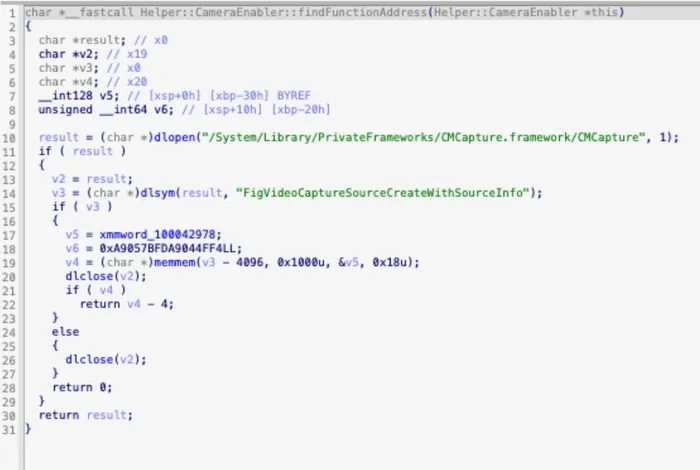
Figure 7: CameraEnabler::findFunctionAddress() using memmem() to search for ARM64 prologue pattern near FigVideoCaptureSourceCreateWithSourceInfo
This technique allows Predator to find internal functions that aren't exported symbols, making the hook more resilient to iOS updates that might rename or reorganize exports.
Hook callback: conditional PAC redirect
The CameraEnabler callback checks the thread state and conditionally redirects execution:

Figure 8a: CameraEnabler callback pseudocode
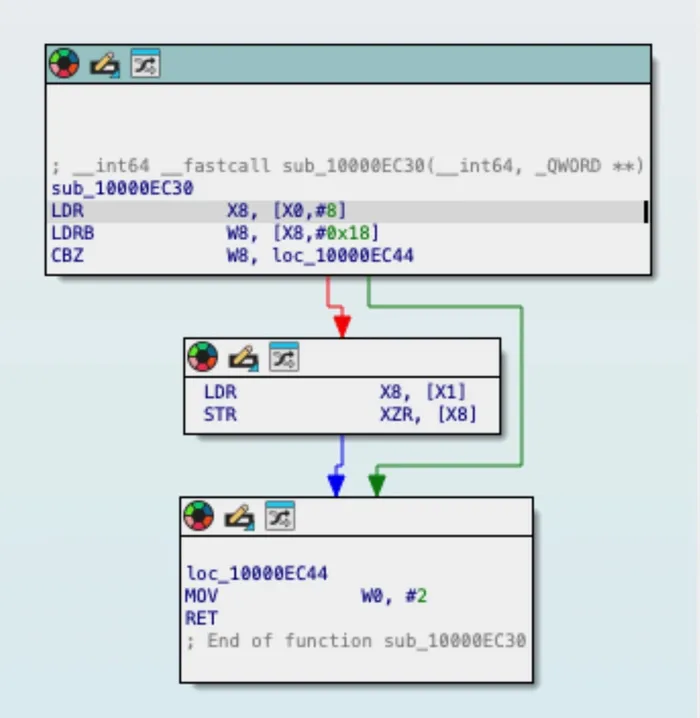
Figure 8b: CameraEnabler callback control flow graph
Return value 3 instructs DMHooker to redirect execution using a pre-signed return address from its PAC cache, effectively bypassing the camera access check.
Detection considerations
Process injection artifacts
Predator's hooks require code injection into system processes:
- SpringBoard (for HiddenDot)
- mediaserverd (for CameraEnabler and VoIP)
Detection approaches:
- Monitor for unexpected memory mappings in system processes
- Check for exception port registration by non-system code
- Analyze thread states for breakpoint instructions at unexpected locations
Hook detection
The DMHooker framework uses Mach exception-based hooking rather than traditional inline hooks. Detection requires:
-
Enumerating exception ports for system processes
-
Checking for
EXC_BREAKPOINThandlers pointing to non-system code -
Monitoring for
thread_set_statecalls that modify register contents
Behavioral indicators
- Camera or microphone usage without corresponding indicator
ExtAudioFileWritecalls from mediaserverd to unusual paths- SpringBoard receiving sensor activity notifications but not updating UI
Conclusion
This research documents a technical analysis of Predator's iOS recording indicator bypass mechanisms. These findings fill gaps in existing threat intelligence and demonstrate the sophisticated post-exploitation techniques employed by commercial spyware to evade iOS privacy protections.
Key findings include:
- Objective-C nil messaging exploitation: A single hook on
SBSensorActivityDataProvider._handleNewDomainData:defeats both camera and microphone indicators by setting theselfpointer to NULL. - Modular architecture without automatic stealth: The VoIP recording module lacks built-in indicator suppression, requiring operators to manually activate HiddenDot first.
- ARM64 pattern matching for target discovery: CameraEnabler locates internal framework functions through instruction pattern matching rather than symbol resolution.
- Dead code reveals development history: Abandoned
SBRecordingIndicatorManagerhooks show the evolution from direct UI manipulation to the cleaner data-source interception approach.
Indicators of compromise
Hooked methods
SBSensorActivityDataProvider._handleNewDomainData:(SpringBoard)- Function at pattern offset in CMCapture.framework (mediaserverd)
AudioConverterNew(mediaserverd)AudioConverterConvertComplexBuffer+52(mediaserverd)
Target processes
- SpringBoard
- mediaserverd
Framework paths
/System/Library/PrivateFrameworks/CMCapture.framework/CMCapture/System/Library/PrivateFrameworks/AudioToolboxCore.framework/AudioToolboxCore
References
- Jamf Threat Labs, "NoReboot: Faking an iPhone Restart," January 2022
- Jamf Threat Labs, "Predator's kill switch: undocumented anti-analysis techniques in iOS spyware", January 2026
- Google Threat Analysis Group, "Buying Spying: Insights into Commercial Surveillance Vendors," February 2024
- Apple Developer Documentation, " About App Privacy Report " December 2025
- Google Threat Intelligence Group “Sanctioned but Still Spying: Intellexa’s Prolific Zero-Day Exploits Continue”, December 2025
Dive into more Jamf Threat Labs research on our blog.