



惯性聚合 高效追踪和阅读你感兴趣的博客、新闻、科技资讯
阅读原文 在惯性聚合中打开

推荐订阅源

T
The Blog of Author Tim Ferriss
S
Securelist
D
Docker
The Register - Security
GbyAI
GbyAI
Recorded Future
Recorded Future
Engineering at Meta
Engineering at Meta
Stack Overflow Blog
Stack Overflow Blog
云风的 BLOG
云风的 BLOG
P
Proofpoint News Feed
罗磊的独立博客
博客园 - 【当耐特】
F
Full Disclosure
WordPress大学
WordPress大学
腾讯CDC
小众软件
小众软件
大猫的无限游戏
大猫的无限游戏
D
DataBreaches.Net
SecWiki News
SecWiki News
L
Lohrmann on Cybersecurity
I
InfoQ
MyScale Blog
MyScale Blog
量子位
Cyberwarzone
Cyberwarzone
博客园 - 三生石上(FineUI控件)
The Hacker News
The Hacker News
F
Fortinet All Blogs
freeCodeCamp Programming Tutorials: Python, JavaScript, Git & More
Jina AI
Jina AI
博客园_首页
H
Help Net Security
K
Kaspersky official blog
酷 壳 – CoolShell
酷 壳 – CoolShell
Threat Intelligence Blog | Flashpoint
www.infosecurity-magazine.com
Webroot Blog
Webroot Blog
Blog — PlanetScale
Blog — PlanetScale
V
Vulnerabilities – Threatpost
Y
Y Combinator Blog
The Cloudflare Blog
P
Proofpoint News Feed
V
Visual Studio Blog
C
Cyber Attacks, Cyber Crime and Cyber Security
T
Tailwind CSS Blog
爱范儿
爱范儿
P
Privacy International News Feed
Security Archives - TechRepublic
The GitHub Blog
The GitHub Blog
C
Cybersecurity and Infrastructure Security Agency CISA
B
Blog RSS Feed

博客园 - czh

基于MDB_ICP协议的纸币识别器与自动售货机通讯的研究 Mobile Network auto-Connection How could you login to ms sql server if you lost system admin password to setup windows auto-login Compile DLLs referenced into exe/dll javascript在vs2003中调试随笔和javascript使用小总结[转载] 世界互联网正处于剧变前夜! 系统分析师 考试 DVD playable asp.net 页面事件:顺序与回传 创业还是读研? C#判断文件名是否合法 Window消息大全 关于STRONG NAME 好东西 一名25岁的董事长给大学生的18条忠告(不想虚度年华的进来) ZT SQL*PLUS命令的使用大全 如何做一个增加系统DSN的过程 ASP连接11种数据库语法总结
族谱软件系统的使用介绍
czh · 2018-04-24 · via 博客园 - czh

软件下载:

 https://files.cnblogs.com/files/pcchs/中国心族谱.rar

1 技术架构。本软件是一个windows 桌面程序,主要使用微软.net,wpf技术,基于开源框架家族秀项目开发而成。

2 运行环境。系统运行在Windows 环境系统(Windows xp/7/8/10),并安装有.NET 4.0或以上(按照windows系统时候会自动安装.net framework。),如果没有安装请在此下载安装:https://www.microsoft.com/zh-CN/download/details.aspx?id=17718

3 开始使用。解压RAR文件后,打开JiaPu.exe,登陆用户名为:Admin,密码:123456. 
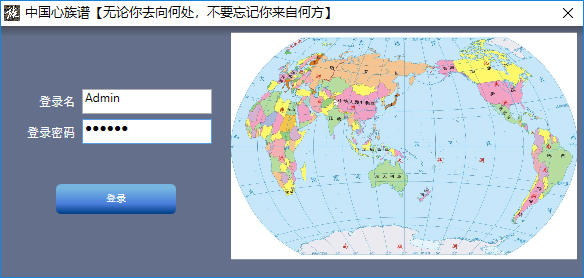
 

4 输入授权码。登陆以后,系统会自动打开【我的族谱.jpx】数据文件,之后默认会在该文件上修改增加您的家族信息。在输入授权码前,您将不能增加修改家族数据。

授权码请联系微信获取:775100435,获取后在系统帮忙-关于页面输入即可。

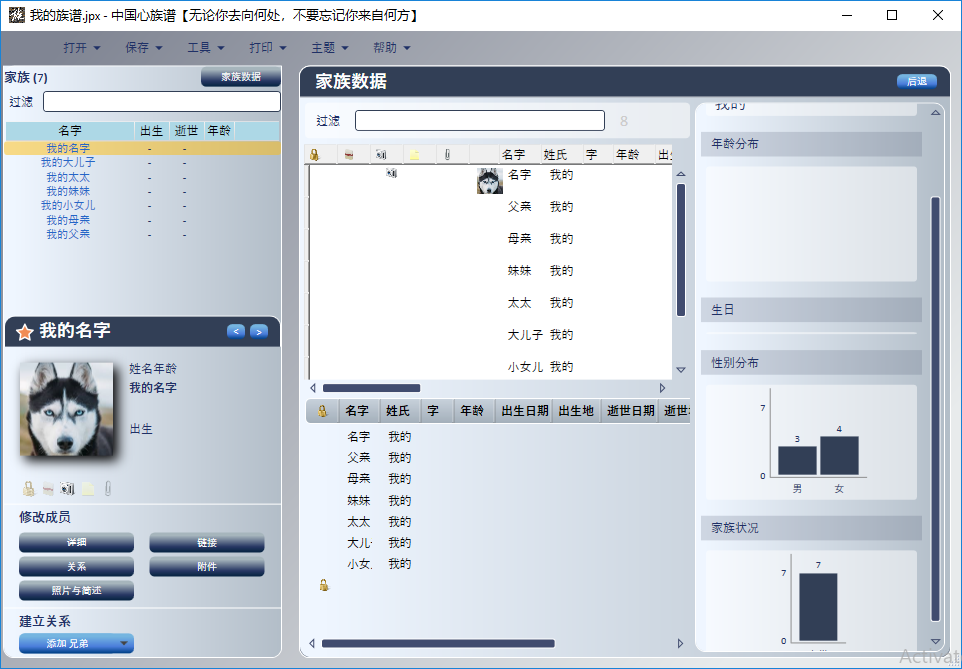
5 修改家族信息。在右边关系图中点击选择需要修改的成员,在左边选择要修改的内容,或添加该成员的家庭成员。


6 添加基本信息与照片,简述等

7 保存

8 家族数据
9 祝您使用愉快