


惯性聚合 高效追踪和阅读你感兴趣的博客、新闻、科技资讯
阅读原文 在惯性聚合中打开

推荐订阅源

P
Proofpoint News Feed
博客园 - 聂微东
Application and Cybersecurity Blog
MyScale Blog
MyScale Blog
罗磊的独立博客
H
Help Net Security
L
LangChain Blog
T
Threat Research - Cisco Blogs
量子位
S
Securelist
Last Week in AI
Last Week in AI
L
Lohrmann on Cybersecurity
T
The Exploit Database - CXSecurity.com
P
Privacy International News Feed
The Hacker News
The Hacker News
Vercel News
Vercel News
D
Darknet – Hacking Tools, Hacker News & Cyber Security
C
Cybersecurity and Infrastructure Security Agency CISA
T
The Blog of Author Tim Ferriss
T
Threatpost
Security Latest
Security Latest
P
Palo Alto Networks Blog
Microsoft Security Blog
NISL@THU
NISL@THU
F
Full Disclosure
WordPress大学
WordPress大学
cs.AI updates on arXiv.org
Stack Overflow Blog
Stack Overflow Blog
C
Check Point Blog
Hacker News - Newest:
Hacker News - Newest: "LLM"
酷 壳 – CoolShell
酷 壳 – CoolShell
H
Heimdal Security Blog
J
Java Code Geeks
Recorded Future
Recorded Future
Hugging Face - Blog
Hugging Face - Blog
G
GRAHAM CLULEY
Know Your Adversary
Know Your Adversary
K
KPMG report finds enterprise disconnect between AI and its ROI | CIO
阮一峰的网络日志
阮一峰的网络日志
U
Unit 42
B
Blog RSS Feed
月光博客
月光博客
C
Cisco Blogs
V
Visual Studio Blog
D
DataBreaches.Net
H
Hacker News: Front Page
博客园 - 叶小钗
N
News and Events Feed by Topic
爱范儿
爱范儿
A
Arctic Wolf

博客园 - 君

50口诀让你轻松记四六级单词 苦瓜炒蛋 随笔 将货币数字描述转化成中文描述 - 君 - 博客园 年旦前 经历一劫 2007-12-16 随缘也 留脚 一篇不错的文章 .net修改网络配置,如IP,DNS等 .net写发送邮件工具 2007-2-3 2006-12-23 .NET中获取系统硬件信息 网站宣传 用C#播放声音文件 Grove——.NET中的ORM实现(转载,学习...........)
DotNetMagic做应用程序界面(类似office2003风格)
· 2006-07-13 · via 博客园 - 君
 

开发语言:C#

开发工具:Microsoft Visual Studio .NET 20032005下一样)

学习控件:DotNetMagic.dll3.01

应用领域:WinForm桌面应用软件

开发目的:美工应用程序界面;

控件下载地址:打开这个地址就可以找到下载 (如果找不到的话可以在baidu里搜索一下)

界面图片如下:
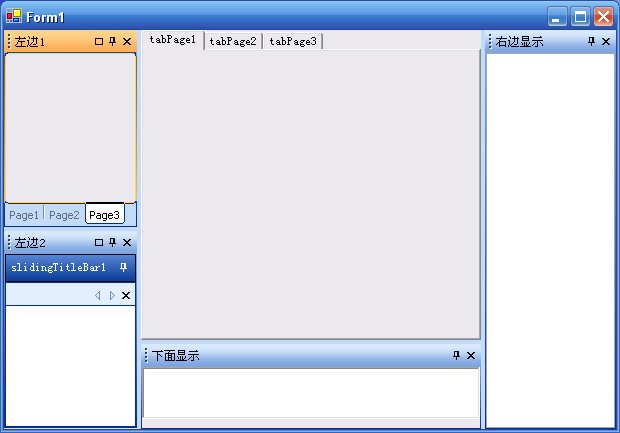
在开发应用软件的时候用开发工具VS.Net2003(2005)下,做出来的应用程序界面美观方面很不足,所以学习了一下第三方控件DotNetMagic处理界面的问题,下面将具体的介绍怎么使用做出这个界面;

第一步:添加一个windows应用程序的项目,然后将下载好的控件DotNetMagic.dll下载后安装一下即可看到界面效果);

第二步:在这个刚建立的项目当中添加5个用户控件,如:main left1left2right bottom然后将这无个用户控件里的界面组合成上图的那个界面;具体的代码在Form1_Load事件里,代码如下:

 1 main pmain = new main();
 2             pmain.Dock = DockStyle.Fill;
 3             _DockManager = new Crownwood.DotNetMagic.Docking.DockingManager(this,Crownwood.DotNetMagic.Common.VisualStyle.Office2003);
 4             _DockManager.InnerControl = pmain;
 5             this.Controls.Add(pmain);
 6             _DockManager.AllowSideCaptions = false;        
 7             
 8             _DockManager.FeedbackStyle = Crownwood.DotNetMagic.Common.DragFeedbackStyle.Outline;
 9             //_DockManager.ContextMenu+=new Crownwood.DotNetMagic.Docking.DockingManager.ContextMenuHandler(_DockManager_ContextMenu);屏蔽右键菜单事件
10         
11             left1 m_left1 = new left1();
12             left2 m_left2 = new left2();
13             Content c = _DockManager.Contents.Add(m_left1,"左边1",this.imgListFloatForm,0);
14             Content c2 = _DockManager.Contents.Add(m_left2,"左边2",this.imgListFloatForm,1);
15             c2.DisplaySize = new Size(150,150);
16             WindowContent wc = _DockManager.AddContentWithState(c,State.DockLeft);
17             _DockManager.AddContentToZone(c2,wc.ParentZone,1);        
18     
19             right m_right = new right();
20             bottom m_bottom = new bottom();
21             Content c3 = _DockManager.Contents.Add(m_right,"右边显示",this.imgListFloatForm,2);
22             _DockManager.AddContentWithState(c3,State.DockRight);
23             Content c4 = _DockManager.Contents.Add(m_bottom,"下面显示");
24             c4.DisplaySize = new System.Drawing.Size(800,85);
25             _DockManager.AddContentWithState(c4,State.DockBottom);


根据以上的步骤,然后运行这个项目,应该可以一个比较美观的界面的应用程序;
上面也许讲的比较粗糙,有兴趣的朋友可以下载这个项目,下载地址为:/Files/fengjun19912/DotNetMagicProject.rar

以上完全是个人平时学习发表,难免有错,希望大家提出宝贵意见,大家共同学习和进步;

最近在学习一个功能更为强大的一个处理界面的工具,这个工具为infragistics,该工具的下载地址为:http://www.evget.com/product/product/infragistics/netadvantage%28WinForms%2C%20ASP.NET%29.EXE
功能非常强大,可以处理winform和webform界面,大家可以研究一下,或指导一下小弟,谢谢