惯性聚合 高效追踪和阅读你感兴趣的博客、新闻、科技资讯
阅读原文 在惯性聚合中打开

推荐订阅源

酷 壳 – CoolShell
酷 壳 – CoolShell
H
Hacker News: Front Page
P
Palo Alto Networks Blog
T
ThreatConnect
Apple Machine Learning Research
博客园_首页
T
True Tiger Recordings
P
Privacy & Cybersecurity Law Blog
B
Blog
IT之家
IT之家
Last Week in AI
Last Week in AI
F
Full Disclosure
Hacker News: Ask HN
Hacker News: Ask HN
C
Comments on: Blog
Microsoft Azure Blog
C
Cybersecurity and Infrastructure Security Agency CISA
Microsoft Security Blog
博客园 - 【当耐特】
N
News and Events Feed by Topic
NISL@THU
NISL@THU
腾讯CDC
雷峰网
雷峰网
Security Latest
Security Latest
李成银的技术随笔
M
Microsoft Research Blog - Microsoft Research
L
LangChain Blog
L
Lohrmann on Cybersecurity
cs.CL updates on arXiv.org
C
Check Point Blog
Y
Y Combinator Blog
Recent Announcements
博客园 - Franky
N
News | PayPal Newsroom
V
V2EX
A
About on SuperTechFans
The Register - Security
月光博客
月光博客
奇客Solidot–传递最新科技情报
奇客Solidot–传递最新科技情报
Google Online Security Blog
MyScale Blog
MyScale Blog
Cisco Talos Blog
Cisco Talos Blog
Vercel News
Vercel News
WordPress大学
WordPress大学
C
Cyber Attacks, Cyber Crime and Cyber Security
The Hacker News
The Hacker News
IntelliJ IDEA : IntelliJ IDEA – the Leading IDE for Professional Development in Java and Kotlin | The JetBrains Blog
爱范儿
爱范儿
A
Arctic Wolf
L
LINUX DO - 最新话题
freeCodeCamp Programming Tutorials: Python, JavaScript, Git & More

博客园 - jowo

websql操作类封装 - jowo Vue.js中Promise、异步、同步、定时器 async/await 来处理异步详解 Promise的基本用法 - jowo zTree setting 配置 WebSQL vue-cli快速构建项目 接收的第一个参数是模块的局部状态对象。 如何使用JavaScript检测Ctrl+V,Ctrl+C? 什么情况下我应该使用 Vuex? Vue+node.js实现一个简洁的个人博客系统 Vuex 是什么? vue中mixins的理解及应用 Vue:slot用法 - jowo web.xml文件的的param-name Robots协议一定放在网站根目录下 浅谈重写与重载 笔记纪要:C# WebService URL重写 Java应用监控利器JMX
使用富文本编辑器wangEditor3
jowo · 2020-05-17 · via 博客园 - jowo

UEditor是由百度web前端研发部开发所见即所得富文本web编辑器,

具有轻量,可定制,注重用户体验等特点,开源基于MIT协议,允许自由使用和修改代码。

可惜在官网下载太慢了,而且界面有些许复古,放弃了,使用了轻量级wangEditor3。

1.下载

手册中下载

https://www.kancloud.cn/wangfupeng/wangeditor3/332599

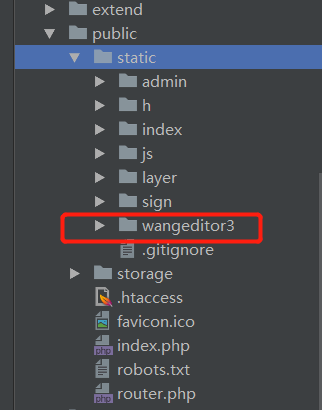
导入到项目中
2.项目中创建

1

2

3

4

5

6

7

8

9

10

11

12

13

14

15

16

17

18

19

20

21

<!DOCTYPE html>

<html>

<head>

    <meta charset="UTF-8">

    <title>wangEditor demo</title>

</head>

<body>

    <div id="editor">

        <p>欢迎使用 <b>wangEditor</b> 富文本编辑器</p>

    </div>

    <!-- 注意, 只需要引用 JS,无需引用任何 CSS !!!-->

    <script type="text/javascript" src="/wangEditor.min.js"></script>

    <script type="text/javascript">

        var E = window.wangEditor

        var editor = new E('#editor')

        editor.create()

    </script>

</body>

</html>


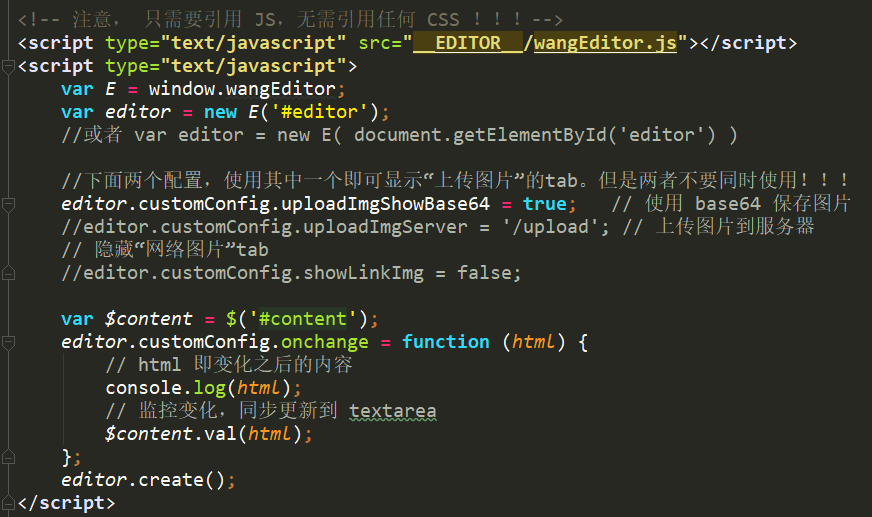
 图片上传选的使用 base64 编码直接将图片插入到内容中,免去配置本地上传

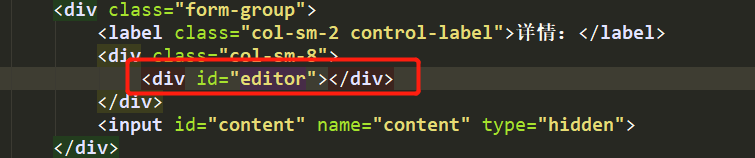
没用Ajax,所以在表单中添加 了一个隐藏文本框

1

<input id="content" name="content" type="hidden">

配置onchange函数之后,用户操作(鼠标点击、键盘打字等)导致的内容变化之后,会自动触发onchange函数执行。

submit提交时富文本内容也会提交。