惯性聚合 高效追踪和阅读你感兴趣的博客、新闻、科技资讯
阅读原文 在惯性聚合中打开

推荐订阅源

酷 壳 – CoolShell
酷 壳 – CoolShell
H
Hacker News: Front Page
P
Palo Alto Networks Blog
T
ThreatConnect
Apple Machine Learning Research
博客园_首页
T
True Tiger Recordings
P
Privacy & Cybersecurity Law Blog
B
Blog
IT之家
IT之家
Last Week in AI
Last Week in AI
F
Full Disclosure
Hacker News: Ask HN
Hacker News: Ask HN
C
Comments on: Blog
Microsoft Azure Blog
C
Cybersecurity and Infrastructure Security Agency CISA
Microsoft Security Blog
博客园 - 【当耐特】
N
News and Events Feed by Topic
NISL@THU
NISL@THU
腾讯CDC
雷峰网
雷峰网
Security Latest
Security Latest
李成银的技术随笔
M
Microsoft Research Blog - Microsoft Research
L
LangChain Blog
L
Lohrmann on Cybersecurity
cs.CL updates on arXiv.org
C
Check Point Blog
Y
Y Combinator Blog
Recent Announcements
博客园 - Franky
N
News | PayPal Newsroom
V
V2EX
A
About on SuperTechFans
The Register - Security
月光博客
月光博客
奇客Solidot–传递最新科技情报
奇客Solidot–传递最新科技情报
Google Online Security Blog
MyScale Blog
MyScale Blog
Cisco Talos Blog
Cisco Talos Blog
Vercel News
Vercel News
WordPress大学
WordPress大学
C
Cyber Attacks, Cyber Crime and Cyber Security
The Hacker News
The Hacker News
IntelliJ IDEA : IntelliJ IDEA – the Leading IDE for Professional Development in Java and Kotlin | The JetBrains Blog
爱范儿
爱范儿
A
Arctic Wolf
L
LINUX DO - 最新话题
freeCodeCamp Programming Tutorials: Python, JavaScript, Git & More

博客园 - chance

SQLServer 2008的数据库镜像实施笔记 报表服务器无法打印 - chance 人生值得学习的81句话 人件之名言警句 将 BLOB 值写入 SQL Server 时保留资源 - chance asp.net中如何打印ReportViewer报表 - chance - 博客园 [翻译]使用ASP.NET2.0的ReportViewer查看RDLC报表 基于消息与.Net Remoting的分布式处理架构 C#程序实现动态调用DLL的研究 javascript事件列表解说 js 操作IE游览器 window.external... 微型项目实践感悟 - chance DELPHI:利用INI文件实现界面无闪烁多语言切换 Delphi - 利用INI文件实现界面多语言切换 SQLServer2000的数据库容量是多大? MessageBox对话框 项目经理是这样当的 SQL Server 存储过程的分页方案比拼 动态调用Webservice - chance
Reporting Service 在打印或预览时可能会导致出现空白页的原因
chance · 2007-08-08 · via 博客园 - chance

Reporting Service 在打印或预览时可能会导致出现空白页的原因:

主要的原因就是报表宽度或高度过大,超过了纸张的大小。

下面以A4纸举例,横向,29.7cm*21cm

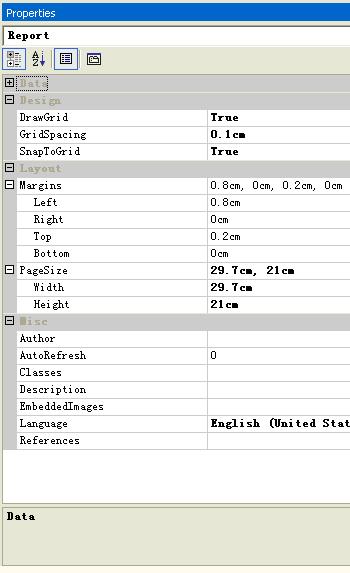
创建新报表后,先要确定这张报表将会用什么大小的纸张进行打印,确定好后,就可以选择属性下拉列表中的Report对象(如下图),对该对象进行属性设置。

首先设置PageSizewidth=29.7cmheight=21cm,这是标准的A4纸大小。然后再根据需要设置Left, Right, Top, Bottom边距。在打印预览或打印时,打印属性对话框会提取PageSize 和上下左右边距成为打印机的默认属性设置。你可以在打印之前更改这些属性。

注意:如果你的报表主体文件(下面的body属性)的大小是29.7cm*21cm,但是你没有设置Report属性。这个时候对打印没有太大的影响,因为你可以通过打印属性对话框重新调整打印属性。但是当你想要导出成PDF文件时,程序会默认的按照PageSize的大小进行导出,你无法再重新更改属性。举个例,如果你的report PageSize属性为21cm*29.7cm,而body的属性为29.7cm*21cm,那么你导出后的PDF,本来是一张纸的将会变成两张纸,完整的表格被切开成两页。
 

设置万Report属性后,我们就可以来设置Body的属性,如下图:

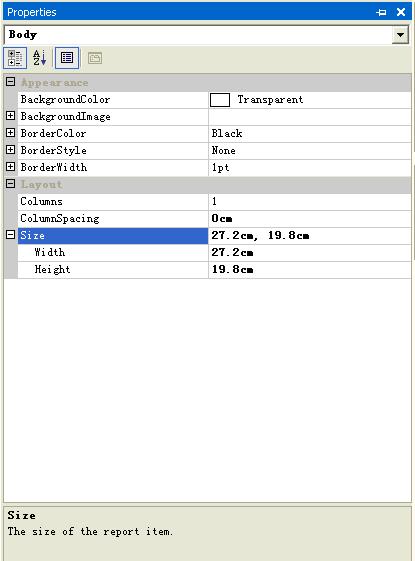
Body有一个Size属性,Size属性如果设置得过大,就会出现空白页现象。 一般可以这样设置:

Body Width <= Report PageSize Width – Margin Left – Margin Right

Body Height = Report PageSize Height – Margin Top – Margin Bottom

很多人都没有考虑到边距问题,导致出现了空白页。

建议如果一定要设置边距的话,只设置LeftTop就可以了。