


tinymce是一款挺不错的html文本编辑器。但是添加图片是直接添加链接,不能直接选择本地图片。
下面我写了一个插件用于直接上传本地图片。
在tinymce的plugins目录下新建一个uploadimage目录,用于存放我新写的上传本地图片的插件。
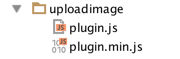
下面看看plugin.js文件的具体内容。

/**
 * tinymce plugin
 * Created by jerry on 16/8/5.
 */
tinymce.PluginManager.add('uploadimage', function (editor) {

    function selectLocalImages() {
        var dom = editor.dom;
        var input_f = $('<input type="file" name="thumbnail" accept="image/jpg,image/jpeg,image/png,image/gif" multiple="multiple">');
        input_f.on('change', function () {
            var form = $("<form/>",
                {
                    action: editor.settings.upload_image_url, //设置上传图片的路由,配置在初始化时
                    style: 'display:none',
                    method: 'post',
                    enctype: 'multipart/form-data'
                }
            );
            form.append(input_f);
            //ajax提交表单
            form.ajaxSubmit({
                beforeSubmit: function () {
                    return true;
                },
                success: function (data) {
                    if (data && data.file_path) {
                        editor.focus();
                        data.file_path.forEach(function (src) {
                            editor.selection.setContent(dom.createHTML('img', {src: src}));
                        })
                    }
                }
            });
        });

        input_f.click();
    }

    editor.addCommand("mceUploadImageEditor", selectLocalImages);

    editor.addButton('uploadimage', {
        icon: 'image',
        tooltip: '上传图片',
        onclick: selectLocalImages
    });

    editor.addMenuItem('uploadimage', {
        icon: 'image',
        text: '上传图片',
        context: 'tools',
        onclick: selectLocalImages
    });
});
下面是组件初始化js代码:
tinymce.init({
            selector: "textarea[data-provide='tinymce']",
            upload_image_url: '/upload/cloud', //配置的上传图片的路由
            height: 400,
            plugins: [
                'advlist autolink autosave lists link image charmap print preview anchor',
                'searchreplace visualblocks code fullscreen textcolor colorpicker textpattern code uploadimage',
                'contextmenu paste'
            ],
            toolbar1: "undo redo | bold italic underline strikethrough | alignleft aligncenter alignright alignjustify | fontselect fontsizeselect ",
            toolbar2: "forecolor backcolor | bullist numlist | outdent indent | removeformat | link unlink uploadimage | preview fullscreen ",
            menubar: false,
            //statusbar : false,
            content_css: [
                '/style/tinymce.css'
            ]
            //参考网站 https://www.tinymce.com/
        });
现在运行编辑器菜单如下:

点击图片小图标就可以从本地选择图片上传了。
此内容由惯性聚合(RSS阅读器)自动聚合整理,仅供阅读参考。 原文来自 — 版权归原作者所有。