


惯性聚合 高效追踪和阅读你感兴趣的博客、新闻、科技资讯
阅读原文 在惯性聚合中打开

推荐订阅源

酷 壳 – CoolShell
酷 壳 – CoolShell
H
Hacker News: Front Page
P
Palo Alto Networks Blog
T
ThreatConnect
Apple Machine Learning Research
博客园_首页
T
True Tiger Recordings
P
Privacy & Cybersecurity Law Blog
B
Blog
IT之家
IT之家
Last Week in AI
Last Week in AI
F
Full Disclosure
Hacker News: Ask HN
Hacker News: Ask HN
C
Comments on: Blog
Microsoft Azure Blog
C
Cybersecurity and Infrastructure Security Agency CISA
Microsoft Security Blog
博客园 - 【当耐特】
N
News and Events Feed by Topic
NISL@THU
NISL@THU
腾讯CDC
雷峰网
雷峰网
Security Latest
Security Latest
李成银的技术随笔
M
Microsoft Research Blog - Microsoft Research
L
LangChain Blog
L
Lohrmann on Cybersecurity
cs.CL updates on arXiv.org
C
Check Point Blog
Y
Y Combinator Blog
Recent Announcements
博客园 - Franky
N
News | PayPal Newsroom
V
V2EX
A
About on SuperTechFans
The Register - Security
月光博客
月光博客
奇客Solidot–传递最新科技情报
奇客Solidot–传递最新科技情报
Google Online Security Blog
MyScale Blog
MyScale Blog
Cisco Talos Blog
Cisco Talos Blog
Vercel News
Vercel News
WordPress大学
WordPress大学
C
Cyber Attacks, Cyber Crime and Cyber Security
The Hacker News
The Hacker News
IntelliJ IDEA : IntelliJ IDEA – the Leading IDE for Professional Development in Java and Kotlin | The JetBrains Blog
爱范儿
爱范儿
A
Arctic Wolf
L
LINUX DO - 最新话题
freeCodeCamp Programming Tutorials: Python, JavaScript, Git & More

博客园 - 蓝蓝的天2016

学习materialize VS2013 启用avalon 智能提示 Intelligence 推荐一款开源的C#TCP通讯框架 js/jquery 获取本地文件的文件路劲 获取input框中type=‘file’ 中的文件路径(转载) HTML5的 input:file上传类型控制(转载) tinymce4.x 上传本地图片 (转载) Jquery append()总结(一) 转载 创建数据库表(转载) 用IIS防止mdb数据库被下载(转载) 放映PPT幻灯片演示文稿如何让演讲者备注不投影到屏幕上(转载) 操作App.config的类(转载) C# MemoryCache 类[转载] 转载css3 图片圆形显示 如何CSS将正方形图片显示为圆形图片布局 微信 学习网址 winform 路径 CodeSimth - .Net Framework Data Provider 可能没有安装。解决方法[转载 ] 加载js代码 tinymce 上传图片空间(转) 页面跳转
Visual Studio各版本工程文件之间的转换 [转载]
蓝蓝的天2016 · 2016-10-14 · via 博客园 - 蓝蓝的天2016

原网址:http://www.cnblogs.com/jmliao/p/5594179.html

Visual Studio各版本工程文件之间的转换

由于VS版本比较多,低版本无法直接打开高版本的工程文件,通过对工程文件进行一些修改可以解决这些问题。

通过修改Solution文件和Project文件,可以使低版本转换为高版本。

例如将VS2015工程转换为VS2010工程。

1.修改解决方案文件

使用记事本打开.lsn文件:

  • 将Format Version 12.00改为11.00;
  • 将# Visual Studio 14改为2010;
  • 将VisualStudioVersion = 14.0.25123.0改为10。

Format Version(解决方案文件版本)和VS版本的对应关系:

-Visual Studio 2005 - Format Version  9.00

-Visual Studio 2008 - Format Version 10.00

-Visual Studio 2010 - Format Version 11.00

-Visual Studio 2012 - Format Version 12.00

-Visual Studio 2013 - Format Version 12.00

-Visual Studio 2015 - Format Version 12.00

2.修改项目文件

 使用记事本打开.vcxproj文件:

  • 将ToolsVersion="14.0"改为4.0。

ToolsVersion(.Net FrameWork版本)与VS版本的对应关系:Reference: https://msdn.microsoft.com/zh-cn/library/bb383796.aspx

-Visual Studio 2008 - ToolsVersion 3.5

-Visual Studio 2010 - ToolsVersion 4.0

-Visual Studio 2012 - ToolsVersion 4.0

-Visual Studio 2013 - ToolsVersion 12.00

-Visual Studio 2015 - ToolsVersion 14.00
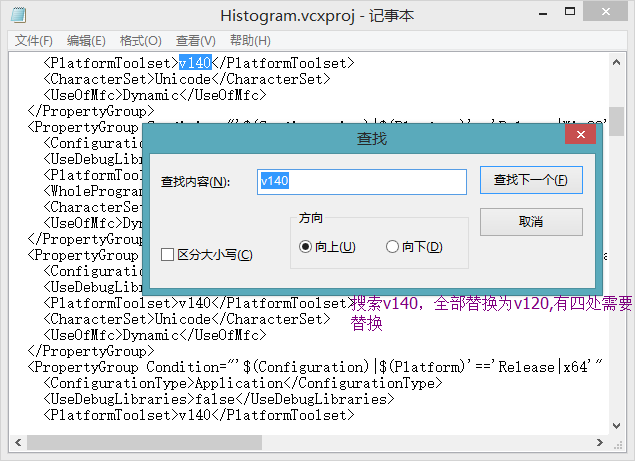
  • 将v140改为v110,按照如图更改,一般来说都是4个。

工具集版本号与VS版本的对应关系:

-Visual Studio 2015: V140

-Visual Studio 2013: V120

-Visual Studio 2012: V110

-Visual Studio 2010: V100

-Visual Studio 2008: V90

-Visual Studio 2005: V80

-Visual Studio 2003: V71

-Visual Studio 2002: V70

-Visual Studio 6: V60

通过以上设置后就可以在低版本VS中正常使用了。