惯性聚合 高效追踪和阅读你感兴趣的博客、新闻、科技资讯
阅读原文 在惯性聚合中打开

推荐订阅源

酷 壳 – CoolShell
酷 壳 – CoolShell
H
Hacker News: Front Page
P
Palo Alto Networks Blog
T
ThreatConnect
Apple Machine Learning Research
博客园_首页
T
True Tiger Recordings
P
Privacy & Cybersecurity Law Blog
B
Blog
IT之家
IT之家
Last Week in AI
Last Week in AI
F
Full Disclosure
Hacker News: Ask HN
Hacker News: Ask HN
C
Comments on: Blog
Microsoft Azure Blog
C
Cybersecurity and Infrastructure Security Agency CISA
Microsoft Security Blog
博客园 - 【当耐特】
N
News and Events Feed by Topic
NISL@THU
NISL@THU
腾讯CDC
雷峰网
雷峰网
Security Latest
Security Latest
李成银的技术随笔
M
Microsoft Research Blog - Microsoft Research
L
LangChain Blog
L
Lohrmann on Cybersecurity
cs.CL updates on arXiv.org
C
Check Point Blog
Y
Y Combinator Blog
Recent Announcements
博客园 - Franky
N
News | PayPal Newsroom
V
V2EX
A
About on SuperTechFans
The Register - Security
月光博客
月光博客
奇客Solidot–传递最新科技情报
奇客Solidot–传递最新科技情报
Google Online Security Blog
MyScale Blog
MyScale Blog
Cisco Talos Blog
Cisco Talos Blog
Vercel News
Vercel News
WordPress大学
WordPress大学
C
Cyber Attacks, Cyber Crime and Cyber Security
The Hacker News
The Hacker News
IntelliJ IDEA : IntelliJ IDEA – the Leading IDE for Professional Development in Java and Kotlin | The JetBrains Blog
爱范儿
爱范儿
A
Arctic Wolf
L
LINUX DO - 最新话题
freeCodeCamp Programming Tutorials: Python, JavaScript, Git & More

博客园 - MasterCai

&lt;&lt;XtraGrid Use Tips&gt;&gt; (1) &lt;&lt;SOA系列&gt;&gt;--(1)-SOA Tips 《醒了自悟》--离别感言 - MasterCai 2007年度家庭IT风云人物 R&D 给你一个抽象的任务,要你具体地完成 - MasterCai 没有蠢问题(1):1个按钮,1张图...100个按钮,100张...,Www我和你拼了! <<读书笔记>>系列--《理解专业程序员》tips - MasterCai - 博客园 &lt;&lt;读书笔记&gt;&gt;系列--《VB2005-菜根谭》注释版 &lt;&lt;读书笔记&gt;&gt;系列--VB2005-菜根谭 Throw和Throw XX Compress DataSet with .net 2.0 &lt;&lt;醒了自悟&gt;&gt;系列--Go On... OR Stop... 压缩传输,数据源源不断,助数据远行高飞 - compress dataset with .net 1.1 <<醒了自悟>>系列--微软好员工的十个标准(From Microsoft.com) - MasterCai &lt;&lt;读书笔记&gt;&gt;系列--微软研发75条心得 <<醒了自悟>>系列-bozo---虫不知---Don't know what you don't know - MasterCai &lt;&lt;醒了自悟&gt;&gt;系列--西游记歌词行诗--程序员生活写照??? 用户体验珠玑 &lt;&lt;醒了自悟&gt;&gt;系列--千年老妖---1000后的重生---重新脚踏实地
&lt;&lt;XtraGrid Use Tips&gt;&gt; (2)
MasterCai · 2010-08-05 · via 博客园 - MasterCai

8. 在最左侧显示行号

 view.CustomDrawRowIndicator += this.GridView_CustomDrawRowIndicator;

view.RowCountChanged += this.GridView_RowCountChanged;protected void GridView_CustomDrawRowIndicator(object sender, RowIndicatorCustomDrawEventArgs e)
        {

            e.Appearance.TextOptions.HAlignment 

= DevExpress.Utils.HorzAlignment.Far;if (e.Info.IsRowIndicator)
            {
                
if (e.RowHandle >= 0)
                {
                    e.Info.DisplayText 
= (e.RowHandle + 1).ToString();
                }
            }
        }
protected void GridView_RowCountChanged(object sender, EventArgs e)
        {

                    GridView gv 

= sender as GridView;
            
if (gv == null)
                
return;
            
if (gv.RowCount <= 0)
            {
                gv.IndicatorWidth 
= -1;
            }
            
else
            {
                gv.IndicatorWidth 
= 25 + Convert.ToInt32(Math.Floor(Math.Log(gv.RowCount, 10)) + 1* 5;
            }
        }


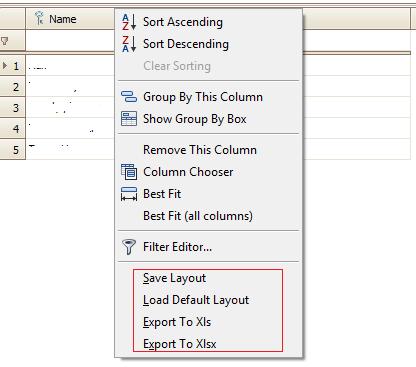
9. 添加右键菜单

view.ShowGridMenu += this.GridView_ShowGridMenu;protected void GridView_ShowGridMenu(object sender, GridMenuEventArgs e)
        {
if (e.MenuType == DevExpress.XtraGrid.Views.Grid.GridMenuType.Column)
            {
                DevExpress.XtraGrid.Menu.GridViewColumnMenu menu 
= e.Menu as GridViewColumnMenu;

                DXMenuItem saveItem 

= new DXMenuItem("&Save Layout"new EventHandler(OnSaveLayoutMenuItemClicked));
                saveItem.BeginGroup 
= true;
                saveItem.Tag 
= sender;
                menu.Items.Add(saveItem);

                DXMenuItem loadItem 

= new DXMenuItem("&Load Default Layout"new EventHandler(OnLoadDefaultLayoutMenuItemClicked));
                loadItem.Tag 
= sender;
                menu.Items.Add(loadItem);

                DXMenuItem exportToXlsItem 

= new DXMenuItem("&Export To Xls"new EventHandler(OnExportToXlsMenuItemClicked));
                exportToXlsItem.Tag 
= sender;
                menu.Items.Add(exportToXlsItem);

                DXMenuItem exportToXlsxItem 

= new DXMenuItem("E&xport To Xlsx"new EventHandler(OnExportToXlsxMenuItemClicked));
                exportToXlsxItem.Tag 
= sender;
                menu.Items.Add(exportToXlsxItem);

            }
        }

需要在ValidateRow事件中进行验证,效果(当右键点击column的时候,添加4个MenuItem)
 

10. 验证某行的输入值

需要在ValidateRow事件中进行验证

private void gridViewMain_ValidateRow(object sender, DevExpress.XtraGrid.Views.Base.ValidateRowEventArgs e)
        {
            
try
            {
if (string.IsNullOrEmpty( this.gridViewMain.GetRowCellDisplayText(e.RowHandle ,this.gridColumn1)))
                {
                    
this.ShowExclamationMessage("Must input gridColumn1.");this.gridViewMain.FocusedColumn = this.gridColumn1;

                    e.Valid 

= false;return;

                }

                         }

catch (Exception ex)
            {
this.ProcessException(ex);
            }
            
finally
            {

            }
        }

 这样做了还是会弹出Grid自带的确认框,如果不要弹出再添加以下事件

        private void gridViewMain_InvalidRowException(object sender, DevExpress.XtraGrid.Views.Base.InvalidRowExceptionEventArgs e)
        {
try
            {
                e.ExceptionMode 
= DevExpress.XtraEditors.Controls.ExceptionMode.NoAction;

            }

catch (Exception ex)
            {
this.ProcessException(ex);
            }
            
finally
            {

                            }

        }

11. Binding的值可以是属性的属性(对泛型支持不好)

this.gridColumn4.FieldName = "Function.FunctionCode";

12. 导出到Excel完整代码(优化了速度)

private static void ExportToEx(String filename, string ext, BaseView view)
        {
            Cursor currentCursor 
= Cursor.Current;try
            {
                Cursor.Current 
= Cursors.WaitCursor;
                
if (ext == "rtf")
                {
                    view.ExportToRtf(filename);
                }
                
if (ext == "pdf")
                {
                    view.ExportToPdf(filename);
                }
                
if (ext == "mht")
                {
                    view.ExportToMht(filename);
                }
                
if (ext == "htm")
                {
                    view.ExportToHtml(filename);
                }
                
if (ext == "txt")
                {
                    view.ExportToText(filename);
                }
                
if (ext == "xls")
                {

                    XlsExportOptions item 

= new DevExpress.XtraPrinting.XlsExportOptions();
                    item.ShowGridLines 
= false;
                    item.Suppress256ColumnsWarning 
= true;
                    item.Suppress65536RowsWarning 
= true;
                    item.ExportHyperlinks 
= false;
                    item.TextExportMode 
= TextExportMode.Text;

                    view.ExportToXls(filename,item);
                }

if (ext == "xlsx")
                {
                    XlsxExportOptions item
=new XlsxExportOptions(TextExportMode.Text ,false ,false);
                    view.ExportToXlsx(filename, item);
                }
            }
            
finally
            {
                Cursor.Current 
= currentCursor;
            }

        }

13. 删除一行记录

比如选中某一行的时候,你按CTRL+Del删除,需要在ProcessGridKey中处理

private void gridMain_ProcessGridKey(object sender, KeyEventArgs e)
        {
            
try
            {
                
if (e.KeyCode == Keys.Delete && e.Control && this.gridViewMain.FocusedRowHandle >= 0)
                {
                    
object item = this.gridViewMain.GetRow(this.gridViewMain.FocusedRowHandle) ;if (item == null)
                    {
                        
return;
                    }
                    
else
                    {
                        
if (this.ShowYesNoQuestionMessage(string.Format("Are you sure to delete the row?")) == DialogResult.Yes)
                        {
//do delete

                        }
                    }

                }
            }

catch (Exception ex)
            {
this.ProcessException(ex);
            }
            
finally
            {

            }
        }

14. 设置某个单元格是否可编辑

光设置属性不可以的,只能设置整个GridView或某一列是否可编辑(Editable).在ShowingEditor事件中处理

private void gridViewMain_ShowingEditor(object sender, CancelEventArgs e)
        {
            
try
            {
if (this.gridViewMain.FocusedRowHandle < 0 )
                {
                    
return;
                }

                Object item 

= this.gridViewMain.GetRow(this.gridViewMain.FocusedRowHandle);if (this.gridViewMain.FocusedColumn.Equals (this.gridColumn1) && Condition(item))
                {
                    
//Item满足一定的条件,不允许编辑
                    e.Cancel = true;
                    
return;
                }

                            }

catch (Exception ex)
            {
this.ProcessException(ex);
            }
            
finally
            {

                            }
        }

 看灰机