






SQL SERVER 2005 + SP3版本,突然无法启动服务。帖出系统日志中的错误:
2010-09-12 18:12:39.12 Server Microsoft SQL Server 2005 - 9.00.4035.00 (Intel X86)
Nov 24 2008 13:01:59
Copyright (c) 1988-2005 Microsoft Corporation
Enterprise Edition on Windows NT 5.2 (Build 3790: Service Pack 2)
2010-09-12 18:12:39.12 Server (c) 2005 Microsoft Corporation.
2010-09-12 18:12:39.12 Server All rights reserved.
2010-09-12 18:12:39.12 Server Server process ID is 5368.
2010-09-12 18:12:39.12 Server Authentication mode is MIXED.
2010-09-12 18:12:39.12 Server Logging SQL Server messages in file 'C:\Program Files\Microsoft SQL Server\MSSQL.1\MSSQL\LOG\ERRORLOG'.
2010-09-12 18:12:39.12 Server This instance of SQL Server last reported using a process ID of 5012 at 2010-9-12 18:11:51 (local) 2010-9-12 10:11:51 (UTC). This is an informational message only; no user action is required.
2010-09-12 18:12:39.12 Server Registry startup parameters:
2010-09-12 18:12:39.12 Server -d C:\Program Files\Microsoft SQL Server\MSSQL.1\MSSQL\DATA\master.mdf
2010-09-12 18:12:39.12 Server -e C:\Program Files\Microsoft SQL Server\MSSQL.1\MSSQL\LOG\ERRORLOG
2010-09-12 18:12:39.12 Server -l C:\Program Files\Microsoft SQL Server\MSSQL.1\MSSQL\DATA\mastlog.ldf
2010-09-12 18:12:39.12 服务器 SQL Server is starting at normal priority base (=7). This is an informational message only. No user action is required.
2010-09-12 18:12:39.12 服务器 Detected 2 CPUs. This is an informational message; no user action is required.
2010-09-12 18:12:39.29 服务器 Using dynamic lock allocation. Initial allocation of 2500 Lock blocks and 5000 Lock Owner blocks per node. This is an informational message only. No user action is required.
2010-09-12 18:12:39.30 服务器 Attempting to initialize Microsoft Distributed Transaction Coordinator (MS DTC). This is an informational message only. No user action is required.
2010-09-12 18:12:40.31 服务器 Attempting to recover in-doubt distributed transactions involving Microsoft Distributed Transaction Coordinator (MS DTC). This is an informational message only. No user action is required.
2010-09-12 18:12:40.31 服务器 Database mirroring has been enabled on this instance of SQL Server.
2010-09-12 18:12:40.31 spid4s Starting up database 'master'.
2010-09-12 18:12:40.45 spid4s SQL Trace ID 1 was started by login "sa".
2010-09-12 18:12:40.47 spid4s Starting up database 'mssqlsystemresource'.
2010-09-12 18:12:40.48 spid4s The resource database build version is 9.00.4035. This is an informational message only. No user action is required.
2010-09-12 18:12:40.61 spid4s Server name is 'TEST_SERVER'. This is an informational message only. No user action is required.
2010-09-12 18:12:40.61 spid9s Starting up database 'model'.
2010-09-12 18:12:40.61 服务器 错误: 17182,严重性: 16,状态: 1。
2010-09-12 18:12:40.61 服务器 TDSSNIClient initialization failed with error 0x2, status code 0xd.
2010-09-12 18:12:40.61 服务器 错误: 17182,严重性: 16,状态: 1。
2010-09-12 18:12:40.61 服务器 TDSSNIClient initialization failed with error 0x2, status code 0x1.
2010-09-12 18:12:40.61 服务器 错误: 17826,严重性: 18,状态: 3。
2010-09-12 18:12:40.61 服务器 Could not start the network library because of an internal error in the network library. To determine the cause, review the errors immediately preceding this one in the error log.
2010-09-12 18:12:40.61 服务器 错误: 17120,严重性: 16,状态: 1。
2010-09-12 18:12:40.61 服务器 SQL Server could not spawn FRunCM thread. Check the SQL Server error log and the Windows event logs for information about possible related problems.
原因分析:
根据这里的文章提示,主要是红色部分错误代码提示比较有用,原因是 SQL SERVER 配置管理->SQL SERVER 2005网络配置->MSSQLSERVER 的协议下TCP/IP的启用与配置。出现上述错误的时候,TCP/IP无法启动。
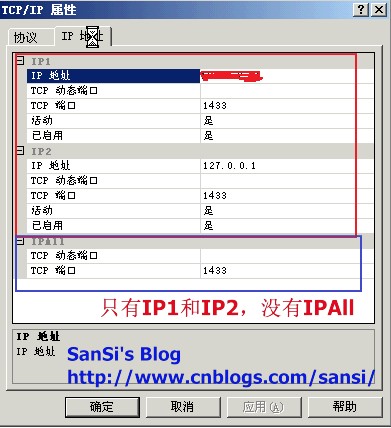
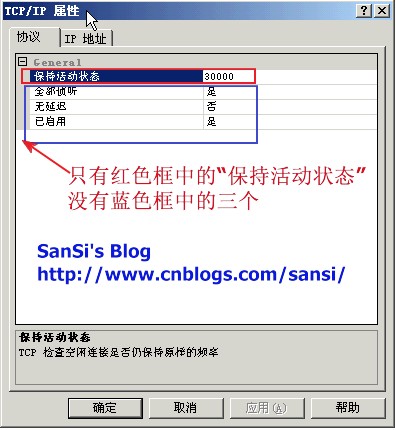
当你打开它的属性的时候,发现在“协议”那一栏,只有“保持活动状态”,其它三个都没有了。而在“IP 地址”栏,缺少IPALL。这个问题的解决办法是去注册表为TCP/IP增加丢失的项。如下图:

解决办法:
一、开始->运行->regedit,找到 HKEY_LOCAL_MACHINE\SOFTWARE\Microsoft\Microsoft SQL Server\MSSQL.1\MSSQLServer\SuperSocketNetLib\Tcp
1)添加“Enabled”,类型dword,值为1。
2)添加IPALL项,并添加如图中的几项。
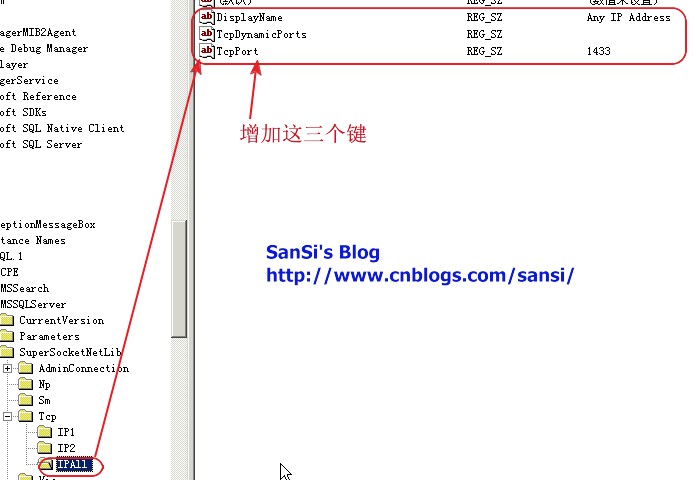
添加完后回到SQL SERVER 配置管理中,你会看到,值都出现了,接下来你要做的事情就很简单了,配置好IP地址,启动它。
后记:昨天从下午4点多到晚上9点多,在机房呆了5个小时,就为了解决这个问题。上午只是对SQL SERVER 2005做过数据库分离,转移路径后附加的操作。一切都是为了TFS2008的需要。当这一切都顺利完成的时候,没想到重起服务器后就出现这个问题。为什么注册表信息会丢失,这真是个迷。在杋房嘈杂的噪音中,我一度想过要重装,但由于这台服务器是TFS2008服务器,重装意味着。。。就是一个不折不扣的恶梦。
我要感谢谁呢。。。从机房回到办公室,我坐在自己的电脑面前,电脑里正是德云社复演直播的画面,小岳在上面正乐么呵的。呆看了几分钟,脑子里一片空白,想着明天要如何交待这个事情。我在真正放弃的前一秒,不知道被什么触动了,想到了对比注册表,结果半个小时搞定了。之前一切的想要去配置TCP/IP,甚至从光盘恢复TCP/IP的网络设置等等等等。。。一切都只是时间的问题,oh yeah~~
此内容由惯性聚合(RSS阅读器)自动聚合整理,仅供阅读参考。 原文来自 — 版权归原作者所有。