


本文是关于WCF安全的一个完整示例,WCF宿主选用IIS,并通过添加“启用Silverlight功能的WCF服务”的方式建立WCF服务。
WCF服务的绑定方式采用Visual Studio 2008默认的customBinding,安全模式选用Transport安全模式(httpsTransport),身份验证模式则选用UserNameOverTransport。
本示例的客户端为Silverlight,并在访问WCF服务时使用了Visual Studio 2008自动生成的代理类。
测试用服务类:
using System;
using System.Linq;
using System.Runtime.Serialization;
using System.ServiceModel;
using System.ServiceModel.Activation;
using System.Collections.Generic;
using System.Text;

namespace SecSample.Web
{
    [ServiceContract(Namespace = "")]
    [AspNetCompatibilityRequirements(RequirementsMode = AspNetCompatibilityRequirementsMode.Allowed)]
    public class WeatherService
    {
        [OperationContract]
        public string GetWeather()
        {
            return "Sunny";
        }
    }
}
1、配置IIS
1.1 生成证书
可以使用Makecert.exe工具生成一个测试用的证书,命令如下:
makecert -sr localmachine -ss My -n CN=localhost -sky exchange -pe -r
其中cn=localhost,表示证书的名称为localhost。
本环节需要注意的问题是:
a. 证书名称必须与访问WCF服务所用的域名或机器名一致,否则用IE访问时会出现如下警告
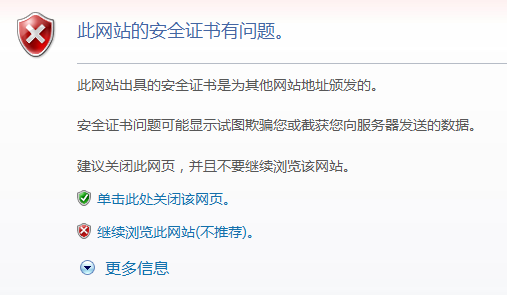
用WCF客户端访问时则会导致“无法为 SSL/TLS 安全通道与颁发机构“XXXX”建立信任关系。”的错误。
该限制的直接后果就是造成无法通过不同域名或IP地址访问同一个网站(比如用localhost或192.168.1.8访问本机),暂未找到生成多域名证书的方法,正在郁闷中,如有高手知道解决措施,望不吝赐教。
b. 以上命令行生成的证书存储在“个人”证书中,需要导入到“受信任的根证书颁发机构”或“受信任的发布者”中。
1.2 为IIS配置绑定
编辑网站绑定,添加https类型,并指定SSL证书。如下图:

2、服务端配置
Web.config文件中system.serviceModel节的代码如下:
  <system.serviceModel>
    <behaviors>
      <serviceBehaviors>
        <behavior name="defaultServiceBehavior">
          <serviceMetadata httpGetEnabled="false" httpsGetEnabled="true" />
          <serviceDebug includeExceptionDetailInFaults="false" />
          <serviceCredentials>
            <userNameAuthentication userNamePasswordValidationMode="Custom"
              customUserNamePasswordValidatorType="SecSample.Web.CustomUserNameValidator,SecSample.Web" />
          </serviceCredentials>
        </behavior>
      </serviceBehaviors>
    </behaviors>
    <bindings>
      <customBinding>
        <binding name="defaultCustomBinding">
          <binaryMessageEncoding />
          <security authenticationMode="UserNameOverTransport"/>
          <httpsTransport/>
        </binding>
      </customBinding>
    </bindings>
    <serviceHostingEnvironment aspNetCompatibilityEnabled="true" />
    <services>
      <service behaviorConfiguration="defaultServiceBehavior" name="SecSample.Web.WeatherService">
        <endpoint address="" binding="customBinding" bindingConfiguration="defaultCustomBinding"
          contract="SecSample.Web.WeatherService" />
        <endpoint address="mex" binding="mexHttpBinding" contract="IMetadataExchange" />
      </service>
    </services>
  </system.serviceModel>
serviceBehaviors节中命名为defaultServiceBehavior的behavior设置了如下内容:
a. 允许https协议获取元数据
b. userNamePasswordValidationMode选用Custom,验证类为继承自UserNamePasswordValidator类的CustomUserNameValidator类,CustomUserNameValidator类的完整源代码如下:
using System;
using System.Collections.Generic;
using System.IdentityModel.Selectors;
using System.Linq;
using System.ServiceModel;
using System.Web;

namespace SecSample.Web
{
    public class CustomUserNameValidator : UserNamePasswordValidator
    {

        public override void Validate(string userName, string password)
        {
            if (userName == "admin" && password == "123456") return;
            throw new ApplicationException("验证失败!");
        }
    }
}
customBinding节中命名为defaultCustomBinding的binding设置了customBinding所选用的编码方式(binaryMessageEncoding)、安全验证模式(UserNameOverTransport)及传输协议(httpsTransport)。
3、客户端配置
客户端ServiceReferences.ClientConfig文件的完整代码如下:
<configuration>
  <system.serviceModel>
    <bindings>
      <customBinding>
        <binding name="defaultCustomBinding">
          <binaryMessageEncoding />
          <security authenticationMode="UserNameOverTransport" />
          <httpsTransport />
        </binding>
      </customBinding>
    </bindings>
    <client>
      <endpoint address="../WeatherService.svc" binding="customBinding"
        bindingConfiguration="defaultCustomBinding" contract="WeatherServiceRef.WeatherService"
        name="CustomBinding_WeatherService" />
    </client>
  </system.serviceModel>
</configuration>
由于Silverlight及WCF使用同一个网站承载并假定相对位置固定,客户端终结点使用了相对地址“../WeatherService.svc”
以避免更换域名造成的问题(可惜证书与域名绑定的问题避免不了),customBinding节中则作了与服务器端对应的配置。
4、客户端示例页面
MainPage.xaml文件:
<UserControl x:Class="SecSample.MainPage"
    xmlns="http://schemas.microsoft.com/winfx/2006/xaml/presentation"
    xmlns:x="http://schemas.microsoft.com/winfx/2006/xaml"
    xmlns:d="http://schemas.microsoft.com/expression/blend/2008"
    xmlns:mc="http://schemas.openxmlformats.org/markup-compatibility/2006"
    mc:Ignorable="d" d:DesignWidth="640" d:DesignHeight="480">
  <Grid x:Name="LayoutRoot">
        <Button Name="btnGet" Content="GetWeather" Click="GetWeather"
                HorizontalAlignment="Center" VerticalAlignment="Center"></Button>
  </Grid>
</UserControl>
MainPage.xaml.cs文件:
using System;
using System.Collections.Generic;
using System.Linq;
using System.Net;
using System.Windows;
using System.Windows.Controls;
using System.Windows.Documents;
using System.Windows.Input;
using System.Windows.Media;
using System.Windows.Media.Animation;
using System.Windows.Shapes;
using SecSample.WeatherServiceRef;

namespace SecSample
{
    public partial class MainPage : UserControl
    {
        public MainPage()
        {
            InitializeComponent();

            _client = new SecSample.WeatherServiceRef.WeatherServiceClient();

            _client.ClientCredentials.UserName.UserName = "admin";
            _client.ClientCredentials.UserName.Password = "123456";


            _client.GetWeatherCompleted += new EventHandler<GetWeatherCompletedEventArgs>(_client_GetWeatherCompleted);
        }

        private WeatherServiceClient _client;

        private void GetWeather(object sender, RoutedEventArgs e)
        {
            this._client.GetWeatherAsync();
            this.btnGet.IsEnabled = false;
        }

        void _client_GetWeatherCompleted(object sender, GetWeatherCompletedEventArgs e)
        {
            this.btnGet.IsEnabled = true;

            if (e.Error == null)
            {
                MessageBox.Show(e.Result);
            }
            else
            {
                MessageBox.Show(e.Error.Message);
            }
        }
    }
}
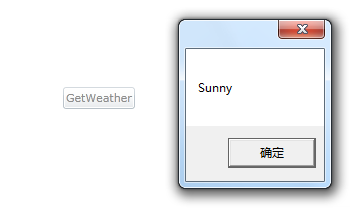
示例页面非常简单,添加一个按钮并在按钮单击时调用WCF服务,调用成功时显示调用结果,否则显示错误信息。
需注意的是客户端代理类的初始化,在服务器端要求UserNameOverTransport验证后,需要为客户端代理类指定UserName及Password。
至此,整个示例就完成了。运行效果图如下:
但如果用另一个机器访问该服务,会可能会出现如下警告:
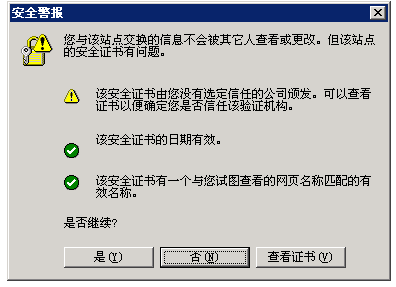
这是由于我们使用的只是自己生成的测试用证书,而该证书并没有受到客户机的信任。如果只是测试或企业内部使用,客户端将该证书安装到受信任区域即可,如果是正式对外提供服务,则可能需要向相关机构申请正式证书。
示例测试环境:
操作系统:Windows7
开发环境:Visual Studio 2008 + Silverlight 3
IIS:7.5
浏览器:IE8
此内容由惯性聚合(RSS阅读器)自动聚合整理,仅供阅读参考。 原文来自 — 版权归原作者所有。