





《在Silverlight 3中使用主题》一文中已经对在Silverlight中使用ToolKit提供的主题做了介绍,本文将介绍在Silverlight中实现并使用自定义主题。
有时候我们可能想开发一套具有特色的主题而不是采用ToolKit提供的默认主题,或者我们可能只是为了统一程序的风格而做一些统一处理(例如将所有TextBlock的Margin定义为5),这时我们就需要自定义主题。使用自定义主题时同样需要添加对Silverlight ToolKit中的System.Windows.Controls.Theming.Toolkit程序集的引用。
以下是实现并使用自定义主题的几种方式:
一、使用自定义主题文件
实现步骤:
1、在项目中添加新项,并选择“Silverlight 资源字典”模板。
本示例添加的主题资源文件名为“CustomTheme.xaml”。
注意:需要将添加的主题资源文件的生成操作设置为“内容”。
2、在主题资源文件中添加样式。
注意:添加样式时只需指定TargetType属性,无需也不能指定 x:Key。
CustomTheme.xaml源码:
<ResourceDictionary
    xmlns="http://schemas.microsoft.com/winfx/2006/xaml/presentation"
    xmlns:x="http://schemas.microsoft.com/winfx/2006/xaml">

    <Style TargetType="Button">
        <Setter Property="Foreground" Value="Red"></Setter>
    </Style>

    <Style TargetType="TextBox">
        <Setter Property="Foreground" Value="Red"></Setter>
    </Style>

</ResourceDictionary>
3、使用ImplicitStyleManager类提供的附加属性将样式应用到控件
MainPage.xaml源码:
<UserControl
    x:Class="ThemeSample.MainPage"
    xmlns="http://schemas.microsoft.com/winfx/2006/xaml/presentation"
    xmlns:x="http://schemas.microsoft.com/winfx/2006/xaml"
    xmlns:Theming="clr-namespace:System.Windows.Controls.Theming;assembly=System.Windows.Controls.Theming.Toolkit" >
    <StackPanel x:Name="LayoutRoot" Width="160" Margin="100"
                    Theming:ImplicitStyleManager.ApplyMode="Auto"
                    Theming:ImplicitStyleManager.ResourceDictionaryUri= "Themes/CustomTheme.xaml">
        <Button Content="Button" Margin="10" ></Button>
        <TextBox Text="TextBox" Margin="10"></TextBox>
    </StackPanel>
</UserControl>
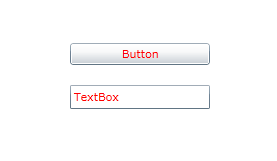
效果预览:
二、自定义主题控件
如果想将自定义主题以程序集的方式发布并提供给第三方使用,就需要自定义主题控件。
本示例将以第一种方式所添加的样式文件做为基础实现一个自定义主题控件。
实现步骤:
1、将CustomTheme.xaml文件的生成操作设置为“嵌入的资源”。
2、在项目中添加类,并将类定义为从System.Windows.Controls.Theming.Theme类继承。
本示例添加的类名为CustomTheme。
3、为类添加默认构造函数并为基类的构造函数提供参数。
CustomTheme.cs源码:
using System.Windows.Controls.Theming;

namespace ThemeSample
{
    public class CustomTheme : Theme
    {
        public CustomTheme()
            : base(typeof(CustomTheme).Assembly, "ThemeSample.Themes.CustomTheme.xaml")
        {}
    }
}
注意主题资源文件的写法类似于命名空间+文件名,而不是普通路径。
4、使用自定义主题控件。
MainPage.xaml源码:
<UserControl
    x:Class="ThemeSample.MainPage"
    xmlns="http://schemas.microsoft.com/winfx/2006/xaml/presentation"
    xmlns:x="http://schemas.microsoft.com/winfx/2006/xaml"
    xmlns:local="clr-namespace:ThemeSample">
    <local:CustomTheme>
        <StackPanel x:Name="LayoutRoot" Width="160" Margin="100">
            <Button Content="Button" Margin="10" ></Button>
            <TextBox Text="TextBox" Margin="10"></TextBox>
        </StackPanel>
    </local:CustomTheme>
</UserControl>
使用自定义主题控件后的效果与使用第一种方式的效果一致,此处不再展示效果图。
此内容由惯性聚合(RSS阅读器)自动聚合整理,仅供阅读参考。 原文来自 — 版权归原作者所有。