


在Silverlight中,可以通过绑定对绑定目标属性和数据源进行连接。如:
XAML代码:
<UserControl x:Class="ValidatorDemo.BindingSample"
xmlns="http://schemas.microsoft.com/winfx/2006/xaml/presentation"
xmlns:x="http://schemas.microsoft.com/winfx/2006/xaml"
Width="400" Height="300">
<StackPanel x:Name="LayoutRoot" Width="200">
<TextBox Text="{Binding Name, Mode=TwoWay}" Margin="10" ></TextBox>
<TextBox Text="{Binding Age, Mode=TwoWay}" Margin="10"></TextBox>
<Button Content="Show" Click="Show" Margin="10"></Button>
</StackPanel>
</UserControl>
C#代码:
public partial class BindingSample : UserControl
{
public BindingSample()
{
InitializeComponent(); this.LayoutRoot.DataContext = this.people;
} private People people = new People(); private void Show(object sender, RoutedEventArgs e)
{
MessageBox.Show(string.Format("{0} is {1}.", this.people.Name, this.people.Age));
}
} public class People
{
public string Name { get; set; }
public int? Age { get; set; }
}
运行程序,效果如下图:
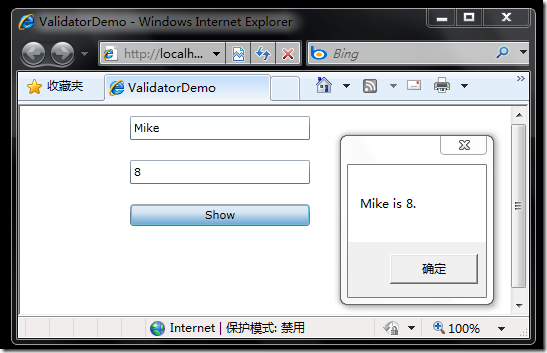
这时,如果清空第二个文本框(显示年龄)中的值,然后点击“Show”按钮,问题出现了:数据源中的属性(此处为People中的Age属性)值并没有改为null,而是修改之前的8。
如果将绑定的ValidatesOnExceptions属性赋值为True,可以看到更清晰的效果:
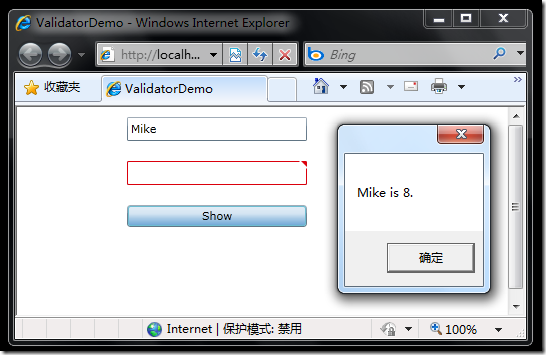
第二个文本框上打上了清晰的标志,告诉我们输入格式不正确。这表明绑定引擎捕捉到了绑定目标更新源对象时发生的异常,进一步可以理解为,默认的转换器不能处理将空字符串到int?类型的转换。为了解决这个问题,我们可以自定义如下转换器:
public class IntConverter : IValueConverter
{
public object Convert(object value, Type targetType, object parameter, CultureInfo culture)
{
return value == null ? null : value.ToString();
}
public object ConvertBack(object value, Type targetType, object parameter, CultureInfo culture)
{
string str = value as string;
if (string.IsNullOrEmpty(str)) return null;
str = str.Trim();
if (str.Length == 0) return null;
int v;
bool isvalid = int.TryParse(str, out v);
if (!isvalid) return null;
return v;
}
}
使用自定义转器的XAML代码如下:
<UserControl x:Class="ValidatorDemo.BindingSample"
xmlns="http://schemas.microsoft.com/winfx/2006/xaml/presentation"
xmlns:x="http://schemas.microsoft.com/winfx/2006/xaml"
xmlns:local="clr-namespace:ValidatorDemo"
Width="400" Height="300">
<StackPanel x:Name="LayoutRoot" Width="200">
<StackPanel.Resources>
<local:IntConverter x:Key="IntConverter"></local:IntConverter>
</StackPanel.Resources>
<TextBox Text="{Binding Name, Mode=TwoWay, ValidatesOnExceptions=True}" Margin="10" ></TextBox>
<TextBox Text="{Binding Age, Mode=TwoWay, ValidatesOnExceptions=True, Converter={StaticResource IntConverter}}"
Margin="10"></TextBox>
<Button Content="Show" Click="Show" Margin="10"></Button>
</StackPanel>
</UserControl>
至此,从空字符串到int?型空值转换的问题解决了。但自定义转换器中如下两行代码依然存在问题:
bool isvalid = int.TryParse(str, out v);
if (!isvalid) return null;
从字符串到int?类型转换时,如果字符串不是合法的数字字符串,则转换不会成功,如果返回null,转换器不抛出异常,绑定引擎当然也无法捕捉转换过程发生的异常。而如果转换过程中抛出异常,同样不幸的是:
数据绑定引擎不捕获由用户提供的转换器所引发的异常。由 ConvertBack 方法引发的任何异常,或由 ConvertBack 方法调用的方法所引发的任何未捕获的异常,均视为运行时错误。通过返回 DependencyProperty.UnsetValue 处理预期的问题。(MSDN原文)
该如何完美解决呢?希望高手指点。
此内容由惯性聚合(RSS阅读器)自动聚合整理,仅供阅读参考。 原文来自 — 版权归原作者所有。